What the GST calculator does, and when you need it
GST, the goods and services tax, is added to most prices in India. A price can be written before GST, with the tax to be added on the bill, or with GST already inside it, as on most shop labels. This calculator goes both ways: it adds GST to a price, or takes the GST out of a price that already includes it, and shows the tax split into CGST and SGST, or as IGST.
Type the amount, the GST rate and which kind of price it is, and the answer shows the price before GST, the GST, and the price with GST, with the working step by step. It all happens in your browser: nothing you type is uploaded or kept.
When it helps:
- Writing a quotation or an invoice: ₹50,000 for a service plus 18% GST is ₹59,000.
- Checking a bill: does the GST on your restaurant, hotel or repair bill add up?
- Finding the price without tax: how much of a ₹2,499 price tag is GST?
- Comparing offers: one seller quotes “+ GST”, another “all inclusive”; the calculator puts them on the same footing.
Step by step
- Type the amount in rupees, such as 10,000. Commas and Hindi digits are read.
- Type the GST rate, such as 18 or 5. Any rate from 0% to 100% works, so special rates and old bills can be checked too.
- Choose what the amount is: Before GST (add GST) for a price without tax, or With GST (take GST out) for a price that already includes it.
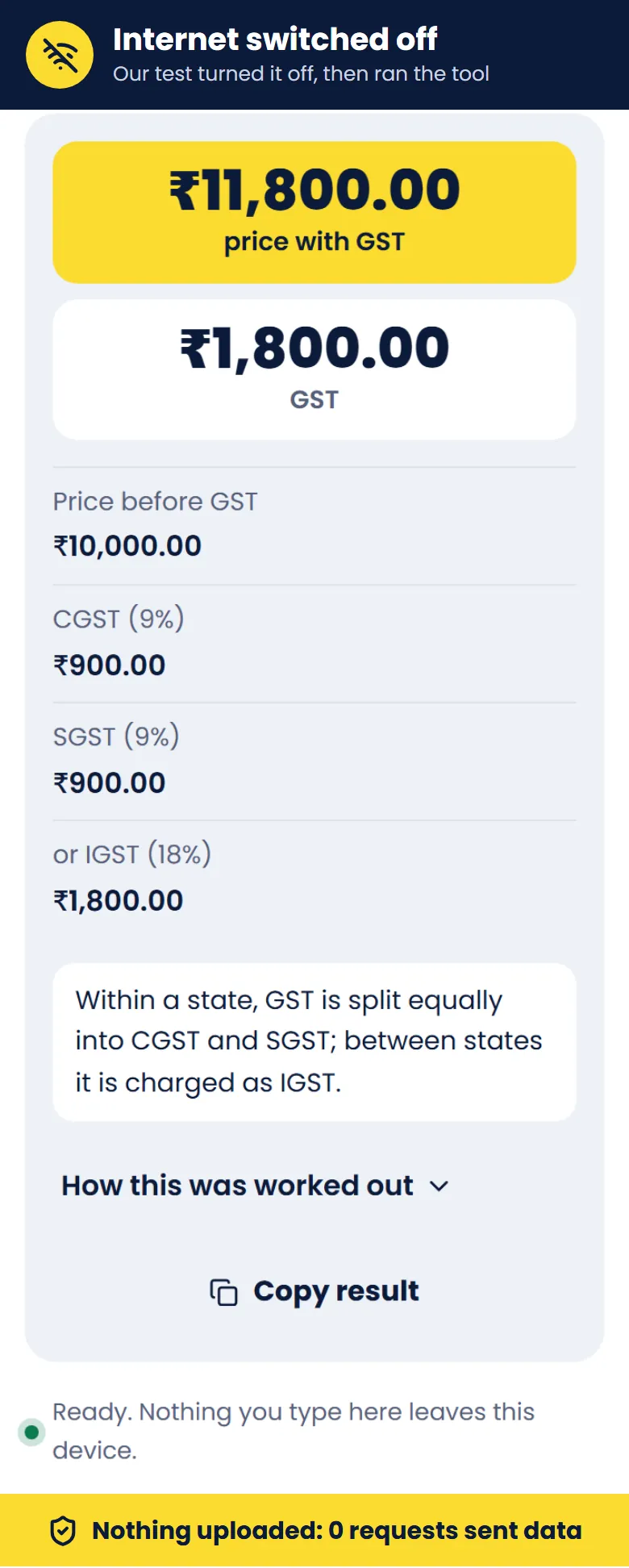
- Read the answer: the price with GST and the GST in large type, then the price before GST, CGST and SGST at half the rate each, or the whole as IGST.
- Open “How this was worked out” to see the sums with your numbers, and use Copy result for a one-line summary.
Try an example fills in ₹10,000 at 18%, with GST to add, and Clear empties the boxes.
What the page does, exactly
These are the calculator's rules in full, and the same rules are checked by our tests.
| Part | The rule | Example |
|---|---|---|
| What you can type | Digits, also those of Hindi and other scripts, a dot for decimals, and commas the Indian or the international way. An amount of 0 or more, a rate from 0% to 100% | 10,000 and 18 |
| Adding GST | GST = amount × rate ÷ 100; price with GST = amount + GST | ₹10,000 at 18%: GST ₹1,800, total ₹11,800 |
| Taking GST out | Price before GST = amount × 100 ÷ (100 + rate); GST = amount − price before GST | ₹11,800 at 18%: ₹10,000 before GST, GST ₹1,800 |
| CGST and SGST | Each is half the rate and half the GST, for a sale within a state | 18% is CGST 9% (₹900) and SGST 9% (₹900) |
| IGST | The whole rate and the whole GST, for a sale between states | IGST 18%: ₹1,800 |
| Rounding | Every sum is worked out exactly, in whole numbers and fractions rather than the computer's binary approximations; amounts are rounded to the paisa, half a paisa up, only when they are written, in the Indian way | ₹2,499 with GST at 18%: ₹2,117.80 and ₹381.20 |
What the rules don't decide: the calculator doesn't know which rate applies to what you sell or buy; that is set by the GST Council for each kind of goods and service, as below. It doesn't work out cess, input tax credit or returns, and it doesn't round the tax to whole rupees as some bills do.
Real results from our tests
We tested the GST Calculator with headless Chromium 148, the open-source browser Chrome is built on, on a Windows laptop with an Intel Core i7-1185G7 and 32 GB of memory, on 1 November 2026. Other work was running on the laptop at the same time, so times vary a little from run to run: each time below is the middle one of 3 runs.
Checked against a second program. Python's decimal numbers, with 40 digits and none of the page's code, worked out 25,000 random GST sums on amounts from ₹0 to ₹5 crore, with and without paise, at 5%, 18%, 40%, the old 12% and 28%, and other rates up to 100%, about half of them adding GST and half taking it out, and the page's code gave the same 150,000 amounts every time, to the paisa: the price with GST, the GST, the price before GST, the CGST, the SGST and the IGST of each. The boxes were typed as people type them, with Indian and international commas, in Hindi, Bengali and Gujarati digits, and with a % sign after the rate. 4,813 of the amounts sat exactly on half a paisa, such as the CGST of ₹751 at 5%, which is ₹18.775, and every one was rounded up, as it should be.
The answer is drawn at once. The page drew the answer to a typed amount in 0.10 milliseconds (the middle of 3 runs of 200 amounts typed in a row), not counting the moment the browser takes to paint the screen.
Size and offline. On a first visit the page downloads about 0.1 MB for the tool: the page, its styles, its scripts and the fonts, with Google's ad code not counted. In our test we switched the network off after the page had loaded and pressed Try an example: the price with GST showed 0.1 seconds later or less in each of 15 runs.
Phone-sized screen. We also ran the tests on a phone-sized screen in Chromium (390 × 844 pixels, with touch). That is not a real phone. Every button and box was 44 pixels high or more, and the page did not scroll sideways.
Try it yourself: press "Try an example" at the top of this page. It puts 10,000 and 18 in the boxes, with GST to add, and the price with GST is ₹11,800.00. Then choose "With GST (take GST out)" and type 2,499: the GST inside it is ₹381.20.

Adding GST, or taking it out
Adding GST is the easy direction: multiply the price by the rate and divide by 100. ₹10,000 at 18% has ₹1,800 of GST, so the total is ₹11,800.
Taking GST out needs one more step, because the GST is a share of the price before tax, not of the total. Divide the price with GST by (100 + rate) and multiply by 100: ₹11,800 × 100 ÷ 118 = ₹10,000. The GST is the difference, ₹1,800. A quick way to remember it: at 18%, the price before GST is the total divided by 1.18; at 5%, the total divided by 1.05.
The calculator does whichever you choose with the same care, so you can check a total, or work back from one, and get the same three numbers either way. Our post on how to remove GST from a total amount shows why dividing works and taking the rate off does not, with the sum at each rate.
Quick ways to check a total
Each rate has its own divisor, and its own share of a total that includes GST. These are handy for checking a bill in your head:
| GST rate | Price before GST | GST's share of the total |
|---|---|---|
| 5% | Total ÷ 1.05 | 5 ÷ 105, about 4.76% |
| 18% | Total ÷ 1.18 | 18 ÷ 118, about 15.25% |
| 40% | Total ÷ 1.40 | 40 ÷ 140, about 28.57% |
| 12% (before 22 September 2025) | Total ÷ 1.12 | 12 ÷ 112, about 10.71% |
| 28% (before 22 September 2025) | Total ÷ 1.28 | 28 ÷ 128, exactly 21.875% |
So a little over 15% of an 18% bill is tax, and a little under 5% of a 5% bill. The calculator uses the exact fractions, not these rounded shares, so its answer can differ from a quick check by a paisa or two on a big bill.
The GST rates since 22 September 2025
On the recommendation of the 56th GST Council, which met on 3 September 2025, the government reduced GST to two main rates, 5% and 18%, with a special rate of 40% on a few luxury and “sin” goods such as pan masala, tobacco, aerated drinks and high-end cars. The new rates took effect on 22 September 2025, replacing the four slabs of 5%, 12%, 18% and 28% (PIB, read on 1 November 2026). Many everyday items were moved down: for example, hotel rooms up to ₹7,500 a night went from 12% to 5%, and air conditioners and small cars from 28% to 18%.
Some goods and services are exempt or nil-rated, and a few have special rates of their own. The rate for a particular item depends on its classification, so check the bill, the seller, or the official rate lists. The calculator takes any rate you type, so it also works for bills from before the change, with the old 12% or 28%.
CGST, SGST and IGST
GST is shared between the centre and the states, and the bill shows who gets what. For a sale within one state, the tax is split in two equal halves: CGST for the central government and SGST for the state. 18% appears as CGST 9% and SGST 9%. In union territories without their own legislature, such as Chandigarh or Ladakh, UTGST takes the place of SGST.
For a sale from one state to another, the whole tax is charged as IGST, integrated GST, at the full rate. The amount you pay is the same either way: ₹10,000 at 18% carries ₹1,800 of tax, as ₹900 + ₹900 or as ₹1,800 of IGST. The calculator shows both, so you can match whichever your bill uses.
Reading a bill
A GST invoice usually lists, for each item, the taxable value (the price before GST), the rate, and the CGST and SGST, or the IGST, in rupees, then the total. To check it, type the taxable value with “Before GST” and the rate: the GST and the total should match the bill, perhaps to within a rupee where the bill rounds.
If only the total is printed, type it with “With GST” to see the price before tax and the GST inside it. Bills often round the final amount to the nearest rupee and show the difference as a round-off line; that is normal and not a mistake. Many invoices also state the total in words, which Number to Words writes for you; the same rules as writing an amount in words on a cheque apply.
Prices that already include GST
Prices on shop labels, menus and MRPs in India include all taxes, so you pay what is printed. To find the GST inside such a price, choose “With GST (take GST out)”. A shirt with a price tag of ₹2,499 at 18% holds ₹381.20 of GST, and its price before GST is ₹2,117.80.
This matters when you buy for a business that claims input tax credit, when you compare a price “+ GST” with one “including GST”, and when you check a discount: a discount on the price with GST is a discount on the tax too. A seller working out a margin should use prices before GST; the Profit Margin Calculator shows the margin and the markup.
Discounts and GST
A discount given at the time of sale and shown on the invoice comes off the price first, and GST is worked out on what is left. A ₹10,000 item with 10% off is ₹9,000, and 18% GST on that is ₹1,620, a total of ₹10,620. Taking 10% off the price with GST, ₹11,800, gives the same ₹10,620, because a percentage off works out the same either way. The Discount Calculator works out the price after a percentage off, with the saving.
A flat discount does not. ₹500 off before GST gives ₹9,500 plus ₹1,710 of GST, ₹11,210 in all; ₹500 off the total with GST gives ₹11,300. So when a seller offers “₹500 off”, ask whether it comes off before or after GST: before is ₹90 better for you at 18%. Our post on 50% plus an extra 20% off shows how a flat amount and a percentage stack, and why the order matters.
Worked examples
- A freelancer's invoice: ₹50,000 for a service at 18% is ₹59,000: CGST ₹4,500 and SGST ₹4,500 for a client in the same state, or IGST ₹9,000 for a client in another state.
- A hotel room: ₹6,000 a night at 5% is ₹6,300, with ₹150 each of CGST and SGST.
- A bill of ₹5,250 with 5% GST inside: ₹5,000 before GST and ₹250 of GST.
- A bill of ₹7,080 with 18% GST inside: ₹6,000 before GST and ₹1,080 of GST.
- A restaurant bill: ₹1,200 of food at 5% is ₹1,260, with ₹30 each of CGST and SGST.
- A small item: ₹1,000 at 5% is ₹1,050.
Common mistakes
- Taking 18% of a price that includes GST. 18% of ₹2,499 is ₹449.82, but the GST inside ₹2,499 is only ₹381.20, because the 18% is of the price before tax. Use “With GST (take GST out)” for prices that include it.
- Adding CGST and SGST rates twice. CGST 9% plus SGST 9% is the whole 18%, not 18% each.
- Using an old rate. Since 22 September 2025 most 12% and 28% items moved to 5% or 18%; check the date of the bill.
- Forgetting the round-off. A rupee's difference on a bill's total is usually its round-off line.
Private: your numbers stay on your device
Your amounts and rates never leave your device. The calculator runs inside your browser and has no upload step: it never sends the numbers you type anywhere, and it doesn't save them, so closing the page forgets them. The page's Content Security Policy lets it contact only this site and Google's ad service, which pays for the site; our code never gives your numbers to the ad code. You can check it yourself in your browser's network panel (F12 on a computer): working out GST adds no request that carries your numbers.
Prices, quotes and bills are business information. A calculator that works on a server receives everything you type; here your own browser does the arithmetic. Read our privacy policy and how we prove your files are never uploaded.
Tips
- Quote clearly: write “₹50,000 + 18% GST” or “₹59,000 including GST”, never just “₹50,000”.
- Check the rate on the bill against the item; rates changed on 22 September 2025.
- Keep the bills if you claim input tax credit; the calculator doesn't keep anything.
- A discount on top? The Percentage Calculator takes a percentage off a price, and the EMI Calculator shows what paying for a big purchase in instalments costs.
Limits
- One rate at a time. A bill with items at different rates needs one sum for each rate.
- No cess, credit or returns. Compensation cess, input tax credit, reverse charge and GST returns are not worked out.
- Not a rate finder. It doesn't tell you which rate applies to an item; the seller, the bill or the official lists do.
- Paisa, not rupees. It shows amounts to the paisa; some bills round each line or the total to whole rupees.
- Not tax advice. It works out the numbers; for registration, returns and credit, ask a tax professional.
- Browsers. We tested only in Chromium, the engine behind Chrome and Edge, with computer and phone-sized screens. We did not test on real phones, in Safari or in Firefox, so we cannot promise how they behave.
Terms explained
- GST
- The goods and services tax, charged on most goods and services sold in India.
- Taxable value
- The price before GST, on which the tax is worked out.
- CGST and SGST
- The central and state halves of GST on a sale within one state.
- IGST
- Integrated GST: the whole tax, charged on a sale from one state to another.
- UTGST
- The union territory's half of GST, in place of SGST, in union territories without their own legislature.
- Inclusive price
- A price with GST already inside it, such as an MRP.
- Input tax credit
- GST a registered business paid on its purchases, which it can set off against the GST it collects.