What Add Days to Date does
Add Days to Date works out the date a number of days, weeks, months or years after, or before, any date. Type the date, choose Add or Subtract, type how many and choose the unit, and the new date appears at once, with its weekday and the number of days from the start. When a month or a year lands on a day the month doesn't have, such as 31 February, the page uses the month's last day and says so.
The start date begins as today, so it also answers "what is the date 90 days from today?". It all happens in your browser: nothing you type is uploaded or kept.
When it helps:
- A due date 30, 45 or 90 days after a bill, an order or a joining date.
- A date in a few weeks, for an appointment, a follow-up or a course.
- A date months or years away, such as a renewal or an anniversary.
- A date in the past: what the date was 100 days ago.
Step by step
- Type the start date: the day and the year, and choose the month by its name. It starts as today; "Use today's date" brings today back. Digits typed in Hindi and other scripts are read as 0 to 9.
- Choose Add or Subtract.
- Type how many, a whole number up to 1,00,00,000, and choose the unit: days, weeks, months or years.
- Read the answer: the new date in large type with its weekday, the start date and its weekday, and the days between them, with a line when the month-end rule applied.
- Open "How this was worked out" for the steps, and Copy result for the answer as text.
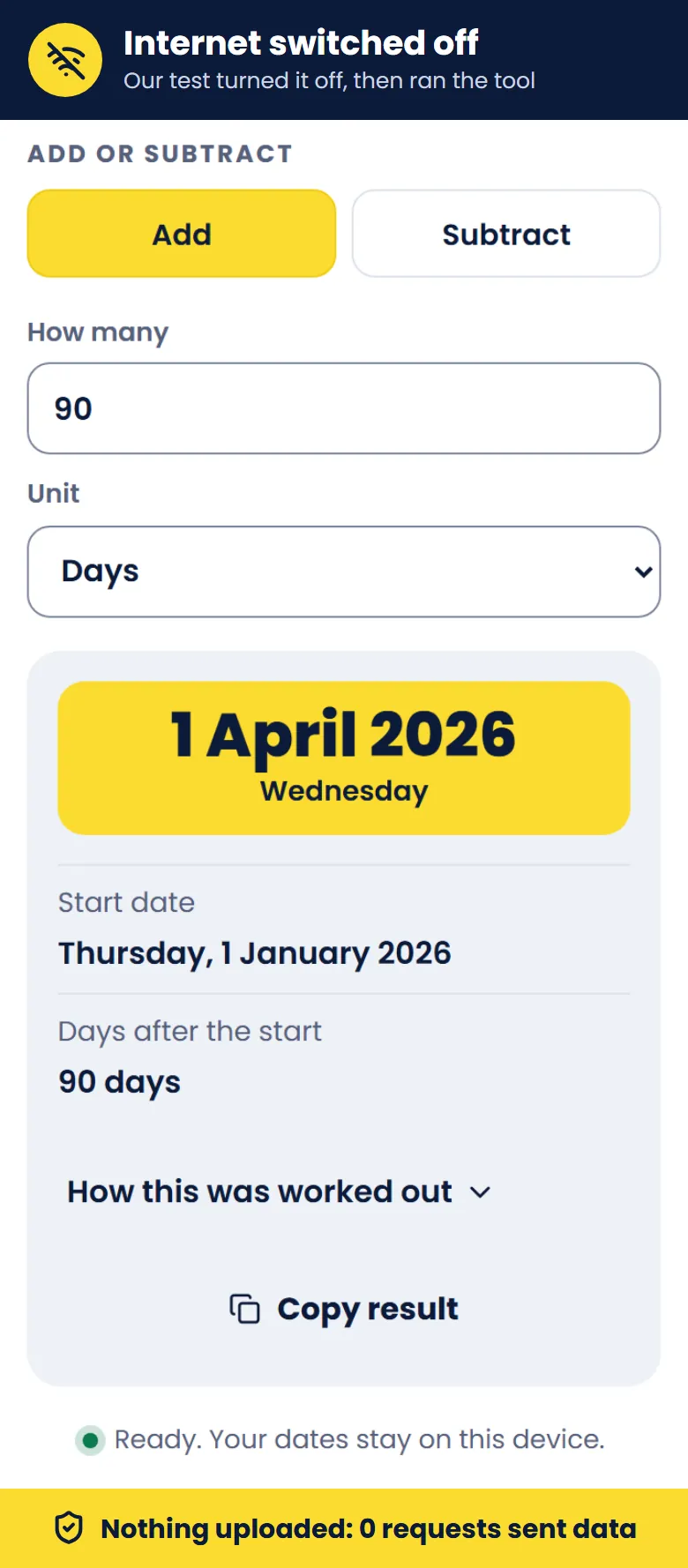
Try an example puts in 1 January 2026 plus 90 days: Wednesday, 1 April 2026.
The rules, in full
These are the calculator's rules, and the same rules are checked by our tests.
| Part | The rule | Example |
|---|---|---|
| Days | The start date is day 0; one day later is the next date | 1 January 2026 + 90 days: 1 April 2026 |
| Weeks | 7 days each | 1 November 2026 + 6 weeks: 13 December 2026 |
| Months | The same day number that many months on; if that month is shorter, its last day | 31 January 2026 + 1 month: 28 February 2026 |
| Years | 12 months each, by the same rule | 29 February 2024 + 1 year: 28 February 2025 |
| Subtract | The same rules backwards | 1 November 2026 − 30 days: 2 October 2026 |
| Range | A start date from 1900 to 9999; results from 1 January of the year 1 to 31 December 9999 | Past that, a calm message instead of a date |
Real results from our tests
We tested the Add Days to Date with headless Chromium 148, the open-source browser Chrome is built on, on a Windows laptop with an Intel Core i7-1185G7 and 32 GB of memory, on 1 November 2026. Other work was running on the laptop at the same time, so times vary a little from run to run: each time below is the middle one of 3 runs.
Checked against a second program. Python's own datetime and calendar modules, with none of the page's code, worked out 10,000 random dates plus or minus random numbers of days, weeks, months and years, and the page gave the same date and weekday every time, with the month-end rule applied in the same cases.
The answer is drawn at once. The page worked out an answer in 1.30 milliseconds or less, in the middle of 3 runs of 200 different inputs worked out in a row, not counting the moment the browser takes to paint the screen.
Size and offline. On a first visit the page downloads about 0.1 MB for the tool: the page, its styles, its scripts and the fonts, with Google's ad code not counted. In our test we switched the network off after the page had loaded and pressed Try an example: the answer showed 0.1 seconds later or less in each of 15 runs.
Phone-sized screen. We also ran the tests on a phone-sized screen in headless Chromium (390 × 844 pixels, with touch). That is not a real phone. Every button and box was 44 pixels high or more, and the page did not scroll sideways. These tests don't cover Safari or Firefox.
Try it yourself: press "Try an example" at the top of this page. It puts 1 January 2026, Add, 90 and Days in the boxes, and the new date is Wednesday, 1 April 2026. Then type 31 January 2026 and 1 month: 28 February 2026, with a line saying the month-end rule applied.
Days and weeks
Days and weeks need no rule: the page counts along the calendar, leap years included. The start date is day 0, so 1 January 2026 plus 1 day is 2 January, and plus 90 days is 1 April 2026, a Wednesday. A week is 7 days, so 1 November 2026 plus 6 weeks is 13 December 2026, the same weekday as the start, a Sunday.
Counting back works the same way: 1 November 2026 minus 30 days is Friday, 2 October 2026. To count the days between two dates you already know, use Days Between Dates, which works the other way round.

The month-end rule
Months and years need a rule, because months have different lengths. A month after 31 January would be 31 February, which doesn't exist. This page uses the month's last day: 31 January 2026 plus 1 month is 28 February 2026, and in a leap year, 31 January 2024 plus 1 month is 29 February 2024. The same goes backwards: 31 March 2026 minus 1 month is 28 February 2026.
Whenever the rule applies, the page says so in a row and a note, and the working shows the date that would have been: "would be 31 February 2026, but February 2026 has 28 days, so its last day is used". It is the same rule as our Age Calculator uses. Some other calculators move on to the next month instead and give 3 March, so if a date must match another program or an office, check which rule it uses.
Leap days
29 February comes only in leap years, so a year after it falls on 28 February: 29 February 2024 plus 1 year is 28 February 2025. Four years after it is a leap year again, so 29 February 2024 plus 4 years is 29 February 2028. Days count straight through leap days: the page counts every day on the calendar.
Years that end in 00 are leap years only if they divide by 400, so 2000 was a leap year and 2100 will not be: 29 February 2000 plus 100 years is 28 February 2100.
Everyday uses
- Payment and return windows: an invoice date plus 30 or 45 days, or an order date plus 7 days.
- Follow-ups: an appointment plus 6 weeks.
- Renewals and anniversaries: a date plus 1 or 5 years.
- Looking back: today minus 100 days, or a date minus 3 months.
Deadlines set by law, a court or an office often have their own counting rules, such as leaving out the first day or moving a deadline that falls on a holiday. The page counts plain calendar days; follow the rule that applies to you.
Worked examples
From Sunday, 1 November 2026:
| Add | New date | Days |
|---|---|---|
| 30 days | Tuesday, 1 December 2026 | 30 |
| 45 days | Wednesday, 16 December 2026 | 45 |
| 60 days | Thursday, 31 December 2026 | 60 |
| 90 days | Saturday, 30 January 2027 | 90 |
| 3 months | Monday, 1 February 2027 | 92 |
| 180 days | Friday, 30 April 2027 | 180 |
| 6 months | Saturday, 1 May 2027 | 181 |
| 1 year | Monday, 1 November 2027 | 365 |
| Minus 100 days | Friday, 24 July 2026 | −100 |
The rows show why the unit matters: 90 days from 1 November 2026 is 30 January 2027, but 3 months is 1 February 2027, 92 days; 180 days is 30 April, but 6 months is 1 May, 181 days. When a rule says days, count days; when it says months, count months.
Common mistakes
- Months instead of days. 3 months and 90 days are different dates, as the table shows.
- Counting the start date as day 1. Here the start is day 0, so 1 day after 1 January is 2 January. If your rule counts the start date as the first day, take one day off.
- Missing the month-end line. Adding months to the 29th, 30th or 31st can land on the month's last day instead; the page says when.
- Forgetting weekends and holidays. The page counts calendar days; check the weekday of the new date.
- Swapping the day and the month. Choosing the month by name avoids it.
- Leaving the start as today when you meant another date: check the start date's weekday in the answer.
Reading the answer
The large figure is the new date, with its weekday under it. The rows give the start date with its weekday and the number of days between the two, positive after the start and negative before it, and a row says when the month-end rule was used, with the date that would have been: "31 February 2026 doesn't exist". Copy result gives one line, such as "Thursday, 1 January 2026 + 90 days = Wednesday, 1 April 2026", ready to paste into a note or a message.
Typing the date and the number
Type the day and the year in their boxes and choose the month by its name, so a date can never be read the wrong way round. Digits typed in Hindi, Tamil and other Indian scripts become 0 to 9 as you type, so १२० is read as 120. A short year is not marked wrong until you leave the boxes, and a day the month doesn't have, such as 31 April, gets a calm note under the boxes.
The number of days, weeks, months or years is a whole number up to 1,00,00,000, with Indian or international commas; a decimal such as 1.5 gets a note, because half a month has no single meaning. A minus sign in front works too: with Add, it subtracts.
Days in each month
The lengths that the month-end rule works with:
| Month | Days | Month | Days |
|---|---|---|---|
| January | 31 | July | 31 |
| February | 28, or 29 in a leap year | August | 31 |
| March | 31 | September | 30 |
| April | 30 | October | 31 |
| May | 31 | November | 30 |
| June | 30 | December | 31 |
So a month after the 31st lands on a shorter month's last day in February, April, June, September and November, and the page tells you when it does.
Landing on the same weekday
A week is 7 days, so adding a whole number of weeks always lands on the same weekday: a Sunday plus 6 weeks is a Sunday. Days that are a multiple of 7 do the same, so 1 November 2026 plus 42 days is Sunday, 13 December 2026. A year moves the weekday on by one, or by two when a 29 February comes in between: Sunday, 1 November 2026 plus 1 year is Monday, 1 November 2027.
That makes it easy to plan something on the same weekday each time, such as a class every Sunday: add weeks, not months, because months change the weekday.
Counting by hand
To check the example by hand, use up the rest of each month in turn. From 1 January 2026, 30 days take you to 31 January; February's 28 bring the count to 58 on 28 February; March's 31 bring it to 89 on 31 March; one more day is 1 April 2026, a Wednesday: 90 days. Here 3 months lands on the same date, 1 April, but only by chance: from 1 November 2026, 90 days is 30 January 2027 and 3 months is 1 February 2027.
Counting back
Choose Subtract, or type a minus sign with Add, to go back. 1 November 2026 minus 30 days is Friday, 2 October 2026; minus 1 month is Thursday, 1 October 2026, 31 days back; minus 6 weeks is Sunday, 20 September 2026, the same weekday. The month-end rule works backwards too: 31 March 2026 minus 1 month is Saturday, 28 February 2026, because February 2026 has no 31st.
Counting back answers "when must I start?": 50 days before Friday, 25 December 2026 is Thursday, 5 November 2026.
Notice periods and deadlines
Rules count days in different ways, so read the rule first. If a 30-day notice is given on 1 November 2026 and that day is day 0, as on this page, the 30th day is Tuesday, 1 December 2026. If the day of notice counts as day 1, the 30th day is Monday, 30 November 2026: type 29. Some rules count only working days, or move a deadline that falls on a holiday to the next working day. This page counts calendar days, so check the weekday it shows against the rule's own words.
Planning dates that repeat
For a date that repeats every month, such as a payment due on the 31st, add from the first date each time rather than from the last answer. 31 January 2026 plus 1 month is Saturday, 28 February 2026, by the month-end rule; adding 1 month to that answer gives 28 March, but 31 January plus 2 months gives Tuesday, 31 March 2026, and plus 3 months gives Thursday, 30 April 2026. For every other week, add 2 weeks at a time: 1 November 2026 plus 2 weeks is Sunday, 15 November 2026.
Private: your dates stay on your device
What you type never leaves your device. The calculator runs inside your browser and has no upload step: it never sends the dates and numbers you type anywhere, and it doesn't save them, so closing the page forgets them. The page's Content Security Policy lets it contact only this site and Google's ad service, which pays for the site; our code never gives your numbers to the ad code. You can check it yourself in your browser's network panel (F12 on a computer): working out the answer adds no request that carries what you typed.
Read our privacy policy and how we prove your files are never uploaded.
Tips
- Choose the month by name, so the day and the month can't be swapped.
- Use days, not months, when a rule says a number of days: 90 days and 3 months are not the same.
- Watch for the month-end line when you add months to the 29th, 30th or 31st.
- Check the weekday of the new date if it must be a working day.
- Copy the result to keep the answer with the start date.
Limits
- Calendar days only: it doesn't skip weekends or public holidays.
- Whole dates: no times of day or time zones; today is your device's date.
- One month-end rule: the month's last day, as the Age Calculator uses.
- Up to 1,00,00,000 of a unit, and results up to 31 December 9999.
- Not a legal count. Follow the counting rule of the law or office that sets a deadline.
Terms explained
- Month-end rule
- The rule that a month after the 31st is the next month's last day when it is shorter.
- Leap year
- A year with 29 February: every fourth year, but not years ending in 00 unless they divide by 400.
- Weekday
- The day of the week a date falls on, such as Wednesday.
- Gregorian calendar
- The calendar most of the world uses.