What the split bill calculator does, and when you need it
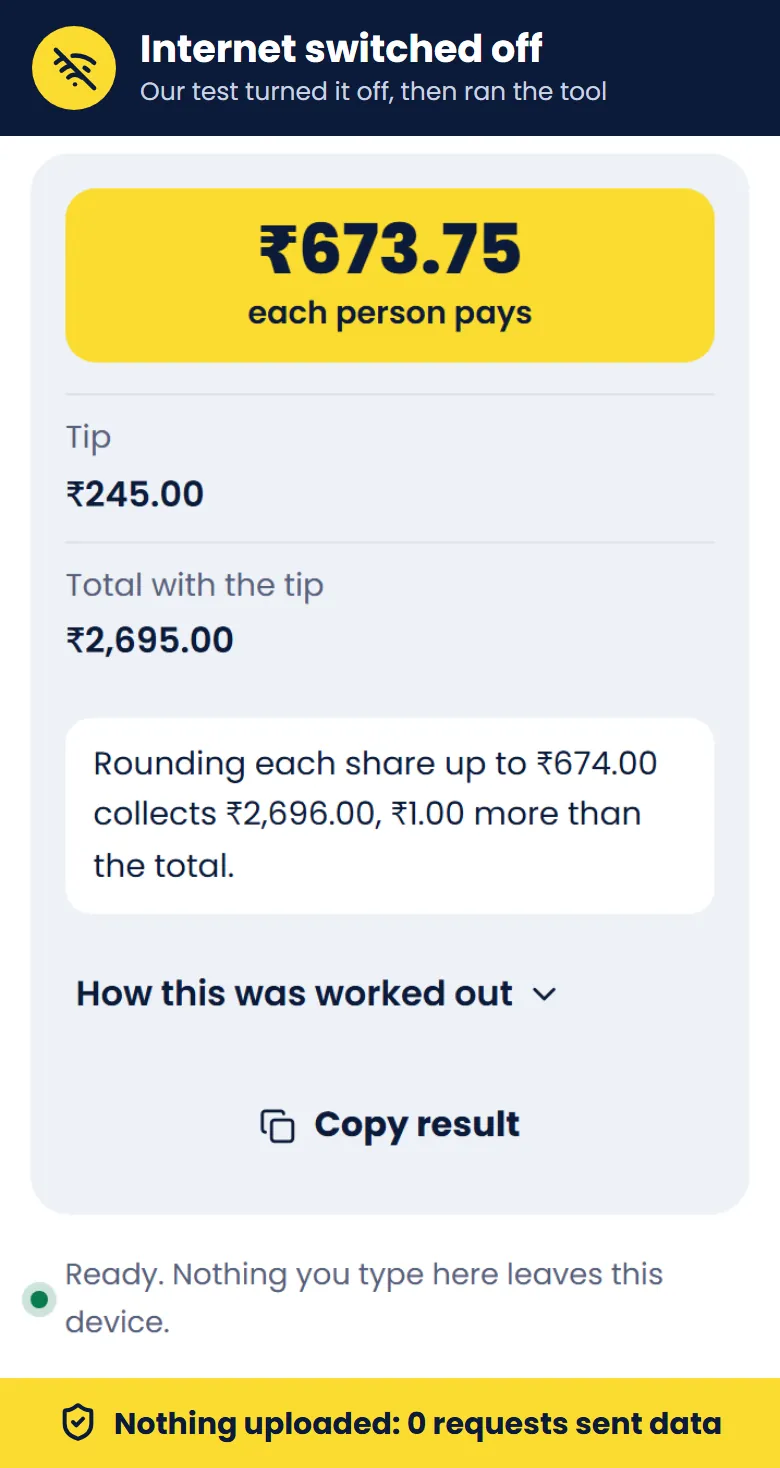
Type the bill, a tip if you want to add one, and the number of people, and this calculator shows what each person pays, the tip and the total. A ₹2,450 dinner with a 10% tip among 4 friends comes to ₹2,695.00, ₹673.75 each. When the total doesn't divide evenly into paise, it says exactly who pays a paisa more, so the shares always add up to the total: ₹1,000 among 3 is ₹333.33 for two people and ₹333.34 for one.
It all happens in your browser: nothing you type is uploaded or kept.
When it helps:
- Restaurant bills with friends, family or colleagues.
- Trips: a shared cab, fuel, a hotel room or a tour booked together.
- Flatmates sharing rent, electricity, internet or a cook's salary.
- Office collections for a gift or a farewell.
- Family events, where relatives share the cost of a hall, a caterer or a photographer.
Step by step
- Type the bill, the total on the bill, such as 2,450. Commas the Indian or the international way and Hindi digits are read.
- Type a tip, as a percentage of the bill, or 0 for none.
- Type the number of people sharing it, such as 4.
- Read the answer: each person's share in large type, then the tip and the total; if the paise don't divide evenly, who pays a paisa more.
- Use Copy result to paste the split into a group chat.
Try an example fills in a ₹2,450 bill with a 10% tip among 4 people, and Clear empties the boxes.
What the page does, exactly
These are the calculator's rules in full, and the same rules are checked by our tests.
| Part | The rule | Example |
|---|---|---|
| What you can type | Digits, also those of Hindi and other scripts, a dot for decimals, and commas the Indian or the international way | 2,450 and 2450 are the same |
| The boxes' limits | A bill from ₹0.01, a tip from 0% to 100%, and from 1 to 1,000 people, in whole numbers | 2.5 people gets a message under its box |
| The tip | The bill × the tip ÷ 100, to the paisa, half a paisa up | 10% of ₹2,450 is ₹245.00 |
| The total | The bill plus the tip, as written | ₹2,695.00 |
| The shares | The total in paise divided by the people; the paise left over are paid one each by that many people, so the shares add up to the total exactly | ₹1,000 among 3: ₹333.33, ₹333.33 and ₹333.34 |
| Whole rupees | A note says what each share rounded up to the next rupee would collect, and how much more than the total that is | ₹674 each collects ₹2,696, ₹1 more |
What the rules don't decide: who pays the extra paisa. Any of them can; the calculator only says how many.
Real results from our tests
We tested the Split Bill Calculator with headless Chromium 148, the open-source browser Chrome is built on, on a Windows laptop with an Intel Core i7-1185G7 and 32 GB of memory, on 1 November 2026. Other work was running on the laptop at the same time, so times vary a little from run to run: each time below is the middle one of 3 runs.
Checked against a second program. Python's decimal numbers, with 120 digits and none of the page's code, worked out 25,000 random bills of ₹1 to ₹5 crore, with and without paise, with tips from 0% to 100% and from 1 to 1,000 people, and the page's code gave the same 93,717 values every time: the share, the tip, the total and, when the paise don't divide evenly, who pays a paisa more, of each. The boxes were typed as people type them, with Indian and international commas, in Hindi, Bengali and Gujarati digits, and with a % sign after the tip. 1,649 of the tips sat exactly on half a paisa, and every one was rounded up, as it should be.
The answer is drawn at once. The page drew the answer to a typed amount in 0.09 milliseconds (the middle of 3 runs of 200 amounts typed in a row), not counting the moment the browser takes to paint the screen.
Size and offline. On a first visit the page downloads about 0.1 MB for the tool: the page, its styles, its scripts and the fonts, with Google's ad code not counted. In our test we switched the network off after the page had loaded and pressed Try an example: the share showed 0.1 seconds later or less in each of 15 runs.
Phone-sized screen. We also ran the tests on a phone-sized screen in Chromium (390 × 844 pixels, with touch). That is not a real phone. Every button and box was 44 pixels high or more, and the page did not scroll sideways.
Try it yourself: press "Try an example" at the top of this page. It puts 2,450, 10 and 4 in the boxes and each person pays ₹673.75. Then make it 1,000, 0 and 3: ₹333.33 each, and 1 person pays ₹333.34.

The sum, by hand
For a ₹2,450 bill with a 10% tip among 4 people:
- The tip: 2,450 × 10 ÷ 100 = ₹245.
- The total: ₹2,450 + ₹245 = ₹2,695.
- Each share: ₹2,695 ÷ 4 = ₹673.75.
That divides exactly, so all four pay the same. With no tip, the sum is just the bill divided by the people.
When it doesn't divide evenly
₹1,000 among 3 is ₹333.3333… each, and no one can pay a third of a paisa. If everyone pays ₹333.33, the group is a paisa short; if everyone pays ₹333.34, it collects two paise too many. So the calculator works in whole paise: 100,000 paise among 3 is 33,333 paise each with 1 paisa left over, and that paisa is paid by one person. The answer says “₹333.33 each, and 1 person pays ₹333.34”, and the three shares add up to exactly ₹1,000.00.
The same happens with any number: ₹5,000 with a 10% tip among 7 is ₹5,500, which is ₹785.71 for 4 people and ₹785.72 for 3. A paisa hardly matters to anyone, but a split that adds up exactly avoids the small arguments over who is short.
Rounding up to whole rupees
Paying in whole rupees is simpler, especially in cash. When the share has paise, a note under the answer shows what rounding every share up to the next rupee would collect: for ₹2,695 among 4, ₹674 each collects ₹2,696, ₹1 more than the total. For ₹12,500 among 8, ₹1,563 each collects ₹12,504, ₹4 more. The extra can go to the tip, or to whoever paid the bill.
Tipping
In India, a tip is a personal choice, not a rule. Many people leave around 5% to 10% for good service at a restaurant, and some round the bill up instead. The calculator takes any percentage, including decimals such as 12.5%, and adds it to the bill before splitting; with 12.5% on a ₹4,780 bill among 5, the tip is ₹597.50 and each person pays ₹1,075.50. Type 0 when the tip is left separately, or when the bill already includes a service charge you chose to pay.
Service charge on the bill
Some restaurant bills add a service charge. The Central Consumer Protection Authority's guidelines of 4 July 2022 say a hotel or restaurant may not add a service charge to the food bill automatically or by default, or collect it under another name, and must tell customers that it is voluntary, optional and at their discretion. The Ministry of Consumer Affairs' announcement adds that a customer can ask for it to be removed, and can complain on the National Consumer Helpline by calling 1915 or through its app.
If you do pay a service charge, it is already in the bill's total: type that total and leave the tip at 0, or the group will tip twice.
When people had different things
An equal split is fair when everyone shared the same dishes. When one person had only a soup and another the most expensive dish, many groups split the shared things equally and pay for their own items. A simple way: add up the items each person had alone, take that from the bill, split the rest here among everyone, and add each person's own items to their share. If the bill has GST, it is already in the total and in each item's share in proportion, so the bill's own total is the right number to split.
Trips, flats and shared costs
The calculator splits any amount, not only food:
- A trip's fuel: work out the cost with the Fuel Cost Calculator, then split it here; 1,000 km of fuel at ₹5,555.56 among 4 is ₹1,388.89 each.
- Rent and bills in a flat: ₹18,000 of rent among 4 flatmates is ₹4,500 each; split electricity, internet and gas the same way each month. A rent agreement states the rent in words, which Number to Words writes.
- A group gift: ₹2,400 among 3 colleagues is ₹800 each.
For costs that people use differently, such as a room shared by two of five travellers, split each cost only among those who used it, one sum at a time.
Collecting the money
Whoever paid the bill can collect the shares by UPI. The UPI QR Code Generator makes a QR code with your UPI ID and the amount already filled in, so each friend scans it and pays the exact share without typing it in. Copy result gives a one-line summary of the split to paste into the group chat first, so everyone can see how it was worked out.
When one person paid
Usually one person pays the whole bill and the others pay them back. Each of the others sends their share, and the payer's own share is simply theirs. For ₹2,695 among 4, the three others send ₹673.75 each, so the payer gets back ₹2,021.25 and is left paying ₹673.75 like everyone else.
When two people paid parts
Sometimes the bill is paid by two people, or one paid the food and another the cab. Add up everything that was paid, split the total here, then compare what each person paid with their share:
- The total and the share: Asha paid ₹1,500 and Bilal ₹1,195, so the total is ₹2,695, and among 4 the share is ₹673.75.
- Who is owed: Asha paid ₹826.25 more than her share, and Bilal ₹521.25 more than his.
- Who owes: Chitra and Dev paid nothing, so each owes ₹673.75.
- Settle up: Chitra sends Asha ₹673.75; Dev sends Asha ₹152.50 and Bilal ₹521.25.
Everyone ends up paying exactly ₹673.75, and no money goes round in circles.
Couples, families and children
When families eat together, many groups split by family rather than by person: two families of different sizes might each pay half, or pay by the number of adults. A simple way to give children a half share is to count shares instead of people: two adults and two children at half each make three shares. Split the bill into three here, and each child's half share is half of one of them.
Paying in cash
Cash is paid in whole rupees, and coins below a rupee are rarely used. Round each share up to the next rupee, as the note under the answer shows, and decide together what happens to the few rupees over: they can go to the tip, or to whoever gathers the money and pays the bill.
Bills that come every month
For flatmates, the same split comes back every month with a different total: the electricity, the internet, the gas and the maid's pay. Type each month's total, copy the result into the flat's group chat with the bill, and everyone can check the sum before paying. The bill's GST, if any, is already in its total, so the total is the number to split.
Office collections and gifts
For a colleague's farewell gift of ₹3,000 shared by 12 people, each gives ₹250. If a few people want to give more, take what they give from the total first, and split the rest among the others. Posting the split in the team's chat, with the total and the number of people, keeps the collection open and simple.
This page or a split app?
Bill-splitting apps keep running balances across many bills, which suits a long trip or a flat, but everyone has to sign up and the app keeps your spending. This page needs no account and remembers nothing, which suits a one-off dinner or a quick check of what an app says. For a long trip, keep a simple list of who paid what, and settle it at the end with the method above.
Worked examples
- ₹1,999 among 4, no tip: ₹499.75 each, or ₹500 each in whole rupees, ₹1 more.
- ₹3,600 with a 5% tip among 6: a tip of ₹180, a total of ₹3,780, ₹630 each.
- ₹1,234 among 5: ₹246.80 each.
- ₹6,450 among 6: ₹1,075 each.
- ₹12,500 for a holiday home among 8: ₹1,562.50 each.
Private: your numbers stay on your device
Your bills and shares never leave your device. The calculator runs inside your browser and has no upload step: it never sends the numbers you type anywhere, and it doesn't save them, so closing the page forgets them. The page's Content Security Policy lets it contact only this site and Google's ad service, which pays for the site; our code never gives your numbers to the ad code. You can check it yourself in your browser's network panel (F12 on a computer): splitting a bill adds no request that carries your numbers.
Read our privacy policy and how we prove your files are never uploaded.
Tips
- Check the bill first for items you didn't order and for a service charge.
- Agree on the tip before you split, so no one is surprised.
- Settle the same day, while everyone remembers the meal.
- Keep the bill or a photo of it until everyone has paid.
- Use the same rule each time with the same group, equal shares or each pays their own, so no one feels singled out.
Limits
- Equal shares only: uneven splits take a few sums, as above.
- One tip on the whole bill, as a percentage.
- No GST is added: type the bill's total, which already includes it.
- No record is kept of who has paid; it works out the shares only.
- Browsers. We tested only in Chromium, the engine behind Chrome and Edge, with computer and phone-sized screens. We did not test on real phones, in Safari or in Firefox, so we cannot promise how they behave.
Terms explained
- Share
- What each person pays towards the total.
- Tip
- An amount added for the staff, at the customer's choice.
- Service charge
- A charge some restaurants add to the bill; under the 2022 guidelines it is voluntary.
- Paisa
- A hundredth of a rupee; the smallest step a share can take.
- UPI
- Unified Payments Interface, India's system for paying from a bank account by phone.
- Settling up
- Paying back what you owe, so everyone has paid their share.