What the Word Counter does, and when you need it
The Word Counter shows six numbers for any text: the words, the characters with spaces, the characters without spaces, the sentences, the paragraphs and the time it takes to read. They follow your typing, so there is no button to press. The counting happens in your browser. Your text is never uploaded and never saved: close the page and it is forgotten.
People reach for a counter when a limit is waiting for their text:
- A word limit. An application, a statement of purpose, an essay, an assignment or an exam answer may ask for "not more than 300 words". Paste the text and read Words.
- A character limit. A field on a form may stop at a number of characters, with or without spaces. The two Characters numbers sit side by side, so you can read the one the form means.
- A post, a bio or a message. Draft it here first, then copy it into the app once it fits.
- A page title or a description. If you write web pages, count the words of a title or a description here to keep them short.
- A speech or a presentation. Reading time turns the words into minutes, and you can change the speed to your own pace.
The counter does not open Word or PDF files, so copy the text out of them first (the part on opening a file shows how). It does not check spelling or grammar, it does not count keywords, and it never changes your text. It also cannot tell you whether a website or a form will accept your text, because every website counts by its own rules. The part on other counters explains why, and what to do about it.
Step by step: counting words
It takes a few seconds, and the same steps work on a phone and on a computer:
- Put your text in the box. Type, or press Paste, or choose Open a text file, or drop a text file anywhere on the page. On a phone you can also press and hold in the box and choose Paste. A browser may not let a button read your clipboard. If so, the page tells you to press and hold in the box and choose Paste, or to press Ctrl+V. To see how it works first, press Try a sample, which fills the box with four short lines. It replaces whatever is in the box, so use it on an empty box.
- Read the six numbers above the box: Words, Characters with spaces, Characters without spaces, Sentences, Paragraphs and Reading time. When you type, they update about 0.15 second after you stop (about 0.4 second for a very long text). The Paste button, an opened file, Try a sample and Clear show their numbers straight away, and text pasted with Ctrl+V or by press and hold is counted after the same short pause as typing.
- Change the Reading speed if you like. The box under the text takes a speed from 50 to 1000 words a minute and starts at 238. If you type a number outside that, the page says so and keeps the last good speed. An empty box means 238.
- Copy or save the numbers. Copy results puts six short lines on the clipboard, such as
Words: 52. Download results saves the same lines in a small text file called word-count.txt. Both wait until there is some text. They carry the numbers only, never your text. - Clear when you finish. Clear empties the box and puts the cursor back in it. If you opened a file, the x beside its name removes the file's text. The counter doesn't save your text, so closing or reloading the page also gives you an empty box.
What is counted, and how
The counts follow fixed rules, the same on every device. They are written here in full, and the same rules are checked by our tests.
| Count | The rule | Example |
|---|---|---|
| Words | Groups of characters between spaces, tabs and line breaks. A group needs at least one letter or number, so a dash, a bullet, a danda (।) or an emoji standing alone is not a word. A long dash between two words separates them even without spaces | well-known, don't and 3.14 are 1 word each. word - word is 2 words |
| Characters | Every Unicode character, spaces and line breaks included. A line break counts once, even in a Windows file that stores it as two characters. Most emoji count once; a flag, a skin tone or a joined emoji counts as two or more, as the emoji note under the numbers shows | हिन्दी has 6 characters (ह ि न ् द ी) |
| Characters without spaces | The same, leaving out every space, tab, line break, no-break space and ideographic space, and nothing else | Hello world has 11 characters, 10 without spaces |
| Sentences | A line is cut after . ! ? … । ॥ ۔ ؟ or 。 when a space or the end of the line follows. Short forms like Dr. and Rs., initials like A. P. J. and numbers in a list don't end one. Every piece with a word is a sentence | Dr. A. P. J. Abdul Kalam spoke. is 1 sentence. 3.14 is pi. Yes. is 2 |
| Paragraphs | Every line with at least one word. Blank lines and lines of symbols don't count | A line, a blank line and another line are 2 paragraphs |
| Reading time | Words divided by the reading speed, 238 words a minute unless you change it: the average found for adults reading English non-fiction in a 2019 review of 190 studies (Brysbaert, Journal of Memory and Language 109) | 238 words take 1 min. 119 words take 30 sec |
A few examples show the rules at work. Each one was counted by the page's own code:
| Text | Words | Characters | Without spaces |
|---|---|---|---|
Hello world | 2 | 11 | 10 |
Hello, world! | 2 | 13 | 12 |
well-known don't 3.14 1,000 | 4 | 27 | 24 |
Good morning 😀 | 2 | 14 | 12 |
₹500 only | 2 | 9 | 8 |
मेरा नाम राम है। | 4 | 16 | 13 |
हिन्दी | 1 | 6 | 6 |
தமிழ் | 1 | 5 | 5 |
Dr. A. P. J. Abdul Kalam was the 11th President of India. | 12 | 57 | 46 |
Some things are not settled by any rule. The sentence count is a rule of thumb: the counter cannot know every short form, so a text full of forms such as etc. or Inc. can show a few more sentences than a person would count. And other counters, and the forms and websites that count your text, may decide some of these points differently. The part on other counters lists them, so that you can leave a little room under a limit.
Real results from our tests
We tested the Word Counter with headless Chromium 148, the open-source browser Chrome is built on, on a Windows laptop with an Intel Core i7-1185G7 and 32 GB of memory, on 10 October 2026. Other work was running on the laptop at the same time, so times vary a little from run to run: each time below is the middle one of 3 runs. Our texts were made by repeating a few lines of English, Hindi and Tamil, so real texts may give other times.
Counting is quick. It took 25 milliseconds or less to count 500,000 characters of English (96,641 words), Hindi (109,756 words) or Tamil (54,688 words), the most the page takes at once. The counting would take little more for far bigger texts: 1,000,000 characters took 25 milliseconds in English and 16 in Hindi, and 5,000,000 took 46 in English, 41 in Hindi and 92 in a mix with emoji.
Showing the text is the slow part. A text box makes the browser draw all of its text, and Hindi and Tamil take the browser longer than English because it has to join their letters. The table gives both times for texts put into the box: the counting by this page, and the browser drawing the text in the box.
| Text | Characters | Words | Counting | The box draws it in |
|---|---|---|---|---|
| English | 100,000 | 19,328 | 7 ms | 18 ms |
| English | 500,000 | 96,641 | 22 ms | 58 ms |
| Hindi | 100,000 | 21,951 | 3 ms | 94 ms |
| Hindi | 250,000 | 54,878 | 9 ms | 236 ms |
| Hindi | 500,000 | 109,756 | 12 ms | 513 ms |
| Tamil | 500,000 | 54,688 | 25 ms | 238 ms |
| English, Hindi, Tamil and emoji | 500,000 | 93,751 | 17 ms | 181 ms |
| Hindi, more than the page takes | 1,000,000 | 219,513 | 16 ms | 1,082 ms |
After a text is put in the box, the page waits 0.15 second before it counts, so a burst of typing is counted once, and 0.4 second when the text has more than 400,000 characters. So 500,000 characters of Hindi showed their numbers about 0.9 seconds after they were pasted on our laptop: 0.5 second for the box, and 0.4 for the wait and the counting. This is why the page takes up to 500,000 characters at once and not more: the longer the text, the longer the box needs. Putting 1,000,000 characters of Hindi in the box took 1.1 seconds and 5,000,000 characters took 9.2 seconds (English took 1.0 second and a mix with emoji 4.4 seconds), while counting the 5,000,000 characters of Hindi took 41 milliseconds.
On a slower processor. We slowed the laptop's processor 4 times in Chromium, which only imitates a slower device. Counting 500,000 characters then took 86 milliseconds in English and 42 in Hindi, and the box needed 0.9 second to draw the English, 5.1 seconds to draw the Hindi and 5.6 seconds to draw the Tamil. With 100,000 characters the box needed 0.09 second for English, 1.6 seconds for Hindi and 0.8 second for Tamil. A phone may be faster or slower than this imitation, so for a very long Hindi or Tamil text, count it in parts.
Checked against a second program. We counted 3,000 random texts and 24 awkward ones with this page's code and again with a separate Python program, which has its own Unicode tables and its own code of the rules. The texts mixed English, Hindi, Tamil, Telugu, Bengali, Urdu, Arabic, emoji, short forms, long dashes, every kind of space and line break, and punctuation on its own. All of them gave the same words, characters, characters without spaces, sentences and paragraphs.
Size and offline. On a first visit the page downloads about 0.1 MB for the tool: the page, its styles, its script and the fonts, with Google's ad code not counted. In our test we switched the network off after the page had loaded and pressed Try a sample: the numbers showed 0.1 seconds later in each of 15 runs.
Phone-sized screen. We also ran every test on a phone-sized screen in headless Chromium (390 × 844 pixels, with touch). Every button and box was 44 pixels high or more, and the page did not scroll sideways. These tests don't cover Safari or Firefox.
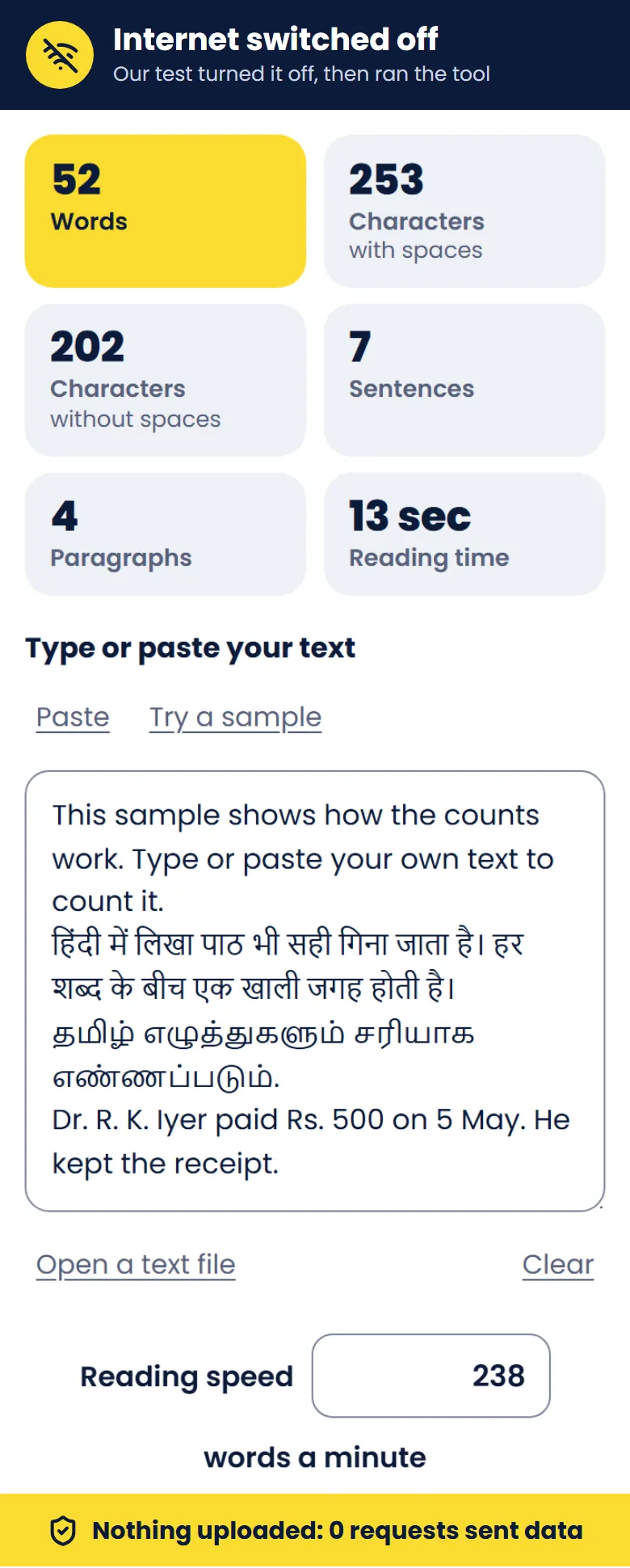
Try it yourself: press "Try a sample" at the top of this page. It puts four short lines in the box (English, Hindi, Tamil and a line with Dr., Rs. and initials), and the numbers should read 52 words, 253 characters, 202 without spaces, 7 sentences and 4 paragraphs.
Try the sampleHindi, Tamil and other Indian scripts
Hindi, Marathi, Tamil, Telugu, Kannada, Malayalam, Bengali, Gujarati, Punjabi and Urdu all put spaces between words. So the rule that counts a group of characters between spaces counts them word by word, just as it counts English. Our known-answer tests include Hindi, Tamil, Telugu, Kannada, Malayalam, Punjabi, Bengali, Gujarati, Urdu and Arabic. Marathi is written in the same script as Hindi.
A Hindi line, counted
मेरा नाम राम है। has 4 words, 16 characters (13 without spaces) and 1 sentence. The danda (।) at the end is a character and it ends the sentence, but it is not a word. A danda or a double danda (॥) standing alone after a space is not a word either, so राम । श्याम counts 2 words.
Characters: what the device stores
The character count is a count of Unicode characters. Unicode is the standard that gives every letter of every language its own number, and a counter that follows it counts what is stored in the text, which is not always what you see. A Hindi letter with a vowel sign is stored as the letter and the sign, so हिन्दी is 1 word and 6 characters: ह, ि, न, ्, द and ी. In the same way தமிழ் is 1 word and 5 characters. This is the count a program such as Python gives, and we checked this page's counts against Python (see the real results). A counter that counted what you see on the screen would give a smaller number for words like these, so when a form says how it counts characters, read which way it means.
Two invisible characters are common in Hindi, Malayalam and other scripts: the zero-width joiner and the zero-width non-joiner. They sit inside a word and change how its letters join. They count as characters but never split a word, so क्ष typed with a joiner is 1 word of 4 characters. A zero-width space is also invisible: it counts as a character here, and it does not split a word either.
Digits, mixed text and old fonts
Digits of other scripts are numbers, like 0 to 9, and a number is a word. १२३ is 1 word. Hindi mixed with English words, or Hindi written in English letters, is counted by the same rule, one group between spaces at a time. Old Hindi fonts are different: text typed in a font such as Kruti Dev is stored as English-looking letters, and this counter counts those letters as it counts English.
Short forms, Urdu, and scripts without spaces
The Hindi short forms डॉ. and प्रो. do not end a sentence, just as Dr. and Prof. do not. डॉ. राम आए। is 3 words and 1 sentence. Urdu and Arabic are written from right to left, with spaces between words, and are counted the same way. Their full stop (۔) and question mark (؟) end a sentence.
Chinese, Japanese and Thai are written without spaces between words, so an unbroken run counts as one word. For those, use the Characters number.
Typing and fonts
The box is an ordinary text box, so any keyboard your device offers can type into it, including the Hindi, Tamil and other Indian-language keyboards of a phone. The count does not depend on fonts: it is worked out from the text itself.

Sentences, paragraphs and reading time
A sentence is a piece of text that ends with a full stop, an exclamation mark, a question mark or a similar sign. Here is how the counter decides, from the simple rules to the exceptions.
- The ending signs. A sentence ends after . ! ? or … (three dots), after the Hindi danda (।) and double danda (॥), after the Urdu and Arabic full stop and question mark, and after the Chinese and Japanese full stop. Several signs in a row, as in
Really?!orWait..., count as one ending. A closing quote or bracket may follow it, soHe said, "Go home." Then he left.is 2 sentences. - A space or the end of the line must come next. That is why
3.14andwww.example.comdo not end a sentence: no space follows the dot.Visit www.example.com for details.is 1 sentence. - Every line ends a sentence. When you press Enter, the sentence before it ends, whether or not it has a full stop. A heading, a name on a line of its own and each item of a list count as a sentence.
Chapter 1followed byIt was a dark night.on the next line is 2 sentences.
A single full stop does not end a sentence in these four cases, because the dot belongs to what came before it:
| After | Examples |
|---|---|
| A title or short form | Mr. Mrs. Ms. Mx. Dr. Prof. Sr. Jr. St. Mt. Rs. Smt. Shri. Sri. Kum. Hon. Rev. vs. Pvt. Govt. Dept. Fig., and डॉ. प्रो. in Hindi |
| A capital letter on its own | The initials in Dr. A. P. J. Abdul Kalam |
| Letters joined by full stops | U.S.A. e.g. Ph.D. B.Tech. a.m. |
| A list number or letter at the start of a line | 1. 2.1. a. iv. |
Short forms that are not on the list do end a sentence: etc., Inc., Ltd. and No. are examples. We sell pens, books, etc. in the shop. shows 2 sentences for that reason. And the other way round, a sentence that ends in a short form such as U.S.A. runs on into the next, so He lives in the U.S.A. Now he is happy. shows 1. Because it is a rule of thumb, you may find a few more or fewer sentences than you would count by eye in a text full of short forms. When a limit is in sentences, read the text as well as the number.
Paragraphs
A paragraph is a line that has at least one word. Press Enter and the next line is a new paragraph. A blank line between paragraphs does not count, and neither does a line of symbols such as ***. So a line, a blank line and another line are 2 paragraphs, and a list of three items on three lines is 3 paragraphs.
Text broken into short lines
Some text arrives with a line break at the end of every line, for example text copied from some emails, old text files or a PDF. The counter then sees every line as a paragraph and as a sentence. Three lines that read This text was wrapped, by an old program and at the end of every line. give 14 words, 3 sentences and 3 paragraphs, though they are one sentence and one paragraph to a reader. The words are right and each line break counts as one character. If you want the sentence and paragraph numbers to mean something, join the lines of each paragraph into one line before you count.
Reading time
Reading time is the number of words divided by a reading speed. The page starts at 238 words a minute, the average that a 2019 review of 190 studies found for adults reading English non-fiction (Brysbaert, Journal of Memory and Language, volume 109, article 104047; we checked the abstract on 10 October 2026). The same review found 260 for fiction. Your own pace, your language and your text may be quite different. We give no speed for Hindi or other languages, because we have no measured one. Type your own speed in the Reading speed box, from 50 to 1000.
The time is shown in seconds when it is under a minute (25 sec), in whole minutes up to an hour (4 min), and then in hours and minutes (1 hr 25 min). A text with words shows at least 1 sec. At the starting speed of 238 words a minute, worked out by the page's own rule, the times look like this:
| Words | Reading time |
|---|---|
| 100 | 25 sec |
| 238 | 1 min |
| 500 | 2 min |
| 1,000 | 4 min |
| 2,000 | 8 min |
| 10,000 | 42 min |
To time a speech, type the speed you speak at. For example, at 120 words a minute (a speed you choose, not one we measured), a speech of 600 words shows 5 min.

Why another counter may show other numbers
Two counters can read the same text and show different numbers, and neither has to be wrong. A counter has to decide a few small questions, and there is no single answer to them. This is what this counter decides, so that you can compare:
| The question | What this counter does |
|---|---|
| A dash, bullet or emoji standing alone | Not a word. word - word is 2 words |
| Two words joined by a long dash (an em dash or an en dash) with no spaces | 2 words. A hyphen, as in well-known, joins: 1 word |
| Numbers and addresses such as 1,000, 3.14 and www.example.com | 1 word each |
| An emoji | 1 character, and no word on its own. A note under the numbers says when some websites would count it as 2 |
| A vowel sign or an accent typed as a separate mark | 1 character each |
| A line break saved as two characters (a Windows file) | 1 character |
| A zero-width space or joiner | A character that does not split a word |
| A full stop after a short form | Does not end a sentence for the forms on the list |
A counter that decides one of these questions differently will show a different number for a text that has it. The long dash is a good example. We chose to split words at a long dash because two words joined by a dash are two words to a reader, and when you are staying under a word limit, undercounting is the unhelpful way to be wrong.
The emoji note is the other one worth knowing. Some web forms measure text in units in which an emoji takes two places. When that makes a difference, the page says so under the numbers. For Good morning 😀 it says that some websites count an emoji as 2 characters, and that they would count 15 for this text, against our 14.
Our tests do not compare this counter with other counters, so this page says what this one does and nothing about how any other one counts. If your numbers differ from another program's, such as a word processor or a website, the questions in the table are the places to look. And when a website or a form counts your text, it may use its own rule, which it often does not print. Leave a little room: stay a few words or characters under a limit, and when a form shows its own counter, trust that number for that form.
Checking a word or character limit
Most limits are checked the same way, whatever the form. Here is the routine, then the usual cases.
- Find out what is counted. Read the form's words: "words", "characters", "characters with spaces" or "characters without spaces". Check whether a title, a heading or a list of references is included.
- Paste only what counts. Select the part that is counted, copy it and paste it into the counter.
- Read the right number. The table below says which one.
- Stay a little under a maximum, or a little over a minimum. A few words or characters of room covers small differences in how the other side counts.
- Count again after your last edit. A small change late in the day is the one that pushes a text over.
| The form says | Read this |
|---|---|
| "in not more than 300 words" | Words |
| "in 500 characters", or "with spaces" | Characters |
| "in 500 characters, without spaces" | Characters without spaces |
| "in 3 sentences" | Sentences (and read the text too, since the count is a rule of thumb) |
| "in 2 paragraphs" | Paragraphs |
| "in 3 minutes", for a speech | Reading time, with your own speed |
Essays, assignments and statements
For an essay, an assignment, a statement of purpose, a cover letter or a long answer typed into a portal, count the finished text, not a draft. Paste the body alone if the title or the references are not counted, and include them if they are. A limit in words is the easiest: read Words. Say a limit is 300 words and the counter shows 312. You need to cut 12 words, and cutting to 295 leaves a little room. When you trim, cut whole sentences or phrases that say the same thing twice, then count again.
Forms with a character limit
Forms often ask for a short answer, such as a few lines about yourself, an address, a reason or a remark, in a fixed number of characters. A box on a form may stop you at the limit, so the end of a longer text can be cut off. Count first, so that you decide what to leave out. Read Characters when spaces count, and Characters without spaces when the form says so.
Hindi, Tamil and other Indian-language text is counted in Unicode characters (see the part on Indian scripts). हिन्दी uses 6 of your characters, so a Hindi answer can use more characters than the letters you see suggest, if the form counts the same way. If the form shows its own counter, trust that number for that form, and use this page to prepare the text in advance.
Posts, bios and messages
A social post, a bio, a caption or a message may have a character limit set by the app. Draft the text in the counter, copy it, and paste it into the app. Each app counts by its own rules, and the app's own counter wins. An app may count emoji, links, line breaks or non-English letters in its own way, so use the emoji note under the numbers as a hint and leave a little room. We give no limit for any app here, because limits change and the app shows the real one.
Web pages
If you write pages for a website, Characters helps you keep a title and a description short. On this site, we keep search titles to 60 characters or fewer and descriptions to 120 to 160 characters. Choose the limits that suit your own site, and check the text against them here. Before the real words exist, Lorem Ipsum Generator fills a layout with placeholder text of the length you choose. To see which words you use most, and cut the ones you repeat, Word Frequency Counter lists every word with its count.
Opening a text file
Choose Open a text file, or drop a file anywhere on the page, and the counter reads it on your device. These files open: .txt, .md, .csv, .tsv, .log, .json, .xml, .srt, .vtt, .html and other plain-text files, with up to 500,000 characters. The file's name and size appear below the box with an x. Press the x to remove the file's text. The file is read on your device and never uploaded.
- Letters. A file saved as UTF-8 (a byte order mark at the start is dropped) or as UTF-16 with a mark is read correctly, Hindi and Tamil included. A file that is not valid UTF-8 is read as Windows-1252, and the page says so: "This file isn't saved as UTF-8, so it was read as Windows-1252. If letters look wrong, save it as UTF-8 and add it again."
- Several files. Only the first one opens, and the page says so, for example "Opening a.txt only. Open the others one at a time."
- Not a text file. A Word, PDF or picture file renamed to .txt is not read, and the page says it doesn't look like a text file. A file named .docx, .pdf or .rtf gets this note: "Only text files (.txt and similar) can be opened here. For a Word or PDF file, copy its text and paste it into the box."
- Empty or too long. An empty file says it is empty. A file with more than 500,000 characters is not opened, and the page says how many characters it has.
A Word or PDF file
Open the file in the program you normally use, select the text, copy it, and paste it into the box. A PDF whose pages are scans holds pictures of pages, not text, so there is nothing to copy. For a PDF that holds real text, PDF to Word turns it into a Word file whose text you can copy.
Private: your text stays on your device
Your text never leaves your device. The counter runs inside your browser and has no upload step: it never sends the text you type, paste or open anywhere, and it keeps no copy of your text, so closing the page forgets it. The page's Content Security Policy lets it contact only this site and Google's ad service, which pays for the site; our code never gives your text to the ad code. You can check it yourself in your browser's network panel (F12 on a computer): counting adds no request that carries your text. The site's menu does remember the last few tools you opened, on your device.
Text is often personal: an application, a statement of purpose, a letter, a medical note or a legal draft. This counter lets you count it without handing it over. Our privacy policy says what we collect, and How we prove it shows how you can check our claims yourself.
Once the page has loaded, it also works with the internet switched off. In our test we switched the network off after the page had loaded and pressed Try a sample, and the numbers showed 0.1 seconds later in each of 15 runs (the real results above have the details).
Long texts
The counter takes up to 500,000 characters at once. That is about 500 KB of English text, roughly 90,000 words. What happens when a text is longer:
- A paste that would go over the limit is not added. This holds for Ctrl+V, for press and hold, and for the Paste button. The page says, for example: "That text is very long (550,000 characters), so it was not added. The box can hold 500,000 characters. Split it into smaller parts for faster results."
- A file with too many characters is not opened. The page says, for example: "long.txt has 550,000 characters, more than the 500,000 counted at once. Split it into smaller parts for faster results."
- A text that gets in some other way stays, uncounted. If text is dragged into the box, for example, it stays there. The numbers show a dash, Copy and Download wait, and the note says: "This text is very long (550,000 characters). Split it into smaller parts for faster results."
Why 500,000 and not more? Counting is quick. What is slow is the browser drawing a very long text in the box, and Hindi and Tamil are the slowest, because the browser has to join their letters. In our tests, headless Chromium on our laptop took 58 milliseconds to draw 500,000 characters of English in the box and 513 milliseconds for Hindi, and with the processor slowed 4 times, 0.9 seconds for English and 5.1 seconds for Hindi. A text ten times longer, 5,000,000 characters of Hindi, took 9.2 seconds just to be drawn, while counting it took 41 milliseconds (the real results above have the table). So a far bigger limit would make the page freeze for a long time on a slower device. The limit is our judgement and not a rule of the browser.
When the text in the box has more than 400,000 characters, typing or pasting updates the numbers after a pause of 0.4 second instead of 0.15. For a text above the limit, split it, count each part, and add the words together.
Tips
- Count a Word or PDF file by pasting its text. Copy the text from the file and paste it into the box.
- Leave room under a limit. Stop a few words or a few characters short, because the website, the form or the person checking may count by their own rule.
- Count one part at a time. The counter counts everything in the box, so paste only the part you want counted, such as one answer or the body without the references.
- Read the right Characters number. Characters counts spaces and line breaks. Characters without spaces leaves them out. Use the one that matches the form.
- On a phone, use the Paste button or press and hold in the box. If your browser refuses the button, the page tells you what to do instead.
- Time a speech. Type your own speaking speed in the Reading speed box.
- Share the numbers. Copy results puts six short lines on the clipboard, ready to paste into a message to a teacher, an editor or a friend.
- Keep your own copy of the text. The counter keeps no copy of your text, and Download results saves only the six numbers. Save your text in your notes or documents before you close the page.
- Join wrapped lines. If a text has a line break at the end of every line, join each paragraph's lines before you count, so that Sentences and Paragraphs mean something.
- Fix the capitals. To turn text typed in capitals into normal sentences, or a heading into Title Case, use the Case Converter.
- Writing for a box with a character limit? The Character Counter shows how many characters are left.
- Text pasted from a PDF? Its lines may break in the middle of sentences: Remove Line Breaks joins them, and PDF to Text takes the text out of a PDF first.
- Comparing two drafts? Text Compare shows which words were added and which were removed.
Limits
- Text only. It counts typed, pasted or opened text. It does not open Word, PDF or picture files: copy the text out of them first.
- 500,000 characters at once, about 500 KB of English text. A longer paste or file is not added, and the page says so. Showing a long text in the box is slow for the browser, most of all for Hindi and Tamil.
- Sentences are a rule of thumb. The rule cannot know every short form, so etc. and Inc. end a sentence here, and a sentence that ends in a short form such as U.S.A. runs on into the next.
- No spelling or grammar check, no keyword counts and no changing of the text.
- Chinese, Japanese and Thai have no spaces between words, so each run counts as one word. Use the character count.
- Reading time is an average for English non-fiction (238 words a minute). Your pace, your language and your text may be different.
- Your text is not kept. The text and the numbers are forgotten when you close the page.
- Browsers. Tested through our agentic testing workflow, in headless Chromium at phone and computer sizes. These tests don't cover Safari or Firefox, so we cannot promise how they behave.
Terms explained
- Word
- A group of characters between spaces (or a long dash) that has at least one letter or number in it. A dash or an emoji on its own is not a word.
- Character
- One Unicode character. A letter, a digit, a space and a Hindi vowel sign each count once, and so do most emoji. A flag, a skin tone or a joined emoji counts as two or more.
- Unicode
- The standard that gives every letter of every language its own number, so the same text can be stored and shown on many devices.
- Sentence
- Text that ends in . ! ? or a similar sign followed by a space or the end of a line. The last piece of every line counts too.
- Paragraph
- A line of text with at least one word. Each time you press Enter you start another.
- Danda
- The vertical bar (।) that ends a sentence in Hindi and some other languages. Two together (॥) are a double danda.
- Reading speed
- The number of words a person reads in a minute. 238 is the average a 2019 review found for adults reading English non-fiction.
- Zero-width joiner
- An invisible character placed inside a word to change how its letters join. It counts as a character and does not split a word.
- Hyphen and long dash
- A hyphen joins the parts of one word, as in well-known. An em dash or an en dash (the long dashes) is used between words, and here it splits the words on either side.
- UTF-16
- A way of storing text in which some characters, such as emoji, take two places. Some websites count those places, which is why an emoji can count as 2 characters on them.