What a text comparison shows, and when you need one
Put two versions of a text side by side, the original and the changed one, and this tool shows exactly what changed: words that were added are underlined, words that were removed are struck through, and a line under the boxes counts the changes. It all happens in your browser: your texts are never uploaded, and nothing is kept.
Where it helps:
- Two drafts of your own writing: an essay, a statement of purpose, a cover letter or a report, before and after edits.
- A clause or a notice that was reworded: the old and the new terms of an agreement, a circular or a form's instructions.
- Lists and scripts: two versions of a list of names, a config file or a piece of code, line by line.
- Copied text: checking that text copied out of a PDF or a website matches the original exactly.
- Feedback on edits: seeing what a teacher, an editor or a colleague changed in your text.
What it doesn't do: it compares characters, not meaning; it doesn't merge two versions into one; and it compares plain text only, so bold, colours and tables are left out. For two PDF files there is Compare PDF.
Step by step: comparing two texts
- Add the two texts. Put the original in the first box and the changed version in the second: type, paste with the Paste button or Ctrl+V (a long press on a phone), or open a text file into each box. Try a sample fills both with a short letter and its edited copy.
- Read the result. The comparison starts as soon as both boxes have text, and follows your typing.
- Choose how to compare: Words, Lines or Characters; the next section explains each.
- Set the choices: Ignore capital letters; in Words, Show changes in spaces and line breaks; in Lines, Ignore spaces at the ends of lines.
- Swap the texts if you pasted them the wrong way round; added and removed swap with them.
- Copy changes or Download to keep the result.
The line under the boxes says what was found, for the sample “4 changes: 6 words added and 2 words removed.”, or “The two texts are the same.” With only one box filled it says “Add text to the other box to see the differences.” Clear empties a box.
What the page does, exactly
The comparison is made by jsdiff, an open-source library (version 9.0.0, BSD 3-Clause licence, its licence) that runs in a background worker in your browser. These are the page's rules in full, and the same rules are checked by our tests.
| Part | The rule | Example |
|---|---|---|
| The two texts | The original goes in the first box and the changed text in the second. Each box takes up to 500,000 characters, typed, pasted or opened from a text file. The comparison starts when both boxes have text and follows what you type, choose or swap | The original on the left and the changed text on the right; one above the other on a phone |
| Words | Each text is cut into words and marks (a full stop, a comma, the Hindi danda) at the boundaries of your browser's own Intl.Segmenter, or by our own rules of letters, vowel signs and digits where a browser has none. Spaces and line breaks are not counted as changes unless you tick "Show changes in spaces and line breaks". Words in both texts, in the same order, are left alone, and the rest is shown as added or removed | I like tea and I like coffee: tea removed, coffee added |
| Lines | Each line is compared as a whole: a line that differs by even one letter is shown as removed, and the new line as added. A last line without a line break is given one first, so a missing break at the very end is not a change. "Ignore spaces at the ends of lines" compares lines without the spaces and tabs before and after them | A line b that becomes B is one line removed and one added |
| Characters | Each text is cut into letters as a reader sees them: a Hindi syllable with its vowel signs, or an emoji with its skin tone, is one. The changes can be as small as one letter | kitten and sitting: k, e and g change, and the rest stays |
| Capital letters | "Ignore capital letters" counts A and a as the same letter, in all three ways. Text that is the same except for capitals is then written as it is in the changed text | Hello World and hello world have no change |
| The shortest list of changes | jsdiff finds the shortest list of additions and removals that turns the original into the changed text (the algorithm of Eugene Myers). A sentence that was moved shows as removed in one place and added in the other | Our tests checked the counts against a separate program that finds the fewest changes |
| The numbers | A change is a place where text was added, removed or both. Added and removed are counted in words (by the rule of the Word Counter), lines (by line breaks) or characters (as the Character Counter counts them), whichever you compare by | 3 changes: 6 words added and 2 words removed. |
| How the changes look | Added text is underlined and shaded green, and a line that was added has a + beside it. Removed text is struck through and shaded amber, and a line that was removed has a - beside it. The marks and the underline and strike-through do not rely on colour. A long stretch that is the same in both texts is folded into one line that says how much it holds, and at most 100,000 characters of the comparison are drawn | … 275 unchanged words … |
| Copy and Download | By words or characters they take the whole text with the changes written in it: [-removed-] and {+added+}, as git's word diff writes them. By lines they take a unified diff with three lines around each change, the format that git and patch use, saved as changes.diff. They take everything, also what the page folded or did not draw | I like [-tea-]{+coffee+} |
| Time | Texts that are very different, or very long, can take a long time to compare, so the work runs in the background with a Stop button, and the page gives up after 30 seconds and says so | Two unrelated texts of 10,000 words |
What the rules don't decide: the page compares the characters of the texts, not what they mean. It doesn't know that two words mean the same, so a sentence that was rewritten shows as removed and added, and a paragraph that was moved shows as removed in one place and added in another. Formatting isn't compared, because only plain text is. And when two different shortest lists of changes exist, the page shows the one jsdiff finds. Words is the usual choice for writing, and Lines for lists and code.
Real results from our tests
We tested the Text Compare tool with headless Chromium 148, the open-source browser Chrome is built on, on a Windows laptop with an Intel Core i7-1185G7 and 32 GB of memory, on 13 October 2026. Other work was running on the laptop at the same time, so times vary a little from run to run: each time below is the middle one of 3 runs.
Comparing is quick when the texts are alike. In Words, two texts of 10,000 words (59,615 characters) with 1 word in 100 changed showed their changes 270 milliseconds after the last typing or pasting, and two texts of 50,000 words (298,907 characters) 522 milliseconds. In Characters, 298,463 characters with 50 letters changed took 364 milliseconds. In Lines, 50,000 words cut into about 5,000 lines took 2.6 seconds, because changing 1 word in 100 changes about half of the lines. Of each time, 0.15 second is the page waiting to see whether more typing follows, and 0.4 second when a text has more than 400,000 characters, so a burst of typing is compared once.
It takes longer the more the texts differ. The time depends on how different the texts are, not only on how long they are. Two unrelated texts of 3,000 words (17,892 characters) took 2.3 seconds, and two of 6,000 words (35,701 characters) took 8.9 seconds. Two unrelated texts of 16,000 words took more than the 30 seconds the page allows, so it stopped and said so. That is why the comparison runs in a background worker, with a Stop button that ends it at once, and why the page gives up after 30 seconds.
Checked against a second program. Python counted, with a longest-common-subsequence table, the fewest words, lines or characters that must be added and removed to turn one text into another, for 6,000 random pairs of texts: 2,021 pairs by words, 2,657 by lines and 1,322 by characters, some with capital letters ignored and some with the spaces at the ends of lines ignored. The page's comparison found exactly those numbers every time. Then 3,537 unified diffs of random lists of lines were applied to their originals with jsdiff's own applyPatch, and each gave the changed text back, and each was letter for letter the same as the one jsdiff's own createTwoFilesPatch writes. More than 25,000 checks on random texts made of English, Hindi and emoji pieces showed that the changed text can always be put together again from the parts shown, and that two texts that are the same show no change, with an Intl.Segmenter and without one.
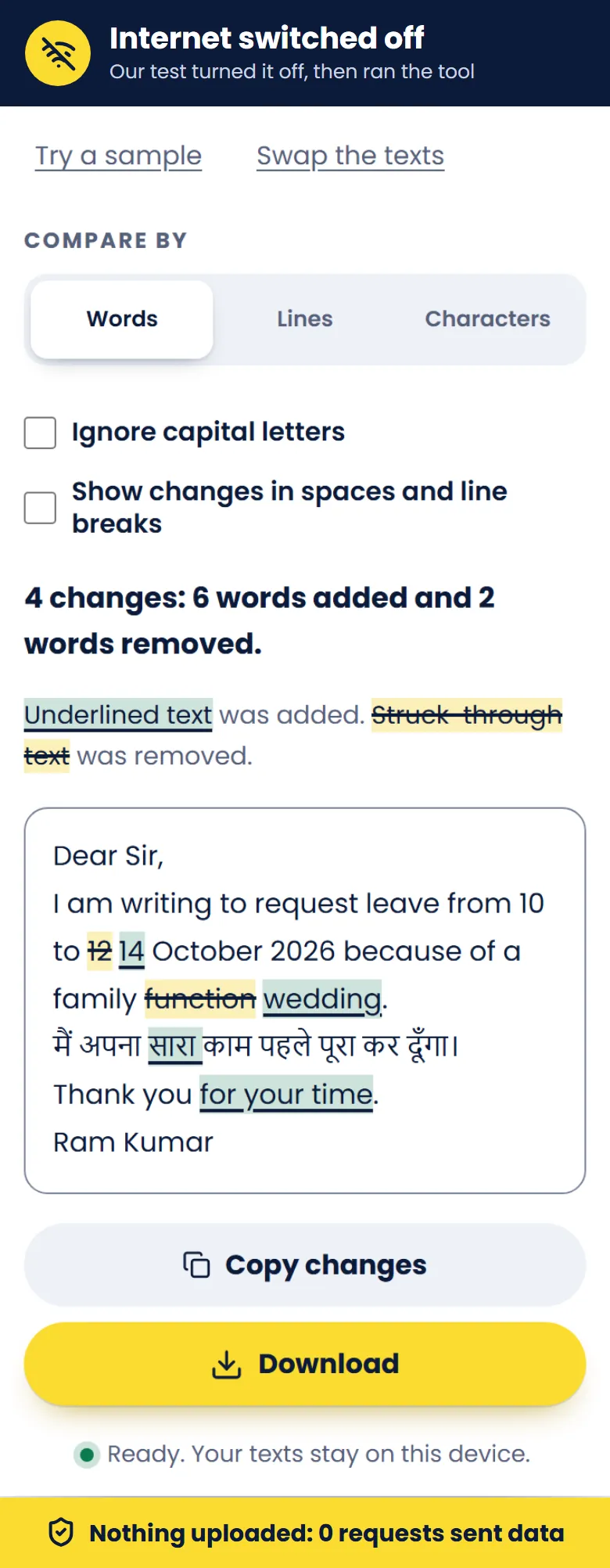
Size and offline. On a first visit the page downloads about 0.11 MB for the tool: the page, its styles, its script, the comparison code (jsdiff and its worker) and the fonts, with Google's ad code not counted. In our test we switched the network off after the page had loaded and pressed Try a sample: the changes showed 0.2 seconds later or less in each of 15 runs, and 0.1 seconds later in 5 of them.
Phone-sized screen. We also ran every test on a phone-sized screen in Chromium (390 × 844 pixels, with touch). That is not a real phone. Every button and box was 44 pixels high or more, and the page did not scroll sideways.
Try it yourself: press "Try a sample" at the top of this page. It puts a short letter and its changed copy in the two boxes. In Words the line under the boxes reads 4 changes: 6 words added and 2 words removed., with 12 and function struck through, and 14, wedding, a Hindi word and "for your time" underlined. Choose Lines to see three lines removed and three added, and Characters to see the smallest changes.
Words, lines or characters: which to use
- Words is for essays, letters and notices. A changed word stands out on its own, and a sentence that was reflowed onto a new line doesn't count as a change. In the sample, 12 and function are struck through, and 14, wedding, a Hindi word and “for your time” are underlined: 4 changes, 6 words added and 2 removed.
- Lines is for lists, code, data and anything where each line is a unit. A changed line shows whole, as a removed line marked - followed by the added line marked +. In the sample, three lines are removed and three added.
- Characters is for names, numbers, codes and short strings, to find the one letter that differs, such as Sharma and Sarma, or an account number with two digits swapped. A Hindi syllable with its vowel signs stays whole.
For a long text, a good habit is to compare by Lines first, to see which lines changed, and then paste just those lines and compare them by Words.

Capital letters, spaces and line breaks
- Ignore capital letters works in all three ways: Delhi and DELHI count as the same.
- Show changes in spaces and line breaks (Words only) is off to begin with, so only the words themselves count. Tick it when spacing matters, such as in a poem or a formatted list.
- Ignore spaces at the ends of lines (Lines only) skips the invisible spaces that editors often leave behind. A missing line break at the very end of a text isn't counted as a change either.
When two texts differ only in what these choices leave out, the line under the boxes says so instead of showing nothing: “No differences found with these choices. The texts differ only in what this comparison leaves out: capital letters, spaces and line breaks.” The choices never change your texts; they only decide what counts as a change.
Hindi, Tamil, Chinese and emoji
To find where words and letters begin and end, the page uses your browser's own Intl.Segmenter, which knows the rules of every script. So a Hindi or Tamil word stays whole in Words, a syllable with its vowel signs stays whole in Characters, and an emoji with a skin tone counts as one letter. The full stop of Hindi, the danda (।), is a mark of its own.
This matters more than it sounds. Word rules written with English in mind split a Devanagari or Tamil word into pieces and mark half a word as changed; the comparison code this page uses did exactly that in our first tests, before we gave it the browser's rules. In a browser without Intl.Segmenter, the page uses its own rules of letters, vowel signs and digits, so Hindi and Tamil words still stay whole. The exact boundaries come from the browser, so they can differ a little between browsers.
Opening text files and copying text out of other files
Each box has its own Open a text file, and you can drop a file on the box you want. Files up to 500,000 characters are read: UTF-8 as it is, UTF-16 with a byte order mark, and an older Windows file that isn't UTF-8 as Windows-1252, with a note: “This file isn't saved as UTF-8, so it was read as Windows-1252. If letters look wrong, save it as UTF-8 and add it again.”
Word, PDF and picture files aren't opened: “Only text files (.txt and similar) can be opened here. For a Word or PDF file, copy its text and paste it into the box.” Their formatting wouldn't be compared anyway. For two PDF files, Compare PDF opens them directly, marks the text changes on the pages side by side, and can also compare how the pages look.
Long texts, big differences and Stop
Each box takes up to 500,000 characters, about 80,000 words of English. The comparison runs in a background worker, so the page stays usable while it works; if it takes more than about 0.4 second, the page shows “Comparing” with the number of characters, and a Stop button that ends it at once.
The time depends far more on how different the texts are than on how long they are. In our test, two texts of 50,000 words with 1 word in 100 changed were compared in about half a second, but two unrelated texts of 6,000 words took 8.9 seconds. The page gives up after 30 seconds and says so: “These two texts are too different to compare in 30 seconds, so the page stopped. Try comparing by lines, or compare smaller parts.”
Long stretches that are the same are folded, such as “... 275 unchanged words ...”, so the changes stay easy to find, and at most 100,000 characters of the comparison are drawn on screen. Copy changes and Download always take all of it.
Private: your texts stay on your device
Your texts never leave your device. The tool runs inside your browser and has no upload step: it never sends the texts you type, paste or open anywhere, and it does not save them, so closing the page forgets them. The page's Content Security Policy lets it contact only this site and Google's ad service, which pays for the site; our code never gives your texts to the ad code. You can check it yourself in your browser's network panel (F12 on a computer): comparing adds no request that carries your texts.
What people compare is often personal: drafts of an application, a contract before signing, a letter, a statement of purpose. A comparison site that works on a server receives everything you paste; here the comparison runs in your own browser, and nothing is kept once you close the page. It works offline too once the page has loaded: in our test we switched the network off and pressed Try a sample, and the changes showed 0.2 seconds later or less in each of 15 runs. Read our privacy policy and how we prove your files are never uploaded.
Tips
- Words for writing, Lines for lists and code, Characters for names and numbers.
- Old text first. Added and removed are read from the original to the changed text; Swap fixes a mix-up.
- Only the style changed? Tick Ignore capital letters.
- A long document: compare by Lines first, then compare the changed lines by Words.
- Sharing the result? Copy changes gives plain text that pastes into an email or a chat.
- Keep your own copies. The page forgets both texts when you close it.
- Counting words too? The Word Counter counts words, characters and reading time.
- Two files exactly the same? For a byte-for-byte check of whole files, compare their hashes with Hash Generator. To compare two lists whatever their order, sort both first with Sort Lines, and tidy their spaces with Remove Extra Spaces.
Limits
- Plain text only. The page compares typed, pasted or opened text. It does not open Word, PDF or picture files and does not compare bold, colours or tables. For two PDF files, use Compare PDF.
- 500,000 characters in each box about 500 KB of English text. A longer paste or file is not added, and the page says so.
- Two texts, no merging. It shows what differs between two texts. It does not merge changes or compare three texts.
- Very different texts can take long. The page gives up after 30 seconds. Stop ends the work sooner.
- Not the meaning. It compares letters and words, not what they mean: a rewritten sentence shows as removed and added.
- Not saved. The texts and the changes are forgotten when you close the page.
- Browsers. We tested only in Chromium, the engine behind Chrome and Edge, with computer and phone-sized screens. We did not test on real phones, in Safari or in Firefox, so we cannot promise how they behave.
Terms explained
- Diff
- The list of differences between two texts; also the name of the classic tool that makes one.
- Unified diff
- The plain-text format of git and patch: a header of two lines, then parts starting with @@, with - before removed lines and + before added ones.
- Word diff
- A diff that compares words, written with [-removed-] and {+added+} marks.
- Added and removed
- Text that is only in the changed text is added; text that is only in the original is removed.
- Intl.Segmenter
- The browser's own tool for finding where words and letters begin and end, in any language.
- Unicode
- The standard that gives every letter of every language, and every emoji, its own code.
- Worker
- A background program in the browser, so a long comparison doesn't freeze the page and can be stopped.