What a hash is, and when you need one
A hash is a short fingerprint of some bytes. Put the same bytes through the same hash and you always get the same fingerprint; change a single byte anywhere, even in a 2 GB file, and the fingerprint comes out completely different. The word abc, for example, has the MD5 hash 900150983cd24fb0d6963f7d28e17f72 and the SHA-256 hash ba7816bf8f01cfea414140de5dae2223b00361a396177a9cb410ff61f20015ad.
This page makes five hashes at once, MD5, SHA-1, SHA-256, SHA-384 and SHA-512, of a text you type or of a file you choose, and compares them with a hash you were given. It all happens in your browser: the text and the file are never uploaded, and nothing is kept.
Where it helps:
- Checking a download. Sites that offer a Linux ISO, an app installer or a driver often print its SHA-256 next to the link; comparing it tells you the file wasn't damaged on the way.
- Checking that two copies are the same, such as a backup and its original, or a file sent by email and the one on your desk.
- Development work: the hash of a string for a test, a cache key or a config value, or the MD5 an old system still asks for.
- Learning: seeing how a tiny change in a text changes the whole hash.
Step by step: making and comparing hashes
- Add a text or a file. Type, paste with the Paste button or Ctrl+V (a long press on a phone), or press Try a sample. For a file, press Choose a file or drop it anywhere on the page.
- Read the five hashes. Text is hashed as you type. A big file shows “Working on” with a percentage while its MD5 is made, and a Stop button.
- Choose capital letters if the hash you were given uses them. The hash means the same either way, and Copy takes what is shown.
- Compare. Paste the hash you were given into the compare box. The page works out which hash it is from its length and says “It matches the SHA-256 hash below.”, with a green outline on that row, or “It does not match the SHA-256 hash below.”
- Copy or download. Each hash has its own Copy button; Copy all takes all five; Download saves them as hashes.txt, starting with what was hashed, such as “Input: text, 3 bytes”.
Clear empties the box, and the × on a file removes it and its hashes. Typing in the box takes the file's place.
What the page does, exactly
The hashes follow the standards, so the same bytes give the same hash anywhere. These are the page's rules in full, and the same rules are checked by our tests.
| Part | The rule | Example |
|---|---|---|
| The five hashes | MD5 (32 hex digits), SHA-1 (40), SHA-256 (64), SHA-384 (96) and SHA-512 (128), all made at once. SHA-1, SHA-256, SHA-384 and SHA-512 come from the browser's own Web Crypto. MD5 is not in Web Crypto, so it is written in this page from RFC 1321, the public algorithm, with no library | abc has the SHA-256 ba7816bf...15ad |
| Text | The text in the box is written as UTF-8 and hashed, so every language works. The box holds a line break as one line feed, so text copied from a Windows file is hashed as if it had been saved with line feeds. To hash a file exactly, choose the file | The empty text has the MD5 d41d8cd98f00b204e9800998ecf8427e |
| A file | A chosen file is hashed byte for byte, up to 256 MB. The SHA hashes need the whole file in memory at once, which is why there is a limit. The MD5 of a big file is made in pieces, with the percentage shown and a Stop button | A 100 MB file is read and hashed in a few seconds |
| How a hash is written | In small letters, as most tools print it. Capital letters (A to F) are one tick away, and Copy then takes the capital form | d41d8cd9... or D41D8CD9... |
| Compare | A hash you were given is tidied first: the first word that is a whole hash counts, so a line like the output of sha256sum (the hash, then the file's name) works, and so does one with a label in front such as SHA256: or md5=; a 0x start is dropped, bytes written with colons, dashes or spaces between them are joined, and capital letters make no difference. Its length says which hash it is: 32, 40, 64, 96 or 128 digits. The page then says whether it matches that hash below, and marks the matching one | SHA256: BA78... is compared with the SHA-256 |
| Not for security | MD5 and SHA-1 can be faked by a determined person, so they only show that two copies are the same. The page never calls a file safe or genuine because a hash matches a hash that you typed | A match says the bytes are the same as the ones that the published hash was made from |
What the rules don't decide: a hash proves nothing about who made a file, or whether the published hash itself can be trusted. If the download and its hash come from the same web page, a match shows that the download wasn't damaged on the way, not that the page is honest. A hash is also one way: it can't be turned back into the text, and it isn't encryption. It only tells you whether two sets of bytes are the same.
Real results from our tests
We tested the Hash Generator with headless Chromium 148, the open-source browser Chrome is built on, on a Windows laptop with an Intel Core i7-1185G7 and 32 GB of memory, on 13 October 2026. Other work was running on the laptop at the same time, so times vary a little from run to run: each time below is the middle one of 3 runs.
Hashing is quick. A file of 100 MB (104,857,600 bytes) showed all five hashes 1,175 milliseconds after it was chosen, and a file of 256 MB (268,435,456 bytes), the biggest the page takes, 4,581 milliseconds after it was chosen. Both gave the same hashes as Node's own. The page shows a percentage while the MD5 of a big file is made, and a Stop button.
Checked against other programs. MD5 is not in the browser's own set of functions, so this page makes it with code written from RFC 1321, and we checked it hard. It gives the results that RFC 1321 lists for its own test suite, its 64 constants are the numbers the RFC defines (the integer part of 4,294,967,296 times the absolute value of the sine of 1 to 64), it gave the same MD5 as Node's own for 100,000 random inputs, and for every length from 0 to 400 bytes and for lengths around 1 KB, 4 KB, 64 KB and a million bytes. Then Python's hashlib made all five hashes of 20,000 random inputs, 100,000 hashes of 36,747,597 bytes in all, and the page gave the same hash every time.
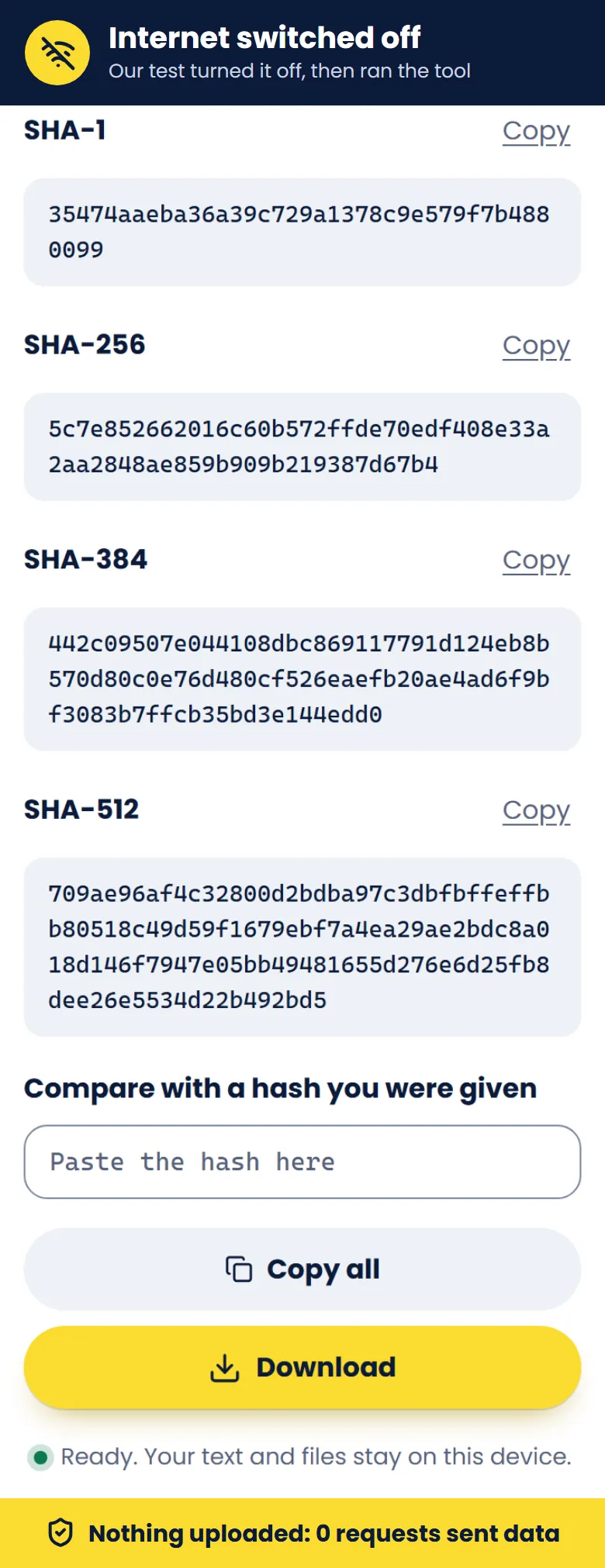
Size and offline. On a first visit the page downloads about 0.1 MB for the tool: the page, its styles, its script and the fonts, with Google's ad code not counted. In our test we switched the network off after the page had loaded and pressed Try a sample: the hashes showed 0.1 seconds later in each of 15 runs.
Phone-sized screen. We also ran every test on a phone-sized screen in Chromium (390 × 844 pixels, with touch). That is not a real phone. Every button and box was 44 pixels high or more, and the page did not scroll sideways.
Try it yourself: press "Try a sample" at the top of this page. It puts Hello, world! नमस्ते 🙏 in the box. The MD5 should read 792fa69b6e9a1b9a81f523af508d31a8 and the SHA-256 should start with 5c7e8526. Paste the MD5 in the box that compares: the page says it matches the MD5 hash below.
Checking a download against a published hash
The recipe for checking a download:
- Find the hash the website gives for the file, usually next to the link or in a file called SHA256SUMS. Note which kind it is: SHA-256 is the most common today.
- Choose the downloaded file here. Big files take a few seconds: in our test a 100 MB file showed all five hashes in 1.2 seconds.
- Paste the published hash into the compare box. You can paste the whole line as it was printed: “SHA256: ...”, a line from sha256sum with the file name after the hash, a PowerShell row or certutil's output. The page finds the hash in it, and capital letters make no difference.
- Read the line under the box.
A match means the bytes of your file are exactly the ones the hash was made from: the download is complete and unchanged. It doesn't mean the file is safe or comes from who you think. No match can mean a damaged or incomplete download, a different version of the file (check the version number on the site), or a hash of another kind. When the length is wrong for every kind, the page says so: “That has 6 digits. The hashes here are 32 (MD5), 40 (SHA-1), 64 (SHA-256), 96 (SHA-384) or 128 (SHA-512) digits long.”

MD5 and SHA-1: for checking copies, not for security
MD5 and SHA-1 are old. Researchers have shown ways to make two different files with the same MD5, and later with the same SHA-1, so a person who sets out to fake a file can do it. For catching accidents, a damaged download or a mixed-up copy, they still work well, which is why many sites still publish them; the line next to the hashes says it plainly: “MD5 and SHA-1 are for checking that files match, not for security.” When someone might tamper with a file on purpose, use SHA-256 or a longer hash, which have no such known weakness.
None of these hashes, used on their own, is the right way to store a password: they are made to be fast, which also makes guessing quick. Systems that keep passwords use slow, salted methods made for the job.
Text and files: why the same words can give two hashes
Text is hashed as UTF-8 bytes, and a line break in the box is always one byte, a line feed. A Windows file stores each line break as two bytes, so the text of a Windows file and the file itself give different hashes. For example, Hello followed by a line feed has the MD5 09f7e02f1290be211da707a266f153b3, while the same word followed by a Windows line break has b73bf7d3ba1a517644661bc4bcd85f9a.
The same goes for a line break at the end, a byte order mark at the start, or a file saved in another encoding: each changes the bytes, so each changes the hash. When you need the hash of a file, choose the file itself instead of copying its text: the file is hashed byte for byte, exactly as it is on disk. An empty file has hashes too; its MD5 is d41d8cd98f00b204e9800998ecf8427e, which you may recognise from logs. An empty text box simply shows no hashes until you type.
Big files and the size limit
The page hashes files up to 256 MB. The limit is there because the browser's own SHA functions need the whole file in memory at once, and a phone has much less memory than a computer. A bigger file gets a clear message with its size, ending: “The SHA hashes need the whole file in memory. For a bigger file, use a tool on your own computer.” On Windows, PowerShell's Get-FileHash does it, and on Linux and Mac, sha256sum or shasum.
Big files are quick: in our test, a 100 MB file showed all five hashes 1.2 seconds after it was chosen, and a 256 MB file 4.6 seconds after. While the MD5 of a file over 4 MB is made, the page shows the file's name with a percentage and a Stop button.
Private: your text and files stay on your device
Your text and files never leave your device. The tool runs inside your browser and has no upload step: it never sends the text or files you type, paste or open anywhere, and it does not save them, so closing the page forgets them. The page's Content Security Policy lets it contact only this site and Google's ad service, which pays for the site; our code never gives your text and files to the ad code. You can check it yourself in your browser's network panel (F12 on a computer): making a hash adds no request that carries your text and files.
What people hash is often private: contracts, scans of IDs, backups, installers from work, and sometimes a password typed to test something. A hash site that works on a server receives whatever you type or upload; here your own browser makes the hashes, and nothing is kept once you close the page. It works offline too once the page has loaded: in our test we switched the network off and pressed Try a sample, and the hashes showed 0.1 seconds later in each of 15 runs. Read our privacy policy and how we prove your files are never uploaded.
Tips
- Prefer SHA-256 when a site offers several hashes.
- Compare the whole hash, not just the first few digits; the compare box does that for you.
- Hash the file, not text copied from it, when you need the file's real hash.
- Paste the hash with its label. “SHA256: ...” or a whole sha256sum line is fine; the page finds the hash.
- Try the sample first to see what each hash looks like: its MD5 is 792fa69b6e9a1b9a81f523af508d31a8.
- Wrong length? Count the digits: 32 is MD5, 40 is SHA-1, 64 is SHA-256.
Limits
- Not for security. MD5 and SHA-1 only show that two copies are the same. A match never means that a file is safe or genuine.
- Files up to 256 MB. The SHA hashes need the whole file in memory at once. A bigger file is not opened, and the page says so.
- Text up to 500,000 characters in the box. A longer paste is not added. A file has no such limit apart from its size.
- Text is hashed with line feeds. A box holds a line break as one line feed. To hash a file exactly, choose the file.
- No other hashes. There is no SHA-3, no CRC32 and no HMAC.
- Not saved. The text, the files and the hashes are forgotten when you close the page.
- Browsers. We tested only in Chromium, the engine behind Chrome and Edge, with computer and phone-sized screens. We did not test on real phones, in Safari or in Firefox, so we cannot promise how they behave.
Terms explained
- Hash
- A short fingerprint of some bytes. The same bytes always give the same hash, and a different file almost always gives a different one.
- Checksum
- A hash used to check that a file arrived or was copied without changes.
- MD5 and SHA-1
- Older hashes: fine for checking copies, not safe against a person who sets out to fake a file.
- SHA-256, SHA-384, SHA-512
- Longer hashes of the SHA-2 family, the ones to use when it matters.
- Hex
- The digits 0 to 9 and the letters a to f. Two of them write one byte of a hash; Hex to Decimal Converter shows any hex number in decimal and binary.
- UTF-8
- The common way text of every language becomes bytes before it is hashed.
- Web Crypto
- The browser's built-in set of cryptographic functions, which makes the SHA hashes here.