What Base64 is, and when you need it
Base64 is a way to write any bytes, the bytes of a text, a picture or a PDF, with only 64 plain characters: the capital letters A to Z, the small letters a to z, the digits 0 to 9, and two more signs. Systems that carry only text, such as email, JSON files and web addresses, can then carry anything. The price is size: every 3 bytes become 4 characters, so Base64 is about a third longer than what it holds.
This page works both ways. Encode turns text or a file into Base64. Decode reads Base64 back into text, or into a file you can download when it holds a picture, a PDF or other data. It all happens in your browser: what you type and the files you choose are never uploaded.
Where people meet Base64 in daily work:
- In an API reply or a settings file. A field like
"photo": "iVBORw0KGgo..."is a picture written as Base64. - Pictures inside web pages and emails. An address that starts
data:image/png;base64,holds a small picture itself. - Email attachments. They usually travel as Base64 in lines of 76 characters, out of sight.
- Login headers. Basic authentication sends
name:passwordas Base64:ravi:Secret@123becomescmF2aTpTZWNyZXRAMTIz. - Tokens. A JWT is three Base64 parts joined by dots. Our JWT Decoder reads all three at once.
What it doesn't do: Base64 is not encryption and hides nothing, and the page doesn't judge whether a decoded text makes sense. It shows exactly what the bytes say.
Step by step: encoding and decoding
- Choose Encode or Decode at the top of the tool.
- Add what you want to change. Type, paste with the Paste button or Ctrl+V (a long press on a phone), or press Try a sample. To work on a file, press Choose a file or drop it anywhere on the page: its name and size show in a chip, and the × on the chip removes it. Typing in the box takes the file's place.
- In Encode, pick the form you need. Standard or URL-safe letters, the = signs on or off, and lines of 76 characters for email. The result changes as you choose; there is no button to press.
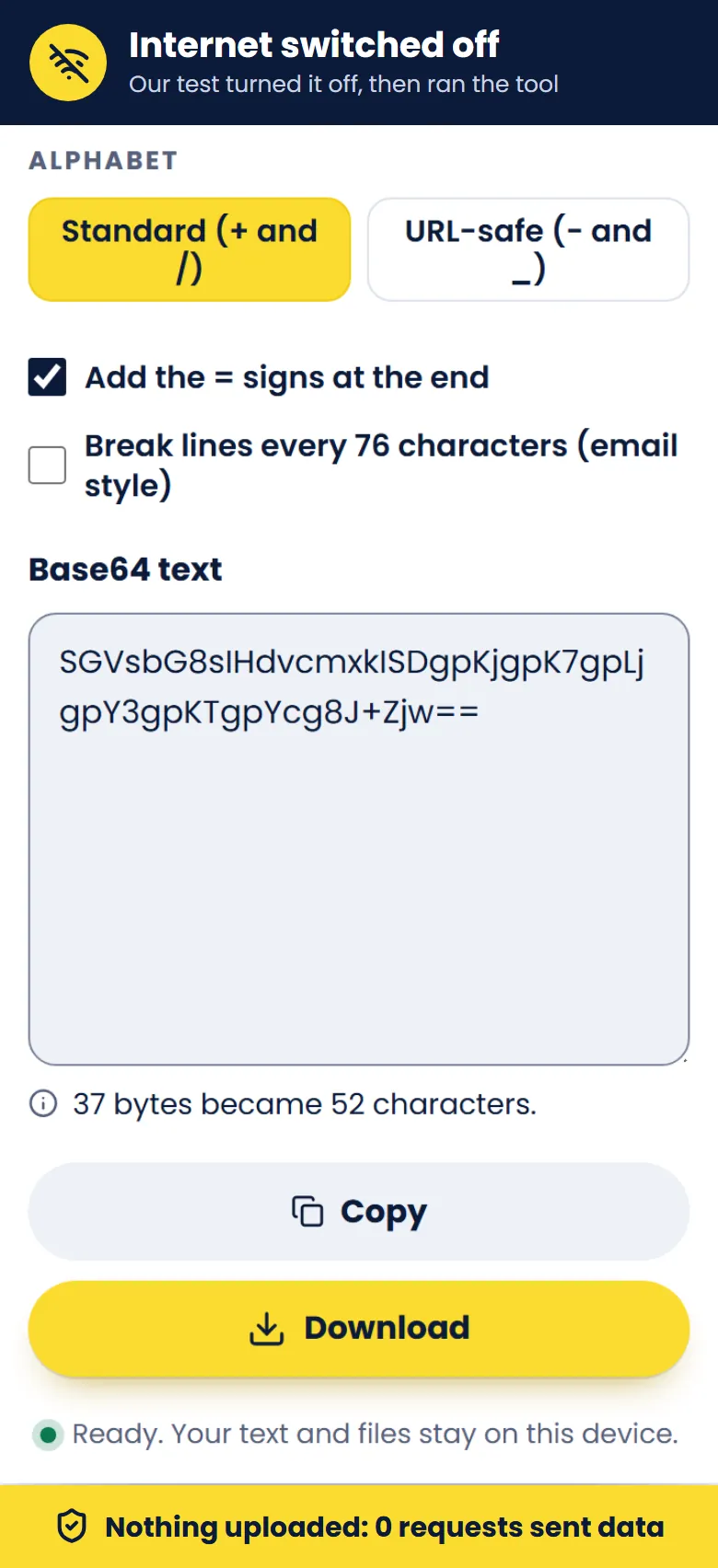
- Read the line under the result. It says what happened: for the sample, “37 bytes became 52 characters.” In Decode it counts the bytes, and says when it left out quotes, a data: start or invisible marks.
- Copy or download. Copy puts the whole result on your clipboard, and Download saves it as a file. A decoded picture, PDF or ZIP file is saved as a real file with the right ending, such as decoded.png.
Clear empties the box when you want to start again. Nothing is kept after you close the page, so there is nothing to delete afterwards.
What the page does, exactly
The page works on bytes. These are its rules in full, and the same rules are checked by our tests.
| Part | The rule | Example |
|---|---|---|
| Text to bytes | Text is written as UTF-8 first, so every language works. A line break in the box is one line feed byte (10), even if the text came from a Windows file. Half of an emoji (a lone surrogate) has no UTF-8 form and is written as U+FFFD (the bytes EF BF BD) | é is the two bytes C3 A9, and encodes to w6k= |
| Encoding | Every 3 bytes (24 bits) become 4 characters of 6 bits each. A last group of 1 or 2 bytes gives 2 or 3 characters, and = signs fill it up to 4 when padding is on | f encodes to Zg==, fo to Zm8=, foo to Zm9v |
| The two alphabets | Standard uses A to Z, a to z, 0 to 9, + and /. URL-safe uses - and _ instead of + and /, so the text can sit in a web address or a file name | The bytes FB FF BF are +/+/ (standard) or -_-_ (URL-safe) |
| The = signs | On to begin with. Turn them off for the form some systems use, like the parts of a JWT. When decoding, missing = signs never matter | Zg== without them is Zg |
| Lines of 76 | A line feed is put after every 76 characters, and none at the end. This is the line length of email (MIME). The page uses a line feed, not the carriage return and line feed pair | 57 bytes make exactly one line of 76 characters; 58 bytes make a line of 76 and a line of 4 |
| Decoding | Both alphabets are read, even mixed. White space (spaces, tabs, line breaks) and invisible marks such as a zero-width space are skipped. = signs may be missing. Extra bits at the end of the last character are ignored | SGVs bG8s decodes to Hello, world! |
| Left out, with a note | Quotes around the whole text, the start of a data: address (data:image/png;base64,), and the BEGIN and END lines of a PEM file. The page says when it left something out | "SGVsbG8=" decodes to Hello |
| Text that is not Base64 | The first character Base64 does not use stops the decoding, and the page names it and says where it is: its place in the text, or its line and place on the line when the text has several lines. Characters are counted as people see them, so an emoji is one. A lone leftover character, a = sign followed by more text, and more than 2 = signs each get a message too | SGVs bG8é: the character “é” at position 9 |
| Text or data | Decoded bytes that are valid UTF-8 text, with no NUL byte and at most 1 control character in 100, are shown as text. Anything else is data: the page gives the size, says what it looks like when the first bytes match a PDF, PNG, JPEG, GIF, WebP, ZIP or gzip file, and Download saves it | Decoded bytes starting with 89 50 4E 47 are a PNG picture, saved as decoded.png |
| Files | A chosen file is encoded byte for byte. In Decode, the file is read as text and its Base64 is decoded. Up to 20 MB at once | A 1 MB picture encodes to 1,398,104 characters |
What the rules don't decide: Base64 only changes how bytes are written. It doesn't hide them, and the page can't know which alphabet, = signs or line length another system expects: that system's documentation says. When in doubt, the standard alphabet with = signs is the most common form. The page also doesn't judge whether a decoded text makes sense; it shows exactly what the bytes say. And a text with a mistake in the middle is refused with a message rather than guessed, because a guessed decode could quietly give you the wrong bytes.
Real results from our tests
We tested the Base64 tool with headless Chromium 148, the open-source browser Chrome is built on, on a Windows laptop with an Intel Core i7-1185G7 and 32 GB of memory, on 10 October 2026. Other work was running on the laptop at the same time, so times vary a little from run to run: each time below is the middle one of 3 runs.
Encoding and decoding are quick. It took 125 milliseconds to turn a 20 MB file (20,971,520 bytes) into 27,962,028 characters of Base64, and 434 milliseconds to read it back, by the page's code. Through the page, choosing the 20 MB file showed its Base64 after 197 milliseconds, and choosing a text file of 20,971,520 characters of Base64 (15 MB of data) showed the result after 616 milliseconds. A file is limited to 20 MB, for Decode too.
A result of more than 100,000 characters shows only its first 100,000 in the box, and says so, because showing a very long text is slow for the browser. Copy and Download take all of it. After a text is put in the box, the page waits 0.15 second before it changes it, so a burst of typing is changed once.
Checked against two other programs. Node's own Buffer made the Base64 of 20,000 random texts in English, Hindi, Tamil and emoji, in the standard and URL-safe alphabets, with and without the = signs, and the page's code gave the same 80,000 results. Python's base64 module made the Base64 of 3,000 random byte strings and texts, in both alphabets, with and without padding and in lines of 76 characters, and a messy copy of each with white space, line breaks, missing = signs and a data: start. The page gave the same Base64 and read every copy back to the same bytes in all 63,000 results. The examples of RFC 4648 pass too.
Size and offline. On a first visit the page downloads about 0.1 MB for the tool: the page, its styles, its script and the fonts, with Google's ad code not counted. In our test we switched the network off after the page had loaded and pressed Try a sample: the Base64 text showed 0.4 seconds later or less in each of 15 runs, and 0.1 seconds later in 12 of them.
Phone-sized screen. We also ran every test on a phone-sized screen in Chromium (390 × 844 pixels, with touch). That is not a real phone. Every button and box was 44 pixels high or more, and the page did not scroll sideways.
Try it yourself: press "Try a sample" at the top of this page. It puts Hello, world! नमस्ते 🙏 in the box, and the Base64 should read SGVsbG8sIHdvcmxkISDgpKjgpK7gpLjgpY3gpKTgpYcg8J+Zjw==. Choose Decode and press the sample again to read it back.
Standard and URL-safe Base64
Standard Base64 uses A to Z, a to z, 0 to 9, + and /. Two of those cause trouble outside plain text: + can stand for a space in a web address, and / separates folders in a web address and can't be part of a file name. So a second alphabet swaps them for - and _. It is called URL-safe Base64 (the standard, RFC 4648, names it base64url). The same three bytes FB FF BF are +/+/ in the standard alphabet and -_-_ in the URL-safe one.
The = signs at the end are padding: they fill the last group up to 4 characters. f becomes Zg== with them and Zg without. Some systems leave them off, like the three parts of a JWT, because = has a meaning of its own in web addresses.
Which should you choose? Follow what the other system asks for. If it says base64url, or the text goes into a web address or a file name, choose URL-safe; for email, JSON and most programming libraries, the standard alphabet with = signs is the usual form. The sample with URL-safe letters and no = signs reads SGVsbG8sIHdvcmxkISDgpKjgpK7gpLjgpY3gpKTgpYcg8J-Zjw.
When decoding you don't need to choose: the page reads both alphabets, with or without the = signs, and says so when a text mixes the two: “The text mixes the two alphabets (+ / and - _). Both were read.”

Hindi, Tamil, emoji and other languages
Base64 works on bytes, not letters, so text is first written as UTF-8, the common way of turning every language into bytes. English letters take 1 byte each, Hindi and Tamil letters 3 bytes each, and an emoji 4. That is why the same greeting is longer in Base64 when it is written in Hindi:
Namasteis 7 bytes and becomesTmFtYXN0ZQ==, 12 characters.नमस्तेis 18 bytes (six letters and signs of 3 bytes each) and becomes4KSo4KSu4KS44KWN4KSk4KWH, 24 characters.வணக்கம்is 21 bytes and becomes4K614K6j4K6V4K+N4K6V4K6u4K+N.- The emoji 🙏 is 4 bytes and becomes
8J+Zjw==.
Decoding does the same in reverse: the bytes are read as UTF-8, so the Hindi, the Tamil and the emoji come back exactly.
Many converters are built on the browser's old btoa function, which takes only characters numbered up to 255 (the Latin-1 set). Give it Hindi or an emoji and it stops with an error about the Latin1 range. This page doesn't use it. Two small details: a line break in the box is always one byte (10), even when the text came from a Windows file with two; and half of an emoji, which can happen when a long text is cut in the middle, has no UTF-8 form, so it is written as the replacement character U+FFFD.
Files, pictures and PDFs
To encode a file, press Choose a file or drop it on the page. Its bytes are encoded exactly as they are, whatever the file: a photo, a PDF, a ZIP or a font. The page takes files up to 20 MB at a time. The result is long: a 1 MB picture becomes 1,398,104 characters. A result of more than 100,000 characters shows only its first 100,000 in the box, because a browser slows down showing very long text, and the line under it says so. Copy and Download always take all of it.
To get a picture, PDF or other file back, paste its Base64 into Decode. A data: start such as data:image/png;base64, is left out for you, with a note. When the decoded bytes are not text, the page says how many there are and what they look like, from their first bytes: a PDF, PNG, JPEG, GIF, WebP, ZIP or gzip file. Download then saves a real file, such as decoded.png or decoded.pdf, that opens in its usual app. Word, Excel and PowerPoint files are ZIP files inside, so they are named as ZIP; rename the ending to .docx, .xlsx or .pptx if you know which it is. Anything else is saved as decoded.bin.
You can decode from a file too: in Decode, choose a text file that holds Base64, and the page reads its text and decodes it. That file counts toward the same 20 MB, so it can hold about 15 MB of data.
When decoding fails: what the messages mean
The page reads Base64 strictly, and when something doesn't fit, it says what and where in a calm line under the box:
- “The character “é” at position 9 can't be part of Base64.” The first character that Base64 doesn't use stops the reading. Places are counted as people see them, so an emoji counts as one, and in a text of several lines the message gives the line and the place on that line. A character you can't see, such as a left-to-right mark, is named by its code: “The character U+200E at position 5 ...”
- “This Base64 text looks cut short: 5 characters is one more than a whole number of bytes needs. Check that all of it was copied.” Part of the text is missing, often the end of a long copy.
- “The = sign at position 8 should end the Base64 text, but more text follows it.” Usually two Base64 texts were pasted together.
- “Base64 ends with at most 2 = signs, and this text ends with 3.”
Some messages add a hint. A dot suggests a JWT, three Base64 parts joined by dots, which the JWT Decoder reads. A percent sign means the text was made safe for a web address (%2B stands for +), so decode it with URL Encode first. A backslash points to escapes from JSON or code, and a colon to a data: address that isn't Base64.
What is not a mistake: spaces, tabs and line breaks are skipped; missing = signs are fine; quotes around the whole text, a data: start and the BEGIN and END lines of a PEM key file are left out, and the line under the result says so. Invisible marks such as a zero-width space are skipped too, with a note: “1 invisible character (like a zero-width space) was skipped.”
Base64 is not encryption
Anyone can decode Base64 in a second, with this page, any programming language or a phone app. It only changes how bytes are written so they can pass through systems made for text; it doesn't lock them. So never use Base64 to hide a password, a key or a private document. The login header above is a good example: cmF2aTpTZWNyZXRAMTIz looks scrambled, but it decodes straight back to ravi:Secret@123, which is why such logins must travel only over HTTPS.
When you need to keep something private, use a tool made for it: for a PDF, Protect PDF locks it with a password (AES 256-bit). And to prove that a file hasn't changed on the way, a hash is the right tool: our Hash Generator makes SHA-256 and four other hashes of a text or a file.
Private: your text and files stay on your device
Your text and files stay on your device. The tool runs inside your browser and has no upload step: it never sends what you type, paste or open anywhere, and it doesn't save it, so closing the page forgets it. The page's Content Security Policy lets it contact only this site and Google's ad service, which pays for the site; our code never gives your text or files to the ad code. You can check it yourself in your browser's network panel (F12 on a computer): encoding or decoding adds no request that carries your text or files.
This matters for what people put through Base64: API keys, login headers, tokens, ID photos and signed documents. A converter that works on a server receives whatever you paste; here your own browser does the work. Once the page has loaded it works offline too: in our test we switched the network off and pressed Try a sample, and the Base64 showed 0.4 seconds later or less in each of 15 runs. Read our privacy policy, and how we prove your files are never uploaded.
Big texts and files
The box takes up to 500,000 characters of text; a longer paste is not added, and the page says so. A file can be up to 20 MB in either direction, and a bigger one gets a calm message with its size, such as “photo.png is 24.6 MB, more than the 20 MB this tool takes at once.” In Decode the 20 MB counts the Base64 file, so it holds about 15 MB of data.
Big inputs are quick. In our test the page's code turned a 20 MB file into 27,962,028 characters of Base64 in 125 milliseconds and read it back in 434 milliseconds; through the page, choosing that file showed its Base64 after 197 milliseconds. While you type, the page waits 0.15 second before it changes the result, so a burst of typing is changed once and the box stays smooth.
Tips
- Going into a web address or a file name? Choose URL-safe, and turn the = signs off if the other side asks for base64url without padding.
- Working with a JWT? Its parts are URL-safe without = signs. To read a whole token, the JWT Decoder is quicker.
- Paste it all, quotes and all. Quotes around the text and a data: start are left out for you, so you don't need to trim them by hand.
- For a decoded picture or PDF, use Download. Copying data as text would spoil it; Download saves the real file.
- Check the length. Base64 is about 4/3 of the original. If a decoded file is much smaller than you expected, part of the text may be missing.
- Lines of 76 only for email. Turn on “Break lines every 76 characters” only when the other side asks for MIME-style Base64; most systems want one long line.
- For HTML or JSON, HTML Entities Encoder and JSON Escape make text safe to paste and keep it readable.
Limits
- Text up to 500,000 characters, files up to 20 MB. A longer paste is not added and a bigger file is not opened, and the page says so.
- Not encryption. Anyone can decode Base64. It hides nothing.
- Strict about mistakes. Text with a character Base64 does not use is refused with a message, not guessed. Only quotes, a data: start and PEM lines are left out.
- Data, not a preview. A decoded picture, PDF or other file is saved, not shown on the page.
- Seven kinds of file are named. PDF, PNG, JPEG, GIF, WebP, ZIP and gzip, from their first bytes. Any other data is saved as decoded.bin.
- Not saved. The text, the files and the result are forgotten when you close the page.
- Browsers. We tested only in Chromium, the engine behind Chrome and Edge, with computer and phone-sized screens. We did not test on real phones, in Safari or in Firefox, so we cannot promise how they behave.
Terms explained
- Base64
- A way to write any bytes with 64 plain characters (A to Z, a to z, 0 to 9, + and /), so systems built for text can carry them. 3 bytes become 4 characters.
- Byte
- A number from 0 to 255, often written as two hex digits from 00 to FF, as in the rules above; Hex to Decimal Converter converts them. Texts, pictures and files are all made of bytes.
- UTF-8
- The common way of writing text of every language as bytes. English letters take 1 byte, Hindi and Tamil letters 3, an emoji 4.
- Padding
- The = signs that fill the last group of Base64 up to 4 characters. Some systems leave them off.
- URL-safe Base64
- The variant that uses - and _ instead of + and /, so it can sit in a web address or a file name. Also called base64url.
- MIME
- The email standard. It carries attachments as Base64 broken into lines of 76 characters.
- Data URL
- An address that holds a small file itself, such as data:image/png;base64, followed by the file's Base64.