What hexadecimal, binary and octal are, and when you need to convert
A number system's base is how many different digits it uses before it carries into the next place. Everyday numbers are base 10, decimal: ten digits, 0 to 9, and after 9 comes 10. Computers count in base 2, binary, with only 0 and 1. Programmers write those long strings of bits shorter in base 16, hexadecimal, whose digits are 0 to 9 and then A to F for ten to fifteen, and sometimes in base 8, octal, with the digits 0 to 7.
This converter shows one number in all of them at once. Type a number in any box, and the others show the same number in their base, exactly, however long it is, up to 50,000 digits. A fifth box shows any other base from 2 to 36. It all happens in your browser: what you type is never uploaded, and nothing is kept.
Where it helps:
- A computer science course or an exam. Checking your hand conversions for a number systems chapter, from 1A3 to 419 and back.
- Colour codes. A web colour like #FF5733 is three hexadecimal numbers: red, green and blue.
- Programming and electronics. Register values, memory addresses, bit masks and error codes such as 0x80070005.
- File permissions. chmod 755 on Linux is an octal number of three groups of bits.
- Signed values. Reading a sensor's FF as -1, or seeing how -1 is stored in 32 bits.
Step by step: converting a number
- Type or paste a number in the box of its base, or press Try an example, which puts DEADBEEF in the hexadecimal box. The other boxes fill in as you type, and the box you typed in keeps your text as you wrote it.
- Don't tidy it first. Starts like 0x, # and an ending h, and spaces, commas or underscores between the digits are all read, so
0xff,DE AD BE EFand12,34,567work as they are. - Choose capital or small letters for the digits A to F (and up to Z in other bases). Every box changes at once.
- For a negative number, type a minus sign in any box. To read a pattern the way a computer stores a signed number, choose a width of 8, 16, 32 or 64 bits, and read the line under the choices.
- For another base, type a base from 2 to 36 in the small box; base 36 is there to begin with.
- Copy any box with its own button. Clear all empties every box.
When a character doesn't belong to the base, the other boxes empty and a calm line under your box names the character and its place, so you can fix it at once.
What the page does, exactly
These are the page's rules in full, and the same rules are checked by our tests.
| Part | The rule | Example |
|---|---|---|
| The boxes | A number typed in any box is written in all the others as you type: hexadecimal (base 16), decimal (10), octal (8), binary (2) and one more base that you choose from 2 to 36. Clear all empties them. A box takes up to 50,000 characters | FF in hexadecimal is 255, 377 and 11111111 |
| What you can type | Digits and letters of the base, in capitals or small letters; a plus or minus sign at the start; the base's own start (0x or # for hexadecimal, 0b for binary, 0o for octal) and, for hexadecimal, an h at the end; spaces, underscores, commas and line breaks between the digits, so 1,234,567, DE AD BE EF and 1111_0000 are read; digits of other scripts (Hindi १२३) and full-width letters | 0xDEAD_BEEF is 3735928559 |
| Exact numbers of any size | The numbers are whole numbers kept exactly, with no rounding, so a number of 50,000 digits is as exact as 255. A digit that does not belong to the base stops the reading, and the page names it and says where it is. Fractions are not read: there is no point | 12G in hexadecimal: the character G at position 3 is not one |
| Another base | Any base from 2 to 36. The digits are 0 to 9 and then A to Z, so base 36 uses all the digits and letters. The box for it follows the number on show, and typing in it works like the others | 255 in base 7 is 513 |
| Capital letters | The letters of the numbers written are capitals to begin with. Untick the box for small letters. Changing it rewrites every box | ff or FF |
| Negative numbers | A minus sign in front makes a number negative in any base: -255 is -FF in hexadecimal and -11111111 in binary | -0xFF is -255 |
| Signed numbers | With a width of 8, 16, 32 or 64 bits chosen, a hexadecimal, octal or binary pattern whose first bit is 1 is a negative number (two's complement), and a negative number is written as its pattern, with zeros in front to fill the width. Decimal and the other base show the number with its sign. A number outside the range of the width gets a message that gives the range | With 8 bits, FF is -1, 80 is -128 and 7F is 127 |
| The size | A line under the choices says how many decimal and hexadecimal digits, bits and bytes the number has (the size of the number without its sign) | 255: 3 decimal digits, 2 hexadecimal digits, 8 bits (1 byte) |
What the rules don't decide: the page works with whole numbers only, so there are no fractions, no floating point (it doesn't show how a computer stores a number like 0.1), and no text: it doesn't turn letters into codes. Hexadecimal digits are just the numbers 0 to 15 written as 0 to 9 and A to F. And the width for a signed number is your choice, because the same pattern means different numbers at different widths: FF is 255 as a plain number and -1 as a signed 8-bit number. Only you know which one your program uses.
Real results from our tests
We tested the Hex to Decimal Converter with headless Chromium 148, the open-source browser Chrome is built on, on a Windows laptop with an Intel Core i7-1185G7 and 32 GB of memory, on 13 October 2026. Other work was running on the laptop at the same time, so times vary a little from run to run: each time below is the middle one of 3 runs.
Converting is quick, even for very long numbers. A number of 50,000 digits typed or pasted in the decimal box had every box written, laid out and drawn 271 milliseconds later (the middle of 3 runs). In the hexadecimal box it took 277 milliseconds and in the binary box 137 milliseconds. The page's code needs only a few of those milliseconds: in Node it read 50,000 digits and wrote them in binary, octal, decimal, hexadecimal, base 7 and base 36 in 30 milliseconds or less each. The rest is the browser laying out up to 166,000 characters of binary.
Checked against a second program. Python's own integers, none of the page's code, wrote and read 8,000 random numbers of up to 3,161 characters in the bases 2, 8, 10 and 16 and one more from 2 to 36. They had signs, capital and small letters, the starts 0x and # and the ending h, groups of digits cut by spaces, underscores or commas, and Hindi digits, and the page's code gave the same numbers every time. For every number that fits, Python also wrote its two's complement pattern in 8, 16, 32 and 64 bits in hexadecimal, octal and binary, and the page matched those too: 147,952 results in all, 69,792 of them two's complement patterns. 20,000 more random numbers were written in every base from 2 to 36 and read back, and each came back as it was.
Size and offline. On a first visit the page downloads about 0.1 MB for the tool: the page, its styles, its script and the fonts, with Google's ad code not counted. In our test we switched the network off after the page had loaded and pressed Try an example: the other boxes showed 0.2 seconds later or less in each of 15 runs, and 0.1 seconds later in 11 of them.
Phone-sized screen. We also ran every test on a phone-sized screen in Chromium (390 × 844 pixels, with touch). That is not a real phone. Every button and box was 44 pixels high or more, and the page did not scroll sideways.
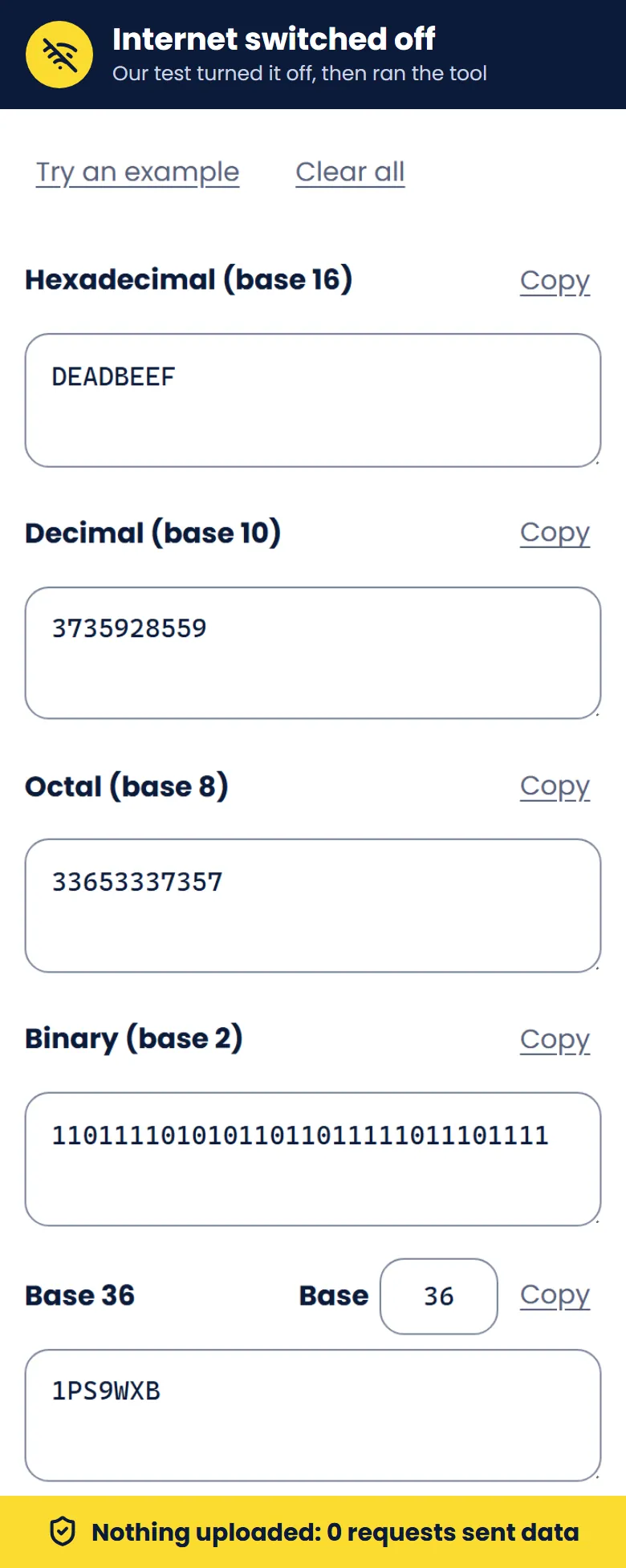
Try it yourself: press "Try an example" at the top of this page. It puts DEADBEEF in the hexadecimal box, and the decimal box shows 3735928559, the octal box 33653337357 and the binary box 11011110101011011011111011101111. Then type FF in the hexadecimal box and choose 8 bits for a signed number: the decimal box shows -1.
How to convert hex, binary and octal by hand
Every base works the same way: each place is worth the base times the place to its right. Here is how to convert by hand, with numbers you can check in the tool.
Hexadecimal to decimal: multiply each digit by its place. In base 16 the places are worth 1, 16, 256, 4,096 and so on. FF is 15 × 16 + 15 = 255. 1A3 is 1 × 256 + 10 × 16 + 3 = 256 + 160 + 3 = 419.
Decimal to hexadecimal: divide by 16 and keep the remainders. 255 ÷ 16 = 15, remainder 15; 15 ÷ 16 = 0, remainder 15. Read the remainders from the last to the first: 15 and 15, which are F and F, so 255 is FF. 419 ÷ 16 = 26 remainder 3, 26 ÷ 16 = 1 remainder 10 (A), 1 ÷ 16 = 0 remainder 1: 1A3.
Binary to hexadecimal: groups of four. One hexadecimal digit is exactly four bits, so split the bits into fours from the right and write each group as a digit: 1101 0111 is D and 7, so D7, which is 215. Going back, write each hexadecimal digit as four bits: F is 1111, so FF is 11111111.
Binary to octal: groups of three. An octal digit is three bits: 111 101 101 is 7, 5 and 5, so octal 755, which is 493 in decimal.
Any other base: the same division method works for every base. 255 ÷ 7 = 36 remainder 3, 36 ÷ 7 = 5 remainder 1, 5 ÷ 7 = 0 remainder 5, so 255 is 513 in base 7. The tool's Base N box does this for any base from 2 to 36. To see the bytes of a text rather than a number, such as 01000001 for A, use Text to Binary; for Roman numerals, Roman Numeral Converter.

Negative numbers and two's complement
A minus sign works in every base: -255 is -FF in hexadecimal, -377 in octal and -11111111 in binary, and the line under the choices starts with “Negative.”
Computers do it differently. They keep a whole number in a fixed number of bits, and for a signed number the first bit says whether it is negative. This is two's complement, and it is why a width matters:
- 8 bits hold -128 to 127.
- 16 bits hold -32,768 to 32,767.
- 32 bits hold -2,147,483,648 to 2,147,483,647.
- 64 bits hold -9,223,372,036,854,775,808 to 9,223,372,036,854,775,807.
The same pattern is a different number at a different width. In 8 bits, FF is -1, 80 is -128 and 7F is 127. -1 written in 32 bits is FFFFFFFF in hexadecimal and 37777777777 in octal. With a width chosen, the hexadecimal, octal and binary boxes are filled with zeros to the full width, so 5 in 8 bits shows as 05, 005 and 00000101.
To make the pattern of a negative number by hand, write the number without its sign in binary, swap every 0 and 1, and add 1: 1 is 00000001, swapped 11111110, plus 1 gives 11111111, which is FF, or -1 in 8 bits. A number outside the width gets a clear message, such as “That does not fit in 8 bits. A signed 8-bit number goes from -128 to 127.”, or for a pattern with too many digits, “That does not fit in 8 bits. A hexadecimal number of 8 bits has at most 2 digits.” Keep the choice on Off for ordinary numbers.
Very long numbers
Each box takes up to 50,000 characters, and the numbers stay exact. That is different from most calculators and spreadsheets: a spreadsheet keeps only about 15 significant digits, and many programs stop at the 64-bit limit. Here 9,007,199,254,740,993 (2 to the 53rd, plus 1) is written as 20000000000001 in hexadecimal, and 2 to the 64th, 18,446,744,073,709,551,616, as 10000000000000000, with nothing rounded off.
Long numbers are quick: a number of 50,000 digits typed or pasted in the decimal box had every box filled 271 milliseconds later in our test, most of it the browser laying out up to 166,000 characters of binary. A longer number is not read, and the line under the box says: “That has more than 50,000 digits. The converter takes up to 50,000 at once.” Copy always takes the whole number, however long.
Private: what you type stays on your device
Your numbers never leave your device. The tool runs inside your browser and has no upload step: it never sends the numbers you type, paste or open anywhere, and it does not save them, so closing the page forgets them. The page's Content Security Policy lets it contact only this site and Google's ad service, which pays for the site; our code never gives your numbers to the ad code. You can check it yourself in your browser's network panel (F12 on a computer): converting adds no request that carries your numbers.
Numbers can be private too: account and order numbers, keys and addresses, values from your work. A converter that works on a server receives whatever you type; here your own browser does the sums, and nothing is kept once you close the page. It also works offline once the page has loaded: in our test we switched the network off and pressed Try an example, and the other boxes showed 0.2 seconds later or less in each of 15 runs. Read our privacy policy and how we prove your files are never uploaded.
Tips
- Paste a hex dump as it is. Spaces and line breaks between the bytes are skipped, so
DE AD BE EFreads as DEADBEEF. - Colours, one part at a time. For #FF5733, convert FF, 57 and 33 on their own: red 255, green 87, blue 51.
- File permissions are octal. 755 is 111 101 101 in binary: read, write and run for the owner, read and run for everyone else.
- Check the width before trusting a negative. FF is -1 only in 8 bits; in 16 bits it is 255.
- Short codes from long numbers. Base 36 uses all ten digits and all 26 letters, so 123456789 becomes 21I3V9.
- Indian grouping is fine. 12,34,567 reads as 1234567, and digits in Devanagari, such as १२३, are read too.
Limits
- Whole numbers only. There are no fractions or floating point numbers: a point is not a digit. The page does not show how a computer stores a number like 0.1.
- 50,000 characters in a box. A longer number is not read, and the page says so.
- Numbers, not text. It does not turn letters into codes or codes into letters. Use the Base64 tool for bytes and text.
- Bases from 2 to 36. Digits are 0 to 9 and A to Z. Bases above 36 and other digits are not supported.
- Widths of 8, 16, 32 and 64 bits. A signed number can be read as one of these. Other widths are not offered.
- Not saved. What you typed and the answers are forgotten when you close the page.
- Browsers. We tested only in Chromium, the engine behind Chrome and Edge, with computer and phone-sized screens. We did not test on real phones, in Safari or in Firefox, so we cannot promise how they behave.
Terms explained
- Hexadecimal
- Base 16, with the digits 0 to 9 and A to F, where A is 10 and F is 15. One hexadecimal digit is four bits, so two make a byte.
- Decimal
- Base 10, the numbers of everyday life.
- Binary
- Base 2, with only 0 and 1: the way computers hold numbers.
- Octal
- Base 8, with the digits 0 to 7. Three bits make an octal digit; Linux file permissions are written in it.
- Base or radix
- How many different digits a number system uses before it carries into the next place.
- Two's complement
- The way computers write negative whole numbers in a fixed number of bits, where the first bit says negative.
- Bit and byte
- A bit is one 0 or 1; a byte is eight bits, and holds a number from 0 to 255.