What a UUID is, and when you need one
A UUID is a long name made to be different every time, such as 3f2b8c1e-5a47-4d9b-8e60-1c7a92d4b0f3: 32 hex digits in five groups of 8, 4, 4, 4 and 12. Because no two are expected ever to be the same, a program can give a row, a file or a message its own UUID without asking any central list for a free number, and without two computers ever clashing.
This page makes version 4 UUIDs, the random kind: one when it opens, and up to 1,000 at once when you ask, in the writing you choose. Your browser makes them from its own secure random numbers, and they are never uploaded or kept.
Where people use them:
- Test data. IDs for a database table, a spreadsheet or an app you are building, one to a line, ready to paste.
- Naming things that must not clash. A file, an upload, an order or a message that needs a name no one else will pick.
- Windows and .NET work. A GUID for a registry key, a COM class or a project file, in capitals and braces if needed.
- Settings and configs. A tracking ID or an instance ID that should be unique to one install.
What it doesn't make: passwords or secret tokens. A UUID is an identifier, a name, not a secret.
Step by step: making UUIDs
- Type how many you want, from 1 to 1,000, or leave the 1 that is there. Digits in Hindi, Tamil and other scripts are read, and so is a comma, as in 1,000.
- Press Make new UUIDs, or Enter in the box, for a completely fresh set.
- Change the number to add or drop some. The UUIDs already on show stay, and new ones are added at the end or the extra ones are dropped from the end, so a list you are reading doesn't change under you.
- Choose the writing. Tick Capital letters, No hyphens or Braces { }. The UUIDs themselves don't change, only how they are written, so you can switch back and forth.
- Copy or download. Copy puts exactly the list shown on your clipboard; Download saves it as uuids.txt.
The line under the result says what you have, such as “5 version 4 UUIDs, made with this device's secure random numbers.” If the number isn't right, a calm line says how to fix it, such as “The most you can make at once is 1,000. For more, make them in turns.”, and the list stays as it was.
What the page does, exactly
The rules are fixed, and the same rules are checked by our tests.
| Part | The rule | Example |
|---|---|---|
| Version 4 | A UUID is 128 bits written as 32 hex digits in groups of 8, 4, 4, 4 and 12. In version 4, 122 of the bits are random and 6 are fixed: the first digit of the third group is always 4 (the version) and the first digit of the fourth group is always 8, 9, a or b (the variant). This is the standard of RFC 9562, which replaced RFC 4122 | 3f2b8c1e-5a47-4d9b-8e60-1c7a92d4b0f3 |
| The random bits | They come from your browser's own secure random number generator (crypto.getRandomValues, the one used to make keys), and never from Math.random. A browser without one makes nothing, and the page says so | 16 random bytes make one UUID |
| How many | From 1 to 1,000 at once. When the page opens it makes one. Changing the number keeps the UUIDs already made and adds or drops some at the end. The button makes all of them new. A number that is not a whole number from 1 to 1,000 gets a calm message, and the digits of Hindi, Tamil and other scripts are read too | 1,000 and १०० (100) are read |
| The three choices | Capital letters, No hyphens (32 digits in a row) and Braces ({ } round each one) change only how the UUIDs are written. They do not change which UUIDs are shown, so you can switch them on and off | {3F2B8C1E-5A47-4D9B-8E60-1C7A92D4B0F3} |
| The list | The result is one UUID to a line. Copy puts exactly the text shown on the clipboard, and Download saves it as uuids.txt with a line break at the end | Three UUIDs make three lines |
| Can two be the same? | In principle yes, but with 122 random bits it is so unlikely that it can be ignored. Worked out, the chance that any two of 1,000 are the same is about 1 in 1031. The page does not check against UUIDs made before or elsewhere | 1,000 × 999 ÷ 2 pairs, each about 1 in 5 × 1036 |
What the rules don't decide: a UUID is an identifier, not a secret or a password. It says nothing about who made it or when: a version 4 UUID carries no time and no trace of the device, only random bits. The page makes version 4 only. And GUID, the name you meet in Windows and .NET, is Microsoft's name for the same thing; the form in braces, {3F2B8C1E-5A47-4D9B-8E60-1C7A92D4B0F3}, is how Windows tools often write it.
Real results from our tests
We tested the UUID Generator with headless Chromium 148, the open-source browser Chrome is built on, on a Windows laptop with an Intel Core i7-1185G7 and 32 GB of memory, on 13 October 2026. Other work was running on the laptop at the same time, so times vary a little from run to run: each time below is the middle one of 3 runs.
Making UUIDs is quick. The page's code made 1,000 UUIDs in 2 milliseconds and 100,000 UUIDs in 146 milliseconds, with no repeat among the 100,000. Pressing Make new UUIDs with 1,000 in the box showed the list 2.8 milliseconds later. The most the page makes at once is 1,000.
Checked against a second program. Python's uuid module built a version 4 UUID from the same 16 random bytes for 20,000 random byte strings and 10 awkward ones, such as all zeros and all ones. The page's code gave the same UUID, the same one without hyphens, the same one in braces and the same one in capital letters every time: 80,040 results, all the same. Python also reads every one of them back as version 4 with the standard variant.
Checked for chance. In the browser, 100 sets of 1,000 UUIDs made in a row by the page's code had no repeat: all 100,000 were different, and all of them were version 4 with the standard variant. Each of the 16 hex digits came up about equally often in their random places (a chi-square test with a wide limit, so that it does not fail by bad luck). In Node, with the same code and Node's own secure random numbers, each of the 122 random bits was set about half the time in 20,000 UUIDs. These are checks of the page's code and of the random numbers of the browser we used, not a promise about any other program.
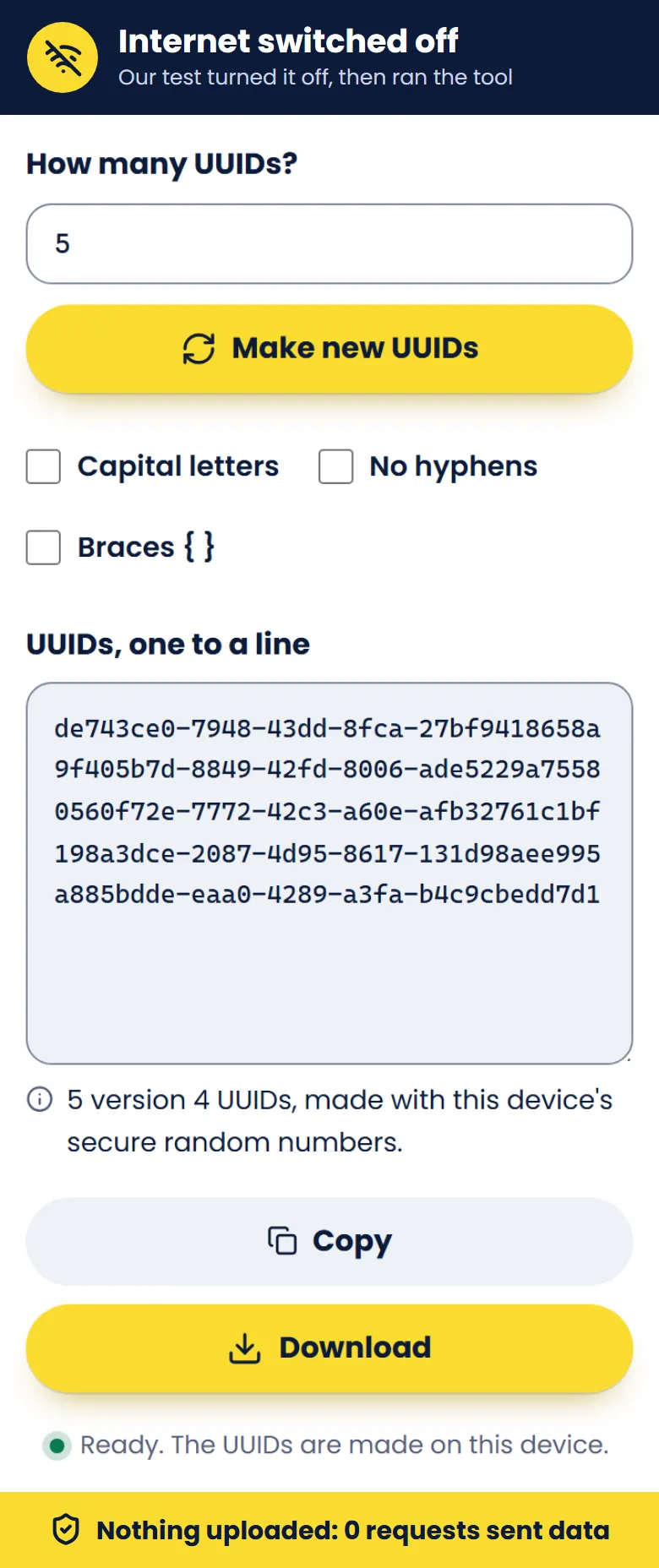
Size and offline. On a first visit the page downloads about 0.1 MB for the tool: the page, its styles, its script and the fonts, with Google's ad code not counted. In our test we switched the network off after the page had loaded and typed 5 in the box and pressed Make new UUIDs: the five UUIDs showed 0.2 seconds later or less in each of 15 runs, and 0.1 seconds later in 13 of them.
Phone-sized screen. We also ran every test on a phone-sized screen in Chromium (390 × 844 pixels, with touch). That is not a real phone. Every button and box was 44 pixels high or more, and the page did not scroll sideways.
Try it yourself: the page opens with one UUID already made. Type 5 in the box and press "Make new UUIDs": five new ones appear, one to a line, each with a 4 at the start of the third group and an 8, 9, a or b at the start of the fourth. Tick "Capital letters", "No hyphens" and "Braces" to see the same UUIDs written another way.
Capital letters, no hyphens or braces: which to use
- Small letters with hyphens (
3f2b8c1e-5a47-4d9b-8e60-1c7a92d4b0f3) is the usual written form, and the standard's own. Most databases, APIs and programming languages print UUIDs this way. If you aren't sure, keep it. - Capital letters (
3F2B8C1E-5A47-4D9B-8E60-1C7A92D4B0F3) is common in Windows and .NET tools. A UUID's letters mean the same in either case. - No hyphens (
3f2b8c1e5a474d9b8e601c7a92d4b0f3) gives 32 characters in a row, handy for a file name, a short ID column or a system that takes only letters and digits. - Braces (
{3f2b8c1e-5a47-4d9b-8e60-1c7a92d4b0f3}) is how Windows writes a GUID in the registry and in some project and configuration files.
The choices combine, so capitals in braces is one tick each. Whatever you pick, the UUIDs are the same 128 bits; only the writing changes, and the page keeps the originals so you can switch back.

Version 4, and what the other versions are
UUIDs come in versions, set out in RFC 9562, the standard that replaced RFC 4122 in 2024:
- Version 4 is random: 122 of its 128 bits are random, and you can see the version in the 4 that starts the third group. This page makes this kind.
- Version 1 is built from the time and the device's network address, so it can reveal when and where it was made.
- Version 7, the newer one, puts the time first, as a Unix timestamp in milliseconds that Unix Timestamp Converter can read, and random bits after it, so UUIDs sort by when they were made, which suits database indexes.
This page makes version 4 only, and says so in the line under the list. It doesn't offer version 1 or 7, or the special all-zero (nil) and all-F (max) values.
How random they are, and can two be the same
The random bits come from your browser's secure random number generator, crypto.getRandomValues, the same source used to make encryption keys, and never from Math.random, which is not made for this. Math.random is meant for games and animations: it is quick, but its numbers can be worked out from earlier ones, which is fine for a dice roll and wrong for names that must never clash or be guessed. A secure generator is designed so that no one can predict the next number, even after seeing millions of earlier ones. Each UUID takes 16 random bytes; 6 bits are then set to mark the version and the variant, and 122 stay random. If a browser has no secure generator, the page makes nothing and says so: “This browser has no secure random number generator, so no UUID was made. Try a current version of your browser.”
Can two be the same? In principle yes, but worked out, the chance that any two of 1,000 are the same is about 1 in 10 to the power 31: there are about 500,000 pairs, and each pair matches with a chance of about 1 in 5 × 10 to the power 36. In our tests, 100,000 UUIDs made by the page had no repeat, and every hex digit came up about equally often in its random places. The page doesn't check your UUIDs against ones made before or elsewhere, and doesn't need to.
Private: the UUIDs stay on your device
Your UUIDs never leave your device. The tool runs inside your browser and has no upload step: it never sends the UUIDs it makes anywhere, and it does not save them, so closing the page forgets them. The page's Content Security Policy lets it contact only this site and Google's ad service, which pays for the site; our code never gives your UUIDs to the ad code. You can check it yourself in your browser's network panel (F12 on a computer): making them adds no request that carries your UUIDs.
UUIDs often end up as the keys of real data: rows in a work database, file names, order numbers. A generator that works on a server has seen every UUID it gives you; here your own browser makes them, so no one else has seen the list, and nothing is kept once you close the page. It also works offline once the page has loaded: in our test we switched the network off, typed 5 and pressed Make new UUIDs, and the five UUIDs showed 0.2 seconds later or less in each of 15 runs. Read our privacy policy and how we prove your files are never uploaded.
Making many at once
The page makes up to 1,000 UUIDs at once; for more, make them in turns, since each press of Make new UUIDs gives a fresh set. A thousand is quick: in our test the page's code made 1,000 UUIDs in 2 milliseconds, and pressing Make new UUIDs with 1,000 in the box showed the list 2.8 milliseconds later.
The list is one UUID to a line, so it pastes straight into a spreadsheet column, a script or a SQL insert. Download saves the same text as uuids.txt, with a line break after the last one, as most tools expect.
Tips
- Keep the usual form unless a system asks for another. Small letters with hyphens is what most systems expect.
- Not sure what a system takes? Make the set once, then switch capital letters, hyphens and braces until it matches; the UUIDs stay the same.
- Copy before you press the button again. Make new UUIDs replaces the whole set.
- Need a few more? Raise the number instead: the ones you have stay, and new ones are added at the end.
- Never use a UUID as a password. For that, the Password Generator makes strong ones on your device.
- Want IDs that sort by time? Look for version 7 in your database or programming language; this page makes version 4.
Limits
- Version 4 only. The page makes random UUIDs. It does not make version 1, version 7, the nil UUID or any name-based UUID.
- Up to 1,000 at once. For more, make them in turns.
- Not a secret. A UUID is an identifier, not a password or a key. Do not use one to protect anything.
- No check for repeats. The page does not compare the UUIDs with any made before or elsewhere. A repeat is so unlikely that it can be ignored.
- Needs the browser's random numbers. A browser without a secure random number generator makes nothing, and the page says so.
- Not saved. The UUIDs are forgotten when you close the page.
- Browsers. We tested only in Chromium, the engine behind Chrome and Edge, with computer and phone-sized screens. We did not test on real phones, in Safari or in Firefox, so we cannot promise how they behave.
Terms explained
- UUID
- A universally unique identifier: 128 bits written as 32 hex digits in groups of 8-4-4-4-12, used to name rows, files and messages without a central list.
- GUID
- Microsoft's name for the same kind of identifier, often written in capitals and braces.
- Version 4
- The kind of UUID made almost entirely of random bits. The digit 4 starts the third group.
- Variant
- The bits that say which layout of UUID it is. For the usual layout, the fourth group starts with 8, 9, a or b.
- Hex digit
- One of 0 to 9 and a to f. Two of them write one byte; Hex to Decimal Converter turns hex numbers into decimal.
- Random number generator
- The browser's built-in source of unpredictable numbers (crypto.getRandomValues), made for keys and not the same as Math.random.
- Collision
- Two identifiers that turn out to be the same. For version 4 UUIDs it is so unlikely that it can be ignored.