What a Unix timestamp is, and when you need to convert one
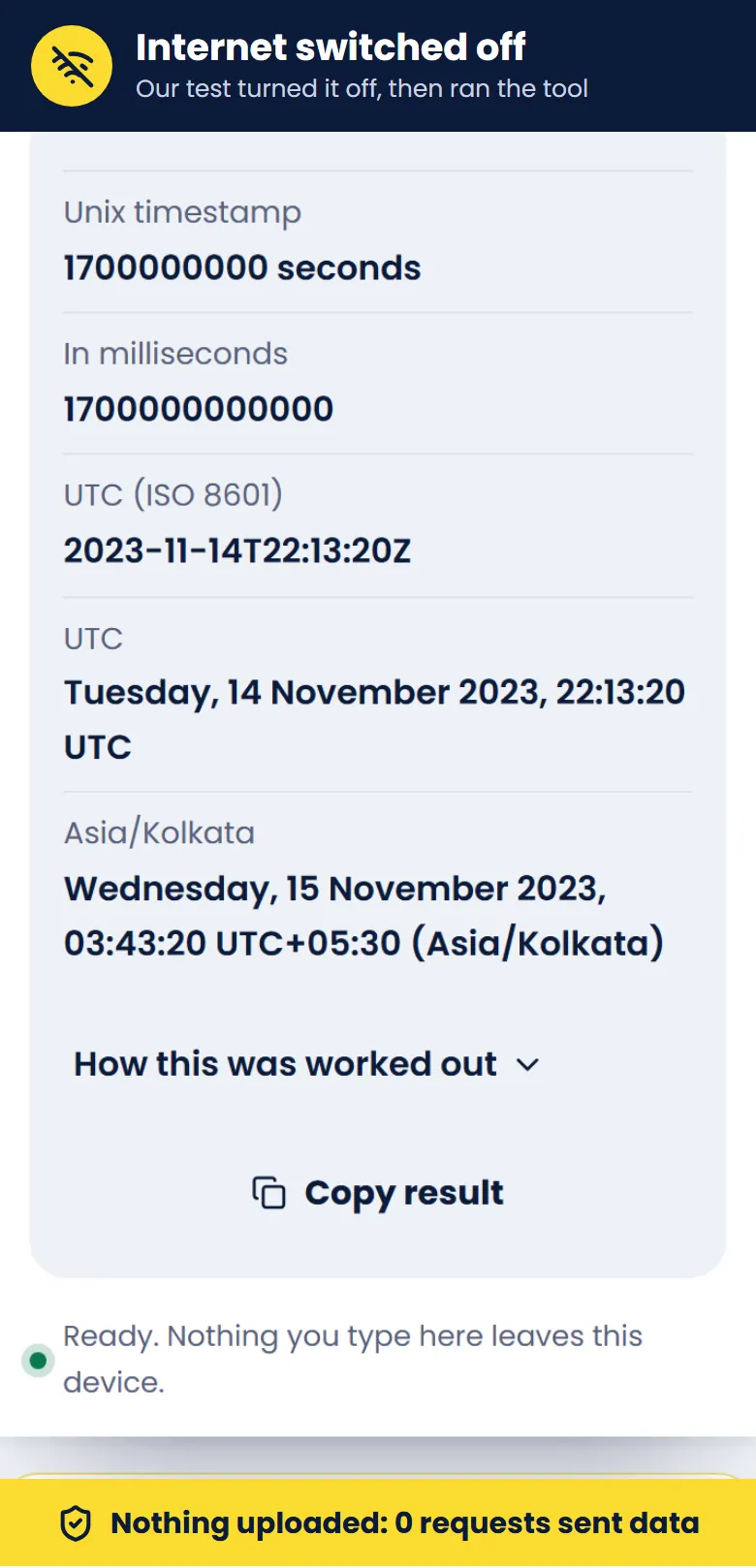
A Unix timestamp, also called epoch time, is a moment written as one number: the count of seconds since 00:00:00 UTC on 1 January 1970. Computers like it because it is the same everywhere in the world and easy to compare or subtract. 1700000000, for example, is Tuesday, 14 November 2023, 22:13:20 UTC, which on Indian clocks was 03:43:20 the next morning.
This converter works both ways. Type a timestamp and it shows the date and time in UTC and on the clocks of the time zone you choose, how long ago that was, and the same moment in every unit. Or type a date and a time and it gives the timestamp. It also shows the current time as a timestamp, ticking every second. It all happens in your browser: nothing you type is uploaded or kept.
Where it helps:
- Reading logs and API replies that say
"created": 1700000000instead of a date. - Database columns in milliseconds, such as 1700000000000 from a JavaScript or Java app.
- Token dates. The exp and iat of a JWT are Unix timestamps in seconds.
- Scheduling and testing: the exact timestamp of a deadline, an offer's end or a test case, on Indian clocks or any other zone's.
Step by step: converting a timestamp
- Choose the time zone first. This device's zone is chosen to begin with; you can pick UTC, one of 20 common zones, or type any zone name.
- Add a timestamp. Type or paste it, press Try an example (1700000000), or press Use the current time.
- Leave the unit on Auto, or choose seconds, milliseconds, microseconds or nanoseconds when you know it.
- Read the answer. It gives UTC in ISO 8601 (2023-11-14T22:13:20Z), UTC in words, the time on your zone's clocks, how long ago that was on this device's clock, how the number was read, and the moment in all four units. How this was worked out shows the steps.
- Going the other way? In the second half, type the day, month, year, hour, minute and second. An empty clock box counts as 0, and Use the current time fills in your zone's clocks now.
- Copy result takes the timestamp, the UTC time and your zone's time in one block, ready for a ticket or a note.
Above the tool, a line shows “Now on this device” in seconds and milliseconds, with a Copy button for each.
What the page does, exactly
These are the page's rules in full, and the same rules are checked by our tests.
| Part | The rule | Example |
|---|---|---|
| A Unix timestamp | The time since 00:00:00 UTC on 1 January 1970, counted in seconds, milliseconds, microseconds or nanoseconds. Leap seconds are not counted, so a day is always 86,400 seconds. A time before 1970 has a minus sign | 0 is 1 January 1970; -1 is one second before |
| The unit | Auto reads a number by its size: below 100,000,000,000 it is seconds, from there to below 100,000,000,000,000 milliseconds, from there to below 100,000,000,000,000,000 microseconds, and above that nanoseconds. You can also choose the unit. A number may have digits after the point: up to 9 in seconds, 6 in milliseconds, 3 in microseconds and none in nanoseconds, so every nanosecond can be written in every unit | 1700000000 and 1700000000000 are the same instant |
| What you can type | Digits (also those of Hindi, Tamil and other scripts), a plus or minus sign at the start, a point, and commas or spaces between groups of three digits. A number with e in it (1.7e9) is not read: write it in full. The numbers are kept exactly, however long, with no rounding | 1,700,000,000.5 |
| The years covered | From 1 January 1900 to 31 December 9999. A timestamp outside them gets a message, not a guess | 253402300799 is 31 December 9999, 23:59:59 |
| UTC | The day and the clock in UTC are worked out with whole numbers on the Gregorian calendar, not with the browser's Date, so they are the same on every device. The weekday follows. The ISO 8601 form ends in Z and has a fraction of 3, 6 or 9 digits only when the instant has one | 2023-11-14T22:13:20Z, a Tuesday |
| A time zone | The time on a zone's clocks is the UTC time plus the zone's offset at that moment, which the browser's own time zone rules (Intl) give: the offset is shown as UTC+05:30. You can use this device's zone, UTC, a zone from the list or any name the browser knows, such as Asia/Kolkata. The zone is shown by its name in use today | 03:43:20 UTC+05:30 (Asia/Kolkata) |
| Date and time to timestamp | The date is a day from 1 to 31, a month and a year from 1900 to 9999; the hour is from 0 to 23, the minute and the second from 0 to 59, and a box left empty counts as 0. The time is read on the clocks of the zone you chose, and the offset of that zone then is taken off to give the instant | 15 November 2023, 03:43:20 in India is 1700000000 |
| A time that never happened | When a zone's clocks go forward, the hour they skip never happens. A time in it is read with the offset from before the change, which puts it just after the gap, and the page says so | 02:30 on 8 March 2026 in New York is read as 03:30 |
| A time that happened twice | When the clocks go back, an hour happens twice. The page uses the first of the two and shows the second as well | 01:30 on 1 November 2026 in New York happened at 05:30 UTC and again at 06:30 UTC |
| How long ago | The distance from this device's clock, in the largest unit that fits (seconds, minutes, hours, days, months or years), always "about", and refreshed every 15 seconds | 3 days ago |
| The current time | The line under the box shows this device's clock as a Unix timestamp in seconds and in milliseconds, each second, with a button to copy either | The clock of a device can be wrong; the page cannot tell |
What the rules don't decide: a timestamp doesn't say which zone it was written in, because it is the same instant everywhere; only its written form changes from zone to zone. The page reads time zones with the rules your browser knows, which are the world's rules as of that browser's version. Countries change their rules from time to time, so a future time in a zone whose rules later change could be written differently then. The page also doesn't know about leap seconds, and neither does Unix time itself.
Real results from our tests
We tested the Unix Timestamp Converter with headless Chromium 148, the open-source browser Chrome is built on, on a Windows laptop with an Intel Core i7-1185G7 and 32 GB of memory, on 13 October 2026. Other work was running on the laptop at the same time, so times vary a little from run to run: each time below is the middle one of 3 runs.
The answers are in place at once. The page drew the answer to a typed timestamp in 0.39 millisecond (the middle of 3 runs of 200 timestamps typed in a row) and the answer to a date and time in 0.29 millisecond, not counting the moment the browser takes to paint the screen. The page's code read and described 100,000 timestamps in UTC in 868 milliseconds.
Checked against a second program. Python's integers, datetime and zoneinfo, none of the page's code, worked out 21,000 results, and the page's code gave the same every time. There were 7,000 timestamps in seconds, milliseconds, microseconds and nanoseconds, with fractions, between 1900 and 9999, with their day, clock, weekday and ISO 8601 text and the exact number in every unit; 7,000 instants written on the clocks of a time zone; and 7,000 times typed on a zone's clocks and turned into an instant, 1,482 of them times that never happened and 1,364 times that happened twice when the clocks changed, which is where such a tool most often goes wrong. The zones were UTC and 17 others: India, Nepal, Japan, the United Kingdom, Germany, the United States, Brazil, Australia, New Zealand and more, with Lord Howe, where the clocks change by half an hour, and Chatham, whose clocks are 12 hours 45 minutes ahead. The page's code ran in Node 24 and Python was 3.14, each with its own copy of the time zone database, and they agreed. 20,000 more instants were written on a zone's clocks and read back, and every one came back.
Size and offline. On a first visit the page downloads about 0.1 MB for the tool: the page, its styles, its script and the fonts, with Google's ad code not counted. In our test we switched the network off after the page had loaded and pressed Try an example and typed a date and time: the answers showed 0.3 seconds later or less in each of 15 runs, and 0.1 seconds later in 8 of them.
Phone-sized screen. We also ran every test on a phone-sized screen in Chromium (390 × 844 pixels, with touch). That is not a real phone. Every button and box was 44 pixels high or more, and the page did not scroll sideways.
Try it yourself: press "Try an example" at the top of this page. It puts 1700000000 in the box and the answer shows 2023-11-14T22:13:20Z, a Tuesday, and on the clocks of India (choose them in the time zone list) Wednesday, 15 November 2023, 03:43:20 UTC+05:30. Then type 15 November 2023 and 3, 43, 20 in the boxes for a date and time, in India: the answer is 1700000000 again.
Seconds, milliseconds, microseconds or nanoseconds: how Auto decides
The same moment can be counted in four units:
- Seconds: what Unix tools, most APIs and JWTs use. 1700000000.
- Milliseconds, thousandths of a second: JavaScript, Java and many databases. 1700000000000.
- Microseconds, millionths: some databases and logs.
- Nanoseconds, billionths: Python's time_ns, Go and some high-precision logs.
Auto guesses the unit from the size of the number: below 100,000,000,000 it reads seconds, below 100,000,000,000,000 milliseconds, below 100,000,000,000,000,000 microseconds, and above that nanoseconds. That works for every date from 3 March 1973 to the year 5138, which covers almost every timestamp people meet. Its blind spot is a small number meant in milliseconds: 1700000000 read as milliseconds is only 20 January 1970, but Auto reads it as seconds. When you know the unit, choose it, and the line Read as shows what was used.
Fractions are kept exactly: up to 9 digits after the point in seconds, 6 in milliseconds and 3 in microseconds, so 1700000000.123456789 is read to the nanosecond.

Time zones, India Standard Time and daylight saving
A timestamp is one instant, the same everywhere; the zone only changes how it is written. India has one offset all year, UTC+05:30, with no daylight saving, so 1700000000 is 22:13:20 on 14 November in UTC and 03:43:20 on 15 November in India: Wednesday, 15 November 2023, 03:43:20 UTC+05:30 (Asia/Kolkata). The page calls India's zone Asia/Kolkata, today's name, even when the browser reports the older Asia/Calcutta.
Zones with daylight saving have two offsets a year, and the changes create two odd cases when you type a date and time:
- A time that never happened. When clocks jump forward, an hour is skipped: 02:30 on 8 March 2026 in New York didn't exist. The page reads it with the clocks as they were before the change, so it lands just after the gap, and says so: “This time never happened in America/New_York: the clocks went forward at that moment.”
- A time that happened twice. When clocks go back, an hour repeats. The page uses the first of the two, says so, and also gives the second one.
These are the same rules Python's time zone library uses, and our tests checked 1,482 times that never happened and 1,364 that happened twice against it.
The year 2038, negative timestamps and the limits of the tool
The year 2038 problem. Many older systems keep a timestamp in a signed 32-bit number, whose largest value is 2147483647: Tuesday, 19 January 2038, 03:14:07 UTC. One second later such a counter wraps around to a negative number, a date in December 1901. This tool uses exact whole numbers that never wrap, so 2147483648 is simply 19 January 2038, 03:14:08 UTC, and you can use it to test how your own systems handle the change.
Before 1970. Earlier moments are negative: -1 is Wednesday, 31 December 1969, 23:59:59 UTC. The tool covers 1 January 1900 to 31 December 9999; outside that it says “That is outside the years 1900 to 9999, which this tool covers.”, because before 1900 most places kept local solar time and their clocks don't map cleanly to zones.
Leap seconds. Unix time treats every day as exactly 86,400 seconds and ignores the leap seconds sometimes added to UTC, and so does this tool.
Private: what you type stays on your device
Your timestamps and dates never leave your device. The tool runs inside your browser and has no upload step: it never sends the timestamps and dates you type or paste anywhere, and it does not save them, so closing the page forgets them. The page's Content Security Policy lets it contact only this site and Google's ad service, which pays for the site; our code never gives your timestamps and dates to the ad code. You can check it yourself in your browser's network panel (F12 on a computer): converting adds no request that carries your timestamps and dates.
What gets pasted here often comes from work: log lines, API replies, the dates inside a token, a deadline from a contract. A converter that works on a server receives whatever you type; here your browser does the arithmetic, and nothing is kept once you close the page. It works offline too once the page has loaded: in our test we switched the network off, pressed Try an example and typed a date and time, and the answers showed 0.3 seconds later or less in each of 15 runs. Read our privacy policy and how we prove your files are never uploaded.
Tips
- A date in 1970? The number was probably in milliseconds or smaller units but read as seconds. Choose the unit.
- A date tens of thousands of years away? Then it was seconds read as something smaller. Choose seconds.
- Paste it as it is. Commas between groups of three digits, as in 1,700,000,000, are read, and so are Devanagari or Tamil digits.
- Write numbers in full. 1.7e9 gets a gentle reminder to type 1700000000 instead.
- Check the zone before you read the clock time. The timestamp is the same everywhere; the clock time is not.
- Reading a token? Its exp and iat are seconds, and the JWT Decoder shows them as dates for you.
- Need an age or a gap in days? The Age Calculator counts years, months and days between dates.
Limits
- The years 1900 to 9999. A timestamp outside them gets a message. Before 1900 clocks followed local mean time, which this tool does not model.
- The zone rules of your browser. The page uses the time zone rules that your browser has. They change from time to time, so a time far in the future in a zone whose rules may change can come out differently later.
- No leap seconds. Unix time does not count them, so a day is always 86,400 seconds, and so does this page.
- Boxes, not text. It reads a timestamp or the boxes for a date and time. It does not read a date written as text, like 14/11/2023 22:13.
- Your device's clock. The current time and the 'how long ago' line come from the clock of this device, which can be wrong.
- Not saved. What you typed and the answers are forgotten when you close the page.
- Browsers. We tested only in Chromium, the engine behind Chrome and Edge, with computer and phone-sized screens. We did not test on real phones, in Safari or in Firefox, so we cannot promise how they behave.
Terms explained
- Unix timestamp
- The number of seconds since 00:00:00 UTC on 1 January 1970, also called epoch time or POSIX time.
- Epoch
- The starting moment of the count: 1 January 1970 at 00:00:00 UTC.
- UTC
- Coordinated Universal Time, the world's reference time, which has no daylight saving.
- ISO 8601
- The international way of writing a date and time, like 2023-11-14T22:13:20Z, where Z means UTC.
- Time zone and offset
- A zone is a place with its own clock rules, like Asia/Kolkata; its offset is how far its clocks are from UTC, like +05:30.
- Daylight saving time
- Moving the clocks forward in summer, which makes one hour that never happens in spring and one that happens twice in autumn.
- Millisecond, microsecond, nanosecond
- A thousandth, a millionth and a billionth of a second.