What the Age Calculator does, and when you need it
The Age Calculator tells you a person's age in years, months and days on a date you choose. Today's date is filled in for you, and you can change it to any date, in the past or the future. It also shows the weekday of the birth, how many months, weeks and days have passed, and the next birthday with the number of days to wait. Under the answer, "How this was worked out" lists each step in plain words. The dates stay in your browser: they are never uploaded and never saved, so closing the page forgets them.
People reach for it when a date is waiting for an age:
- The age on the cut-off date of an exam or a job. Recruitment and entrance notifications often give an age limit "as on" a date. Type your date of birth, then that date, and read your completed years. This is the main use, and it has its own part below.
- A school admission or a form. Forms may ask for a child's age on a particular date, in years and months.
- A pension, insurance or scholarship form that asks for your age on a date.
- A child's age in months and days. The months and days matter for a baby or a young child, and they are shown beside the years.
- A birthday count. How many days old someone is, which weekday they were born on, and how long until the next birthday.
The calculator works out an age from two dates. It does not decide who is eligible for anything: a notification or a form does that, and it may count in its own way. It does not know a time of birth, so it gives no hours or minutes. And it uses the calendar in common use today, so it does not convert dates from a lunar or regional calendar.
Step by step: finding an age
It works the same on a phone and on a computer:
- Type the date of birth. Type the day and the year, and choose the month by its name. Choosing the month by name means nobody mixes up the day and the month. Digits typed in Hindi, Tamil, Telugu, Kannada, Malayalam, Bengali, Gujarati, Punjabi, Odia, Urdu and other scripts turn into 0 to 9 as you type, so १९९० becomes 1990. Any other character is dropped.
- Check the date in "Age on this date". It starts with today's date, taken from your device's clock. Change it to find the age on another date, such as an exam's cut-off date. Use today's date appears when the date is not today, and brings today back.
- Read the answer. It appears as soon as both dates are complete. Three big numbers give the years, months and days. Below them are Born on, In months, In weeks, In days and Next birthday. If your date of birth is the 29th, 30th or 31st of a month, a short note about the rule that applies appears under the answer.
- Open "How this was worked out" to see the steps in plain words. It stays open or shut while you change the dates.
- Copy the result if you want to keep it. Copy result puts four lines on the clipboard: the age on the date, the date of birth, the days lived in all and the next birthday.
To see how it looks first, press Try an example. It fills in a date of birth, 15 August 1990. While a date is unfinished, nothing is said. If part of a date cannot be right, a calm line under the boxes tells you what to change (see Messages you may see). The calculator doesn't save the dates, so closing or reloading the page forgets them.
How the age is worked out
The age is worked out by one fixed rule, written here in full and checked by our tests:
- Whole months. Count the most whole months that fit from the date of birth to the age on date. A month counts on the same day number as the date of birth. When a month is too short for that day, its last day is used: one month after 31 January is 28 February (29 in a leap year).
- Years and months. Those months are split into years and months: 14 whole months are 1 year and 2 months.
- Days. The days that are left, from the last month's date to the age on date.
A birthday is the same day number in the same month as the date of birth, so on the birthday itself the new age begins. The day of birth is day 0: someone born on 1 January is 0 days old on 1 January and 1 day old on 2 January. Here are worked examples, each checked by our tests:
| Born | Age on | Age | How |
|---|---|---|---|
| 15 August 1990 | 10 October 2026 | 36 years, 1 month, 25 days | 36 birthdays by 15 August 2026, 1 month to 15 September, then 25 days to 10 October |
| 1 January 2000 | 31 December 2023 | 23 years, 11 months, 30 days | One day short of 24 years |
| 2 August 1994 | 1 August 2024 | 29 years, 11 months, 30 days | One day short of 30 years |
| 31 January 2023 | 1 March 2023 | 0 years, 1 month, 1 day | 31 January plus 1 month is 28 February, the last day of the shorter month, then 1 day |
| 29 February 2000 | 28 February 2001 | 1 year, 0 months, 0 days | In a year that is not a leap year the birthday is on 28 February |
| 29 February 2000 | 27 February 2001 | 0 years, 11 months, 29 days | The day before that birthday |
The rule is simple to say: you are a year older on your birthday and not a day before, and a month is complete when the same day number comes round again. A form that asks for your age "as on" a date is asking how many whole years you had completed on that date, which is the first number here. What a form does with that age is the form's rule, not ours: who may apply, whether the limit includes people who have just reached it, and any relaxation. This calculator does not decide eligibility.
Real results from our tests
We tested the Age Calculator with headless Chromium 148, the open-source browser Chrome is built on, on a Windows laptop with an Intel Core i7-1185G7 and 32 GB of memory, on 10 October 2026. Other work was running on the laptop at the same time, so times vary a little from run to run.
Checked against a second program. We worked out 5,000 random pairs of dates with this page's code and again with Python's own calendar, which shares no code with the page. Each pair was a date of birth and a date to find the age on, from 1900 to 2100, with many month ends, 527 births on 29 February and 1,374 pairs less than 400 days apart. The years, months and days, the days lived, the weekdays of both dates and the next birthday (its date, the days to wait and the age it makes) all matched, 5,000 times out of 5,000.
Every one of the 73,414 days from 1 January 1900 to 31 December 2100 was also turned into a day number and back into the same date, and each day number was one more than the one before it.
Today's date and time zones. Today's date comes from the clock and time zone of the device. We held the clock at 20:00 UTC on 10 October 2026 and opened the page in 4 time zones. Each page filled in the date on its own clock:
| Time zone | The clock there | The page showed |
|---|---|---|
| Asia/Kolkata (India) | 1:30 a.m. on 11 October | 11 October 2026 |
| America/Los_Angeles | 1:00 p.m. on 10 October | 10 October 2026 |
| Pacific/Kiritimati | 10:00 a.m. on 11 October | 11 October 2026 |
| Pacific/Pago_Pago | 9:00 a.m. on 10 October | 10 October 2026 |
A page left open overnight moved on to the new date when it got the focus again after midnight, and a date the person had chosen was left alone.
Speed. The answer was on the screen within 12 milliseconds of the last digit of a date being typed (between 8.6 and 11.9 milliseconds in 9 runs), and the page's code worked out 1,000,000 ages and next birthdays in under 0.4 seconds.
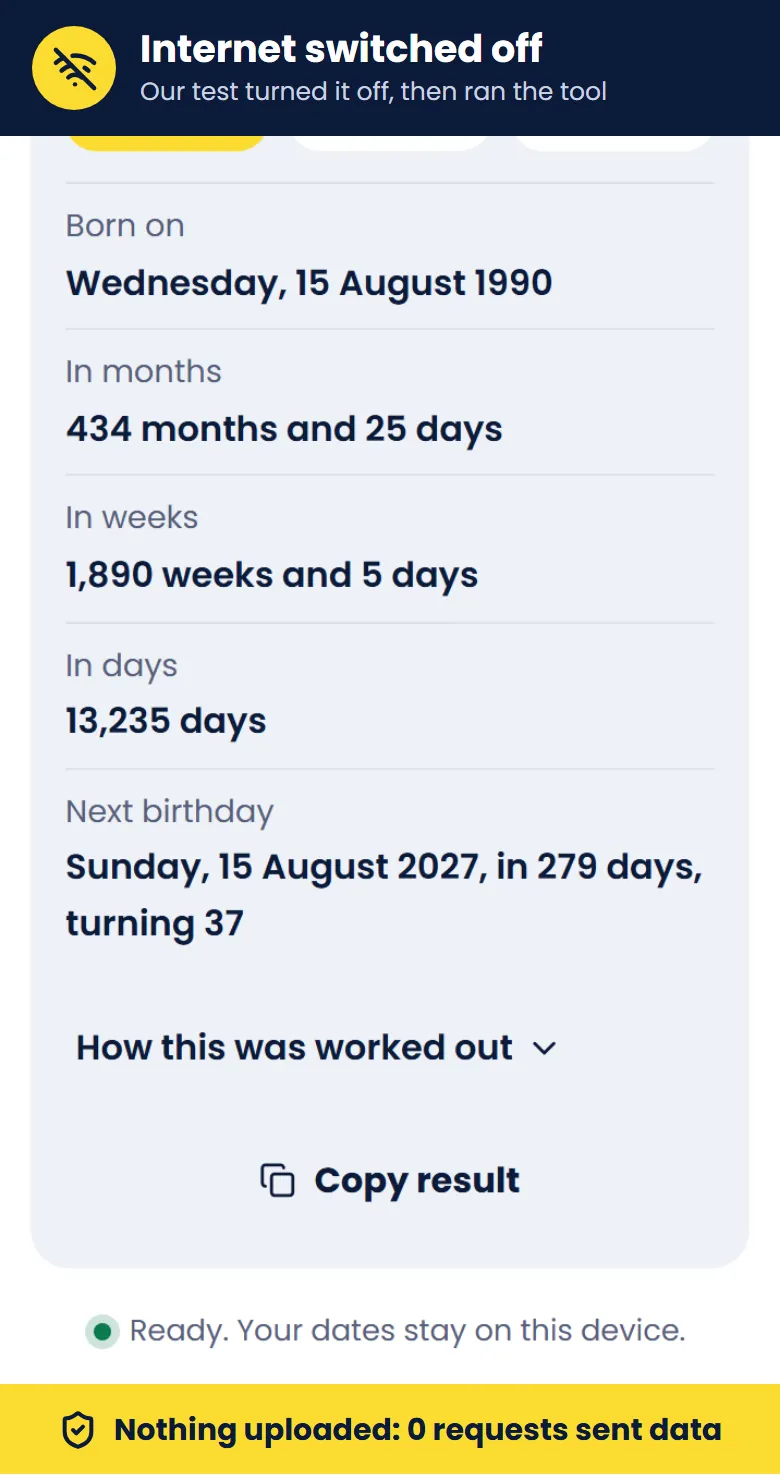
Size and offline. On a first visit the page downloads about 0.1 MB for the tool: the page, its styles, its scripts and the fonts, with Google's ad code not counted. In our test we switched the network off after the page had loaded and pressed Try an example: the age showed 0.1 seconds later in each of 15 runs.
Phone-sized screen. We also ran every test on a phone-sized screen in headless Chromium (390 × 844 pixels, with touch). Every button and box was 44 pixels high or more, and the page did not scroll sideways. These tests don't cover Safari or Firefox.
Try it yourself: type 15 August 1990 as the date of birth and 10 October 2026 as the date to find the age on. The answer should be 36 years, 1 month and 25 days, and the next birthday Sunday, 15 August 2027, in 309 days.
Try itAge on an exam's cut-off date
Many notifications for jobs and entrance exams give an age limit "as on" a date, and the same idea comes up in admission and scholarship forms. That date is the cut-off date. Your age on the day you apply, or on the day of the exam, can be different from your age on the cut-off date, so this calculator lets you choose the date. The same notifications often set a minimum percentage of marks as well: Percentage Calculator works out yours from your marks and the total. Our post on how to calculate the percentage of your marks shows how, including subjects with different maximums.
- Find the cut-off date in your own notification. Do not rely on memory or on a message from a friend, because the date can change from one notification to the next.
- Type your date of birth as it is written on the document you will submit.
- Type the cut-off date in "Age on this date".
- Read the first number. It is the number of years you had completed on that date. The months and days show how close you are to the next birthday.
One day can change the years. These examples are only about dates and are not from any real notification:
| Born | Age on | Age |
|---|---|---|
| 1 January 2006 | 1 January 2024 | 18 years, 0 months, 0 days |
| 2 January 2006 | 1 January 2024 | 17 years, 11 months, 30 days |
| 1 August 1994 | 1 August 2024 | 30 years, 0 months, 0 days |
| 2 August 1994 | 1 August 2024 | 29 years, 11 months, 30 days |
The person born on 1 January 2006 has completed 18 years on 1 January 2024, and the person born a day later has not. The birthday itself counts: on the day of your birthday you have completed the year. Our post on calculating your age for an exam form shows how to read an age limit and the slips to avoid.
What the notification decides
This calculator gives the facts of the calendar. Your notification applies them. It is the notification that says:
- which date counts as the cut-off date;
- whether the limit includes people who have just reached it, or who are one day short of it;
- whether there is a relaxation, which is extra years allowed for some groups or for service, and how it is added;
- how the age is written or rounded on the form.
If your result is close to a limit, do not rely on any tool, this one included. Read the exact sentence in the notification and, if you are unsure, ask the office that issued it. We do not list any exam's cut-off date or age limit on this page. They change, and only the official notification is right.
When your age fits, the form may also ask for papers under a size. Resize PDF, Compress PDF to 100 KB and Compress PDF to 200 KB make a PDF fit, on your own device.

Born on 29 February
29 February comes only in leap years, so a person born on that day has no 29 February in most years. This calculator counts the birthday on 28 February in a year that is not a leap year, and on 29 February in a leap year. The page says so under the answer when the date of birth is a 29 February. Some rules count it on 1 March instead, so if a form or a law says how to count it, follow that.
| Born 29 February 2000, age on | Age | Next birthday |
|---|---|---|
| 28 February 2001 | 1 year, 0 months, 0 days | 28 February 2001, today, turning 1 |
| 1 March 2001 | 1 year, 0 months, 1 day | 28 February 2002, in 364 days, turning 2 |
| 28 February 2004 | 3 years, 11 months, 30 days | 29 February 2004, in 1 day, turning 4 |
| 29 February 2004 | 4 years, 0 months, 0 days | 29 February 2004, today, turning 4 |
| 1 March 2024 | 24 years, 0 months, 1 day | 28 February 2025, in 364 days, turning 25 |
Why 28 February? It keeps the birthday in the same month as the date of birth. It is a choice, not a law of nature, and the page tells you which choice it made so that you can compare it with your form's rule. The two choices differ by one day: on 28 February of a year that is not a leap year, this page says the birthday has come, while a rule that counts 1 March says it is a day away.
The same idea covers other long dates: for a date of birth on the 29th, 30th or 31st, a shorter month uses its last day. When a month is shorter shows an example.

When a month is shorter
Months are not all the same length, so one question comes up for dates of birth on the 29th, 30th and 31st: what is one month after 31 January? February has no 31st. This calculator's rule is simple: when the next month is too short for the day number, use its last day. One month after 31 January is 28 February (29 February in a leap year), and one month after 31 March is 30 April.
Here is a person born on 31 January 2023, on five dates around the end of February and March:
| Age on | Age | Days lived | Why |
|---|---|---|---|
| 27 February 2023 | 0 years, 0 months, 27 days | 27 | The first month mark, 28 February, has not come yet |
| 28 February 2023 | 0 years, 1 month, 0 days | 28 | 28 February is the last day of the shorter month, so it is the month mark |
| 1 March 2023 | 0 years, 1 month, 1 day | 29 | One day after that mark |
| 30 March 2023 | 0 years, 1 month, 30 days | 58 | The next mark, 31 March, is a day away |
| 31 March 2023 | 0 years, 2 months, 0 days | 59 | Two months after 31 January is 31 March |
In a leap year the last day of February is the 29th. For someone born on 31 January 2024, the age on 28 February 2024 is 0 months and 28 days, and on 29 February 2024 it is 1 month and 0 days.
Another way to count is possible: a month is complete only when the same day number comes round again, which never happens for the 31st in February. By that way, the person in the table would be 0 months and 28 days on 28 February 2023, not 1 month and 0 days. The two ways differ only on the last days of a short month, and only in the months and days. The years are not affected, apart from the 29 February birthday, which has its own rule (see above). We use the first way because it is easy to say and to check: one month after the end of a month is the end of the next month.
If a form tells you how to count your age and your date of birth is the 29th, 30th or 31st, follow the form. When your date of birth is one of these, the page shows a short note under the answer: "A month is counted on the same day number as your birth date. When a month is shorter, its last day is used." Our tests do not compare this calculator with other calculators, so this page says what this one does and nothing about what any other one shows.
Next birthday and days lived
Under the three big numbers, the answer lists rows that answer the other questions people ask. For someone born on 15 August 1990, with the age found on 10 October 2026, they read:
| Row | What it shows |
|---|---|
| Age | 36 years, 1 month, 25 days |
| Born on | Wednesday, 15 August 1990 |
| In months | 433 months and 25 days |
| In weeks | 1,886 weeks and 3 days |
| In days | 13,205 days |
| Next birthday | Sunday, 15 August 2027, in 309 days, turning 37 |
Days lived. The days are the days from the date of birth to the date you chose. The day of birth is day 0: someone born on 1 January is 0 days old on 1 January and 1 day old on 2 January. The weeks and the months are worked out from the same dates, so the three rows agree with each other.
Whole days only. The totals are whole numbers of days. They do not depend on a time of birth, and they do not change with the time zone or with the clocks going forward or back, because the calculator counts calendar days and not hours.
The next birthday is the first birthday that comes on or after the date you chose, with its weekday, the number of days to wait and the age it makes. If the date you chose is the birthday itself, it says "today" and counts it as the next birthday. A baby born on the date you chose has the first birthday a year on.
The weekday of birth comes from the same calendar, for any date from 1900 on.
Today's date, and time zones
The "Age on this date" boxes start with today's date, taken from the clock and the time zone of your device. So it is the date you see on your phone or computer, and it changes at midnight where you are. A page that you leave open moves on to the new date when it is shown again or gets the focus, and within a minute. If you had chosen another date yourself, it is left alone.
The same moment can be two different dates in two places. In our test we held the clock at 20:00 UTC on 10 October 2026 and opened the page in 4 time zones. India showed 11 October, where it was 1:30 a.m. there. Los Angeles showed 10 October, Kiritimati 11 October and Pago Pago 10 October. The real results above have the table.
A date you type is used exactly as typed, with no time zone. So if the clock or the time zone of your device is wrong, or you are travelling and want the date at home, type the date yourself in "Age on this date". For an exam's cut-off date you type it yourself anyway.
Messages you may see
The page tells you calmly what to change, under the boxes. Nothing is shown while you are still typing a date, only when part of it cannot be right.
| You typed | What the page says |
|---|---|
| A day of 0 or 32 | Type the day as a number from 1 to 31. |
| 30 February 1990 | February 1990 has 28 days, so 30 is not a day of it. |
| A year of 1850 | Type a year from 1900 to 9999. |
| A year of 95 or 199, after leaving the boxes | Type the year with four digits, like 1995. |
| A date of birth after the age on date | The date of birth is after the date to find the age on, so there is no age yet. Check the years. |
Private: your dates stay on your device
Your dates never leave your device. The calculator runs inside your browser and has no upload step: it never sends the dates you type anywhere, and it keeps no copy of the dates, so closing the page forgets them. The page's Content Security Policy lets it contact only this site and Google's ad service, which pays for the site; our code never gives your dates to the ad code. You can check it yourself in your browser's network panel (F12 on a computer): working out an age adds no request that carries your dates. The site's menu does remember the last few tools you opened, on your device.
A date of birth is a personal detail. It is on identity documents, exam and school records, and bank and insurance forms, and a child's date of birth is one of the first things a form asks for. Many people would rather not type it into a site that stores it. This calculator keeps the dates in the page while you use it and forgets them when you close it. Our privacy policy says what we collect, and How we prove it shows how you can check our claims yourself.
Once the page has loaded, it also works with the internet switched off. In our test we switched the network off after the page had loaded and pressed Try an example, and the age showed 0.1 seconds later in each of 15 runs (the real results above have the details).
Tips
- Choose the month by its name. It means the day and the month cannot be swapped by mistake, whichever order your forms use.
- For an exam, type the cut-off date from the notification in "Age on this date", and check the notification for relaxations, because the calculator does not add them.
- Type the date of birth as it is written on your document. The same date is then used by the form and by this page.
- Try several dates in a row. The date of birth stays when you change "Age on this date", so you can check the age on a few cut-off dates quickly.
- Read the note under the answer if you were born on the 29th, 30th or 31st of a month. It tells you which rule was used.
- Keep a copy. Copy result puts the answer, the days lived and the next birthday in one short text you can paste into a note or a message.
- For a baby or a young child, read all three numbers. The months and the days matter more than the years. In months gives the total.
- Check the message if no answer appears. A line under the boxes says which box to look at.
- Type the date yourself if you doubt your clock. Today's date comes from your device.
- For other sums with dates, Days Between Dates counts the days, weeks and weekdays between two dates, and Add Days to Date finds the date a number of days, weeks, months or years away.
- A date written as a number, such as 1700000000 in a log or an app's data, is a Unix timestamp: Unix Timestamp Converter turns it into a date.
Limits
- It does not decide eligibility. A notification or a form says how age is counted and who may apply. This page works out the completed years, months and days on a date.
- Years 1900 to 9999. Dates use the Gregorian calendar, the one used today, for every year.
- Dates only. There is no time of birth, so no hours or minutes, and no time zone for a date you type in.
- 29 February. The birthday is counted on 28 February in a year that is not a leap year. Some rules count 1 March.
- No other calendars. Hindu, Islamic and other lunar or regional calendar dates are not converted: type the date of the Gregorian calendar.
- Today comes from your device's clock. If the clock or time zone is wrong, so is today's date: type the date yourself.
- Your dates are not kept. The dates and the answer are forgotten when you close the page.
- Browsers. Tested through our agentic testing workflow, in headless Chromium at phone and computer sizes. These tests don't cover Safari or Firefox, so we cannot promise how they behave.
Terms explained
- Age on a date
- The age a person has completed on a given date: whole years, then whole months, then days.
- Cut-off date
- The date an exam or a form uses to count age ("as on"). Your own notification names it.
- Completed year
- A year counts once the birthday has come. On the day before the 18th birthday a person is 17 years, 11 months and some days.
- Leap year
- A year with 29 February. It comes every fourth year, except century years that are not divisible by 400, so 2000 was a leap year and 1900 was not.
- Gregorian calendar
- The calendar in common use today, with the months January to December. This calculator uses it for every year from 1900 to 9999.
- Month mark
- The date that is a whole number of months after the date of birth. How this was worked out uses it to count the days that are left over. When a month is shorter, the mark is its last day.
- Relaxation
- Extra years allowed on an age limit for some groups or for service. A notification gives it, and this calculator does not add it.
- Day 0
- The day of birth. A person is 0 days old on it, and 1 day old on the next day.