What the data storage converter does, and when you need it
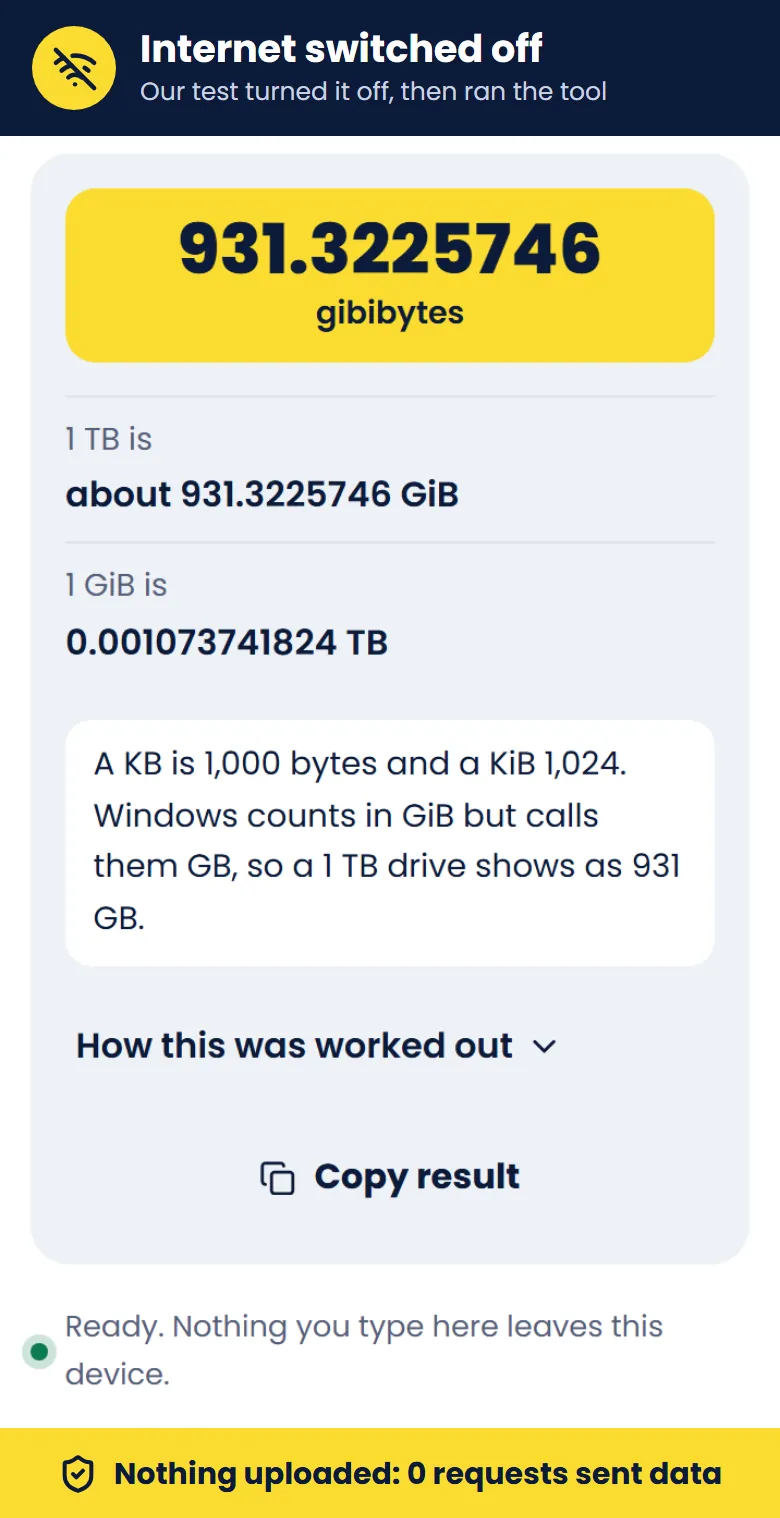
Type a size, choose its unit and the unit you want, and this converter gives the answer at once, with both one-unit rates and the working. 1 TB is 931.3225746 GiB, which is why a new 1 TB drive shows about 931 GB on a computer; 100 megabits is exactly 12.5 megabytes. It converts between bits, bytes, the decimal units KB, MB, GB and TB, the binary units KiB, MiB, GiB and TiB, and megabits, working in exact fractions.
It all happens in your browser: nothing you type is uploaded or kept.
When it helps:
- A drive or a phone that shows less space than the box says.
- Internet speeds in megabits, and download sizes in megabytes.
- File size limits on online forms, in KB or MB.
- Buying memory cards, pen drives or cloud storage and comparing plans.
- Backing up a phone or a computer onto a drive of the right size.
The Length, Speed and Volume converters work the same way, from exact definitions.
Step by step
- Type the size, such as 1. Commas the Indian or the international way and Hindi digits are read, and decimals are fine.
- Choose the unit it is in, such as TB, and the unit you want, such as GiB.
- Read the answer in large type, with what one of each unit is in the other.
- Open “How this was worked out” for the definitions in bytes and the sum, and use Copy result for a one-line summary.
Try an example fills in 1 TB to GiB, and Clear empties the box.
What the page does, exactly
These are the converter's rules in full, and the same rules are checked by our tests.
| Part | The rule | Example |
|---|---|---|
| What you can type | Digits, also those of Hindi and other scripts, a dot for decimals, and commas the Indian or the international way | 1,000 and 1000 are the same |
| Decimal units | KB, MB, GB and TB in thousands: 1 KB = 1,000 bytes, 1 TB = 1012 bytes | 1 GB = 1,00,00,00,000 bytes |
| Binary units | KiB, MiB, GiB and TiB in 1,024s: 1 KiB = 1,024 bytes, 1 GiB = 1,07,37,41,824 bytes | 1 GiB = 1,024 MiB |
| Bits | 8 bits to a byte; a megabit is 10,00,000 bits, 1,25,000 bytes | 100 Mbit = 12.5 MB |
| How it is written | Worked out exactly, then written to 10 significant digits, half away from zero, with lakh-style commas, and with a power of ten from 1015 up | 931.3225746 GiB; 8 × 1018 bits |
Real results from our tests
We tested the Data Storage Converter with headless Chromium 148, the open-source browser Chrome is built on, on a Windows laptop with an Intel Core i7-1185G7 and 32 GB of memory, on 1 November 2026. Other work was running on the laptop at the same time, so times vary a little from run to run: each time below is the middle one of 3 runs.
Checked against a second program. Python's exact fractions, with none of the page's code, converted 25,000 random sizes from 10-12 to 1015, with and without decimals, between every pair of the eleven units, and the page's code gave the same 75,000 values every time: the answer and the two one-unit rates of each, to 10 significant digits. The boxes were typed as people type them, with Indian and international commas, and in Hindi, Bengali and Gujarati digits. 165 of the answers sat exactly on half of their tenth digit, and every one was rounded away from zero, as it should be.
The answer is drawn at once. The page drew the answer to a typed size in 0.52 milliseconds (the middle of 3 runs of 200 sizes typed in a row), not counting the moment the browser takes to paint the screen.
Size and offline. On a first visit the page downloads about 0.1 MB for the tool: the page, its styles, its scripts and the fonts, with Google's ad code not counted. In our test we switched the network off after the page had loaded and pressed Try an example: the answer showed 0.2 seconds later or less in each of 15 runs, and 0.1 seconds later or less in 14 of them.
Phone-sized screen. We also ran the tests on a phone-sized screen in Chromium (390 × 844 pixels, with touch). That is not a real phone. Every button and box was 44 pixels high or more, and the page did not scroll sideways.
Try it yourself: press "Try an example" at the top of this page. It puts 1 in the box, from TB to GiB, and the answer is 931.3225746, which is why a 1 TB drive shows about 931 GB in Windows.

Two kinds of kilobyte
Computers count in powers of two, so for decades “a kilobyte” meant 1,024 bytes in some places and 1,000 in others. To end the confusion, the International Electrotechnical Commission named the binary units separately: the kibibyte (KiB) is 1,024 bytes, the mebibyte (MiB) 1,024 KiB, the gibibyte (GiB) 1,024 MiB and the tebibyte (TiB) 1,024 GiB. The ordinary prefixes keep their SI meaning: a kilobyte (KB) is 1,000 bytes, a megabyte a million, a gigabyte a thousand million and a terabyte a million million.
The two drift further apart at each step: a KiB is 2.4% more than a KB, but a TiB is about 10% more than a TB. That gap is the whole story behind “missing” space.
Why a 1 TB drive shows 931 GB
Drive makers sell decimal units: a 1 TB drive holds 10,00,00,00,00,000 bytes. Windows counts in binary units but labels them GB, so it divides by 1,07,37,41,824 and shows about 931 GB, which is really 931.3225746 GiB. Nothing is missing: it is the same number of bytes, measured with a bigger unit. Macs have counted in decimal units since 2009, so a Mac shows the same drive as about 1 TB. A 500 GB drive shows about 465.66, and a 2 TB drive about 1,862.65. Some space also goes to the file system and to recovery or system files, so the free space you see is a little lower again. Why a 1 TB drive shows 931 GB goes further, with what to check when a gap looks too big.
Phones and memory cards
A 256 GB phone holds 256,000,000,000 bytes, which is 238.4185791 GiB. Phones differ in which unit they show, and the operating system and its apps take a share before you store anything, so a new 256 GB phone may show quite a bit less free. Memory cards and pen drives are sold in decimal units too: a 64 GB card is about 59.6 GiB.
Bits and bytes
A byte is 8 bits. Sizes of files and drives are given in bytes, written with a capital B (MB, GB); network speeds are given in bits a second, written with a small b (Mbps, Mbit/s). So 100 Mbit is 12.5 MB, and 50 MB is 400 Mbit. Mixing up b and B makes a speed look eight times faster or slower than it is.
Internet speeds and download times
A 100 Mbps connection moves at most 100 megabits a second, which is 12.5 megabytes a second. To estimate a download, turn the file into megabits and divide by the speed: a 4.7 GB file is 37,600 megabits, so at 100 Mbps it takes about 376 seconds, a little over six minutes, at best. Real downloads are slower, since speeds vary and other devices share the connection. Plans are sold by the speed in Mbps and by the data in GB each month, so the two use different letters for good reason.
File size limits on forms
Online forms often limit uploads to a size such as 200 KB or 2 MB, and a form rarely says whether it counts a KB as 1,000 or 1,024 bytes. The difference is small, 200 KB is 195.3125 KiB, but a file right at the limit can be refused. Stay a little under it. To bring a PDF under a limit, Compress PDF makes it smaller without uploading it, and Zip Files packs several files into one.
Memory, storage and data plans
A computer's memory, its RAM, is built in powers of two, so 8 GB of RAM is really 8 GiB, 8,58,99,34,592 bytes. Drives and phones are sold in decimal units, and mobile data plans count gigabytes of data used, which operators may measure in either way. When a number really matters, such as fitting a backup onto a drive, convert both sizes into bytes here and compare those.
Reading a speed test
Speed tests report download and upload speeds in megabits a second. A result of 40 Mbps is 5 megabytes a second, so a 500 MB video would take at least 100 seconds. Upload speeds are often lower than download speeds, which matters when you send large files or join video calls. Test a few times, at different hours, since speeds change with how busy the network is.
How many photos will fit?
Divide the space by the size of one file. If your phone's photos are about 3 MB each, a 64 GB card has room for about 64,000 ÷ 3, roughly 21,000 photos, a little fewer once the card's own overhead is taken off. Photo and video sizes vary a lot with the camera and its settings, so look at the size of a few of your own files first, then do the sum.
Email attachments
Email services limit the size of attachments, often to around 20 to 25 MB for everything attached to one message, and the limit counts the attachment as it is sent, which can be larger than the file on your computer. For a large PDF, compressing a PDF for email shows how to bring it under the limit, without uploading it anywhere.
In programming
Programs measure sizes in bytes, and memory sizes in powers of two: 1 KiB is 210 bytes, 1 MiB 220, 1 GiB 230 and 1 TiB 240. When a program prints a size such as “1.5 GB”, check its documentation for which kind of GB it means; many tools on Linux and macOS use decimal units, while Windows uses binary ones with decimal names.
The 4 GB limit on some pen drives
Many pen drives and memory cards come formatted with the FAT32 file system, which can't hold a single file of 4 GiB or more, 4,29,49,67,296 bytes, even when the drive has plenty of free space. A long video or a disc image can be larger than that. Formatting the drive as exFAT removes the limit, but formatting erases everything on it, so copy your files off first.
Planning a backup
Add up the size of what you want to keep, convert it into the same unit as the drive or plan you are looking at, and leave plenty of room to grow, since photos and videos pile up quickly. Cloud plans and drives are sold in decimal gigabytes and terabytes; a computer that reports your files in binary units will show a smaller number for the same data, so compare like with like.
Cloud storage plans
Cloud storage is sold in steps such as 50 GB, 100 GB, 200 GB and 2 TB, and the space is often shared between email, photos and files on the same account. To choose a plan, find how much you store today, in the unit the service reports, and pick a plan with room for a year or two of growth. Remember that a phone's photo backup can grow by many gigabytes a year.
Converting by hand
Turn the size into bytes, then into the unit you want. For 1 TB in GiB: 1 TB is 1012 bytes, and 1 GiB is 230 = 1,07,37,41,824 bytes, so 1012 ÷ 1,07,37,41,824 = 931.3225746 GiB. Within the same family it is simpler: decimal units step by 1,000, binary units by 1,024. To go from megabits to megabytes, divide by 8.
Quick table
| Unit | Bytes | Against its pair |
|---|---|---|
| KB / KiB | 1,000 / 1,024 | 1 KiB is 1.024 KB |
| MB / MiB | 10,00,000 / 10,48,576 | 1 MiB is 1.048576 MB |
| GB / GiB | 109 / 230 | 1 GiB is 1.073741824 GB |
| TB / TiB | 1012 / 240 | 1 TiB is about 1.099511628 TB |
Common mistakes
- Thinking a drive is short-changed when it shows 931 GB for 1 TB.
- Reading Mbps as MB a second: divide megabits by 8 for megabytes.
- Assuming every KB is 1,024 bytes, or that every one is 1,000.
- Comparing a file size in MB with a limit in MiB without converting.
Worked examples
- 500 GB in GiB: 465.6612873 GiB.
- 2 TB in GiB: 1,862.645149 GiB.
- 1 GiB in MiB: 1,024 MiB, exactly.
- 1 MB in KiB: 976.5625 KiB, exactly.
- 4.7 GB, a DVD, in MiB: 4,482.269287 MiB.
- 8 bits in bytes: 1 byte, exactly.
- 256 GB in GiB: 238.4185791 GiB.
- 200 KB in KiB: 195.3125 KiB, exactly.
Private: your numbers stay on your device
The sizes you type never leave your device. The converter runs inside your browser and has no upload step: it never sends the numbers you type anywhere, and it doesn't save them, so closing the page forgets them. The page's Content Security Policy lets it contact only this site and Google's ad service, which pays for the site; our code never gives your numbers to the ad code. You can check it yourself in your browser's network panel (F12 on a computer): converting a size adds no request that carries your numbers.
Read our privacy policy and how we prove your files are never uploaded.
Tips
- Look at the i: GiB, MiB and KiB are the 1,024 kind.
- Look at the b: a small b is bits, a capital B is bytes.
- Stay under upload limits by a little, whichever kind of KB a form means.
- Compare in bytes when two sizes use different units.
- Divide Mbps by 8 to know how many megabytes a second a connection can move.
- Keep a margin on any drive or plan: a full drive slows down and leaves no room for updates.
Limits
- No speeds: it converts sizes, not sizes a second, though megabits and megabytes convert the same way.
- No PB or PiB: petabytes aren't in the list; use 1,000 TB, or 1,024 TiB.
- No file system overhead: the space a drive really offers is a little less than its size.
- Browsers. We tested only in Chromium, the engine behind Chrome and Edge, with computer and phone-sized screens. We did not test on real phones, in Safari or in Firefox, so we cannot promise how they behave.
Terms explained
- Bit
- A single 0 or 1, the smallest unit of data.
- Byte
- 8 bits; one character of plain English text.
- KB, MB, GB, TB
- Thousands, millions, thousand millions and million millions of bytes.
- KiB, MiB, GiB, TiB
- 1,024 bytes and its powers: 1,024, 1,024², 1,024³ and 1,024⁴ bytes.
- Mbps
- Megabits a second, a network speed; divide by 8 for megabytes a second.
- File system
- The way a drive organises files, such as NTFS, exFAT or FAT32; it takes a little of the space.