What XML to JSON does, and when you need it
XML and JSON both hold data as plain text. XML wraps each value in tags, like <city>Pune</city>, and was the usual way to exchange data for years. JSON writes names and values in curly brackets, like {"city": "Pune"}, and is what most web apps, scripts and databases read today. This page turns XML into JSON by fixed rules, shown below, so you always know what you will get.
Where it helps:
- An export from an accounting or payroll program, such as Tally's XML export, that a newer app or a script needs as JSON.
- A SOAP service's answer or an old system's XML feed, for a web app that speaks JSON.
- A sitemap or an RSS feed, to see its links and dates as data.
- Reading XML at all: nested tags with attributes are often easier to follow as indented JSON.
Files are read in your browser, in a background worker, and never uploaded. A file with a mistake is not guessed at: the page names the mistake and where it is.
How to convert XML to JSON, step by step
- Paste XML in the box, or press Try a sample for a made-up order, and press Convert to JSON (or Ctrl+Enter).
- Or choose files: press Choose files, or drop .xml files anywhere on the page. Each one is converted at once, in a row of its own.
- Pick the options: how repeated tags become lists, whether values stay text, and the indent. They are explained below.
- Read the line on the result: for the sample, “<order>, 15 elements”, with a note for anything left out, such as the 1 comment JSON has no place for.
- Copy or Download. A file keeps its name, so orders.xml becomes orders.json; XML you pasted is saved as data.json. Two or more results can be saved together with Download all as ZIP.
How XML becomes JSON: the rules
Every file is converted by the same rules, so a program that reads the JSON can count on them. They never change between files or visits.
| In the XML | In the JSON |
|---|---|
The main element <order>...</order> | One name at the top: {"order": {...}} |
An attribute id="17" | "@id": "17" |
An element with only text <city>Pune</city> | "city": "Pune" |
An element with attributes and text <price currency="INR">180</price> | "price": {"@currency": "INR", "#text": "180"}: attributes first, then #text, then child elements |
The same tag more than once <item>...</item><item>...</item> | A list: "item": [..., ...], in order. With Always a list, every child element is a list, even when it appears once |
An empty element <note/> | "note": "" |
A prefix <gst:rate> and xmlns:gst="..." | Kept as written: "gst:rate", "@xmlns:gst" |
CDATA <![CDATA[a < b]]> | Its text: "a < b" |
Comments, <?...?> instructions and <!DOCTYPE> | Left out, and the result says how many comments |
| Spaces and line breaks at the start and end of a text | Left out. xml:space="preserve" keeps them |
Text between child elements <p>Hello <b>you</b> there</p> | Joined with a space: "#text": "Hello there". Its place among the child elements isn't kept |
Entities &, क and the ones the file defines | Their characters: &, क |
Values like 42, 3.50, true | Text by default: "42". With Detect numbers: 42, 3.50, true. 007, 1e5, +5 and numbers of more than 15 digits stay text, so nothing is rounded |
Names keep the order in which they first appear. When the same tag comes back later (<a/><b/><a/>), both a go into one list where the first one was, so the order between different tags isn't kept.
The options, explained
Repeated tags. List when repeated, the usual choice, makes a list only where a tag appears more than once: two <item> elements become "item": [...], one stays a single value. Always a list makes every child element a list, even one that appears once. That helps when a program reads the result: an order with one item and an order with three then have the same shape, and the program never has to check whether it got a list or not.
Values. Keep as text is the safe choice: everything stays text, so a PIN code like 411001, a phone number or an ID with zeros in front keeps every character. Detect numbers turns plain numbers into JSON numbers and true or false into true and false: in the sample, 7 values change, such as "@qty": "2" becoming "@qty": 2. A value like 007, 1e5, +5 or one with more than 15 digits stays text, so nothing is ever rounded or loses a zero.
Indent. 2 spaces, 4 spaces, a tab, or one line for the smallest file. Changing an option never redoes a finished result by itself: each one made before says so, and offers a button such as “Redo with Always a list”, or “Apply to all” for many files.

Real results from our tests
We tested XML to JSON with headless Chromium 148, the open-source browser Chrome is built on, on a Windows laptop with an Intel Core i7-1185G7 and 32 GB of memory, on 1 November 2026. Other work was running on the laptop at the same time, so times vary a little from run to run: each time below is the middle one of 3 runs, each in a fresh browser.
Checked against Python. Our test gave the page every file of our test set for this tool, 8 that it should convert and 13 with mistakes, with the usual options and again with changed ones, and then the 50 MB file: 43 files in all. For every converted file, Python's own XML reader (expat) read each XML file, the page's rules were applied a second time to what it read, and each saved JSON had the same values and, laid out by Python's json.dumps with the same indent, the same text byte for byte. Each of the 13 files with mistakes was refused, as Python refuses it too, with the page's message naming the mistake.
Speed and memory. The test files were made up for these tests: a product catalogue, of 1 MB, 10 MB and 50 MB. The time is from choosing the file to its finished row, and the memory is what the whole browser added while it worked. “Page kept waiting” is the most that a timer on the page, set to tick every 50 milliseconds, was ever late: the work runs in a background worker, so the page itself stays free to answer a tap or a click.
| File | Time | Result | Memory added | Page kept waiting |
|---|---|---|---|---|
| A 1.0 MB XML file | 0.1 s | 1.5 MB | 0 MB | 3 ms |
| A 10 MB XML file | 0.7 s | 15 MB | 114 MB | 69 ms |
| A 50 MB XML file | 3.3 s | 74 MB | 702 MB | 70 ms |
| A 1.0 MB XML file, on a phone-sized screen with the processor slowed 4 times | 0.4 s | 1.5 MB | 23 MB | 106 ms |
| A 10 MB XML file, on a phone-sized screen with the processor slowed 4 times | 1.5 s | 15 MB | 179 MB | 109 ms |
What the numbers mean: a 50 MB file took 3.3 seconds on the laptop, and the page was never kept waiting for more than 70 milliseconds while it worked, less than a tenth of a second. With the processor slowed 4 times, roughly a mid-range phone, a 10 MB file took 1.5 seconds, and the page was never kept waiting for more than 109 milliseconds: on a phone, a big result's box starts closed and is filled when you open it, so the finished row appears at once.
Big files: up to 200 MB
The work runs in a background worker, a separate part of the browser, so the page keeps responding while a big file is read. In our tests a 50 MB file, a product catalogue, took 3.3 seconds on a laptop, and the page was never kept waiting for more than 70 milliseconds. A big file needs memory, though: the browser used 702 MB more while it worked, so on a phone or an older computer a file of a few tens of MB is the comfortable size. Stop, or the × on a row, ends the work at once.
The result box shows the start of a big result, the first 20,000 characters, so the page doesn't slow down drawing millions of them; Download always saves all of it, and Copy works up to 10 MB. Files over 200 MB are not started, because a browser tab would run out of memory: split them first. On a phone, a big result's box starts closed, so its row, with Download and Copy, appears at once: tap Result to see the start of it.
When the XML has a mistake
A broken file isn't guessed at. The row names the mistake with its line and column, then shows the line with a ^ under the place; for XML in the box, Show in the box selects it. The usual mistakes and what the page says:
- A lone &, as in
R&D: “A lone & must be written as & in XML.” - An HTML name, as in
: “ is a name from HTML that XML doesn't know. Write   instead.” - Two main elements, as in
<a>1</a><b/>: “There is a second main element, <b>, after </a>. An XML file has one main element: put both inside one.” - An attribute twice in one tag: “The attribute x appears twice in <a>.”
- Tags closed in the wrong order, or a file that stops before its tags are closed, are named with the tag and the line where it was opened.
Fix the place it names, in the box or in the file, and convert again.
Hindi, other languages and encodings
Hindi, Tamil, Bengali, Urdu, Chinese and emoji come through as they are: the JSON is UTF-8 and keeps the letters themselves, not \u codes, and an entity like क becomes its letter, क. A file that starts with a UTF-16 byte order mark is read as UTF-16, and one whose first line names another encoding, such as encoding="ISO-8859-1" or Windows-1252, is read in it; the result says so in both cases. A file that claims UTF-8 but has wrong bytes in it is still read, with � where the bytes were wrong, and a note saying so.
A worked example: the sample order
The sample is a made-up order: an <order> with an id, a date and a namespace, a customer, two items, a GST rate, a note in CDATA and a comment. With the usual options it becomes JSON like this:
<order id="INV-2026-0417" ...>becomes the one name at the top,"order", with"@id": "INV-2026-0417","@date"and"@xmlns:gst"first.- The customer has two
<name>elements, so"name"is a list:"Priya Sharma", then{"@lang": "hi", "#text": "प्रिया शर्मा"}, because the second one has an attribute. - The two
<item>elements make"item": [...], and each<price currency="INR">180.00</price>becomes{"@currency": "INR", "#text": "180.00"}. <gst:rate>5</gst:rate>keeps its prefix:"gst:rate": "5". The CDATA note is plain text, its & included, and the comment is left out, as the result's note says.
The whole result is 838 bytes with 2 spaces. With Always a list and Detect numbers it is 1,044 bytes: every child element is in [ ], and 7 values, such as the PIN code and the quantities, are numbers.
A sitemap, and why Always a list helps
A website's sitemap.xml lists its pages, each in a <url> with its <loc> and <lastmod>. With two pages it becomes {"urlset": {"@xmlns": "http://www.sitemaps.org/schemas/sitemap/0.9", "url": [{"loc": "https://example.com/", "lastmod": "2026-11-01"}, ...]}}: a list of pages, ready for a script.
With only one page, though, "url" is a single object instead of a list, because the tag appears once. A script that expects a list then breaks on the smaller file. Always a list avoids that: "url" is a list of one, and each "loc" and "lastmod" a list too, so every file has the same shape. That is the choice to make whenever a program, not a person, reads the JSON.
Turning the JSON back into XML
JSON to XML follows these rules in reverse, so XML that went through this page comes back the same way: the attributes from the @ names, the text from #text, a list as the same tag repeated. The sample order comes back with every element, attribute and value it had, the Hindi name and the gst: prefix included.
Three things don't come back, because JSON has no place for them: comments, the CDATA wrapping (its text comes back with & written as &, which means the same), and the exact place of text that stood between child elements. For data files, such as orders, exports and feeds, that changes nothing a program reads.
Private and safe: no upload, nothing fetched
Your XML never leaves your device. The converter runs inside your browser, in a background worker on your own phone or computer, and has no upload step: it never sends your file or the text you paste anywhere. The page's Content Security Policy lets it contact only this site and Google's ad service, which pays for the site; our code never gives your files to the ad code. You can check it yourself in your browser's network panel (F12 on a computer): converting a file adds no request that carries it.
Nothing you paste is run as code. The XML is read by our own small reader, written for this site, which only reads text: there is no eval and no step that runs anything from the file.
Nothing is fetched from inside the file. An XML file can point to other files and addresses: a DTD (<!DOCTYPE ... SYSTEM "...">) or an outside entity (<!ENTITY x SYSTEM "...">), the trick behind "XXE" attacks. Browsers' own XML reader (DOMParser) doesn't fetch them either. Our reader runs in a background worker, where browsers have no DOMParser, and it has no code that loads anything: an outside entity is refused with a message, and a <!DOCTYPE> is left out. Entities a file defines for itself are expanded up to 10 million characters, then the reader stops, so an "entity bomb" (billion laughs) can't freeze your device.
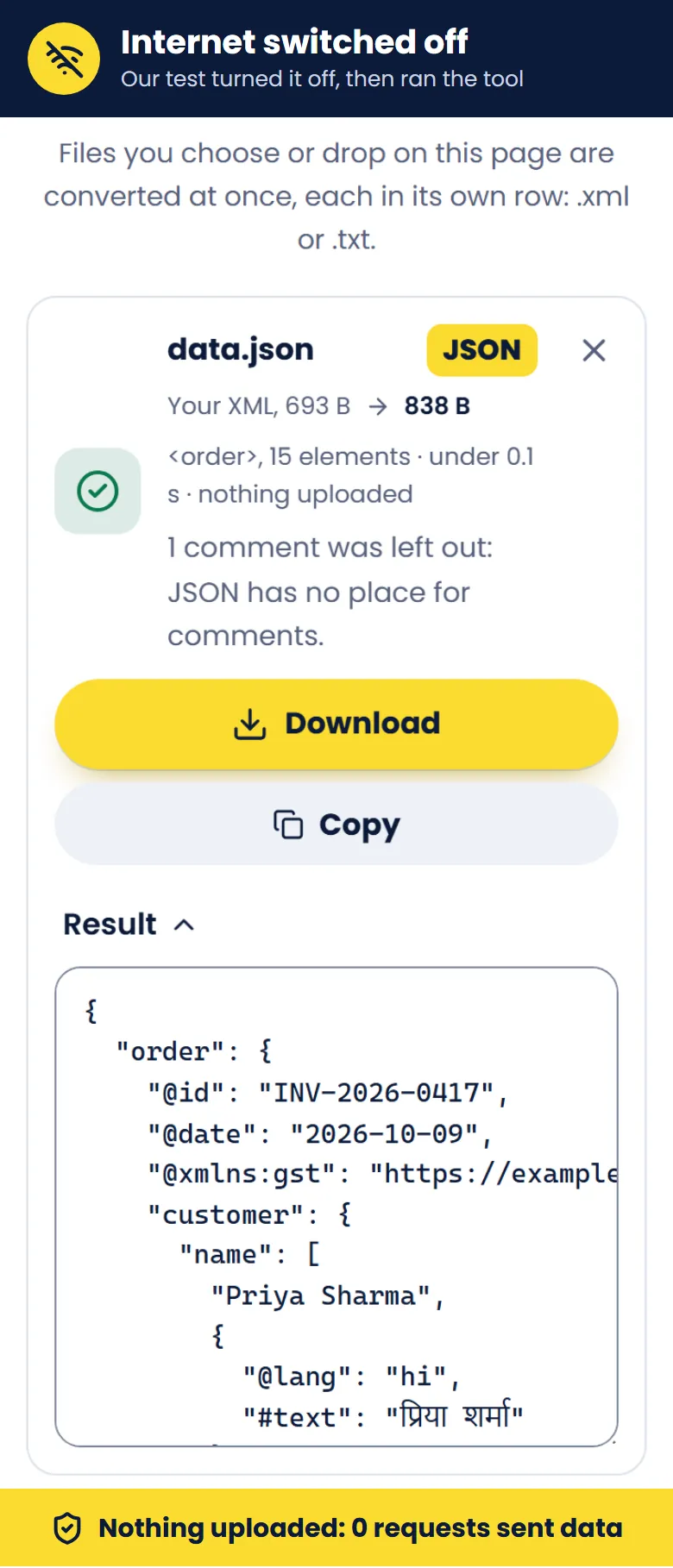
Compared with converters that upload your file
| This page | A converter that uploads | |
|---|---|---|
| Where your file goes | Nowhere: it is converted in your browser | To the site's server |
| Size | Up to 200 MB | Often a few MB, the upload limit |
| The rules | Shown on this page, the same for every file | Often not stated |
| A mistake in the XML | Named, with its line, column and a ^ | Varies |
| Outside files the XML names | Never fetched | Depends on the server's reader |
| Offline and sign-up | Works once loaded; no sign-up | Needs the internet; sometimes an account |
Tips for clean JSON
- Always a list when a program will read the result: every repeated part then has the same shape.
- Keep as text for IDs, PIN codes and phone numbers, so no zero in front is lost.
- One line for the smallest file to send or store.
- To tidy or check the JSON afterwards, use JSON Formatter; to open it in Excel, JSON to CSV.
- For the way back, JSON to XML follows the same rules in reverse.
Limits
- Files up to 200 MB. Bigger files are not started: a browser tab would run out of memory. Split them first.
- Text mixed with tags (like a web page or the XML inside a Word file) loses its place among the tags: the text goes into #text, joined with spaces.
- Order between different tags isn't kept when the same tag comes back later: both go into one list.
- Comments, <?...?> instructions and <!DOCTYPE> are left out: JSON has no place for them.
- DTDs: default attribute values they declare are not added, entities that point to other files are refused, and entities that hold tags aren't expanded.
- Prefixes are kept as written, not replaced with their namespace addresses, and an undeclared prefix isn't reported.
- Nesting deeper than 500 levels (an element inside another, 500 times over) isn't read.
XML and JSON terms, explained
- XML
- Extensible Markup Language: a way to write data as text with tags, like <city>Pune</city>.
- JSON
- JavaScript Object Notation: a way to write data as text, with names and values in { } and lists in [ ].
- Element and tag
- The <name>...</name> pair and everything inside it; <name/> is an empty one.
- Attribute
- A name="value" inside a start tag, like id="17" in <order id="17">.
- Namespace and prefix
- The gst: in gst:rate, declared with xmlns:gst="..." so that names from different sources can't clash.
- CDATA
- A part of the text written as it is, between <![CDATA[ and ]]>, so < and & in it need no escaping.
- Entity
- A name for a character, like & for & or क for क.
- Array or list
- A JSON list: values in order, in [ ].