What a JWT is, and when you need to read one
A JWT, or JSON Web Token, is a short text that carries facts about someone, usually to show that they are logged in. It has three parts joined by dots: a header that says how the token was signed, a payload with the facts themselves (called claims), and a signature. The header and the payload are JSON written in Base64URL, so they look like scrambled letters, but anyone can read them back.
This page does that reading. Paste a token and it shows the header and the payload as neat, indented JSON, names the signing algorithm in plain words, turns the time claims into real dates, and shows the signature with its size. It all happens in your browser: the token is never uploaded and not kept.
When it helps:
- Checking what an app or an API put in a token while you build or test it: the user id, the roles, when it ends.
- Finding out why a login fails: a token that ended an hour ago, a wrong audience, a missing claim.
- Learning how tokens work for a course or an interview, with the sample from the JWT standard's own site.
- Reading a token from a log or a support ticket without pasting it into a website that uploads it.
What it doesn't do: it doesn't check the signature, so it can't tell you a token is genuine or still allowed. More on that below.
Step by step: decoding a token
- Add the token. Paste it with the Paste button or Ctrl+V (a long press on a phone), press Try a sample, or open a text file that holds it. A token copied with the word Bearer in front, inside quotes, or broken over several lines is fine: the page leaves those out and says so.
- Read the result. A line says what kind of token it is and names the algorithm, for the sample “A signed token (a JWS) with 3 parts. Algorithm: HS256, HMAC with SHA-256, signed with a shared secret. Type: JWT.” Below it come the header and the payload as indented JSON, the time claims as dates, and the signature with its size.
- Copy or download. Each part has its own Copy button. Copy all takes the header, the payload and the signature together, ending with “Decoded only: the signature was not checked.”, and Download saves the same text as decoded-token.txt.
The result follows your typing, so there is no button to press. Clear empties the box, and the × on a file removes it. Remember throughout: the page reads the token, it never checks it.
What the page does, exactly
The page decodes and never checks. These are its rules in full, and the same rules are checked by our tests.
| Part | The rule | Example |
|---|---|---|
| The parts | A signed token has 3 parts joined by dots: header, payload and signature, each written in Base64URL (the - and _ alphabet, no = signs). An encrypted token (a JWE) has 5 parts, and only its header can be read without the key. A text with 2 parts is read too, with a note that the signature is missing | aaa.bbb.ccc is a header, a payload and a signature |
| Header and payload | Each is read as UTF-8 text and must be JSON (the header must be an object). They are shown with 2 spaces of indent, character for character as written: the order of the names, the text of the numbers (a number beyond 2^53 is not rounded) and the escapes are kept. A payload that is not JSON is shown as text | {"sub":"1","iat":1516239022} is shown on 4 lines |
| The signature | Shown as it is written, with its size in bytes. It is never checked: the page has no key and does no check. An empty signature goes with the algorithm none, which means no signature at all | HS256 gives a 32-byte signature |
| The algorithm | The alg in the header is named in plain words when it is one of HS256, HS384, HS512, RS256, RS384, RS512, ES256, ES384, ES512, PS256, PS384, PS512, EdDSA or none. Another one is shown as it is | HS256: HMAC with SHA-256, signed with a shared secret |
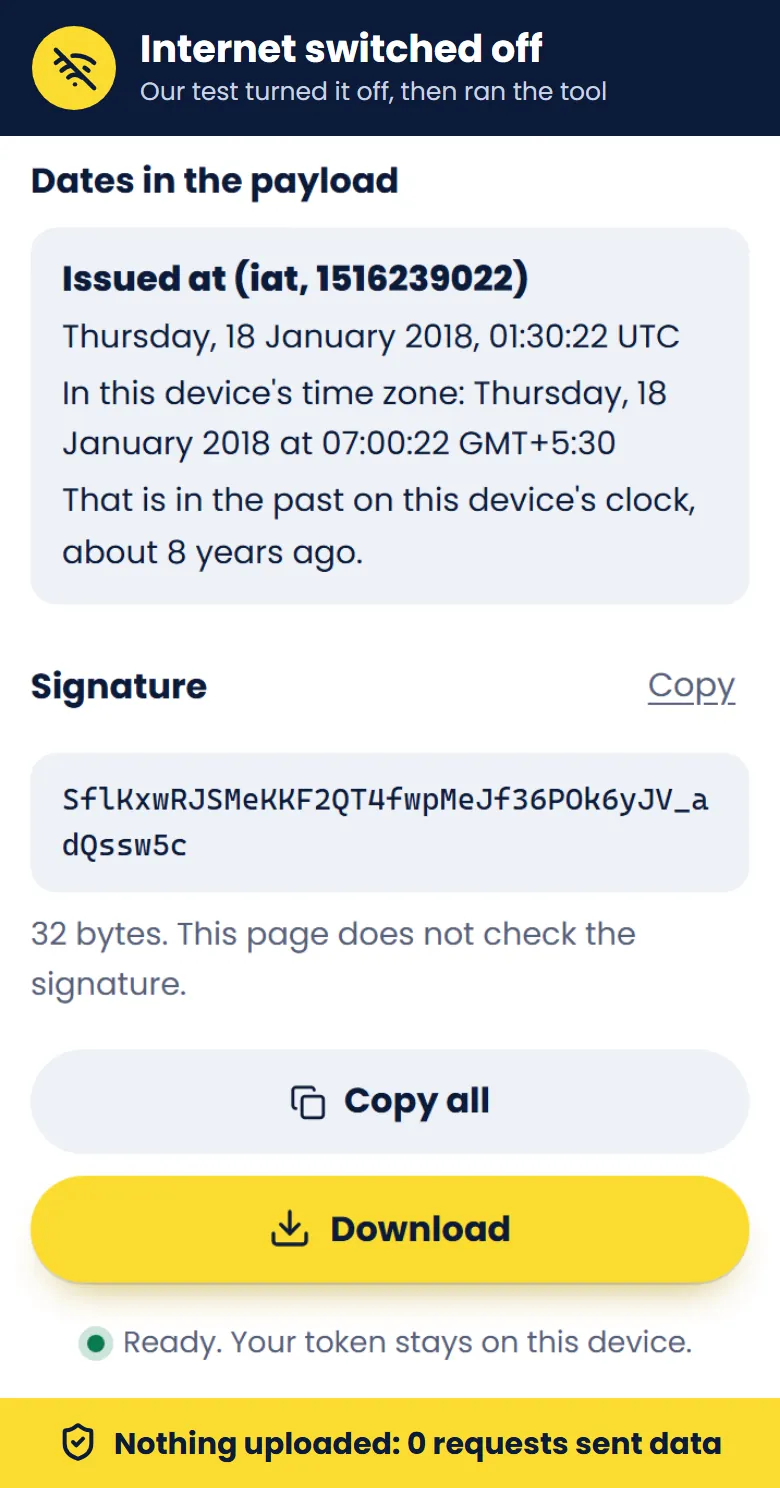
| The dates | exp, nbf and iat are numbers of seconds since 1 January 1970 UTC. Each is shown as a date in UTC and in this device's time zone, and as in the past or in the future on this device's clock, about so many minutes, hours, days, months or years. The page never calls a token expired or valid: a date is only a date, and the clock is only your device's | 1516239022 is Thursday, 18 January 2018, 01:30:22 UTC |
| Left out, with a note | The word Bearer at the start, quotes around the token, and white space inside it (a token wrapped over lines). The page says when it left something out | Bearer eyJ... is read as eyJ... |
| A token that cannot be read | The page says which part is the trouble: how many parts there are, a character that is not Base64URL and where it is in that part, a part that is cut short, a header or a payload that is not text or not JSON | The header is not Base64URL text: the character “!” is at position 3 of it. |
What the page can't do: it doesn't verify the signature, so it can't say that a token is genuine, current, trusted or safe. The dates are only read from the payload and compared with this device's clock. A real check needs the key, and it is done by the program that receives the token, not by a decoder. And whatever you paste, the page never sends the token anywhere.
Real results from our tests
We tested the JWT decoder with headless Chromium 148, the open-source browser Chrome is built on, on a Windows laptop with an Intel Core i7-1185G7 and 32 GB of memory, on 13 October 2026. Other work was running on the laptop at the same time, so times vary a little from run to run: each time below is the middle one of 3 runs.
Decoding is quick. A token of 333,173 characters, with a payload of 3,000 entries and 150,000 characters of text, was read in 15 milliseconds by the page's code, and its parts showed 171 milliseconds after it was pasted in the box. The box takes at most 500,000 characters at once. After a text is put in the box, the page waits 0.15 second before it reads it, so a burst of typing is read once.
Checked against a second program. Python's json and base64 modules made 3,000 random tokens, each with a random header, a random payload and random signature bytes. The payloads were nested objects and lists with Hindi, Tamil, emoji, escapes, big whole numbers and decimals. For every token the page showed the header and the payload exactly as Python's json.dumps writes them with an indent of 2, character for character, with the same values, and gave the signature's size in bytes. We also checked 20,000 Unix dates spread over the years 1901 to 2100: the page wrote each one as the same date and time in UTC as JavaScript's own clock does.
Size and offline. On a first visit the page downloads about 0.1 MB for the tool: the page, its styles, its script and the fonts, with Google's ad code not counted. In our test we switched the network off after the page had loaded and pressed Try a sample: the token's parts showed 0.1 seconds later in each of 15 runs.
Phone-sized screen. We also ran every test on a phone-sized screen in Chromium (390 × 844 pixels, with touch). That is not a real phone. Every button and box was 44 pixels high or more, and the page did not scroll sideways.
Try it yourself: press "Try a sample" at the top of this page. It puts the example token of the JWT standard's own site in the box. The header says HS256, the payload has the name John Doe and an iat of 1516239022, which the page writes as Thursday, 18 January 2018, 01:30:22 UTC, and the page says plainly that it only decodes and does not check the signature.
What this page does not do: it does not verify the signature
Decoding is just reading. The header and the payload are only Base64URL text, so anyone who has a token can read what it says, with this page or with one line of code. What protects a token is its signature: the service that issued it signed the first two parts with a key, so a receiver holding the key, or the matching public key, can notice any change.
This page doesn't have that key and doesn't ask for it. So it can't tell a real token from a forged one, an ended one from a current one, or yours from someone else's. A decoded payload that says "role": "admin" proves nothing: anyone can write those words and encode them. Never trust what a payload says only because it decodes.
That's why the page never uses words like valid, verified or expired about a token. It shows what the token says, the algorithm it claims, and how its dates compare with your clock, and leaves the checking to the program that holds the key.

exp, nbf and iat: reading the dates
Three claims hold times, each as a number of seconds since 1 January 1970, 00:00 UTC (a Unix timestamp):
- exp, Expiration time: when the token should stop being accepted.
- nbf, Not before: when it should start being accepted.
- iat, Issued at: when it was made.
For each one the page shows the number, the date in UTC, the date in this device's time zone, and how it compares with this device's clock. The sample's iat is 1516239022, which is Thursday, 18 January 2018, 01:30:22 UTC, so the page adds “That is in the past on this device's clock” and how long ago. An exp of 1893456000 is Tuesday, 1 January 2030, 00:00:00 UTC, “in the future on this device's clock”. A number too big to be a date gets “That number is not a date from the year 1 to 9999.”
Why not simply say expired? Because the comparison is only with this device's clock, which can be wrong, and because services often allow a few minutes of leeway or end tokens early. Whether a token is still accepted is decided by the service that checks it. For other timestamps, our Unix Timestamp Converter turns any number into a date and back.
HS256, RS256, ES256 and none: what the algorithm says
The header's alg says how the token claims to be signed, and the page names 14 values in plain words:
- HS256, HS384, HS512: HMAC with SHA-256, 384 or 512, signed with a shared secret. The same secret signs and checks, so every service that checks the token also holds the secret.
- RS256, RS384, RS512: RSA with SHA-256, 384 or 512, signed with a private key and checked with the public one.
- PS256, PS384, PS512: RSA-PSS, a newer way of signing with RSA keys.
- ES256, ES384, ES512: ECDSA with the P-256, P-384 or P-521 curve: short keys and short signatures.
- EdDSA: an Edwards-curve signature (Ed25519 or Ed448).
- none: no signature at all: anyone could have written this token. Its third part is empty.
Any other value is shown as written. Remember that the header only says how the token claims to be signed; it proves nothing about who signed it. A service that checks tokens should decide for itself which algorithm it accepts, and refuse none.
Encrypted tokens (JWE) and tokens cut short
Not every token has three parts. A token with 5 parts is encrypted (a JWE): its contents are locked with a key, and only the header can be read without it. The page shows that header and says so: “An encrypted token (a JWE) with 5 parts. Only its header can be read without the key.”, with the algorithm it names, such as RSA-OAEP.
A text with 2 parts is read with a note, because the signature is missing: “This text has only 2 parts. A signed token has a third part, the signature, after a second dot.” Usually the end of the token was lost when it was copied. Any other number of parts gets “A token has 3 parts joined by dots (header.payload.signature), or 5 for an encrypted one. This text has 1 part.”, with the count of the text you pasted.
When a token will not decode: what the messages mean
When a token can't be read, the message names the part and says what is wrong:
- “The header is not Base64URL text: the character “!” is at position 3 of it.” A character that Base64URL doesn't use, with its place inside that part.
- “The payload is not complete Base64URL text: it looks cut short. Check that all of the token was copied.”
- “The header was read, but it is not JSON.” The bytes are there, but they aren't a JSON object.
- “The payload was read, but it is not valid UTF-8 text.”
Some things are not mistakes, and the page simply leaves them out with a note: the word Bearer at the start (“The word Bearer at the start was left out.”), quotes around the token, and spaces or line breaks inside it (“White space inside the token was left out.”), so a token wrapped over lines in a log is read.
Common causes of real errors: a token cut short when it was copied from a narrow window, an extra character picked up at either end, or a text that only looks like a token. A payload that isn't JSON at all is still shown, as text, under “Payload (not JSON, shown as text)”.
Private: your token stays on your device
Your token never leaves your device. The decoder runs inside your browser and has no upload step: it never sends the token you type, paste or open anywhere, and it does not save it, so closing the page forgets it. The page's Content Security Policy lets it contact only this site and Google's ad service, which pays for the site; our code never gives your token to the ad code. You can check it yourself in your browser's network panel (F12 on a computer): decoding adds no request that carries your token.
This matters more for a token than for most text. A token is often a key to an account: while it lasts, whoever holds it can act as the person it was given to. Pasting one into an online decoder that sends it to a server is a real risk. This page doesn't upload it, and it forgets it when you close the page. If a token was shared by mistake, end it in the service that made it, usually by logging out or revoking the session, rather than waiting for it to run out.
Once the page has loaded it works offline too: in our test we switched the network off and pressed Try a sample, and the token's parts showed 0.1 seconds later in each of 15 runs. Read our privacy policy and how we prove your files are never uploaded.
Tips
- Look at alg and the dates first. They answer most “why doesn't this token work” questions.
- Decoding proves nothing. To know a token is genuine, check its signature in the program that receives it, with the key.
- Only paste tokens you are allowed to read, on a device you trust. A live token is like a password.
- Leave Bearer, quotes and line breaks in. The page handles them, so you don't have to trim by hand.
- Use the sample to learn. It is the example token from the JWT standard's site, safe to share.
- Copy only the part you need. Each part has its own Copy button, so a bug report can carry the payload without the signature.
- Need one part on its own? Each part is Base64URL, which our Base64 Encode and Decode reads too.
Limits
- It only decodes. It does not check a signature, so it cannot tell you that a token is genuine, current or trusted. A decoded token can still be forged, expired or revoked.
- Dates compare with your clock. The page compares the dates with this device's clock, which can be wrong. It never says a token has expired.
- Encrypted tokens stay closed. A token with 5 parts can only have its header read without the key.
- Text only. It reads a token typed, pasted or opened as text. It does not open Word, PDF or picture files.
- 500,000 characters at once. A longer paste or file is not added, and the page says so.
- Not saved. The token and the result are forgotten when you close the page.
- Browsers. We tested only in Chromium, the engine behind Chrome and Edge, with computer and phone-sized screens. We did not test on real phones, in Safari or in Firefox, so we cannot promise how they behave.
Terms explained
- JWT
- A JSON Web Token: a short text that carries claims, often to show that you are logged in.
- Header
- The first part of a token. It says what kind of token it is and how it was signed.
- Payload
- The second part: the claims, such as who the token is for and when it was made.
- Signature
- The third part, made with a key so a receiver can notice any change to the token. This page doesn't check it.
- Claim
- One name with its value in the payload, such as sub (the subject) or exp (the expiration time).
- Base64URL
- Base64 with - and _ instead of + and /, and usually without = signs. Each part of a token is written in it.
- exp, nbf and iat
- The time claims: when the token ends, when it starts and when it was made, in seconds since 1 January 1970 UTC.
- JWE
- An encrypted token with 5 parts. Its contents can't be read without the key.