What the Character Counter does, and when you need it
The Character Counter shows six numbers for any text: the characters with spaces, the characters without spaces, the words, the lines, the length in UTF-16 units and the size in bytes. They follow your typing, so there is no button to press. You can also type a limit, choose what it counts, and see how many characters are left or how many are over. The counting happens in your browser. Your text is never uploaded and never saved: close the page and it is forgotten.
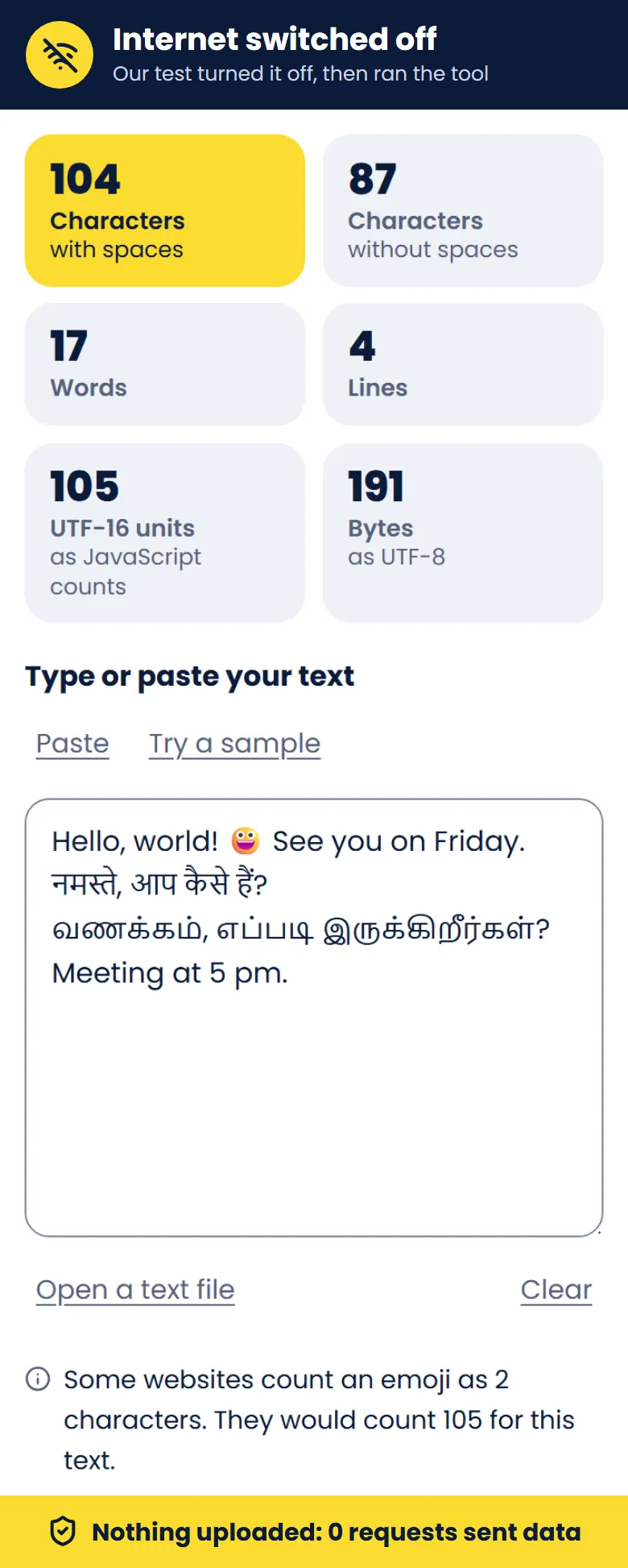
Why six numbers, when you came for one? Because "length" means different things to different places. A form may count characters, with or without spaces. A program may count UTF-16 units, the way JavaScript does. A database field or a file may count bytes. The same text can have a different length in each. The sample on this page, four short lines in English, Hindi and Tamil with an emoji, is 104 characters, 87 without spaces, 105 UTF-16 units and 191 bytes. Showing them side by side lets you pick the one that matches the rule you were given.
People use it when a number is waiting for their text:
- A field with a limit. A name, an address, a remark or a short statement on an online form, where the box or the instructions give a number.
- A message you want to check before you send it, when the app or the service shows a limit.
- A page title or description for a website. Count the characters to keep them short.
- A program or a database. A field may hold a number of bytes, or a program may measure text in UTF-16 units. Both numbers are on the page.
- Curiosity about scripts. A Hindi sentence and its English meaning can have very different sizes in bytes, and the counter shows why.
The counter does not open Word or PDF files, so copy the text out of them first. It does not know the rules of any website, form or service: it counts your text and compares it with the number you type. It does not work out how many text messages a text would take, and it does not check spelling.
Step by step: counting characters
It takes a few seconds, and the same steps work on a phone and on a computer:
- Put your text in the box. Type, or press Paste, or press Ctrl+V, or press and hold in the box on a phone and choose Paste. You can also choose Open a text file, or drop a text file anywhere on the page. To see how it works first, press Try a sample: it fills the box with four short lines (English with an emoji, Hindi, Tamil and English again) and replaces whatever was there.
- Read the six numbers above the box: Characters with spaces, Characters without spaces, Words, Lines, UTF-16 units and Bytes. When you type, they update about 0.15 second after you stop (about 0.4 second for a very long text). The Paste button, an opened file, Try a sample and Clear show their numbers straight away.
- Check a limit, if you have one. Type it in the Limit box, which takes a whole number from 1 to 1,000,000,000, and choose what it counts: Characters, Without spaces, UTF-16 units or Bytes (UTF-8). The line under the box says how many are left, or how many are over. Leave the box empty for no limit. If you type something that is not allowed, the page says so calmly and keeps the last good limit.
- Copy or save the numbers. Copy results puts the six numbers on the clipboard as six short lines, and a seventh line that starts "Limit:" when a limit is set. Download results saves the same lines as a small text file called character-count.txt. They carry the numbers only, never your text.
- Clear when you finish. Clear empties the box. If you opened a file, the x beside its name removes the file's text. The counter doesn't save your text, so closing or reloading the page also gives you an empty box.
What is counted, and how
The counts follow fixed rules, the same on every device. They are written here in full, and the same rules are checked by our tests.
| Count | The rule | Example |
|---|---|---|
| Characters | Every Unicode character, spaces and line breaks included. A line break counts once, even in a Windows file that stores it as two characters. Most emoji count once, and so does each Hindi vowel sign; a flag, a skin tone or a joined emoji counts as two or more. A byte order mark at the very start of a text is not text and is not counted | हिन्दी has 6 characters |
| Characters without spaces | The same, leaving out every space, tab, line break, no-break space and ideographic space, and nothing else | Hello world has 11 characters, 10 without spaces |
| Words | The same count as in the Word Counter: groups of characters between spaces, tabs, line breaks and long dashes, each with at least one letter or number | Hello, world! has 2 words |
| Lines | One more than the number of line breaks, so a text that ends with a line break has an empty last line that counts. An empty text has no lines | a, a line break and b make 2 lines |
| UTF-16 units | The length a web page's own code gives, which many forms and programs use: a letter or digit counts 1, and an emoji or a rare letter outside the first 65,536 counts 2 | Good 😀 has 6 characters and 7 UTF-16 units |
| Bytes | The size of the text saved as UTF-8: 1 byte for English letters and digits, 2 for most accented Latin and Greek letters, 3 for Hindi, Tamil and most other scripts, 4 for an emoji. A line break counts 1, even a Windows one, which a saved Windows file holds as 2 | हिन्दी has 18 bytes |
A few examples show the rules at work. Each was counted by the page's own code. The family emoji is three people joined by two invisible joiners:
| Text | Characters | Without spaces | Words | UTF-16 units | Bytes |
|---|---|---|---|---|---|
Hello world | 11 | 10 | 2 | 11 | 11 |
हिन्दी | 6 | 6 | 1 | 6 | 18 |
Good 😀 | 6 | 5 | 1 | 7 | 9 |
| A family emoji | 5 | 5 | 0 | 8 | 18 |
a, break, b | 3 | 2 | 2 | 3 | 3 |
+91 98765 43210 | 15 | 13 | 3 | 15 | 15 |
What the rules do not decide is how some other place counts. A website, a form or a program may count characters, spaces, emoji or line breaks in its own way, and these numbers say nothing about theirs. That is why the counter shows the count by characters, by UTF-16 units and by bytes together: pick the one that matches the rule you are given. One more thing to know is that a letter with a separate accent mark, typed as two characters, counts as 2.
Real results from our tests
We tested the Character Counter with headless Chromium 148, the open-source browser Chrome is built on, on a Windows laptop with an Intel Core i7-1185G7 and 32 GB of memory, on 10 October 2026. Other work was running on the laptop at the same time, so times vary a little from run to run: each time below is the middle one of 3 runs.
Counting is quick. It took 44 milliseconds or less to count 500,000 characters of English, Hindi or a mix of English, Hindi, Tamil and emoji, the most the page takes at once. That is the characters with and without spaces, the words, the lines, the UTF-16 units and the bytes together.
After a text is put in the box, the page waits 0.15 second before it counts, so a burst of typing is counted once, and 0.4 second when the text has more than 400,000 characters. So the numbers of 500,000 characters showed between 0.41 and 0.44 second after they were pasted in our test. Showing a very long text in the box is the slow part for the browser, most of all for Hindi and Tamil, which is why the page takes up to 500,000 characters at once.
Checked against a second program. We counted 3,000 random texts and 24 awkward ones with this page's code and again with a separate Python program, which has its own Unicode tables and its own code of the rules. The texts mixed English, Hindi, Tamil, Telugu, Bengali, Urdu, Arabic, emoji, short forms, long dashes, every kind of space and line break, and punctuation on its own. All of them gave the same characters, characters without spaces, words, lines, UTF-16 units and bytes. The bytes were also checked against Node's own byte count on 5,000 random strings that included broken halves of emoji.
Size and offline. On a first visit the page downloads about 0.1 MB for the tool: the page, its styles, its script and the fonts, with Google's ad code not counted. In our test we switched the network off after the page had loaded and pressed Try a sample: the numbers showed 0.1 seconds later in each of 15 runs.
Phone-sized screen. We also ran every test on a phone-sized screen in headless Chromium (390 × 844 pixels, with touch). Every button and box was 44 pixels high or more, and the page did not scroll sideways. These tests don't cover Safari or Firefox.
Try it yourself: press "Try a sample" at the top of this page. It puts four short lines in the box (English with an emoji, Hindi, Tamil and English again), and the numbers should read 104 characters, 87 without spaces, 17 words, 4 lines, 105 UTF-16 units and 191 bytes.
Try the sampleEmoji, Hindi, Tamil and other scripts
Emoji, Hindi and Tamil are where the different ways of counting come apart, so they are worth a closer look. In all of them, the counter counts Unicode characters. Unicode is the standard that gives every letter, digit, sign and emoji of every language its own number. A "character" here is one such number, which is what the computer stores, and not always what you see as one shape on the screen.
Emoji
A simple emoji is 1 character. In UTF-16 units it is 2, and in bytes it is 4. Good 😀 is 6 characters, 7 UTF-16 units and 9 bytes. When the UTF-16 count would differ from the character count, the page tells you under the numbers: "Some websites count an emoji as 2 characters. They would count 7 for this text." That is the UTF-16 number, which a program that measures text the way JavaScript does would give.
Some emoji are built from several characters. A flag is 2 characters, and so is an emoji with a skin tone. A family of three people is three emoji joined by two invisible joiners, so it is 5 characters, 8 UTF-16 units and 18 bytes, and it is 0 words, because an emoji is not a word. A thumbs-up with a skin tone is the thumbs-up and a skin-tone mark: 2 characters, 4 UTF-16 units and 8 bytes. A counter that counted what you see would say 1 for each of these, and ours says 5 and 2, because it counts what is stored.
Hindi
A Hindi consonant is 1 character, and so is each vowel sign (ा, ि, े) and the small mark that joins two consonants into one shape (्). The page counts every one of them, so the number of characters is more than the number of shapes you see:
| Word | What it is made of | Characters | Bytes |
|---|---|---|---|
क | one consonant | 1 | 3 |
कि | a consonant and a vowel sign | 2 | 6 |
क्ष | two consonants and the joiner | 3 | 9 |
क्षि | the same, and a vowel sign | 4 | 12 |
नमस्ते | न, म, स, ्, त, े | 6 | 18 |
हिन्दी | ह, ि, न, ्, द, ी | 6 | 18 |
श्रीमान | श, ्, र, ी, म, ा, न | 7 | 21 |
Hindi digits are characters too: १२३ is 3 characters and 9 bytes, where 123 is 3 characters and 3 bytes. The rupee sign ₹ is 1 character and 3 bytes.
Tamil and other Indian scripts
The same holds for the other scripts. Each consonant, vowel sign and joining mark is a character. A few words, counted by the page:
| Word | Script | Characters | Bytes |
|---|---|---|---|
தமிழ் | Tamil | 5 | 15 |
இந்தியா | Tamil | 7 | 21 |
తెలుగు | Telugu | 6 | 18 |
ಕನ್ನಡ | Kannada | 5 | 15 |
മലയാളം | Malayalam | 6 | 18 |
বাংলা | Bengali | 5 | 15 |
ગુજરાતી | Gujarati | 7 | 21 |
ਪੰਜਾਬੀ | Punjabi | 6 | 18 |
اردو | Urdu | 4 | 8 |
Notice that each Indian-script word above takes exactly 3 bytes for each character, where the Urdu word takes 2 and English letters take 1. This is why a Hindi or Tamil text is much bigger in bytes than the same number of English characters. The part on UTF-16 units and bytes explains when that matters.
Accents
A letter with an accent can be stored as one character or as two: the letter and a separate accent mark. They look the same. é as one character is 1 character and 2 bytes. The same letter typed as e plus a separate accent is 2 characters and 3 bytes. The counter counts what is stored, so the two give different numbers. If a count seems one too high near an accented letter, this is a likely reason.

Characters with and without spaces
Characters with spaces counts every character in the text, spaces included. Characters without spaces leaves out the blanks: spaces, tabs, line breaks, no-break spaces, the wide spaces used in Chinese and Japanese text and the thin spaces, and nothing else. Invisible characters that are not blanks, such as the joiners inside some Hindi and Malayalam words, stay in the count.
| Text | With spaces | Without spaces | What is left out |
|---|---|---|---|
Hello world | 11 | 10 | 1 space |
+91 98765 43210 | 15 | 13 | 2 spaces |
| Three spaces and nothing else | 3 | 0 | 3 spaces |
a, a tab, b, a line break, c | 5 | 3 | 1 tab and 1 line break |
a, a no-break space, b | 3 | 2 | 1 no-break space |
Which one does a rule mean?
Read the words of the rule. "Characters" on its own, or "including spaces", means the first number. "Excluding spaces" and "without spaces" mean the second. When the rule is not clear, use a fact about the two numbers: the count with spaces is never smaller than the count without them. So if you need to stay under a limit and you do not know whether spaces count, make the larger number fit, and the text passes either way. If you need to reach a minimum, make the smaller number reach it.
Lines are counted for you as well. A line is the text between line breaks, so there is always one more line than there are breaks. An empty text has no lines. A text that ends with a line break has an empty last line, and it counts. To take double spaces and spaces at the ends of lines out before you count, use Remove Extra Spaces.
Checking a character limit
The Limit box turns the counter into a checker. It does one small job: it compares your text with the number you type. Here is how to use it:
- Type the limit, a whole number from 1 to 1,000,000,000.
- Choose what it counts: Characters, Without spaces, UTF-16 units or Bytes (UTF-8). The choice decides which of the six numbers is compared.
- Read the line under the box. It says how many are left, that you are exactly at the limit, or how many are over.
With the sample on this page (104 characters, 87 without spaces, 105 UTF-16 units and 191 bytes), the line reads as follows:
| Limit | Counts | The line says |
|---|---|---|
| 160 | Characters | 56 characters left of 160. |
| 104 | Characters | Exactly at the limit of 104. |
| 100 | Characters | 4 characters over the limit of 100. |
| 103 | Characters | 1 character over the limit of 103. |
| 100 | Without spaces | 13 characters without spaces left of 100. |
| 100 | UTF-16 units | 5 UTF-16 units over the limit of 100. |
| 200 | Bytes (UTF-8) | 9 bytes left of 200. |
| 190 | Bytes (UTF-8) | 1 byte over the limit of 190. |
The same text is under a limit of 100 when you count without spaces, and over it when you count characters. That is the reason the choice exists.
Which count to choose
| The rule says | Choose |
|---|---|
| "Characters", or "characters including spaces" | Characters |
| "Characters excluding spaces", or "without spaces" | Without spaces |
| The length a web page's own code reports, as JavaScript counts it | UTF-16 units |
| "Bytes", or a size in bytes or KB for the text itself | Bytes (UTF-8) |
If the rule does not say which, ask whoever set it, or look at the box where you will type: if it shows its own counter, paste your text there and compare. For a maximum, a safe habit is to make the larger of the numbers fit.
A minimum works too
The words on the page talk about a limit that you must not pass, but a minimum is read the same way. "42 characters left of 50" means 42 more to reach 50. "Exactly at the limit of 50" means you have just reached it, and "over the limit" means you have passed it.
Text messages and other systems that count their own way
The counter does not work out how many text messages a text would take. A messaging service may count with its own alphabet and its own rules, and a message that has Hindi letters or an emoji may be counted differently from a plain English one. We do not give a number for any service here, because rules differ and change. The UTF-16 and Bytes numbers are hints about the size of your text, not the service's count. To be sure, ask your provider, or use the counter that your app shows when you type.
The same goes for any website or form: the page knows no site's rules. It only compares. Leave a little room under a maximum, and when the other side shows its own number, trust that number for that place.
UTF-16 units and bytes: when they matter
Computers store text as numbers, and the way the numbers are written down decides how many bytes a text takes. Two ways matter here.
- UTF-16 units. This is how JavaScript, the language of web pages, counts the length of text. Most letters, digits and Hindi or Tamil signs are 1 unit. An emoji or a rare letter outside the first 65,536 characters is 2 units.
- UTF-8 bytes. This is how text is usually saved in a file, and how many systems store it. The number of bytes a character takes depends on the character, as the table shows.
| Kind of character | UTF-16 units | UTF-8 bytes | Example |
|---|---|---|---|
| English letters, digits, most signs, a line break | 1 | 1 | A, 7, ? |
| Accented Latin and Greek letters | 1 | 2 | é, ñ, Ω |
| Hindi, Tamil and most other Indian scripts, the rupee sign, Chinese | 1 | 3 | क, த, ₹, 中 |
| An emoji, a rare letter | 2 | 4 | 😀 |
In the table of scripts above, the Urdu word takes 2 bytes for each character, which is why اردو is 4 characters and 8 bytes.
The same greeting in three scripts
Here is "Hello, how are you?" in English, Hindi and Tamil, as three lines of the sample:
| Text | Characters | Words | Bytes |
|---|---|---|---|
Hello, how are you? | 19 | 4 | 19 |
नमस्ते, आप कैसे हैं? | 20 | 4 | 50 |
வணக்கம், எப்படி இருக்கிறீர்கள்? | 31 | 3 | 85 |
The Hindi line has about the same number of characters as the English one, 20 against 19, but it is 50 bytes against 19. The Tamil line has 31 characters and 85 bytes. If a place counts bytes, a Hindi or Tamil text fills a limit much faster than an English text of the same number of characters. If it counts characters, they are close. That is the difference the Bytes number shows.
When bytes or UTF-16 units matter
Most people need only the characters. The other two are for places that measure text in a different way:
- a program or a web page whose own code checks the length of what you type, which is in UTF-16 units;
- a database column, a file or a system that limits the size of a text field in bytes;
- a text you will save as a file and want to know the size of.
The Bytes number is the size of the text as UTF-8, with single-character line breaks and without a byte order mark at the start. A file saved on Windows holds 2 bytes for each line break, one more than the page counts, and a file with a byte order mark holds 3 more bytes. So a saved file can be a little bigger than the number on the page, by one byte for each line break in a Windows file. To see the bytes themselves, in binary or hex, use Text to Binary.
The sample, line by line
The Try a sample button fills the box with four lines: English with an emoji (Hello, world! 😀 See you on Friday.), Hindi (नमस्ते, आप कैसे हैं?), Tamil (வணக்கம், எப்படி இருக்கிறீர்கள்?) and English again (Meeting at 5 pm.). Here are the numbers for each line by itself, and for all four together:
| Line | Characters | Without spaces | Words | UTF-16 units | Bytes |
|---|---|---|---|---|---|
| Line 1 | 34 | 28 | 6 | 35 | 37 |
| Line 2 | 20 | 17 | 4 | 20 | 50 |
| Line 3 | 31 | 29 | 3 | 31 | 85 |
| Line 4 | 16 | 13 | 4 | 16 | 16 |
| All four | 104 | 87 | 17 | 105 | 191 |
Add up the first column and you get 101, not 104. The other 3 are the line breaks between the four lines, which are characters and each take 1 byte. In the same way, the bytes of the lines add up to 188, and the 3 line breaks make 191. The UTF-16 units are 105 because of the emoji in the first line, which is 2 units and 1 character. The page says so under the numbers.
The first line has 34 characters and the third has 31, yet their bytes are 37 and 85. The two numbers show that a count by characters and a count by bytes can tell different stories about the same text.
Opening a text file
Choose Open a text file, or drop a file anywhere on the page, and the counter reads it on your device. These files open: .txt, .md, .csv, .tsv, .log, .json, .xml, .srt, .vtt, .html and other plain-text files, with up to 500,000 characters. The file's name and size appear below the box with an x. Press the x to remove the file's text. The file is read on your device and never uploaded.
- Letters. A file saved as UTF-8 (a byte order mark at the start is dropped) or as UTF-16 with a mark is read correctly, Hindi and Tamil included. A file that is not valid UTF-8 is read as Windows-1252, and the page says so: "This file isn't saved as UTF-8, so it was read as Windows-1252. If letters look wrong, save it as UTF-8 and add it again."
- Windows line breaks. A line break typed as two characters in a Windows file counts as 1 character and 1 byte here, so the Bytes number can be smaller than the size of the file on your device.
- Several files. Only the first one opens, and the page says so, for example "Opening a.txt only. Open the others one at a time."
- Not a text file. A Word, PDF or picture file renamed to .txt is not read, and the page says it doesn't look like a text file. A file named .docx, .pdf or .rtf gets this message: "Only text files (.txt and similar) can be opened here. For a Word or PDF file, copy its text and paste it into the box."
- Empty or too long. An empty file says it is empty. A file with more than 500,000 characters is not opened, and the page says how many characters it has.
A Word or PDF file
Open the file in the program you normally use, select the text, copy it, and paste it into the box. A PDF whose pages are scans holds pictures, not text, so there is nothing to copy. For a PDF that holds real text, PDF to Word turns it into a Word file whose text you can copy.
Private: your text stays on your device
Your text never leaves your device. The counter runs inside your browser and has no upload step: it never sends the text you type, paste or open anywhere, and it keeps no copy of your text, so closing the page forgets it. The page's Content Security Policy lets it contact only this site and Google's ad service, which pays for the site; our code never gives your text to the ad code. You can check it yourself in your browser's network panel (F12 on a computer): counting adds no request that carries your text. The site's menu does remember the last few tools you opened, on your device.
Text is often personal: a form answer, a message, a statement, a letter or a draft you are not ready to share. This counter lets you measure it without handing it over. Our privacy policy says what we collect, and How we prove it shows how you can check our claims yourself.
Once the page has loaded, it also works with the internet switched off. In our test we switched the network off after the page had loaded and pressed Try a sample, and the numbers showed 0.1 seconds later in each of 15 runs (the real results above have the details).
Long texts
The counter takes up to 500,000 characters at once, about 500 KB of English text. Counting is quick: in our tests it took 44 milliseconds or less to count all six numbers of 500,000 characters, in English, Hindi or a mix. What is slow is the browser drawing a very long text in the box, and Hindi and Tamil are the slowest, because the browser has to join their letters. The real results of the Word Counter have a table of how long the browser needs to draw long texts in English, Hindi, Tamil and a mix.
That is why the limit is 500,000. What happens above it:
- A paste that would go over the limit is not added. This holds for Ctrl+V, for press and hold, and for the Paste button. The page says, for example: "That text is very long (550,000 characters), so it was not added. The box can hold 500,000 characters. Split it into smaller parts for faster results."
- A file with too many characters is not opened. The page says, for example: "long.txt has 550,000 characters, more than the 500,000 counted at once. Split it into smaller parts for faster results."
- A text that gets in some other way stays, uncounted. If text is dragged into the box, for example, it stays there. The numbers show a dash, Copy and Download wait, and the note says: "This text is very long (550,000 characters). Split it into smaller parts for faster results."
After a paste of 500,000 characters, the numbers showed between 0.41 and 0.44 second later in our test, because the page waits 0.4 second above 400,000 characters before it counts. For a text above the limit, split it at a line break or a space, so that a word is not cut in two, count each part, and add the numbers together.
Tips
- Match the count to the rule. Read whether the rule counts characters, characters without spaces, UTF-16 units or bytes, and choose the same in the Limit box.
- Count the final text. A small change at the end is the one that pushes a text over a limit.
- Paste as plain text. Text copied from a document or a web page can carry a bullet, a trailing space or a line break. Look at the start and the end of what you pasted.
- Watch the emoji note. If it appears under the numbers, a place that counts UTF-16 units would count more than the characters shown.
- Leave a little room under a maximum. The place you write for may count in a slightly different way. When it shows its own counter, trust that number.
- For a Hindi or Tamil text that is measured in bytes, a rough idea is 3 bytes for each letter or sign, though spaces and English letters take 1. Read the Bytes number for the real count.
- Use the lines count for list-like text. One line for each item, and Lines tells you how many items.
- For a Word or PDF file, copy the text out of it first, and paste it into the box.
- Keep your own copy of the text. The counter keeps no copy of your text, and Download results saves only the numbers.
- Text in the wrong capitals? The Case Converter changes it in one click.
- Lines broken in the middle? Text copied from a PDF often is: Remove Line Breaks joins it into paragraphs.
Limits
- Text only. It counts typed, pasted or opened text. It does not open Word, PDF or picture files: copy the text out of them first.
- 500,000 characters at once, about 500 KB of English text. A longer paste or file is not added, and the page says so. Showing a long text in the box is slow for the browser, most of all for Hindi and Tamil.
- The limit is yours. The page does not know the rules of any website, form or service. It only compares your text with the number you type, so read the rule of the place you write for and pick the count it uses.
- Other ways of counting. Bytes are counted as UTF-8. A system that saves text another way, such as UTF-16 or an old SMS alphabet, can count differently.
- No spelling or grammar check, no keyword counts and no changing of the text.
- Your text is not kept. The text and the numbers are forgotten when you close the page.
- Browsers. Tested through our agentic testing workflow, in headless Chromium at phone and computer sizes. These tests don't cover Safari or Firefox, so we cannot promise how they behave.
Terms explained
- Character
- One Unicode character. A letter, a digit, a space and a Hindi vowel sign each count once, and so do most emoji. A flag, a skin tone or a joined emoji counts as two or more.
- Unicode
- The standard that gives every letter of every language its own number, so the same text can be stored and shown on many devices.
- UTF-16 unit
- The unit that JavaScript, the language of web pages, and many web forms count in. Most characters are 1 unit and an emoji is 2.
- UTF-8 and byte
- UTF-8 is the usual way text is saved in files. A byte is a small unit of storage. In UTF-8 an English letter takes 1 byte, an accented Latin letter 2, a Hindi or Tamil letter 3 and an emoji 4.
- Emoji
- A small picture used as a character. It is 1 character here, 2 UTF-16 units and 4 bytes, and some are built from several characters.
- Line break
- What Enter puts into a text. It is 1 character here, even in a Windows file that stores it as two.
- Character limit
- The most characters, or the fewest, that a form, a message or a field accepts. Read its words to see what it counts.
- Zero-width joiner
- An invisible character placed inside a word or an emoji to change how the parts join. It counts as a character.
- Byte order mark
- An invisible mark that some files start with to say how the text is saved. The counter does not count it.