What the Word Frequency Counter does, and when you need it
The Word Frequency Counter counts how many times each word appears in a text, and lists the words from the most common to the least. For each word it gives the number of times and its share of all the words, in three columns you can paste into a spreadsheet. The list appears in the second box as you paste, and a line under it says how many words and how many different words the text has. The box with your own text is never changed.
Words in Hindi, Tamil and every other script are counted, numbers count as words, and you can choose whether capital letters matter and leave out short words. It runs in your browser: your text is never uploaded and never saved, so closing the page forgets it.
Some jobs it is made for:
- Overused words in an essay, a statement of purpose or a cover letter: the words you lean on show at the top.
- The main words of a page or an article, to see what it is really about.
- Feedback and comments, where the words people repeat show what matters to them.
- Vocabulary for a language or an exam, starting with the words a text uses most.
- How often a name or a term appears in a long document.
Step by step: counting words
It takes a few seconds, and the same steps work on a phone and on a computer:
- Put your text in the top box. Paste it with the Paste button, with Ctrl+V, or by pressing and holding in the box on a phone. You can also type it, choose Open a text file, or drop a text file anywhere on the page.
- Choose how to count. Count Word and word as one is ticked at first, so capitals don't matter. Under Shortest word counted, keep Any length, or choose 3, 4 or 5 letters or more to leave out short words such as a, is and the.
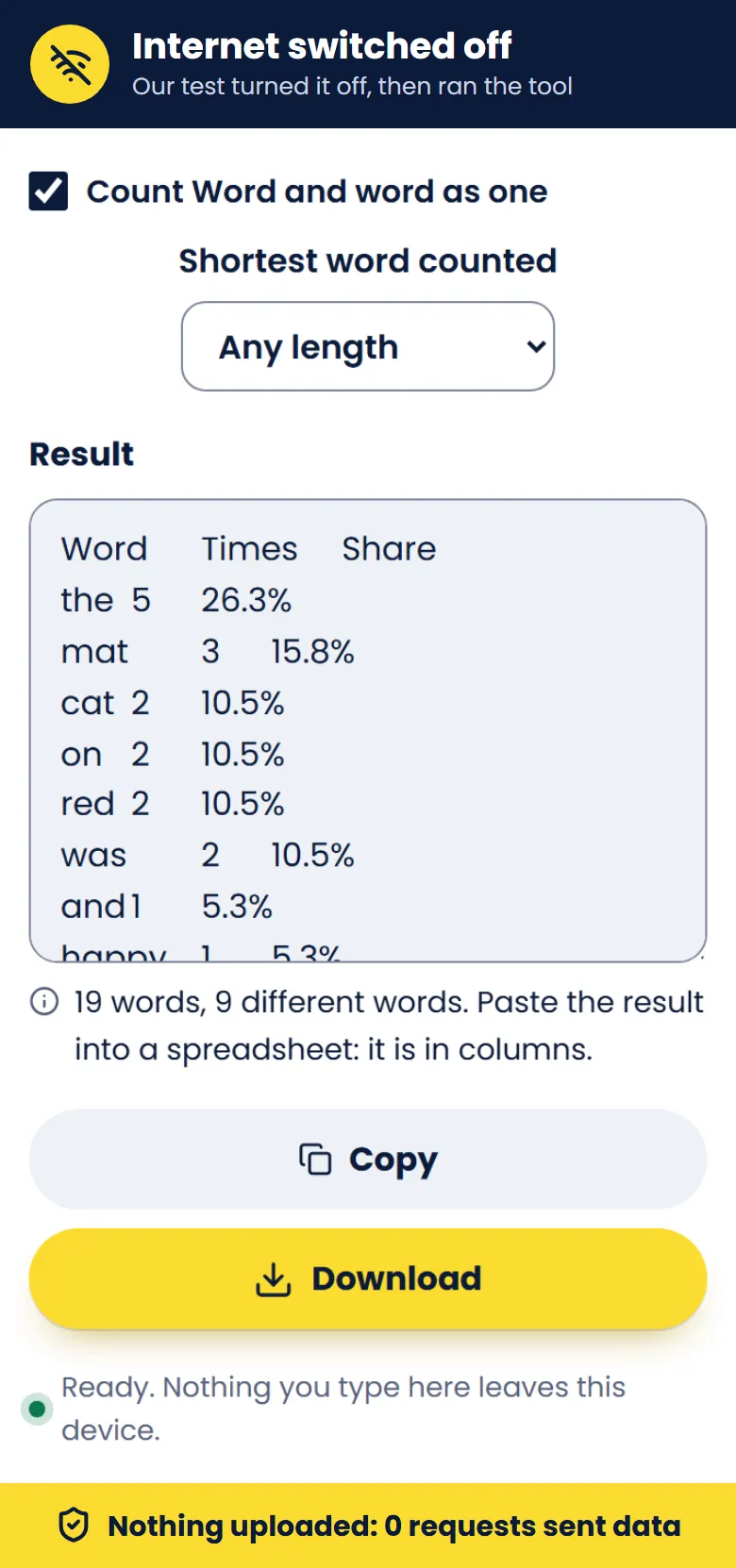
- Read the list. The first row is the headings Word, Times and Share; then come the words, the most common first. The line under it says, for example, "19 words, 9 different words."
- Copy or download the list, or paste it into a spreadsheet, where it falls into three columns.
Press Try a sample: the box fills with The cat sat on the mat. The mat was red, and the cat was happy on the red mat. The list starts with the 5 times, 26.3%, then mat 3 times, 15.8%, then cat, on, red and was twice each, and and, happy and sat once each. The page says 19 words, 9 different words.
What counts as a word, exactly
The rules are written here in full, and the same rules are checked by our tests.
| Part | The rule | Example |
|---|---|---|
| A word | A run of letters, marks and digits of any script. Spaces, punctuation and symbols end it | cat. counts as cat |
| Inside a word | An apostrophe or a hyphen between two letters or digits keeps the word whole | it's and well-known are one word each |
| Numbers | A run of digits is a word. A comma or a dot splits it | 2026 is a word; 1,000 is 1 and 000 |
| Count Word and word as one | On at first: every word is counted in small letters. Off, each spelling with capitals is its own word | Off: The, the and THE are three words |
| Shortest word counted | Any length at first, or 3, 4 or 5 letters and more. A shorter word is left out of the list and of the total | 3 letters or more: a an the cat keeps the and cat |
| Letters | Counted as a reader sees them: a Hindi letter with its vowel sign is one | नमस्ते is one word of 3 letters: न, म and स्ते |
| Order | The most times first; words with the same count go A to Z, numbers before letters | 2026 before a |
| Share | The word's times as a percentage of all the words counted, to one decimal place | the: 5 of 19, 26.3% |
The total in the note counts every word in the list, so with a shortest word chosen, the left-out words are not in the total either, and the shares are of the words that are left.
Real results from our tests
We tested Word Frequency Counter with headless Chromium 148, the open-source browser Chrome is built on, on a Windows laptop with an Intel Core i7-1185G7 and 32 GB of memory, on 1 November 2026. Other work was running on the laptop at the same time, so times vary from run to run: each time below is the middle one of 3 runs.
Counting is quick. It took 98 milliseconds or less to count the words of 500,000 characters of English, Hindi or a mix of English, Hindi, Tamil and emoji, with Word and word counted as one, the most the page takes at once. With 5 letters or more chosen under Shortest word counted, it took 563 milliseconds or less.
After a text is put in the box, the page waits 0.15 second before it works, so a burst of typing is worked on once, and 0.4 second when the text has more than 400,000 characters. So the result of 500,000 characters of English showed between 0.50 and 0.51 second after it was put in the box in our test. A result of more than 100,000 characters shows only its first 100,000 in the box, and says so, because showing a very long text is slow for the browser; Copy and Download take all of it.
Checked against a second program. We counted the words of 1,500 random texts with this page's code and again with a separate Python program, with capitals counted as one and apart at random: every word's count was the same every time. The texts had English words with capitals, apostrophes, hyphens, numbers and punctuation. Every example on this page is also one of our tests, run on the page's own code.
Size and offline. On a first visit the page downloads about 0.1 MB for the tool: the page, its styles, its scripts and the fonts, with Google's ad code not counted. In our test we switched the network off after the page had loaded and pressed Try a sample: the result showed 0.2 seconds later or less in each of 15 runs.
Phone-sized screen. We also ran the tests on a phone-sized screen in headless Chromium (390 × 844 pixels, with touch). That is not a real phone. Every button, box and tick box was 44 pixels high or more, and the page did not scroll sideways. These tests don't cover Safari or Firefox.
Try it yourself: press "Try a sample" at the top of this page. It puts a short sentence about a cat and a mat in the box. The list starts with the, 5 times and 26.3%, then mat, 3 times, and the page says 19 words, 9 different words. Then choose 4 letters or more under Shortest word counted.
Try the sampleReading the table, and using it in a spreadsheet
The result is a table in plain text: one word to a row, with a tab between the word, its times and its share, and a first row of headings, Word, Times and Share. Copy it and paste it into Excel or Google Sheets, and it falls into three columns, ready to sort, filter or chart. Download saves the same table as a text file.
The shares are rounded to one decimal place, so they may not add up to exactly 100%. They are shares of the words counted, after short words are left out if you chose that.
The top of a long list is usually small words: the, a, and, to, of. That is normal in English, and in most languages. To see the words that carry the meaning, choose 4 letters or more under Shortest word counted; most small words drop out, though a few short words that matter, such as tax or fee, drop out with them.
The note gives the number of words and the number of different words. Dividing the second by the first gives a rough idea of how varied the words are: a text that repeats itself has few different words for its length.

Words that need care
- Apostrophes.
it'sis one word, and so isData's, separate fromdata: inData, data and DATA. Data's role: data-driven., data is counted 3 times, and data's and data-driven once each. - Hyphens. A hyphen inside a word keeps it whole, so
e-mailandemailare two different words:e-mail email E-Mailgives e-mail twice and email once. - Numbers with commas.
₹500 is 500 rupees; 1,000 is 1000counts 500 twice (the ₹ sign is not part of the word), and splits 1,000 into 1 and 000. - Capitals. With Count Word and word as one off,
The the THE themgives four different words. Keep it on unless capitals matter, as with names that are also words. - Hindi and other scripts.
नमस्ते दुनिया नमस्तेgives नमस्ते twice, 66.7%, and दुनिया once, 33.3%. The Hindi full stop । ends a word like any punctuation.
The tool counts spellings, not meanings: run, runs and running are three words, and it doesn't know which words are names.
Everyday uses
- Edit an essay or an SOP. Find the words you use too often, then change some of them. For the total number of words, use Word Counter.
- Study a text. Make a list of the most common words of a chapter, choose 4 letters or more, and learn them first.
- Read feedback. Paste the comments of a survey and see which words come up most.
- Check a page's main words. See whether the words a page is about are the ones it uses most.
- A list, one item a line? To see its different items rather than its words, use Remove Duplicate Lines.
Opening a text file
Choose Open a text file, or drop a file anywhere on the page, and the tool reads it on your device. These files open: .txt, .md, .csv, .tsv, .log, .json, .xml, .srt, .vtt, .html and other plain-text files, with up to 500,000 characters. The file's name and size appear below the box with an x; press the x to remove the file's text. The file is read on your device and never uploaded. The result can be copied, or saved as a new text file; the file you opened is never changed.
- Letters. A file saved as UTF-8 (a byte order mark at the start is dropped) or as UTF-16 with a mark is read correctly, Hindi and Tamil included. A file that is not valid UTF-8 is read as Windows-1252, and the page says so: "This file isn't saved as UTF-8, so it was read as Windows-1252. If letters look wrong, save it as UTF-8 and add it again."
- Windows line breaks. A Windows file stores each line break as two characters. The tool reads the pair as one line break, so a word at the end of a line is counted the same in a Windows file.
- Several files. Only the first one opens, and the page says so, for example "Opening a.txt only. Open the others one at a time."
- Not a text file. A Word, PDF or picture file renamed to .txt is not read, and the page says it doesn't look like a text file. A file named .docx, .pdf or .rtf gets this message: "Only text files (.txt and similar) can be opened here. For a Word or PDF file, copy its text and paste it into the box."
- Empty or too long. An empty file says it is empty. A file with more than 500,000 characters is not opened, and the page says how many characters it has.
For a Word or PDF file, open it in the program you normally use, select the text, copy it, and paste it into the box. A PDF whose pages are scans holds pictures, not text, so there is nothing to copy.
Private: your text stays on your device
Your text never leaves your device. The tool runs inside your browser and has no upload step: it never sends the text you type, paste or open anywhere, and it keeps no copy of it, so closing the page forgets it. The page's Content Security Policy lets it contact only this site and Google's ad service, which pays for the site; our code never gives your text to the ad code. You can check it yourself in your browser's network panel (F12 on a computer): counting the words adds no request that carries your text. The site's menu does remember the last few tools you opened, on your device.
Text you study is often personal: an essay, a statement of purpose, feedback from customers or a chat. This tool counts its words without handing it over. Our privacy policy says what we collect, and How we prove it shows how you can check our claims yourself.
Once the page has loaded, it also works with the internet switched off. In our test we switched the network off after the page had loaded and pressed Try a sample, and the result showed 0.2 seconds later or less in each of 15 runs.
Long texts
The tool takes up to 500,000 characters at once, about 500 KB of English text. What happens when a text is longer:
- A paste that would go over the limit is not added. This holds for Ctrl+V, for press and hold, and for the Paste button. The page says, for example: "That text is very long (550,000 characters), so it was not added. The box can hold 500,000 characters. Split it into smaller parts for faster results."
- A file with too many characters is not opened. The page says, for example: "long.txt has 550,000 characters, more than the 500,000 counted at once. Split it into smaller parts for faster results."
- A text that gets in some other way stays, unchanged. If text is dragged into the box, for example, it stays there, the result stays empty and the note says: "This text is very long (550,000 characters). Split it into smaller parts for faster results."
Counting is quick. In our tests it took 98 milliseconds or less to count the words of 500,000 characters of English, Hindi or a mix of English, Hindi, Tamil and emoji, with Word and word counted as one. The slow part is the browser showing a very long text in a box, so a result of more than 100,000 characters shows only its first 100,000, without cutting an emoji in half, and the note says so, for example "Showing the first 100,000 of 164,999 characters. Copy and Download take all of it." Copy and Download always take the whole result.
Tips
- Choose 4 letters or more to skip most small words and see the words that carry the meaning.
- Keep Count Word and word as one on for most texts.
- Paste into a spreadsheet to sort or chart the list.
- Tidy spellings first with Find and Replace if one word is written two ways, such as e-mail and email.
- Compare two drafts by counting each and comparing the top of the lists.
- Keep your own copy. The page forgets everything when you close it.
Limits
- Spellings, not meanings. run, runs and running are different words, and so are e-mail and email.
- No list of small words to skip. Short words are left out by length only, with Shortest word counted.
- Single words only. It counts words, not phrases of two or three words.
- Numbers with commas or dots are split into parts.
- Scripts without spaces, such as Chinese, Japanese or Thai, are counted as long runs, not as words.
- 500,000 characters at once, about 500 KB of English text. Text only: copy text out of Word or PDF files first.
Terms explained
- Word frequency
- How many times a word appears in a text.
- Share
- A word's count as a percentage of all the words counted.
- Different words
- The number of rows of the list: each spelling counted once.
- Stop words
- Small common words such as the, a and of, which many word counts leave out.
- Tab-separated
- Text with a tab between its columns, which a spreadsheet splits into cells.