What the Case Converter does, and when you need it
The Case Converter changes the case of the text you type, paste or open. Choose one of 11 cases and the result appears in a second box, ready to copy or download. The box on top, with your own text, is never changed, so you can try one case after another. It runs in your browser: your text is never uploaded and never saved, so closing the page forgets it.
Some everyday jobs it helps with:
- Text typed with the Caps Lock key on. A heading, an email subject or a whole paragraph in capitals can be put back to Sentence case or Title Case in one click. If the Shift key worked the wrong way round, iNVERT turns it right.
- A list of names in capitals.
RAMESH KUMAR SHARMAbecomesRamesh Kumar Sharmain Title Case. - A form that asks for capital letters. UPPER CASE turns what you typed into capitals.
- A title. An essay or article title in Title Case, with the small words like of and the left small if you like.
- Names for programs and files. snake_case, camelCase, PascalCase and CONSTANT_CASE for the names of variables, and kebab-case for the last part of a web address.
It does not check spelling or grammar, and it does not change the words themselves. It follows no style guide, and it does not know names or acronyms, so it cannot tell that NASA should keep its capitals; the parts on Title Case and Sentence case say what that means in practice. It does not open Word or PDF files, so copy the text out of them first.
Step by step: changing the case
It takes a few seconds, and the same steps work on a phone and on a computer:
- Put your text in the top box. Type, or press Paste, or press Ctrl+V, or press and hold in the box on a phone and choose Paste. You can also choose Open a text file, or drop a text file anywhere on the page. To see how it works first, press Try a sample: it fills the box with four lines (a short English note, a heading in capitals, a Hindi line and a line of plain words) and replaces whatever was there.
- Choose a case under "Change it to": UPPER CASE, lower case, Title Case, Sentence case, camelCase, PascalCase, snake_case, kebab-case, CONSTANT_CASE, aLtErNaTe or iNVERT. The result changes at once, and again about 0.15 second after you stop typing.
- Keep the small words small, if you want. When Title Case is chosen, a box appears that reads "Keep small words like of, the and in in lower case". It is off to begin with.
- Read the result in the second box. If the result is very long, the box shows only its first part and says so (see the part on long texts).
- Copy or download. Copy puts the whole result on the clipboard. Download saves it as a text file called converted-text.txt, exactly as shown, with nothing added at the end.
- Clear when you finish. Clear empties the top box. If you opened a file, the x beside its name removes the file's text. The converter doesn't save your text, so closing or reloading the page also gives you an empty box.
What each case does
Every case is a fixed rule, the same on every device. The rules are written here in full, and the same rules are checked by our tests.
| Case | The rule | Example |
|---|---|---|
| UPPER CASE | Every letter in capitals, by the Unicode rules that do not depend on a language. The German ß becomes SS. A letter with no case (Hindi, Tamil and the other Indian scripts, Chinese), a digit or an emoji stays as it is | straße 12 becomes STRASSE 12 |
| lower case | Every letter small, by the same rules. A Greek capital sigma at the end of a word becomes the final sigma ς | ΟΔΟΣ becomes οδος |
| Title Case | The first letter of every word is a capital and the rest are small, so NASA becomes Nasa. A word is letters, marks and digits, with an apostrophe allowed inside it (don't); a hyphen, a full stop or an underscore ends a word. A word that starts with a digit has no capital. With "Keep small words" on, a, an, the, and, but, or, nor, for, so, yet, as, at, by, in, of, off, on, per, to, up and via stay small, except the first and last word of a line. The list is a simple one, not any style guide's | the lord of the rings becomes The Lord Of The Rings, or The Lord of the Rings with small words kept small |
| Sentence case | Everything in lower case, then a capital for the first letter of each line and of each sentence. A sentence ends after . ! ? and the like followed by a space, except after a short form such as Dr. or Rs., an initial, letters joined by full stops (U.S.A.) and a list number. Names, the word I and acronyms are made small too, so capitalise them yourself | hello world. this is a test becomes Hello world. This is a test |
| camelCase | Each line is split into words (letters, marks and digits; a new word starts where a small letter or digit meets a capital, and before the last capital of a run of capitals that a small letter follows). Spaces, punctuation, hyphens and underscores only separate words and are dropped, and an apostrophe inside a word is dropped. The first word is small and the others start with a capital, all joined | user first name becomes userFirstName; HTTPServer error becomes httpServerError |
| PascalCase | The same words, every one starting with a capital, all joined | user first name becomes UserFirstName |
| snake_case | The same words, all small, joined with an underscore | user first name becomes user_first_name |
| kebab-case | The same words, all small, joined with a hyphen | user first name becomes user-first-name |
| CONSTANT_CASE | The same words, all in capitals, joined with an underscore | user first name becomes USER_FIRST_NAME |
| aLtErNaTe | The letters that have a case are made small, capital, small, capital and so on, starting with a small one. Spaces, digits and other characters stay and are not counted | hello world becomes hElLo WoRlD |
| iNVERT | Every capital letter becomes small and every small letter a capital. Everything else stays | Hello, World! becomes hELLO, wORLD! |
Title Case, Sentence case and the programmer styles work on each line on its own, and the line breaks stay as they are. The rules do not decide everything. No style guide is followed, so a heading that must follow one needs checking against it. Names, places and acronyms are not recognised, so Sentence case makes them small and Title Case writes NASA as Nasa. And the result is always made from the text in the top box, which the page never changes.
Real results from our tests
We tested the Case Converter with headless Chromium 148, the open-source browser Chrome is built on, on a Windows laptop with an Intel Core i7-1185G7 and 32 GB of memory, on 10 October 2026. Other work was running on the laptop at the same time, so times vary a little from run to run: each time below is the middle one of 3 runs.
Changing is quick. It took 330 milliseconds or less to change 500,000 characters of English, Hindi or a mix of English, Hindi, Tamil and emoji to any of the 11 cases, the most the page takes at once. UPPER CASE and lower case took 2 milliseconds or less, Title Case, Sentence case, aLtErNaTe and iNVERT took 127 milliseconds or less, and the five programmer styles, which first find the words, took 329 milliseconds or less.
After a text is put in the box, the page waits 0.15 second before it changes it, so a burst of typing is changed once, and 0.4 second when the text has more than 400,000 characters. So the result of 500,000 characters showed between 0.41 and 0.43 second after the paste in our test. A result of more than 100,000 characters shows only its first 100,000 in the box, and says so, because showing a very long text is slow for the browser, most of all for Hindi and Tamil. Copy and Download take all of it.
Checked against a second program. We changed 3,000 random texts and 24 awkward ones to all 11 cases, and to Title Case with the small words kept small, with this page's code and again with a separate Python program. UPPER CASE and lower case use Python's own case mapping, so they check JavaScript's against it; the other cases are the rules on this page written again in Python. The texts mixed English, Hindi, Tamil, Greek, German, emoji, words in mixed case such as HTTPServer and fooBar, apostrophes, every kind of space and line break, and punctuation on its own. All of them gave the same results.
Size and offline. On a first visit the page downloads about 0.1 MB for the tool: the page, its styles, its script and the fonts, with Google's ad code not counted. In our test we switched the network off after the page had loaded and pressed Try a sample: the result showed 0.1 seconds later in each of 15 runs.
Phone-sized screen. We also ran every test on a phone-sized screen in headless Chromium (390 × 844 pixels, with touch). Every button and box was 44 pixels high or more, and the page did not scroll sideways. These tests don't cover Safari or Firefox.
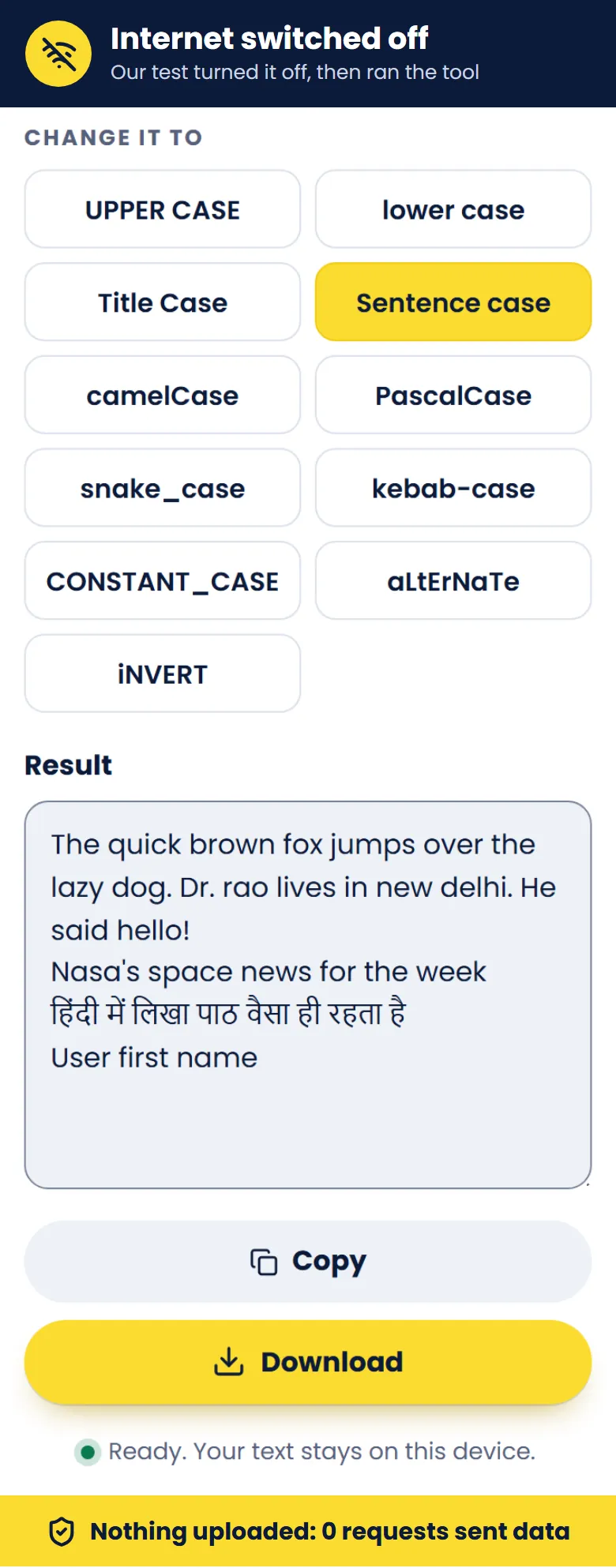
Try it yourself: press "Try a sample" at the top of this page, then choose snake_case. The last line, user first name, becomes user_first_name. In Sentence case the first line starts with "The quick brown fox" and says "Dr. rao", because names are made small too.
Try the sampleTitle Case and small words
Title Case makes the first letter of every word a capital and the rest small. That is the whole rule, and it means a few things you should know about before you use it:
- A word is a run of letters, marks and digits. An apostrophe is allowed inside it, so
don'tis one word. A hyphen, a full stop or an underscore ends a word, sostop-believingis two words and gets two capitals:Stop-Believing. - The rest of the word goes small, so an acronym loses its capitals:
NASA launchesbecomesNasa Launches. After an apostrophe the letter is small too:ravi o'neilbecomesRavi O'neil. - A word that starts with a digit has no capital, so
3rd place winnerbecomes3rd Place Winner.
Small words
In a title, little words like of and the are often left small. Turn on "Keep small words like of, the and in in lower case" and these 21 words stay small: a, an, the, and, but, or, nor, for, so, yet, as, at, by, in, of, off, on, per, to, up and via. The first word and the last word of a line always keep their capital.
| You type | Small words off | Small words kept small |
|---|---|---|
the lord of the rings | The Lord Of The Rings | The Lord of the Rings |
a tale of two cities | A Tale Of Two Cities | A Tale of Two Cities |
how to apply for a job in india | How To Apply For A Job In India | How to Apply for a Job in India |
to be or not to be | To Be Or Not To Be | To Be or Not to Be |
mother-in-law | Mother-In-Law | Mother-in-Law |
The list is a simple one that we chose. It is not any style guide's list, and the page does not follow APA, Chicago or any other style. You can see its limits in the sample wake up and smell the coffee: because up is on the list, it comes out as Wake up and Smell the Coffee with small words kept small. If a school, a journal or an office tells you which style to use, check the heading against that guide.
Names, addresses and acronyms
Title Case is handy for a name or an address typed in capitals, but it treats every word the same, so it cannot know which ones were meant to stay capitals:
| You type | Title Case gives | What to fix by hand |
|---|---|---|
RAMESH KUMAR SHARMA | Ramesh Kumar Sharma | Nothing |
12 MG ROAD, NEW DELHI 110001 | 12 Mg Road, New Delhi 110001 | Mg to MG |
flat 4b, 12th cross, mg road | Flat 4b, 12th Cross, Mg Road | 4b to 4B, Mg to MG |
Read the result once before you copy it. A short look for initials, abbreviations and flat or plot numbers takes a few seconds.

Sentence case
Sentence case makes everything small, and then puts a capital on the first letter of each line and of each sentence. It is the way ordinary text is written, and the quickest way to repair text that was typed in capitals:
| You type | Sentence case gives |
|---|---|
HELLO WORLD. THIS IS A TEST | Hello world. This is a test |
what is your name? my name is ravi. i live in pune! | What is your name? My name is ravi. I live in pune! |
"hello," she said. 'what now?' | "Hello," she said. 'What now?' |
hello... what happened? nothing! | Hello... What happened? Nothing! |
Where a sentence ends
A sentence ends after a full stop, an exclamation mark, a question mark or a similar sign, including the Hindi danda (।), when a space comes next. This is the same rule as in the Word Counter. A full stop does not end a sentence after a short form such as Dr. or Rs., after an initial, after letters joined by full stops (U.S.A.) or after a list number at the start of a line. A new line always starts a new sentence. A quote or a bracket in front of a word is skipped, so the capital goes on the word.
| You type | Sentence case gives | Why |
|---|---|---|
dr. rao lives in new delhi. he said hello! | Dr. rao lives in new delhi. He said hello! | Dr. is a short form, so rao does not start a sentence |
2024 was great. next year | 2024 was great. Next year | A number cannot take a capital, so the sentence starts with it |
1. apples and 2. oranges on two lines | 1. Apples and 2. Oranges | A list number is skipped, and each line starts a sentence |
i went to the u.s.a. last year. it was fun | I went to the u.s.a. last year. It was fun | The full stops in u.s.a. do not end a sentence |
chapter 1: the beginning | Chapter 1: the beginning | A colon does not start a sentence |
Names, places and acronyms
Sentence case makes every word small, and then capitalises only the first letter of each sentence. So names, places, days, months, acronyms and the word I come out small too, except where they start a sentence. Look at the second row of the first table: ravi and pune are small, while I is a capital only because it starts a sentence. The page cannot know which words are names. A short pass through the result to capitalise them takes less time than retyping the text. Initials suffer the same way: Dr. A. P. J. Abdul Kalam becomes Dr. a. p. j. abdul kalam.
Hindi, Tamil and the other scripts without capital letters are not changed by Sentence case. Their sentences are still found, and the English parts next to them are capitalised as usual.
camelCase, snake_case and the other programmer styles
camelCase, PascalCase, snake_case, kebab-case and CONSTANT_CASE are ways of writing several words as one name, for variables and functions in a program, for file names and for the last part of a web address. All five work on each line of your text on its own: first the line is split into words, then the words are written in the style.
How the words are found
- A word is a run of letters, marks and digits.
- A new word also starts where a small letter or a digit meets a capital (
fooBaris foo and Bar,version2Betais version2 and Beta), and before the last capital of a run of capitals that a small letter follows (HTTPServeris HTTP and Server). - Spaces, punctuation, hyphens and underscores only separate words and are dropped. An apostrophe inside a word is dropped too, so
don'tbecomesdont. - A line with no word comes out empty.
The five styles
| Style | user first name becomes | Used for |
|---|---|---|
| camelCase | userFirstName | Names in many programs |
| PascalCase | UserFirstName | Names of types and classes in many programs |
| snake_case | user_first_name | File names, database columns, names in many programs |
| kebab-case | user-first-name | File names and the last part of a web address |
| CONSTANT_CASE | USER_FIRST_NAME | Constants, settings |
What happens to real text
| You type | Style | Result |
|---|---|---|
HTTPServer error | camelCase | httpServerError |
XMLHttpRequest | snake_case | xml_http_request |
version2Beta | kebab-case | version2-beta |
my-file_name final (2).pdf | snake_case | my_file_name_final_2_pdf |
My Blog Post Title! | kebab-case | my-blog-post-title |
Summer Offer 50% Off | kebab-case | summer-offer-50-off |
max retry count | CONSTANT_CASE | MAX_RETRY_COUNT |
Café au lait | kebab-case | café-au-lait |
Two things to watch. A name with a small letter in front of a capital is split there, so iPhone 15 Pro Max becomes i-phone-15-pro-max in kebab-case. And an accented letter stays an accented letter: if a web address must use plain letters, take the accents out yourself.
Each line is converted on its own. The first long line of the sample becomes one very long name, and the line breaks stay where they were. Hindi and Tamil words are kept whole: नमस्ते दुनिया becomes नमस्ते_दुनिया in snake_case and नमस्तेदुनिया in camelCase, and hello हिंदी world becomes hello_हिंदी_world. For a web address made from a title, with accents and symbols taken out, use Text to Slug.
Hindi, Tamil, German ß and Greek: letters with and without capitals
The cases follow Unicode, the standard that says which letters have a capital form. Hindi, Tamil, Telugu, Kannada, Malayalam, Bengali, Gujarati, Punjabi and the other Indian scripts, Chinese and Japanese have no capital letters, so every case leaves their letters alone. Digits and emoji are left alone too.
| You type | Case | Result |
|---|---|---|
हिंदी में लिखा पाठ | UPPER CASE or Title Case | हिंदी में लिखा पाठ (unchanged) |
हिंदी में लिखा पाठ | snake_case | हिंदी_में_लिखा_पाठ |
தமிழ் மொழி | UPPER CASE | தமிழ் மொழி (unchanged) |
hello हिंदी world | UPPER CASE | HELLO हिंदी WORLD |
hello हिंदी world | Title Case | Hello हिंदी World |
मेरा नाम राम है। | aLtErNaTe or iNVERT | मेरा नाम राम है। (unchanged) |
So in a text that mixes English and Hindi, only the English letters change, and the Hindi stays as you typed it. The spaces and punctuation around them are treated as in any other text.
German ß
The German sharp s has no one-letter capital. UPPER CASE writes it as SS, so straße 12 becomes STRASSE 12. In Title Case a word that starts with it gets Ss. iNVERT also writes SS, so straße becomes STRASSE.
Greek final sigma
The Greek letter sigma has a different small form at the end of a word, ς. lower case follows that rule, so ΟΔΟΣ ΑΣ becomes οδος ας, and UPPER CASE turns οδος back into ΟΔΟΣ.
Turkish and other languages
The cases use the Unicode rules that do not depend on a language. Turkish has a dotted and a dotless i with their own capitals, and the page does not apply that: istanbul in UPPER CASE becomes ISTANBUL, and a capital dotted İ in lower case becomes an ordinary i followed by a separate dot mark. If you write a language with its own case rules, check the result.
aLtErNaTe and iNVERT
These two are not for everyday work, but they have their uses.
aLtErNaTe
The letters that have a case are made small, capital, small, capital and so on, starting with a small one. Spaces, digits and other signs stay as they are and are not counted. hello world becomes hElLo WoRlD, india becomes iNdIa, and hello, world 123! becomes hElLo, WoRlD 123!. People use it for playful messages and posts. It makes no difference to Hindi or Tamil letters, which have no case.
iNVERT
Every capital becomes small and every small letter becomes a capital. Everything else stays. Hello, World! 123 becomes hELLO, wORLD! 123. This one has a real use: if you typed with the Caps Lock key on and held Shift for the capitals, the text comes out reversed, and iNVERT puts it right. tHIS IS WHAT cAPS lOCK DOES becomes This is what Caps Lock does. To write a text backwards instead, letter by letter or word by word, use Reverse Text. For dots and dashes, the Morse Code Translator writes it in Morse code.
Opening a text file
Choose Open a text file, or drop a file anywhere on the page, and the converter reads it on your device. These files open: .txt, .md, .csv, .tsv, .log, .json, .xml, .srt, .vtt, .html and other plain-text files, with up to 500,000 characters. The file's name and size appear below the box with an x. Press the x to remove the file's text. The file is read on your device and never uploaded. The result can be copied, or saved as a new text file; the file you opened is never changed.
- Letters. A file saved as UTF-8 (a byte order mark at the start is dropped) or as UTF-16 with a mark is read correctly, Hindi and Tamil included. A file that is not valid UTF-8 is read as Windows-1252, and the page says so: "This file isn't saved as UTF-8, so it was read as Windows-1252. If letters look wrong, save it as UTF-8 and add it again."
- Several files. Only the first one opens, and the page says so, for example "Opening a.txt only. Open the others one at a time."
- Not a text file. A Word, PDF or picture file renamed to .txt is not read, and the page says it doesn't look like a text file. A file named .docx, .pdf or .rtf gets this message: "Only text files (.txt and similar) can be opened here. For a Word or PDF file, copy its text and paste it into the box."
- Empty or too long. An empty file says it is empty. A file with more than 500,000 characters is not opened, and the page says how many characters it has.
For a Word or PDF file, open it in the program you normally use, select the text, copy it, and paste it into the box. A PDF whose pages are scans holds pictures, not text, so there is nothing to copy. For a PDF with real text, PDF to Word turns it into a Word file whose text you can copy.
Private: your text stays on your device
Your text never leaves your device. The converter runs inside your browser and has no upload step: it never sends the text you type, paste or open anywhere, and it keeps no copy of your text, so closing the page forgets it. The page's Content Security Policy lets it contact only this site and Google's ad service, which pays for the site; our code never gives your text to the ad code. You can check it yourself in your browser's network panel (F12 on a computer): changing the case adds no request that carries your text. The site's menu does remember the last few tools you opened, on your device.
Text you change the case of is often personal: a list of names, addresses, an application, a letter or a piece of code. This converter lets you change it without handing it over. Our privacy policy says what we collect, and How we prove it shows how you can check our claims yourself.
Once the page has loaded, it also works with the internet switched off. In our test we switched the network off after the page had loaded and pressed Try a sample, and the result showed 0.1 seconds later in each of 15 runs (the real results above have the details).
Long texts
The converter takes up to 500,000 characters at once, about 500 KB of English text. What happens when a text is longer:
- A paste that would go over the limit is not added. This holds for Ctrl+V, for press and hold, and for the Paste button. The page says, for example: "That text is very long (550,000 characters), so it was not added. The box can hold 500,000 characters. Split it into smaller parts for faster results."
- A file with too many characters is not opened. The page says, for example: "long.txt has 550,000 characters, more than the 500,000 counted at once. Split it into smaller parts for faster results."
- A text that gets in some other way stays, unchanged. If text is dragged into the box, for example, it stays there, the result stays empty and the note says: "This text is very long (550,000 characters). Split it into smaller parts for faster results."
Changing the case is quick. In our tests it took 330 milliseconds or less to change 500,000 characters to any of the 11 cases. UPPER CASE and lower case took 2 milliseconds or less, Title Case, Sentence case, aLtErNaTe and iNVERT took 127 milliseconds or less, and the five programmer styles, which first find the words, took 329 milliseconds or less. The slow part is the browser showing a very long text in a box, and Hindi and Tamil are the slowest.
That is why a result of more than 100,000 characters shows only its first 100,000 in the box, without cutting an emoji in half. The note says: "Showing the first 100,000 of 150,000 characters. Copy and Download take all of it." (the number depends on your text). Copy and Download always take the whole result. After a paste of 500,000 characters, the result showed between 0.41 and 0.43 second later in our test, because the page waits 0.4 second above 400,000 characters.
Tips
- Fix text typed in capitals with Sentence case, then capitalise the names, the places and the word I by hand.
- Use Title Case with small words kept small for headings. Then look at acronyms and initials, which Title Case makes small.
- Check addresses after Title Case. Road names with initials, flat numbers like 4b and abbreviations such as MG need a quick fix.
- Use iNVERT for Caps Lock accidents where the capitals and small letters came out reversed.
- Use snake_case for file names and kebab-case for the last part of a web address, and take out accents and signs that the place does not accept.
- Try several cases in a row. The top box is never changed, so you can switch from one case to another and copy the one you want.
- Read the result before you copy it. It takes a few seconds, and it is the best check there is.
- For a Word or PDF file, copy the text out of it first, and paste it into the box.
- Keep your own copy of the text. The converter keeps no copy of your text, so save anything you need before you close the page.
- Count it afterwards. The Character Counter shows characters left under a limit.
- Pasted from a PDF? Join the broken lines first with Remove Line Breaks.
Limits
- Text only. It converts typed, pasted or opened text. It does not open Word, PDF or picture files: copy the text out of them first.
- 500,000 characters at once about 500 KB of English text. A longer paste or file is not added, and the page says so. Showing a long text in a box is slow for the browser, most of all for Hindi and Tamil.
- No style guide. Title Case follows the simple rule on this page, not APA, Chicago or any other style. Check a heading against the guide you must follow.
- Names are not recognised. Sentence case makes names, the word I and acronyms small, and Title Case makes an acronym such as NASA into Nasa. Fix them by hand.
- No language rules. The cases use Unicode's rules that do not depend on a language. A language with its own rules, such as Turkish with its dotted and dotless i, is not given them.
- No spelling or grammar check and no change to the words themselves.
- Your text is not kept. The text and the result are forgotten when you close the page.
- Browsers. Tested through our agentic testing workflow, in headless Chromium at phone and computer sizes. These tests don't cover Safari or Firefox, so we cannot promise how they behave.
Terms explained
- Case
- Whether a letter is a capital (upper case) or a small letter (lower case). Many scripts, such as Hindi and Tamil, have only one.
- Title Case
- A capital on the first letter of each word, as in a heading. Here the rest of each word is made small.
- Sentence case
- A capital only on the first word of each sentence, as in ordinary writing. Here every other letter is made small, names included.
- camelCase and PascalCase
- Words joined together with no space, each word after the first starting with a capital. PascalCase starts the first word with a capital too. Used for names in programs.
- snake_case and kebab-case
- Small words joined with an underscore or a hyphen. Used in programs, file names and web addresses.
- Unicode
- The standard that gives every letter of every language its own number, and says which letters have a capital form.
- Final sigma
- The form of the Greek letter sigma used at the end of a word, written ς.