What a percentage is, and the five things this calculator works out
A percentage is a number of hundredths: 12.5% means 12.5 out of every 100, or 0.125 as a decimal. Percentage Calculator works out the five things people need percentages for, each with its own boxes:
- A percentage of a number: 20% of 150, or the 18% part of a bill.
- One number as a percentage of another: 432 marks out of 500, or how much of a target is done.
- The percentage change from one number to another: a price, a salary, a rent or a count going up or down.
- Adding or subtracting a percentage: a price after a 20% discount, or with 18% added.
- Undoing a percentage: the price before the discount, or before the 18% was added.
Everything is worked out in your browser, exactly, with every step shown; nothing you type is uploaded or saved. In India that covers marks and cut-offs, sale prices, pay rises, rent increases, and prices with a fee or a tax added. What it doesn't do: it works out the percentage you type and knows no tax rate, interest rule or the rules of a bill, and it takes two numbers at a time.
Step by step: working out a percentage
- Choose what to work out from the list at the top. A line under it says what that choice does, and the two boxes take new names: Percentage and Number, Part and Whole, From (old number) and To (new number), Number and Percentage, or Result and Percentage.
- Type the two numbers. Commas, a % sign and Hindi or Tamil digits are all read. For adding or subtracting, and for undoing, choose which way the percentage went.
- Read the answer as it appears: the answer in large figures, rows under it with the amount or the change, and a note when something is worth knowing, such as an answer over 100%.
- Open How this was worked out to see every step with the exact numbers.
- Choose Decimal places and Commas in the answer for another style: 0 places for whole numbers, 2 for money, Indian commas for lakh and crore.
- Press Copy result for the answer as a sentence, or Clear to start again.
Try an example fills the boxes for the calculation chosen. When a number can't be read, the page says why once you pause typing or leave the box, never while a number such as 1,25,000 is still being typed.
What the page does, exactly
These are the page's rules in full, and the same rules are checked by our tests.
| Part | The rule | Example |
|---|---|---|
| What you can type | Digits (also those of Hindi, Tamil and other scripts), a plus or minus sign at the start, a dot for decimals, a % sign at the end (it is left out), and commas or spaces between groups of digits, the international way (1,234,567) or the Indian way (12,34,567). Up to 40 digits in a number. A comma used as a decimal point is not guessed at: the page asks for a dot. A mistake is said once you pause or leave the box, not while you are still typing | 12.5%, 1,25,000, -40 |
| Exact numbers | Every number is kept as an exact fraction of two whole numbers, with no rounding until the answer is written. A calculator that works in floating point numbers gives 1.2100000000000002 for 110% of 1.1; this page gives 1.21. A third stays 1/3 until it is written out | 110% of 1.1 is 1.21 |
| A percentage of a number | The percentage divided by 100, times the number. A percentage can be more than 100 or negative | 12.5% of 80 is 10 |
| Part as a percentage of a whole | The part divided by the whole, times 100. The whole cannot be 0. When the part is bigger than the whole (by size, ignoring the sign) the answer is more than 100% and the page says so | 432 out of 500 is 86.4% |
| Percentage change | The new number minus the old, divided by the size of the old number (its value without a minus sign), times 100. A positive answer is an increase and a negative one a decrease. The old number cannot be 0. The change is measured from the first number, so 80 to 90 and 90 to 80 do not have the same percentage | 80 to 90 is +12.5%; 90 to 80 is -11.11% |
| Add or subtract a percentage | The number times 1 plus (or minus) the percentage divided by 100. The row under the answer gives the amount added or subtracted. Subtracting more than 100% takes the number below 0, and the page says so | 1000 plus 18% is 1180; 1000 minus 18% is 820 |
| Undo a percentage | The result divided by 1 plus (or minus) the percentage divided by 100: the number you started from. When that factor is 0 (adding -100% or subtracting 100%) every number gives 0, so the page says it cannot work back | 1180, after adding 18%, was 1000 |
| When it cannot be worked out | A whole of 0, a starting number of 0 in a change, or a factor of 0 in an undo. The page says why in words instead of showing infinity or a wrong number, and marks the box to change | "The whole is 0, so there is no percentage to work out" |
| Decimal places and rounding | You choose 0, 1, 2, 3, 4, 6, 8 or 10 places; 2 to begin with. An answer that has no more places than that is written as it is, with no zeros added. Any other is rounded half away from zero to that many places (0.125 becomes 0.13 and -0.125 becomes -0.13, 2.5 becomes 3 with no places) and written with all of them, so a rounded answer always shows its places. A number that rounds to 0 has no minus sign. The rounding is done on the exact number: 1.005 becomes 1.01, where floating point arithmetic gives 1.00 | 1 out of 3 is 33.33% |
| The exact value | When the answer was rounded, a row gives the exact value: as a decimal when it ends within 40 places, as a fraction when it ends later, and as a fraction with the words "the decimal never ends" when it never does. The other rows (the amount added, the change in the number) are rounded in the same way | 100/3% (the decimal never ends) |
| Commas in the answer | None to begin with. Or the international way (1,250,000) or the Indian way (12,50,000), in the answer, the rows, the working and the text that Copy gives. Only the whole part has commas; the digits after the dot do not | 1250000 becomes 12,50,000 |
| The working | "How this was worked out" gives the steps in plain words with the exact numbers, and a last step when the answer was rounded. Copy result gives the answer as a sentence, and the exact value when it was rounded | "Multiply that by the number: 0.125 times 80 is 10." |
Three things the rules don't decide for you. A percentage change isn't symmetric, and it isn't the same as a difference in percentage points: a rate going from 10% to 12% has risen by 2 percentage points, which is a change of 20%. Adding a percentage and then subtracting the same percentage doesn't give back the number: 1000 plus 10% is 1100, and 1100 minus 10% is 990, which is what Undo is for. And the page works out the percentage you type: it knows nothing of tax rates, interest or the rules of a bill or a form.
Real results from our tests
We tested the Percentage Calculator with headless Chromium 148, the open-source browser Chrome is built on, on a Windows laptop with an Intel Core i7-1185G7 and 32 GB of memory, on 13 October 2026. Other work was running on the laptop at the same time, so times vary a little from run to run: each time below is the middle one of 3 runs.
The answer is drawn at once. The page drew the answer to a pair of numbers in 0.11 milliseconds (the middle of 3 runs of 200 pairs typed in a row, in all five calculations), not counting the moment the browser takes to paint the screen. The page's code worked out 10,000 calculations with numbers of 40 digits, the longest it takes, in 2,829 milliseconds (the middle of 3 runs).
Checked against a second program. Python's fractions and decimals, none of the page's code, worked out 20,000 calculations in all five modes, and the page's code gave the same every time: 108,358 results in all. The numbers were typed as people type them, with signs, zeros in front, a % sign, commas the international and the Indian way, spaces, Hindi digits and up to 40 digits, and the answers were written to 0, 1, 2, 3, 4, 6, 8 and 10 decimal places with no commas and with the international and the Indian commas. 14,223 of the answers were rounded, 662 of them from an exact tie (such as 0.125 to 2 places) where a calculator that works in floating point numbers can go the wrong way, and 434 were calculations that cannot be done (a whole of 0, say), where the page has to give its reason and no number. 29,660 rows under the answers (the amounts, the changes, the exact values) matched as well.
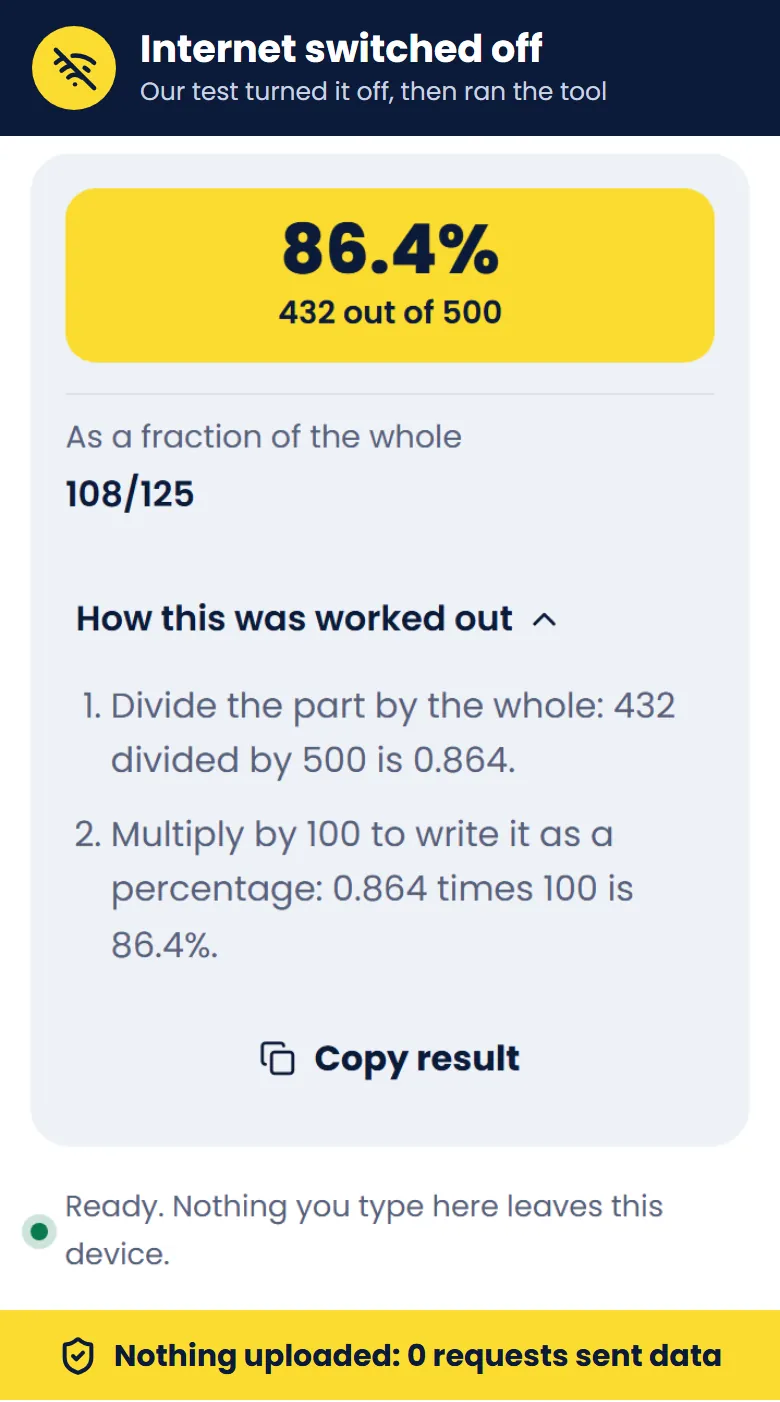
Size and offline. On a first visit the page downloads about 0.1 MB for the tool: the page, its styles, its script and the fonts, with Google's ad code not counted. In our test we switched the network off after the page had loaded and chose Part as a percentage of a whole, typed 432 and 500 and opened the working: the answer showed 0.2 seconds later or less in each of 15 runs, and 0.1 seconds later in 12 of them.
Phone-sized screen. We also ran every test on a phone-sized screen in Chromium (390 × 844 pixels, with touch). That is not a real phone. Every button and box was 44 pixels high or more, and the page did not scroll sideways.
Try it yourself: press "Try an example" at the top of this page. It puts 12.5 and 80 in the boxes and the answer is 10. Then choose "Part as a percentage of a whole" and type 432 and 500: the answer is 86.4%.
The five formulas, with an example of each
Each calculation in words, with the page's own example worked through:
- A percentage of a number = the percentage ÷ 100 × the number. 12.5% of 80 = 0.125 × 80 = 10.
- One number as a percentage of another = the part ÷ the whole × 100. 432 out of 500 = 0.864 × 100 = 86.4%.
- Percentage change = (the new number minus the old) ÷ the old × 100. From 80 to 90: 10 ÷ 80 × 100 = +12.5%. From 90 to 80: minus 10 ÷ 90 × 100 = -11.11%.
- Adding or subtracting a percentage = the number × (1 plus or minus the percentage ÷ 100). 1000 plus 18% = 1000 × 1.18 = 1180; 1000 minus 18% = 1000 × 0.82 = 820.
- Undoing a percentage = the result ÷ the same factor. 1180, after adding 18%, = 1180 ÷ 1.18 = 1000.
The page does this arithmetic with exact fractions, so it never shows the long tails of digits that ordinary calculators leave behind, and every step it shows can be checked by hand. Our post on how to calculate the percentage of your marks takes the second formula through five subjects, uneven totals and a target.

Discounts, marks, pay rises and prices: which calculation to use
| What you want to know | Choose | Example |
|---|---|---|
| The price after a discount | Add or subtract a percentage, subtracting | ₹2,499 with 20% off is ₹1,999.20 |
| A price with a percentage added | Add or subtract a percentage, adding | ₹1,000 plus 18% is ₹1,180 |
| The price before a discount, or before a percentage was added | Undo a percentage | ₹1,180, after adding 18%, was ₹1,000 |
| Marks as a percentage | Part as a percentage of a whole | 432 out of 500 is 86.4% |
| A pay rise, or a price going up or down | Percentage change | ₹40,000 to ₹46,000 is +15% |
| How much a percentage of an amount is | A percentage of a number | 12.5% of 80 is 10 |
The page does the arithmetic of the percentage you type. The rate itself, such as a GST rate, a fee or an interest rate, comes from the bill or the official source, and a loan's monthly payments need the EMI formula, not a single percentage: the EMI Calculator works them out, and the GST Calculator adds or takes out GST with its CGST and SGST halves. A CGPA has its own formulas, one per board or university: CGPA to Percentage applies yours. For a shop's percentage off, the Discount Calculator shows the price and the saving in one step; for a seller's margin and markup, the Profit Margin Calculator; and for a tip shared among friends, the Split Bill Calculator. Our post on 50% plus an extra 20% off shows how two percentages off in a row combine.
Decimal places, rounding and the exact value
Decimal places sets how many digits are kept after the dot: 0, 1, 2, 3, 4, 6, 8 or 10, with 2 to begin with. An answer that ends within those places is written as it is, with no zeros added: 12.5% of 80 is 10, not 10.00. Any other answer is rounded half away from zero to that many places and written with all of them, so a rounded answer always shows its places: 1 out of 3 is 33.33%.
When an answer was rounded, an Exact value row gives the true answer: a decimal if it ends within 40 places, otherwise a fraction, such as 100/3% with the words "the decimal never ends". The rounding is done on that exact value, which is why 1.005 rounds to 1.01 here, where a calculator working in floating point numbers gives 1.00, and why 110% of 1.1 is 1.21 here, not 1.2100000000000002.
Half away from zero means a 5 in the next place always rounds outwards: 0.125 becomes 0.13, and -0.125 becomes -0.13. A number that rounds to zero is written 0, with no minus sign.
Common mistakes with percentages
- Measuring a change from the wrong number. A change is measured from where it started: 80 to 90 is +12.5%, but 90 to 80 is -11.11%. A price that falls by half must then double, a rise of 100%, to get back.
- Mixing up percent and percentage points. An interest rate going from 10% to 12% has risen 2 percentage points, which is a 20% increase in the rate.
- Taking a percentage off to undo it. 1000 plus 10% is 1100, but 1100 minus 10% is 990. To find a number before a percentage was added, divide: use Undo.
- Adding discounts together. 20% off and then another 10% off is 28% off, not 30%: 100 becomes 80, then 72.
- Typing a comma for a decimal point. 12,5 isn't read as 12.5: the page asks for a dot rather than guess.
- A change from 0. A rise from 0 to anything has no percentage; the page says so instead of showing infinity.
Private: what you type stays on your device
Your numbers never leave your device. The tool runs inside your browser and has no upload step: it never sends the numbers you type, paste or open anywhere, and it does not save them, so closing the page forgets them. The page's Content Security Policy lets it contact only this site and Google's ad service, which pays for the site; our code never gives your numbers to the ad code. You can check it yourself in your browser's network panel (F12 on a computer): calculating adds no request that carries your numbers.
That matters for what people work out here: salaries and pay rises, prices, marks, loan and rent figures. Our privacy policy says the same in full, and How we prove it shows how to check any of our tools. Once the page has loaded it works with the internet switched off: in our test with the network off, the answer showed 0.2 seconds later or less in each of 15 runs.
Tips
- Paste numbers as they are: 1,25,000, 12.5% or a number in Hindi digits are all read.
- Choose Indian commas for lakh and crore amounts: 12,50,000 instead of 1250000.
- Pick 0 places for whole numbers such as marks, and 2 for money.
- Open How this was worked out to check a step, or to explain it to someone.
- Use Undo for a price before a discount; never take the percentage off a second time.
- Copy result gives the answer as a sentence, ready to paste into a message or a report.
- Read the Exact value row when it appears: it shows what the rounding changed.
Limits
- Two numbers at a time. Each calculation takes two numbers. For a column of numbers use a spreadsheet.
- Up to 40 digits. A longer number is not read, and the page says so.
- Only the percentage you type. It does not know tax rates, interest, EMI or the rules of a bill or a form. Check those with the official source, and for a loan, a SIP, a fixed deposit or GST use the EMI, SIP, FD or GST calculator.
- One kind of change. A percentage change goes from the first number to the second and is divided by the first. A difference divided by the average of the two numbers (a percentage difference) is not offered.
- A dot for decimals. A comma is read only as a mark between groups of digits, like 1,25,000. The page does not guess that 12,5 means 12.5: it asks for a dot.
- Not saved. The numbers and the answers are forgotten when you close the page.
- Browsers. We tested only in Chromium, the engine behind Chrome and Edge, with computer and phone-sized screens. We did not test on real phones, in Safari or in Firefox, so we cannot promise how they behave.
Terms explained
- Percent, per cent, %
- A number of hundredths: 12.5% means 12.5 out of every 100, or 0.125.
- Percentage change
- How much a number went up or down compared with where it started, as a percentage of the starting number.
- Percentage point
- The plain difference between two percentages: from 10% to 12% is 2 percentage points.
- Increase and decrease
- A positive and a negative change; 80 to 90 is an increase, 90 to 80 a decrease.
- Reverse percentage
- Finding the number before a percentage was added or taken off, by dividing, not by taking the percentage off again.
- Decimal places and rounding
- How many digits are kept after the dot; half away from zero means 0.5 goes up to 1 and -0.5 goes down to -1.
- Indian and international grouping
- 12,50,000 (lakh and crore) and 1,250,000 are the same number written with commas in different places.