What CSV to JSON does, and when you need it
A CSV file is a table written as text: one row a line, with the cells separated by commas (or semicolons, tabs or pipes). Excel, Google Sheets, banks and most business programs can save one. JSON is how web apps, scripts and databases like to receive data: here, a list with one object for each row, the column names as the object's names. This page turns the first into the second by the rules shown below.
Where it helps:
- A sheet of students, products or customers from Excel or Google Sheets, for a web app, a form, a database or a chart.
- A bank statement or a report downloaded as CSV, for a script that adds things up.
- An export from an online shop or a business program, to load into another one that reads JSON.
- Test data for a developer, written in a sheet because that is quicker than typing JSON.
The file is read in your browser, in a background worker, and never uploaded. The result is a .json file, saved under your file's name.
How to convert CSV to JSON, step by step
- Paste CSV in the box, or press Try a sample for a made-up marks list, and press Convert to JSON (or Ctrl+Enter).
- Or choose files: press Choose files, or drop .csv files anywhere on the page. Each one is converted at once, in a row of its own.
- Pick the options: the delimiter, whether the first row holds the column names, whether values stay text, and the indent. They are explained below.
- Read the line on the result: for the sample, “4 rows, 6 columns”, with the delimiter it used.
- Copy or Download. A file keeps its name, so marks.csv becomes marks.json; CSV you pasted is saved as data.json. Two or more results can be saved together with Download all as ZIP.
From Excel: File, Save As, and choose CSV UTF-8 (Comma delimited). From Google Sheets: File, Download, Comma-separated values (.csv). Both save the sheet you are looking at.
How CSV becomes JSON: the rules
The CSV is read the way RFC 4180 (the CSV standard), Excel, Google Sheets and Python's csv module read it, and turned into JSON by these rules:
| In the CSV | In the JSON |
|---|---|
| The first row, with First row: Header names | The names: [{"roll": "101", "name": "Aarav Patel"}, ...] |
| With First row: Data | A list of lists: [["roll", "name"], ["101", "Aarav Patel"]] |
"Iyer, Meera" | Iyer, Meera: quotes hold the delimiter in a cell |
"say ""hi""" | say "hi": a quote is written twice inside quotes |
| A line break inside quotes | Kept in the text, as \n |
Text right after a closing quote "ab"c | Kept: abc, as Excel and Python read it |
| An empty header cell (the 3rd) | Named column_3 |
| A header name used twice | The second becomes name_2 |
| A row with fewer cells than the header | The missing cells are "" |
| A row with more cells than the header | The extra cells are named column_7 and on |
| Blank lines | Skipped |
| A byte order mark (BOM) at the start; line ends CRLF, LF or CR | The mark is removed; all line ends are read |
| A quote that is never closed | A message naming its line, rather than reading the rest of the file as one cell |
Values like 91, 3.50, TRUE | Text by default: "91". With Detect numbers: 91, 3.50, true. 007, 1e5, +5 and numbers of more than 15 digits stay text, so nothing is rounded |
Auto delimiter. It tries comma, semicolon, tab and pipe on the first rows and takes the one that splits them into the steadiest number of cells (more than one); a tie goes to comma, then semicolon, tab and pipe. The result names the one it used.
CSV files from Excel and Google Sheets
Excel offers two kinds of CSV in Save As, and the difference matters for Hindi and other letters. CSV UTF-8 (Comma delimited) keeps every letter, and is the one to choose. CSV (Comma delimited) saves in the computer's older code page, on most computers in India Windows-1252, which has no Hindi letters at all: Excel writes question marks in their place before the file ever reaches this page. When a file isn't UTF-8, the page reads it as Windows-1252, so accented letters such as é come through, and the result says so, with the tip to save as CSV UTF-8.
Excel in many European countries saves CSV with semicolons, because there the comma is the decimal mark; Auto finds them. Google Sheets always downloads UTF-8. And what Excel shows on screen isn't always what it writes: a 12-digit number shown as 1.23457E+11 is written in full, but a date is written the way your computer shows dates, such as 01-11-2026, and the page keeps it exactly as written.

Real results from our tests
We tested CSV to JSON with headless Chromium 148, the open-source browser Chrome is built on, on a Windows laptop with an Intel Core i7-1185G7 and 32 GB of memory, on 1 November 2026. Other work was running on the laptop at the same time, so times vary a little from run to run: each time below is the middle one of 3 runs, each in a fresh browser.
Checked against Python. Our test gave the page every file of our test set for this tool, 12 that it should convert and 1 with mistakes, with the usual options and again with changed ones, and then the 50 MB file: 27 files in all. For every converted file, Python's csv module read each CSV with the file's delimiter, the page's rules were applied a second time to its rows, and each saved JSON had the same values and the same text as Python's json.dumps writes. Each of the 1 files with mistakes was refused, as Python refuses it too, with the page's message naming the mistake.
Speed and memory. The test files were made up for these tests: a sales table, of 1 MB, 10 MB and 50 MB. The time is from choosing the file to its finished row, and the memory is what the whole browser added while it worked. “Page kept waiting” is the most that a timer on the page, set to tick every 50 milliseconds, was ever late: the work runs in a background worker, so the page itself stays free to answer a tap or a click.
| File | Time | Result | Memory added | Page kept waiting |
|---|---|---|---|---|
| A 1.0 MB CSV file | 0.1 s | 2.5 MB | 0 MB | 6 ms |
| A 10 MB CSV file | 0.5 s | 25 MB | 158 MB | 23 ms |
| A 50 MB CSV file | 2.9 s | 126 MB | 823 MB | 15 ms |
| A 1.0 MB CSV file, on a phone-sized screen with the processor slowed 4 times | 0.3 s | 2.5 MB | 3 MB | 162 ms |
| A 10 MB CSV file, on a phone-sized screen with the processor slowed 4 times | 0.8 s | 25 MB | 123 MB | 121 ms |
What the numbers mean: a 50 MB file took 2.9 seconds on the laptop, and the page was never kept waiting for more than 15 milliseconds while it worked, far too little to notice. With the processor slowed 4 times, roughly a mid-range phone, a 10 MB file took 0.8 seconds, and the page was never kept waiting for more than 162 milliseconds: on a phone, a big result's box starts closed and is filled when you open it, so the finished row appears at once.
The options, explained
Delimiter. Auto tries comma, semicolon, tab and pipe on the first rows and takes the one that splits them most steadily, and the result names it. Pick one yourself when a file is unusual, such as a single column with commas inside its text.
First row. Header names uses the first row as the names, so each row becomes an object, {"roll": "101", "name": "Aarav Patel", ...}. Data keeps the first row as data, and each row becomes a list of its cells, for files with no header.
Values. Keep as text is the safe choice: PIN codes, phone numbers, roll numbers and account numbers keep their zeros in front. Detect numbers turns plain numbers into JSON numbers and TRUE or false into true and false: in the sample, 11 values change, such as "maths": "91" becoming "maths": 91. 007, 1e5, +5 and numbers of more than 15 digits stay text, so nothing is rounded.
Indent. 2 spaces, 4 spaces, a tab, or one line for the smallest file. Changing an option never redoes a finished result by itself: it says it was made before the change and offers a button such as “Redo with Detect numbers”, or “Apply to all” for many files.
Big files: up to 200 MB
The work runs in a background worker, a separate part of the browser, so the page keeps responding while a big file is read. In our tests a 50 MB file, a sales table, took 2.9 seconds on a laptop, and the page was never kept waiting for more than 15 milliseconds. A big file needs memory, though: the browser used 823 MB more while it worked, so on a phone or an older computer a file of a few tens of MB is the comfortable size. Stop, or the × on a row, ends the work at once.
The result box shows the start of a big result, the first 20,000 characters; Download always saves all of it, and Copy works up to 10 MB. Files over 200 MB are not started, because a browser tab would run out of memory: split them first. On a phone, a big result's box starts closed, so its row, with Download and Copy, appears at once: tap Result to see the start of it.
Hindi, other languages and encodings
A UTF-8 file, which is what CSV UTF-8 from Excel and every Google Sheets download are, keeps Hindi, Tamil, Bengali, Urdu, Chinese and emoji as letters: सुनीता यादव in the sample comes through as it is, not as \u codes. A file that starts with a UTF-16 byte order mark, as some programs save, is read as UTF-16, and the result says so. A file that isn't valid UTF-8 is read as Windows-1252, the code page of Excel's older CSV kind, with a note.
A worked example: the sample marks list
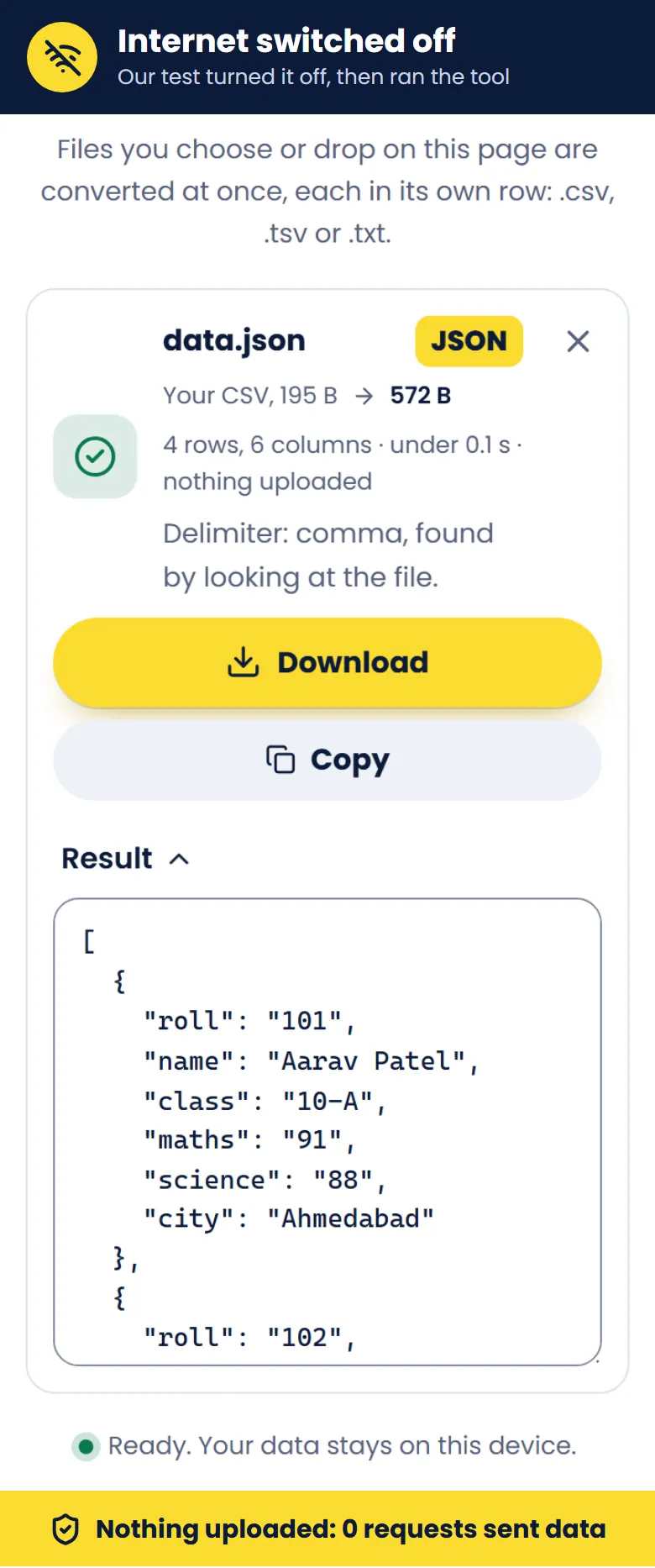
The sample is a made-up marks list: a header row roll,name,class,maths,science,city and four students. With the usual options it becomes a list of four objects:
- Each row is an object named by the header:
{"roll": "101", "name": "Aarav Patel", "class": "10-A", "maths": "91", "science": "88", "city": "Ahmedabad"}. "Iyer, Meera"is in quotes in the CSV because it holds a comma, and comes through as one name,"Iyer, Meera".सुनीता यादवkeeps its Hindi letters.- Rohan has no science mark, an empty cell, so his
"science"is"".
The result line says “4 rows, 6 columns” and “Delimiter: comma.” With Detect numbers, the 11 marks and roll numbers become numbers, and the empty science mark stays "".
Quotes, commas and line breaks inside cells
A comma separates cells, so a cell that holds a comma, a quote or a line break is written in quotes. RFC 4180, the document that describes CSV, sets the rules, and Excel, Google Sheets and Python follow them: "Iyer, Meera" is one cell, a quote inside quotes is written twice ("say ""hi""" is say "hi"), and a line break inside quotes stays part of the text, written \n in the JSON.
The page reads them the same way, so an address over two lines or a product name with a comma comes through whole. The one mistake it can't read around is a quote that is opened and never closed, which would make the rest of the file one cell: instead of guessing, it stops and names the line where the quote opened.
Bank statements and other reports
A CSV downloaded from a bank or a business program is often a report, not a plain table: a few lines with the account holder's name and the dates above the real header row, and totals at the bottom. The page reads the first line as the header, so those lines would become the names. Open the file in Excel or a text editor first, delete the lines above the header row and below the last row, save it as CSV UTF-8, and convert that. A statement holds private details, which is one more reason to convert it on your own device, as this page does.
Column names, and dates
The header row's cells become the JSON's names exactly as written, spaces and capitals included: a column Roll No gives "Roll No". Two cases are changed so that no value is lost, and the result says so: an empty header cell is named after its place, column_3, and a name used twice gets _2, so two Name columns give "Name" and "Name_2". A program that reads the JSON is easiest to write with short names without spaces, so it can help to rename the header cells in Excel before you save.
Dates are kept as the text the CSV holds, such as "01-11-2010", even with Detect numbers, because a date in a CSV has no fixed form: 01-11-2010 is 1 November in India and 11 January in the United States. If a program needs dates, a form like 2010-11-01 (year, month, day) is the one most programs read the same way.
Private: your data stays on your device
Your file never leaves your device. The converter runs inside your browser, in a background worker on your own phone or computer, and has no upload step: it never sends your file or the text you paste anywhere. The page's Content Security Policy lets it contact only this site and Google's ad service, which pays for the site; our code never gives your files to the ad code. You can check it yourself in your browser's network panel (F12 on a computer): converting a file adds no request that carries it.
Nothing you paste is run as code. The CSV is read by our own small reader, written for this site, which only reads text: there is no eval and no step that runs anything from the file.
Compared with converters that upload your file
| This page | A converter that uploads | |
|---|---|---|
| Where your file goes | Nowhere: it is converted in your browser | To the site's server |
| Size | Up to 200 MB | Often a few MB |
| Zeros in front | Kept: values stay text unless you ask | Some turn every number-like value into a number |
| Commas inside cells | Read as RFC 4180 and Excel do | Varies |
| A broken file | A message naming the line | Sometimes a guess |
| Offline and sign-up | Works once loaded; no sign-up | Needs the internet; sometimes an account |
Tips for clean JSON
- Save from Excel as CSV UTF-8, never the older CSV, when the sheet has Hindi or other letters.
- Keep Values as text for IDs, PIN codes and phone numbers, and turn on Detect numbers only when a program needs real numbers.
- Check the header row first: its names become the JSON's names, so short, plain names make the JSON easiest to use.
- To check or tidy the JSON, use JSON Formatter; for the way back to a table, JSON to CSV.
- For a system that needs XML, turn the JSON into XML with JSON to XML.
Limits
- Files up to 200 MB. Bigger files are not started: a browser tab would run out of memory.
- Excel files (.xlsx) aren't read: save the sheet as CSV first.
- Each value is detected on its own with Detect numbers, so one column can hold numbers and text.
- Dates stay text, as written in the CSV.
- A quote that is never closed stops the conversion with a message, rather than guessing.
CSV and JSON terms, explained
- CSV
- Comma-separated values: a table written as text, one row a line, the cells separated by a delimiter.
- Delimiter
- The character between cells: a comma, a semicolon, a tab or a pipe (|).
- Header row
- The first row, with the column names, which become the names in the JSON.
- RFC 4180
- The document that describes CSV: quotes around a cell that holds the delimiter, a quote or a line break, and quotes doubled inside.
- UTF-8 and BOM
- UTF-8 is how letters of every language are stored as bytes; the byte order mark (BOM) is the mark at the start that Excel looks for to know a file is UTF-8.
- JSON
- JavaScript Object Notation: data written as text, with names and values in { } and lists in [ ].