How many pages fit in 300 KB
This page makes a new, smaller copy of your PDF that is under 300 KB, and no smaller than it needs to be. The copy has -300KB added to its name, like marksheet-300KB.pdf. Your original file is not changed.
Here is how it works, in plain words. A scanned page is a photograph of the paper, made of tiny dots called pixels. Almost all of a scan's size is those dots. A 300 dpi scan (dpi means dots per inch) has 300 dots in every inch. To fit a limit, the page keeps fewer dots per inch (we write ppi, for pixels per inch) and squeezes the picture harder. Fewer dots means a softer page. Typed text, fonts and drawings are not photographs, so they are copied as they are and stay sharp.
It does not guess once. It makes a copy with its usual setting and checks the size. Then it tries a stronger or a gentler setting, and narrows down. It stops when a copy lands within 15% under 300 KB, or after six tries, and keeps the sharpest copy that fits. While it works, the progress bar names the size it is aiming for and counts the tries. Each try is a pass over the whole file, so a long scan takes longer.
All the pages share the 300 KB. Divide 300 KB by the number of pages to see what each page gets on average: one page gets all of it, four pages about 75 KB each, and twenty pages about 15 KB each. So the fewer the pages, the clearer each one stays.
We measured test files that our own script draws to look like office-scanner pages: A4 at 300 dpi, with text, a colour photo and a blue signature. We also tried a grayscale scan, 20 different pages in one file, and a 12-megapixel picture (3,000 by 4,000 dots) made to look like a phone photo of a printed letter. They are test files, not your papers, so your results will differ. The word under Pictures is how sharp the page said the pictures stayed: How it looks explains the four words. In the table, an MB is 1,000,000 bytes, so your file app may show a smaller number for the same file.
| Test file | Before | After | Pictures | Tries, time |
|---|---|---|---|---|
| 1 page, colour scan | 1.078 MB | 271,534 bytes | Sharp, 158.9 ppi | 3 tries, 1.7 s |
| 2 pages, colour scan | 2.147 MB | 278,468 bytes | Good, 116.6 ppi | 3 tries, 1.7 s |
| 4 pages, colour scan | 4.279 MB | 282,273 bytes | Readable, 85.5 ppi | 5 tries, 5.3 s |
| 6 pages, colour scan | 6.437 MB | 229,388 bytes | Readable, 72.7 ppi | 6 tries, 17.5 s |
| 4 pages, grayscale scan | 7.144 MB | 276,872 bytes | Readable, 85.6 ppi | 5 tries, 2.1 s |
| 20 different pages, colour scan | 21.445 MB | 282,161 bytes | Readable, 46.5 ppi | 4 tries, 30.5 s |
| 1 page, phone-style photo | 3.385 MB | 259,779 bytes | Sharp, 170.3 ppi | 3 tries, 1.7 s |
- Every scan fitted, and most landed close to the limit. Six of the seven are between 255,000 and 300,000 bytes, the window the page aims for. The 6-page file used all six tries and ended at 229,388 bytes, the sharpest copy that fitted.
- Each time the pages doubled, sharpness fell by about a quarter. One page kept 158.9 ppi, two kept 116.6 and four kept 85.5. A single page stayed Sharp, scan or photo.
We also ran a 42-page scan of 48.263 MB. It took 59.1 seconds, and the browser tab used at most about 397 MB of memory. We do not say how many pages "fit" from it, because its 42 pages are only four page pictures repeated, and repeated pictures are stored once. The 20-page result is the honest one for many different pages. Typed PDFs are different: see Over, Rough, other messages.
These runs were on one Windows computer (Intel Core i7, 4 cores) in Chromium, the browser engine under Chrome and Edge, while other programs were busy. Treat the seconds as rough, not as a promise.
Many of these forms also ask your age on a cut-off date: the Age Calculator works it out to the day. When one asks your marks as a percentage, Percentage Calculator works that out exactly, from your marks and the total.
NEET and JEE Main: PDFs between 50 and 300 KB
The National Testing Agency (NTA) runs NEET (UG) and JEE (Main). In both online forms, some papers must be uploaded as a PDF of 50 KB to 300 KB. That is the size this page is made for.
The NEET (UG) 2026 Information Bulletin (Chapter 3, printed page 16, point d, items iv to xi) asks for these papers as PDFs of 50 KB to 300 KB:
- the category certificate;
- the Class X certificate and the Class X marksheet;
- the CGPA conversion certificate, the paper that turns CGPA grades into a percentage (to see the percentage your board's formula gives first, use CGPA to Percentage);
- the PwD, PwBD or UDID disability certificate;
- address proof, present and permanent;
- the proof for NRI, OCI and foreign candidates.
The JEE (Main) 2027 Information Bulletin (page 8, Step 2) asks for the Class 10 certificate or marksheet as a PDF between 50 KB and 300 KB. It says the PDF must be "clearly legible". The disability or UDID certificate has the same range.
These are the NEET (UG) 2026 rules, last checked on 2026-10-08, and the JEE (Main) 2027 rules, checked on 2026-10-31. NTA publishes a new bulletin each year, so open the current one before you start. The links are repeated under Which forms ask for 300 KB.
Not every upload is a PDF. In both bulletins the photograph (10 KB to 200 KB) and the signature (10 KB to 100 KB) are JPG pictures. NEET also takes finger and thumb impressions and a photo ID as JPGs (10 KB to 200 KB each). This page works on PDFs only: for the JEE photo and signature use JEE Main Photo and Signature Resizer, and for NEET's pictures, Reduce Image Size in KB has the NEET settings.
A simple plan for one candidate:
- Scan or photograph each paper by itself, flat, in good light, with the whole page in view. A scanner app on your phone can save it as a PDF. Make one PDF for each upload box.
- Add each PDF here. Look for "Under 300 KB" in green and the word after "Pictures".
- Upload the copy whose name ends in -300KB.pdf, not your original.
A file that fits the size but cannot be read is no use, and the JEE line asks for a readable file. So give every result a careful look before you upload.
Staying between 50 KB and 300 KB
Some forms set a floor as well as a ceiling. For NEET and JEE Main the PDF must be at least 50 KB, so a file that is too small can be refused, just like one that is too big. This page aims for the top of the range, on purpose.
It stops when a copy lands within 15% under 300 KB, so a result is usually between 255,000 and 300,000 bytes. In our tests the compressed files came out between 229,388 and 282,273 bytes, which the page shows as 224 KB to 276 KB. That is far above 50 KB. The one below 255,000 bytes is the 6-page scan: it used all six tries and kept the sharpest copy that fitted.
If your file is already under 300 KB, the page does not touch it. It says "Already under 300 KB, so you can use your original file" and shows no Download button. That includes a file under 50 KB: this page can only make files smaller, so it cannot lift a file up to 50 KB. If a form refuses your file as too small, scan again at a higher quality, for example more dots per inch in your scanner app. Then bring the new file here if it is over 300 KB.
PAN card documents: 300 KB per page
Protean's page for Form 49A applications with scanned images has a table of what to upload. For the supporting documents (proof of identity, proof of address and proof of date of birth) it asks for 200 dpi, black and white, PDF/A or JPEG, at most 300 KB per page. Last checked: 2026-10-08. The photograph and the signature are separate JPEG pictures, at most 20 KB and 10 KB. This page cannot make those.
Here is what this page can and cannot do for that rule:
- It can bring a PDF under 300 KB. The limit is per page, so a 2-page proof may use up to 600 KB by that rule. This page keeps the whole file under 300 KB, which is safe but softer. If your slot takes one page per file, make a PDF for each page with Split PDF and shrink each one.
- It does not make PDF/A. Our files are ordinary PDFs, and we have not tried uploading to the portal, so we cannot say whether it accepts them.
- It does not turn pages black and white. A colour scan stays colour. If the rule asks for black and white at 200 dpi, set that in your scanner app before you scan, and use this page only for the size.

How pages look at 300 KB
The page tells you how sharp the pictures stayed with one word, worked out from the pixels per inch (ppi) they kept. Our test scans started at 300 ppi. Here are the four words, with where our test files landed at 300 KB:

| Word | Pixels per inch | Our 300 KB test files |
|---|---|---|
| Sharp | 150 or more | 1 page (158.9), the phone-style photo (170.3) |
| Good | 100 up to 150 | 2 pages (116.6) |
| Readable | 45 up to 100 | 4 pages (85.5), 4 grayscale pages (85.6), 6 pages (72.7), 20 different pages (46.5) |
| Rough | Below 45 | None of them |
We opened one 300 KB result ourselves and looked at it: the 20-page scan, where every page is different. It fitted at 46.5 ppi, just above where Rough begins. The blue "Signed: J. Doe" was still clear, but the body text was smudged and hard to read. So Readable near 45 ppi means: check every number. The same 20 pages under 1 MB kept 72.5 ppi, and the body text was readable. We judged the other 300 KB results only by their word and ppi, so we do not describe how they looked.
Typed text is different. If your PDF was made on a computer, its words are real text and stay sharp at any size. Only pictures inside it, such as a logo, get softer. If it has no pictures at all, the row shows no word after Pictures. If it says "Pictures unchanged", the page left your pictures as they were.
Before you upload, open the new file and look at it the way the person checking your form will:
- Zoom in until the page is about as big as the real paper. On a phone, spread two fingers until one line of text fills the screen width.
- Read every number the form depends on: roll or application number, date of birth, marks, certificate number, name and address.
- Find the stamp and the signature, and count the pages. The new file has the same pages as the old one.
Several certificates, and doing it on a phone
Many forms have one upload box for each paper, each with the same 300 KB limit. You can do all your papers in one go:
- Choose all your PDFs at once, or drop them on the page together. Each one becomes its own row.
- They are done one after another, each to its own copy under 300 KB, with its own result word and Download button.
- Download each one. The names keep the original name and add -300KB, like class10-marksheet-300KB.pdf.
If all your papers are in one PDF, split it first with Split PDF, which can save chosen pages, or every page, as PDFs of their own, together in one ZIP file. Unzip it, then add the parts here. If a form wants everything in one file, do the opposite: join the papers with Merge PDF first, then bring the joined file under 300 KB. Shrink last, because the limit is checked on the file you upload. Remember that all the pages then share the 300 KB.
On a phone, open this page in your phone's browser, tap Choose PDF files and pick the PDF. There is nothing to install, and your browser saves the new file like any download. We tested at phone size, 390 by 844, in Chromium on a computer. That imitates a phone but is not one. The 1-page scan came out at 271,534 bytes (Sharp, 158.9 ppi) in 2.3 seconds, and the phone-style photo at 259,779 bytes (Sharp, 170.3 ppi) in about 3 seconds: the same sizes as at computer width. We have not tested real phones, Safari or Firefox. If the page says the tool could not start in your browser, update the browser.
A phone has less memory than a computer, and we measured memory only on a computer. At phone size there, the browser tab used at most about 195 MB and 231 MB for those two files. A long scan on a small phone may run out of room. The page then says the file needs more memory than your browser allows. Close other tabs, or use a computer. To see how the page works first, press "Try with a sample file" under the tool: it makes a four-page scan in your browser and shrinks it.

When it says Over 300 KB, Rough, or something else
"Over" means the file cannot get under 300 KB, and you are looking at the smallest copy possible. In our 300 KB tests it happened only with a typed PDF. A scan is mostly pictures, and pictures can be shrunk a long way. We did not try a scan with hundreds of pages. A typed PDF is mostly text and fonts. This page copies those as they are, so that words stay sharp, and no setting can win that room back. We tried two typed files:
| Typed test file | Before | What happened |
|---|---|---|
| 24 pages of dense text, 2 fonts, no pictures | 123,583 bytes | Already under 300 KB, so the page left it alone. No download. |
| 120 pages with 6 fonts, tables and line drawings, no pictures | 540,504 bytes | Over 300 KB. The smallest it could get was 437,996 bytes (428 KB on the page), found in 2 tries in under a second. |
When the result says Over, the page tells you it is the smallest it can get, and suggests a bigger size or fewer pages. Here is what to do, from the easiest:
- Send only the pages the form asks for. Take them out with Split PDF and try again. Fewer pages mean less text and fewer fonts.
- Check whether a bigger limit exists. Another box on the form may take more. The same method is on the 500 KB and 1 MB pages.
- For one or two pages, make each page a picture first. PDF to JPG turns a page into a picture, and JPG to PDF puts it back into a PDF that this page can shrink like a scan. We did not measure this at 300 KB, so read the result word. The words are then a picture, not text you can search or copy.
Rough means the file fitted, but its pictures had to drop below 45 ppi, so small print may be unreadable. None of our 300 KB scans came out Rough, but 20 different pages came close at 46.5 ppi. If you see Rough, send fewer pages in each file, make one PDF for each upload box, start again from your original scan (a copy already squeezed has lost detail for good), and crop away the empty paper or table around the page.
Other messages you may see:
- Already under 300 KB, or "can't get any smaller": keep your original file.
- Locked with a password: remove the password first with Unlock PDF. You need the password.
- Can't be read as a PDF: the file may be damaged, or may not be a PDF.
- Needs more memory: close other tabs, or use a computer. A file over 2 GB is refused.
How 300 KB is counted
There are two ways to count a kilobyte: 1,000 bytes or 1,024 bytes. Websites use either. We use the stricter one. "Under 300 KB" here means at most 300,000 bytes. A website that counts in 1,024s allows 307,200 bytes, so a file under 300,000 bytes is under the limit either way. The 50 KB minimum works the same way: whether a site reads it as 50,000 or 51,200 bytes, our smallest result (229,388 bytes) is far above it.
Your phone or computer may show a different number for the same file. The sizes on this page's result row are in 1,024-byte kilobytes, like most file apps. In our tests, 271,534 bytes showed as 265 KB and 282,273 bytes as 276 KB. Both describe files under the limit.
The page lands close to the limit on purpose, within 15% under it. A much smaller file would be blurrier than needed, because it would throw away detail the limit had room for.
Which forms ask for 300 KB, and where we checked
This table lists the forms whose rules we read ourselves, with the official notice and the day we checked. Limits change with every notice and every year, so open the current notice for your form before you upload. We read the written instructions only. We did not try uploading to any of these portals.
| Form | Papers | Rule | Notice | Last checked |
|---|---|---|---|---|
| NEET (UG) 2026 | Category certificate, Class X certificate and marksheet, CGPA conversion certificate, PwD, PwBD or UDID certificate, address proof, NRI or OCI proof | PDF, 50 KB to 300 KB | Information Bulletin, Chapter 3, printed page 16, point d | 2026-10-08 |
| JEE (Main) 2027 | Class 10 certificate or marksheet, disability or UDID certificate | PDF, 50 KB to 300 KB | Information Bulletin, page 8, Step 2 | 2026-10-31 |
| PAN card, Form 49A, scanned images (Protean) | Proof of identity, proof of address, proof of date of birth | 200 dpi, black and white, PDF/A or JPEG, at most 300 KB per page | Protean page for Form 49A, section (k) | 2026-10-08 |
| Governor Assam Pratibha Protsahan Yojana (GAPPY) 2025-26 | Aadhaar card scan | PDF only, at most 300 KB each, at least 20 KB | Annexure 2, instructions for the online application, point 7 | 2026-10-08 |
Forms we did not read are not in the table, even if a website says they use 300 KB. If your form is not here, follow its own notice. Other forms use other sizes, such as 100 KB, 200 KB or 500 KB.
Your papers stay private
A certificate or an ID proof is one of your most private papers. Most sites that shrink PDFs send the file to their own computers first. This page has no upload step. A program running inside your browser, on your own phone or computer, does the work, and the new file is saved straight to your device. The result row says "nothing uploaded". The page's Content Security Policy, the browser's list of what a page may contact, also lets it contact only this site and Google's ad service, which shows the ads. Our code never gives your files to the ad code.
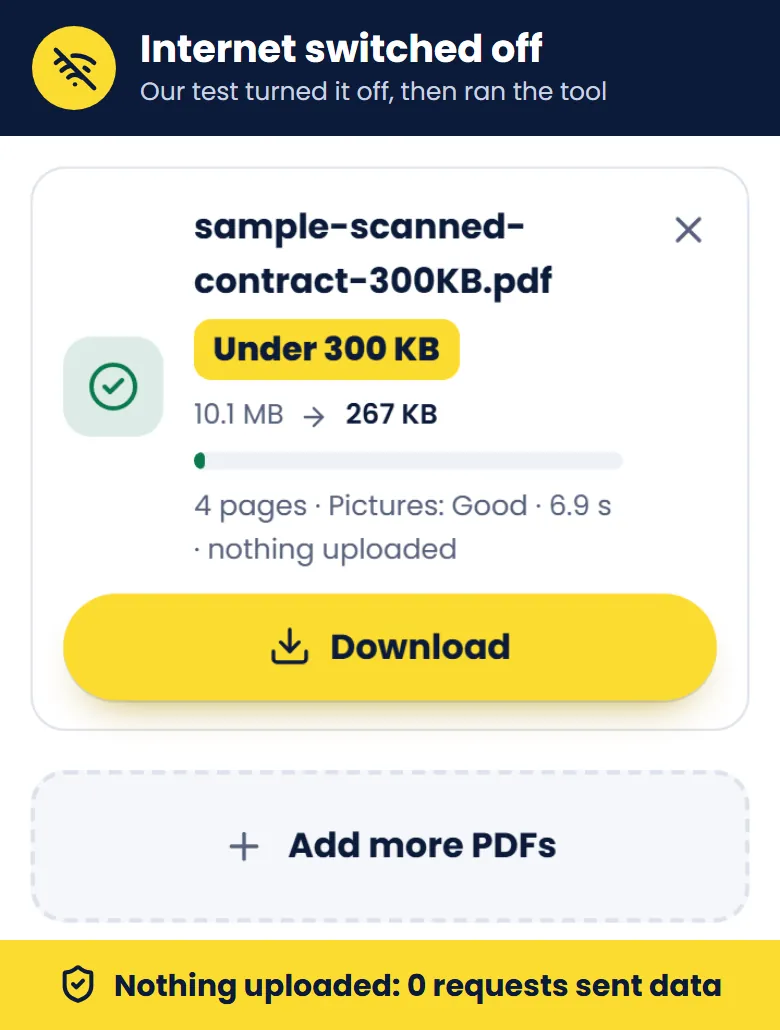
Once the page has loaded, the work needs no internet, because the program is already in your browser. We tested that with the network switched off on Compress PDF, which uses the same program, not on this page. There is no account, no sign-up and no watermark. Our privacy policy has the details.
Limits, and other ways
- Typed PDFs have a smallest size set by their text and fonts. Our 120-page typed book could not go below 437,996 bytes.
- Many scanned pages share one budget. 20 different pages fitted, but at 46.5 ppi, with the body text hard to read.
- The page only makes files smaller. It cannot add size to reach a minimum such as 50 KB.
- Our files are ordinary PDFs, not PDF/A. Colour scans stay colour.
- A PDF that needs a password to open is refused. A digital signature in the PDF stops being valid when the file changes, and the row warns you. A signature scanned as part of a page is just a picture and stays. If the PDF had editing restrictions, the new copy opens without them.
- It works on PDFs only. It does not resize JPG photos and signatures.
- Big scans take longer: on our busy computer, 20 different pages took 30.5 seconds.
If this page cannot do what a form needs, there are other ways. Many scanner apps let you pick a lower resolution, grayscale or black and white, and crop to the page, before you save, which makes a smaller file at the source. A photo editor can resize a JPG. Some office programs can save a PDF/A. Websites that upload your file to their computers can also shrink PDFs, but then your papers leave your device. If a rule does not fit your paper, ask the people who run the form.