What this page does, and when you need it
This page makes a PDF smaller until it is under 500 KB. You choose a file, and soon you get a new copy with the same pages in the same order. Your own file is not changed, and it is never sent to a server: your browser does the work.
Why are some PDFs so big? Mostly because of pictures. A page you scan or photograph is one large picture of the paper. In our tests a one-page colour scan was 1.03 MB and a four-page one was 4.08 MB. A PDF typed on a computer is far lighter: our 24-page typed test file was only 121 KB. (MB is short for megabyte, about a thousand KB.)
You need this page when an upload form says "file too large" and its limit is 500 KB. We found two official papers that set 500 KB as the top size, one for a bank exam and one for GST, and both are below. If your form uses another number, pick it at the top of the page or type your own under Other. Under the hood this is Resize PDF with 500 KB picked.
How many pages stay clear in 500 KB
All the pages of your PDF share the same 500 KB. One page can use nearly all of it, but twenty pages must split it twenty ways. So the page count matters most.
We tried the page on A4 scans made at 300 dpi (dots per inch: how finely a scanner looks at the paper). After shrinking, a scanned page keeps some pixels per inch (ppi). A pixel is one tiny dot of a picture, so more ppi means a sharper page. The result row turns this into one word: Sharp (150 ppi or more), Good (100 to 149), Readable (45 to 99) or Rough (under 45).
| Test file | Before | After | Pictures | Time |
|---|---|---|---|---|
| 1 page, colour scan | 1.03 MB | 451 KB | Sharp, 207 ppi | 1.8 s |
| 1 page, phone-style photo of a letter | 3.23 MB | 436 KB | Sharp, 202 ppi | 2.1 s |
| 2 pages, colour scan | 2.05 MB | 438 KB | Good, 145 ppi | 3.6 s |
| 4 pages, colour scan | 4.08 MB | 463 KB | Good, 108 ppi | 3.8 s |
| 4 pages, grayscale scan | 6.81 MB | 437 KB | Good, 106 ppi | 2.5 s |
| 6 pages, colour scan | 6.14 MB | 448 KB | Readable, 89 ppi | 10.9 s |
| 20 different pages, colour scans | 20.5 MB | 471 KB | Readable, 56 ppi | 33 s |
All seven went under 500 KB, between 436 KB and 471 KB. Time runs from choosing the file to the result. The computer was busy with other work, and the same four-page colour scan took 3.8 seconds in one run and 9.6 in another, so read every time as "about". More pages meant less sharpness: the same colour scan kept 207 ppi as one page, 145 as two and 108 as four. A photographed page did as well as a scan: the phone-style photo (3,000 × 4,000 pixels, a printed letter on a table) came out Sharp. Crop such a photo to the paper first, so that none of the 500 KB is spent on the table.
Bank exam forms: the 10th certificate under 500 KB
We read the IBPS guidelines for scanning and uploading documents on the registration site of one bank recruitment, CRP PO/MT-XV. On page 3, the SSC, SSLC or 10th standard certificate (or an equivalent one) and the certificate named in Clause J (ix) must each be a PDF with an A4 page. The file size must not be above 500 KB. If a scan is bigger, the guidelines tell you to change the scanner's dpi and colour settings.
Last checked: 2026-10-08. These are one recruitment's guidelines. Each IBPS notice has its own and limits change, so read the one for your exam. The same guidelines ask for the photograph as a JPG of 20 to 50 KB and 200 × 230 pixels. That is not a PDF, so this page does not make it. The newer CRP PO/MT-XVI notification of June 2026 keeps the same 500 KB limit for the certificate; for its four pictures, IBPS Photo and Signature Resizer makes each in IBPS's exact pixels and KB.
- Scan or photograph the certificate flat, so that it fills an A4 page (see A4 pages).
- Add the PDF above and look for "Under 500 KB" in green.
- Zoom in on your name, roll number and marks. If you can read them all, upload the copy whose name ends in -500KB.pdf.
We did not upload a test file to the real IBPS site. We did check our saved test results with three other PDF programs (pypdf, PDFium and qpdf): within the limit, same pages and page sizes as the original, no errors on opening.
GST registration: proof of business place up to 500 KB
When you register for GST, or change a registration, you add proof of your place of business. A GST portal advisory dated 09/07/2024 covers the principal and any additional place of business, in a new registration and in an amendment. Four papers can now be up to 500 KB, as JPEG or PDF: the Municipal Khata copy, the electricity bill, the consent letter and the property tax receipt. The limit was 100 KB before. Last checked: 2026-10-08. The notice page loads its words with JavaScript, so open it in a normal browser.
- A scan or a photo of the paper: add it above. This page makes PDFs only, so it cannot shrink a JPEG.
- A bill you downloaded as a PDF may be small already. If the page says "Already under 500 KB", upload your original.
- Several proofs: add them together. Each gets its own copy and Download button. A form that still says 100 KB needs Compress PDF to 100 KB.
- Other GST uploads: the advisory names only those four papers, so read the portal's own words for the rest.

A4 pages and scanner settings
IBPS asks for an A4 page. A4 is 210 × 297 mm, the usual printer paper in India. This page leaves page sizes alone: in our checks every saved file had the same page count and page sizes as the original. So if your pages are not A4, change that first and shrink last, because the limit is checked on the file you finally upload.
- Open Resize PDF, switch to Page size, pick A4 and add your PDF. Each page is scaled to fill A4 as far as its shape allows, and centred. If every page is already A4, the row says so and you can skip this.
- Download the A4 copy. Its name ends in -A4, like certificate-A4.pdf.
- Add that copy here. You get certificate-A4-500KB.pdf.
If you photographed your papers, JPG to PDF can put each photo on an A4 page. About scanner settings: IBPS says to change dpi and colours when a file is too big, and a higher dpi gives finer detail and a bigger file. We did not test settings against each other, so we cannot name a best dpi. Our test scans were 300 dpi, and this page kept their pictures at 56 to 207 ppi. Keep your first clear scan as the original, and make every copy from it.
How pages look at 500 KB
We did not open each 500 KB result and look at it, so we will not describe those files by eye. What we did look at, next to the original at about normal zoom, were pages at other sizes with ppi close to ours:

| Page we looked at | What we saw |
|---|---|
| 72 ppi, Readable: one colour scan page under 50 KB | The heading and every line of body text were readable, a little soft. The colour photo kept its colours and shapes. |
| 46.5 ppi, Readable: twenty different pages under 300 KB | The blue signature was still clear. The body text was smudged and hard to read. |
| 38 ppi, Rough: six colour pages under 50 KB | The heading was readable. The body text blurred into grey lines and could not be read. |
Our 500 KB results kept 207 ppi for one page, 145 for two, 108 for four, 89 for six and 56 for twenty. We expect up to six pages to read well, as they are above the 72 ppi page. We also looked at the same twenty pages under 1 MB (72.5 ppi), where the body text was readable. So our twenty pages sit between that and the smudged 46.5 ppi: expect soft text. That is an expectation, not something we looked at. Near 45 ppi, "Readable" means you must check every number. Typed text stays sharp at any size, because only pictures get softer.
- Zoom in until one line of text fills the screen. Read every number the form depends on: roll number, date of birth, marks, bill number, amount.
- Find the stamp and signature, and count the pages. Softer is fine; missing is not.

Long scans in 500 KB
Our longest test with different pages had twenty scanned pages, 20.5 MB in all. It came out at 471 KB, Readable at 56 ppi, after 4 tries and 33 seconds. It fits, but the pages are soft, so check every number. The engine reserved 93 MB of memory for it, and the browser tab used at most 339 MB.
A bigger limit helps long scans a lot. The same twenty pages kept 46.5 ppi under 300 KB, 56 ppi under 500 KB and 72.5 ppi under 1 MB. If your form allows 1 MB, use Compress PDF to 1 MB.
Another test file had 42 pages, 46.0 MB. It came out at 463 KB, Good at 108 ppi, in 48 seconds, with 145 MB reserved by the engine and the tab using at most 382 MB. But it holds only four different page pictures, repeated, and once shrunk the copies are stored once. So do not read it as "42 pages stay Good in 500 KB". We quote it for time and memory only.
For a long scan, Split PDF can take out only the pages the form asks for. If the form has a slot for each paper, make one file per paper: every file gets its own 500 KB. If it wants a single file, join the papers with Merge PDF first and shrink last.
When it says Over 500 KB
"Over 500 KB" means the page could not get under the limit, and the file it gives you is the smallest it reached. The row adds: "This is the smallest it can get. Most of what's left is text and fonts, which stay sharp and can't shrink further. Try a bigger size, or fewer pages."
None of our ten test files came out Over at 500 KB. Most were scans, and the page can keep thinning out pictures, though only so far, so a scan with enough pages could still say Over. Typed PDFs are the other case to watch, because their text and fonts are copied as they are. We tried two:
| Typed PDF, no pictures | Before | After | Result |
|---|---|---|---|
| 24 pages of dense text, 2 fonts | 121 KB | Not changed | Already under 500 KB: your original is kept and there is no Download button |
| 120 pages, 6 fonts, tables and line drawings | 528 KB | 428 KB | Fitted in 2 tries and 0.4 s. The drop came from packing the data more tightly, not from changing the words. |
A longer or heavier typed file might still say Over. If it does, send fewer pages (take out the ones the form does not need with Split PDF), or choose a bigger size such as 1 MB if the form allows it. For typed pages this page can only pack the data more tightly, and we have not measured any other trick, so we will not promise one.
How it fits a file into 500 KB, in plain words
Nobody can know in advance how many dots to drop from a scanned page. Too many and the file stays over 500 KB. Too few and the page is blurrier than it needs to be. So the page tries, measures and learns from each try:
- First try: the Recommended setting of our PDF compressor.
- Find the edges. If that file is too big, it tries the strongest setting, and if even that is too big, it stops there and says Over. If the first file fitted, it tries the gentlest setting, in case the best quality fits too. If it does, that is the answer.
- Narrow in. The settings form a ladder of 13 steps, with settings in between. Each new try is aimed between the last copy that fitted and the last one that did not.
- Stop when a result lands within 15% under 500 KB, or after 6 tries, and keep the sharpest result that fits.
Each try is a whole pass over your file, so big files take longer. The test files that needed work took 2 to 5 tries. While it works, the bar says "Fitting it under 500 KB" and counts the tries. At the end the new file is read back as a check, and only then do you get the Download button.
How 500 KB is counted
A kilobyte is 1,000 bytes to some programs and 1,024 bytes to others, and websites use either. We count the strict way: 1 KB is 1,000 bytes here, so "under 500 KB" means at most 500,000 bytes. Such a file is under the limit on every site, so there is no need to aim for 450 KB "to be safe".
This page shows sizes in 1,024-byte units, like most file apps, so the same file can show another number elsewhere. Our biggest result was 481,836 bytes: 471 KB here, and 481.8 KB in an app that counts 1,000 bytes. Both are under the limit.
The page stops looking once a result is within 15% under the limit, which for 500 KB means 425,000 to 500,000 bytes. Our results were between 437,996 and 481,836 bytes. A much smaller file would be blurrier for no reason.
Compressing a PDF to 500 KB on a phone
There is nothing to install. Open this page in your phone's browser, tap Choose PDF files and pick the PDF from your phone's storage. Keep the page open until the result appears. To try first, "Try with a sample file" makes a four-page sample scan inside your browser.
We tested Chromium 148 (the open-source browser Chrome and Edge are built on) on a computer, set to a phone-sized screen of 390 × 844 with touch turned on. That imitates a phone, but it is not one. The one-page colour scan and the phone-style photo came out the same size as on the computer screen (462,104 and 446,272 bytes). They took 1.6 and 2.2 seconds, and the tab used at most 212 and 227 MB. We did not test a real phone, Safari or Firefox. A real phone may be slower and have less memory, so for a long scan close other tabs and apps first.
If something goes wrong
- Nothing happens after you choose a file. Wait until the line under the box says "Ready. Your files stay on this device." Only PDF files work here. If it says "This tool couldn't start in this browser", try an up-to-date browser. We tested only Chromium.
- "This PDF is locked with a password." Remove it with Unlock PDF, which needs the password, then add the unlocked copy here.
- "This file can't be read as a PDF." It may be damaged, or not a PDF. Check that it opens on your device, or scan it again.
- "This file needs more memory than your browser allows." Close other tabs, send fewer pages, or use a computer with more memory. A file over 2 GB is turned away, so split it first.
- "Something went wrong while resizing this file." Your original is unchanged. Try again, or try fewer pages with Split PDF.
If this page is happy and the portal is not, read the portal's message. It may not be about size: IBPS, for one, also asks for an A4 page.
Which forms ask for 500 KB, and where we checked
Upload limits belong to each portal and change with each notice. This table lists the papers we read ourselves. We read the written instructions only and did not upload to any portal. Always open the current notice for your form.
| Portal and paper | Document | Format | Limit | Official source |
|---|---|---|---|---|
| IBPS, CRP PO/MT-XV, guidelines for scanning and uploading, page 3 | 10th (SSC/SSLC) certificate and the certificate in Clause J (ix) | PDF, A4 page | Not above 500 KB | IBPS guidelines. Last checked: 2026-10-08 |
| GST portal, advisory dated 09/07/2024 | Proof of place of business: Municipal Khata copy, electricity bill, consent letter, property tax receipt | JPEG or PDF | Up to 500 KB (earlier 100 KB) | GST advisory. Last checked: 2026-10-08 |
| Raj Bhavan Assam, GAPPY 2025-26, Annexure-2, point 6 | Documents to upload | 500 KB to 1 MB | Annexure-2. Last checked: 2026-10-08 |
In the Assam row, 500 KB is the smallest size allowed, not the largest. This page only makes files smaller, so it is not the right tool for that rule. Other notices may use 500 KB too, but we could not read an official paper for them, so they are not listed.
Your papers stay private
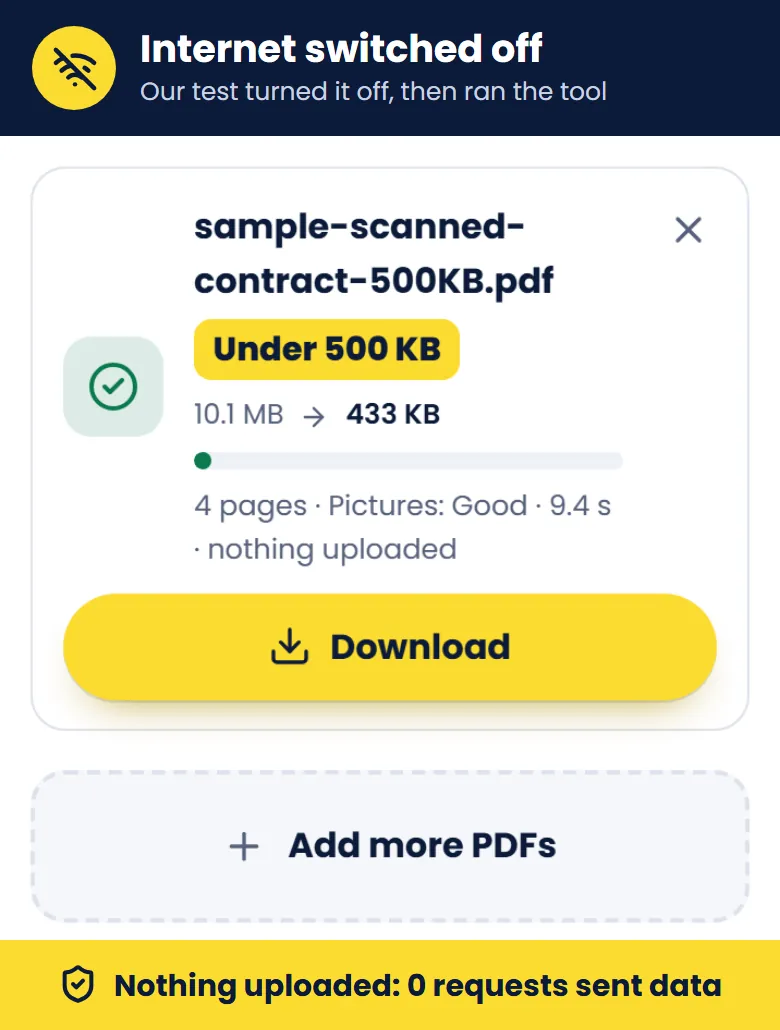
A 10th certificate, an electricity bill and a property tax receipt are personal papers. Many websites that shrink PDFs first send your file to their own computers. This page does not: a program inside your browser does the work, and the new file is saved straight to your device. The line under each new file ends with "nothing uploaded".
The work needs no internet once the page has loaded. We tested that on our main PDF compressor, which uses the same engine, and did not repeat it on this page. You can try it: let the page load, switch off Wi-Fi and mobile data, then choose a file. Our privacy policy has the details. In a cyber cafe or on any shared computer, delete the downloaded copy after you have uploaded it.
Limits
- Typed PDFs have a smallest size, set by their text and fonts. Many scanned pages share one 500 KB: twenty different pages fitted, but only as Readable.
- A PDF that needs a password to open cannot be changed until you remove the password with Unlock PDF.
- A digital signature stops being valid when the file changes, and the result row warns you. A signature scanned as part of a page is only a picture and stays. A PDF with editing restrictions can be shrunk, but the new copy opens without them, and the row says so.
- It only makes files smaller. It cannot add size, so it cannot help with a form that sets a minimum, like the Assam rule above.
- It works on PDFs only. It does not shrink a JPG photo or signature, and it does not read the words in a scan.
- We tested in Chromium at computer and phone screen sizes, not on real phones, Safari or Firefox, and we did not upload to the real portals.
Other ways to get under 500 KB
This page is one way. In general terms there are others, which we have not measured here. You can scan again at a lower setting, as IBPS itself suggests, and leave out blank sides and pages the form does not ask for. PDF programs on a computer often have a "Reduce file size" command. Many online tools send your file to their own computers, which you may not want for identity papers.
Or use another size, if the form allows it: 1 MB or 2 MB for more room, or 50 KB, 100 KB, 200 KB or 300 KB for stricter forms. When no exact size is needed, for example for email, our PDF compressor lets you choose a quality level instead.