What fits in 1 MB
This page makes a PDF smaller until it is under 1 MB, for forms and portals that refuse bigger files. It is Resize PDF with the size already picked. You choose a PDF and get a new copy, and your original stays as it is. Only the pictures inside the PDF get smaller, so a scan gets softer by only as much as 1 MB needs, and typed text stays as it is.
A 1 MB limit is shared by every page of the PDF. One page can have all of it, four pages about 250 KB each, twenty pages about 50 KB each. That is roomy: ten times what a 100 KB form allows and twice a 500 KB one.
We measured on 2026-10-08 in Chromium 148 (the open-source browser under Google Chrome). The computer ran Windows 11 on an Intel Core i7-1185G7 processor (4 cores) with 31.7 GB of memory. It was busy with other work, so your times will differ. Most test scans are A4 colour pages scanned at 300 dpi (dots per inch), with text, a photo and a blue signature. Our own scripts made them, so they are not real papers.
Pictures are measured in ppi, pixels per inch: how many dots of picture fit along one inch of the page. More dots mean a sharper and bigger file. The page turns the number into a word: Sharp from 150 ppi, Good from 100, Readable from 45, Rough below that.
| Test file | Before | After | Pictures | Time |
|---|---|---|---|---|
| 1-page colour scan | 1.03 MB | 522,497 bytes (510 KB) | Sharp, 220 ppi | 0.9 s |
| Phone-style photo of a letter, 1 page | 3.23 MB | 602,036 bytes (588 KB) | Sharp, 220 ppi | 2.8 s |
| 2-page colour scan | 2.05 MB | 920,465 bytes (899 KB) | Sharp, 207 ppi | 2.6 s |
| 4-page colour scan | 4.08 MB | 999,257 bytes (976 KB) | Good, just under 150 ppi | 3.3 s |
| 4-page grayscale scan, stored without loss | 6.81 MB | 988,387 bytes (965 KB) | Good, just under 150 ppi | 3.9 s |
| 6-page colour scan | 6.14 MB | 909,629 bytes (888 KB) | Good, 123 ppi | 13.6 s |
| 20 different scanned pages | 20.5 MB | 831,523 bytes (812 KB) | Readable, 72.5 ppi | 48.6 s |
Every file in the table fitted, from 522,497 to 999,257 bytes. The Before column and the brackets show sizes the way this page writes them, with 1 KB as 1,024 bytes and 1 MB as 1,048,576 (see How 1 MB is counted). Time runs from choosing the file to the result. What stands out:
- One or two pages stay Sharp. The one-page scan and the photo kept 220 ppi, the gentlest setting the page has, and the two-page scan kept 207.
- Four to six pages stay Good. The four-page colour scan kept just under 150 ppi, a hair short of where Sharp starts. The grayscale scan is a different document, so don't compare the two four-page rows.
- Twenty different pages stay Readable, at 72.5 ppi. How pages look at 1 MB shows what that means.
How the page fits a file under 1 MB
A PDF is built from pieces: typed text, fonts (the shapes of the letters), drawings and pictures. A scanned page is one big picture, so a scan is almost all picture. Pictures make a PDF heavy, and they are the only part this page shrinks. Text, fonts and drawings are copied as they are, so they stay sharp and searchable.
Nobody can know the result's size before trying, so the page makes a copy, weighs it and adjusts, all inside your browser:
- First try. A copy with the Recommended setting of our PDF compressor, which keeps pictures at about 150 ppi.
- If that fits, the gentlest setting comes next. It keeps pictures at 220 ppi with JPEG quality 85 (JPEG is the usual way to squeeze photos and scans, and its quality scale tops out at 100). It is the sharpest copy this page makes. If it fits, you get it, however far under 1 MB it lands. That is why our one-page scan came out at 522,497 bytes, about half the limit.
- If it does not fit, the page looks in between. When the first copy was already too big, it tries the strongest setting first. Each new try then aims between the two closest results. It stops when a file lands within 15% under the limit, which is 850,000 bytes or more for 1 MB, or after six tries.
- It keeps the sharpest copy that fits. If even the strongest setting is over 1 MB, you get the smallest copy, marked Over 1 MB.
Our twenty-page scan used all six tries and stopped at 831,523 bytes, a little short of the 850,000 mark. While it works, the row says Try 1, Try 2 and so on, because each try is a full pass over your file. At the end the page opens the new PDF again to check that it has the same number of pages. Your original is never changed.
Forms that ask for PDFs up to 1 MB
Job, recruitment and scheme portals often set a size for each document, and every portal picks its own number. Two with a 1 MB rule are ones we read on their official pages (links in Which forms ask for 1 MB, and where we checked):
- ARIES, Nainital. An autonomous institute of the Department of Science and Technology. Its recruitment guidelines ask for the photo ID proof, the certificates, the NOC (no objection certificate) and the experience certificates as PDFs of at most 1 MB each.
- GAPPY, Assam. The Governor of Assam's Pratibha Protsahan Yojana (2025-26) asks for marksheets and certificates as PDFs between 500 KB and 1 MB, and says the pages of one document must be joined into one file of at most 1 MB.
These are examples, and notices change every year, so your own form's notice wins. Both measure a whole document, not a page. In our tests, up to six scanned pages stayed Good in 1 MB. Before you start, read the line for your upload slot:
- Each document, or the whole application? "1 MB each" and "1 MB in total" need different plans.
- A smallest size too? "500 KB to 1 MB" has one: see the next part.
- A PDF slot? Photo and signature slots usually want JPG pictures, which this page can't shrink.
When a form wants between 500 KB and 1 MB
Some forms set a smallest size too, and a file that is too small is refused as firmly as one that is too big. GAPPY asks for 500 KB to 1 MB. Around that range, this page behaves like this:
- It doesn't know about your minimum. It keeps the sharpest copy that fits under 1 MB, and a few pages fit at the sharpest setting, so short files come out well under 1 MB. Our one-page scan came out at 522,497 bytes, the photo at 602,036 and the two-page scan at 920,465. The longer scans landed between 831,523 and 999,278.
- The smallest was only just over the minimum. 522,497 bytes is above 500 KB whether a site counts that as 500,000 or 512,000 bytes. A plainer page could land lower, so check the size of the saved file.
- A file already under 1 MB is left alone. This page can't make a file bigger. Our typed 24-page file (123,583 bytes) would be too small for a 500 KB minimum, and our typed 120-page book (540,504 bytes) is already inside the range.
If your file is too small, make a bigger one: scan again at a higher quality setting, or join it with your other papers first. The same GAPPY notice asks for the Aadhaar PDF at 20 to 300 KB, a job for Compress PDF to 300 KB.

Many papers in one 1 MB file
Say a job form wants your ID proof, Class 10 and Class 12 marksheets, degree certificate and experience letter in one PDF. Shrink last, in this order:
- Join the papers with Merge PDF, in the order the form lists them.
- Take out what the form doesn't need, such as blank backs, with Organize PDF or Split PDF. Each page you remove gives the rest more room.
- Bring the joined file under 1 MB here.
Why last? The form checks the file you upload, and joining adds sizes: three parts, each just under 1 MB, join into about 3 MB. Then do the sum: 1 MB divided by the number of pages is each page's room. In our tests four and six scanned pages stayed Good, and twenty different pages Readable. We tried no more than twenty different pages, so expect softer pages beyond that.
If the form has one slot per paper, don't join them. Choose all your PDFs at once: each gets its own row, its own 1 MB and its own Download button, named like marksheet-1MB.pdf.
How pages look at 1 MB
We drew page 1 of some results at 96 ppi, about 100% zoom on a computer screen, next to the original. At 1 MB we looked at one result, the twenty different pages, and its body text was readable. We did not open the other 1 MB results one by one, so for them we give only the word and the ppi. Results at other sizes from the same test show what a ppi means:

| Result | What we saw |
|---|---|
| 20 different pages under 1 MB: Readable, 72.5 ppi | Body text readable. |
| 1 page under 50 KB: Readable, 72 ppi | The heading and every line of body text readable, slightly soft. The colour photo kept its colours and shapes. |
| The same 20 pages under 300 KB: Readable, 46.5 ppi | The blue signature (a made-up one) still clear, but the body text smudged and hard to read. |
| 6 pages under 50 KB: Rough, 38 ppi | The heading readable. The body text had blurred into grey lines and could not be read. |
The same word can look different: Readable runs from 45 ppi to just under 100. At 72 ppi the print read well, and at 46.5, just above Rough, it smudged. What counts is the room each page gets: twenty pages in 1 MB and one page in 50 KB both got about 50 KB a page and came out near 72 ppi, though they were different files. So zoom in on your saved file before you upload, and read the numbers a reader will need.

Big scans: from tens of MB to 1 MB
Our biggest test with different pages was twenty A4 pages scanned in colour at 300 dpi: 21,445,170 bytes (20.5 MB). It went to 831,523 bytes, Readable at 72.5 ppi, in 48.6 seconds in our test, using all six tries. Time follows pages and tries together, because each try is a pass over the whole file: the six-page scan needed 4 tries and 13.6 seconds. Treat times as rough. The engine (the part of the page that shrinks files) reserved 93 MB of memory, and the browser tab peaked at 314 MB on our Windows computer.
A second file, 48,263,122 bytes (46.0 MB) with 42 pages, tests time and memory only. It took 29.1 seconds in one run and 69.6 in another. The engine reserved 221 MB and the tab peaked at 449 to 459 MB. That file holds only four different page pictures, repeated, and once shrunk the copies are identical, so the page keeps one of each. It does not show that 42 different pages fit. Every page was still read and shrunk, so its time and memory are real.
For a big scan, keep the tab open and don't start other heavy work. If the page says the file needs more memory than your browser allows, close other tabs or use a computer.
On a phone
There is no app to install. Open this page in your phone's browser, tap Choose PDF files and pick the PDF. The copy is saved like any download. A photo of a page must become a PDF first, with JPG to PDF. Crop the photo to the paper first, so the 1 MB is spent on the page and not on the table it lay on.
We tested phone-sized screens, not phones. In Chromium with a 390 by 844 pixel screen and touch input, the one-page scan came out at 522,497 bytes in 1.2 seconds, the same size as at computer width, and the tab peaked at 212 MB. The phone-style photo came out at 602,036 bytes in 1.3 seconds (223 MB peak).
We have not tested Safari, Firefox or any real phone. If the tool can't start, the page suggests an up-to-date Chrome, Edge, Firefox or Safari. A phone may give a browser tab less memory than a computer does, and our 46.0 MB scan took the tab up to 459 MB, so use a computer for a big scan. A short file should be fine, but we haven't proved it on a phone.
Typed documents and books
A typed PDF, saved from Word, Google Docs or a website, is mostly text, fonts and drawings. This page copies those as they are, so words stay sharp and searchable, and only pictures inside can shrink. If your PDF has no pictures, the row shows no Pictures word at all.
We tried two typed files. One had 24 pages of dense text, 2 fonts saved inside the file and no pictures: 123,583 bytes, shown here as 121 KB. The other had 120 pages with 6 fonts, tables and line drawings, and no pictures: 540,504 bytes, shown as 528 KB. Both were already under 1 MB, so the page left them alone and gave no download button. Upload the originals.
A typed PDF over 1 MB is harder, because text and fonts can't shrink. The page may end with Over 1 MB and its smallest copy. We had no typed file over 1 MB in this test, so we can't quote how low one goes. What helps:
- Fewer pages. Take out the pages the form needs with Split PDF.
- For a few pages, make them pictures. PDF to JPG, then JPG to PDF, turns typed pages into picture pages that this page can shrink. The words are then no longer text you can search or copy, and we haven't measured this at 1 MB.
- Ask whether a bigger file or a summary is allowed.
How 1 MB is counted
A file's size is counted in bytes. A kilobyte (KB) is counted two ways: as 1,000 bytes or as 1,024. So "1 MB" can mean 1,000,000 bytes or 1,048,576, depending on the website. This page uses the strict way: "under 1 MB" means at most 1,000,000 bytes, which is under 1 MB however a site counts. There is no need to aim for 900 KB "to be safe".
Your phone may show another number for the same file. This page shows sizes in 1,024-byte KB, like most file apps. One of our results, 999,257 bytes, shows as 976 KB here, and a site that counts 1,000 bytes to a KB shows about 999 KB. Both are under the limit.
When it has to shrink a file, the page stops once a copy is within 15% under the limit, so between 850,000 and 1,000,000 bytes. A much smaller file would be blurrier than needed. Two cases end elsewhere. A short file may already fit at the sharpest setting. A long one can use up its six tries first, as our twenty-page scan did at 831,523 bytes.
Which forms ask for 1 MB, and where we checked
These are limits we read on official pages ourselves. Limits change with every notice, so use this as a pointer and read the current notice for your form.
| Form | Papers | Limit | Official page |
|---|---|---|---|
| ARIES, Nainital: recruitment applications | Photo ID proof | PDF, at most 1 MB | Application guidelines. Last checked: 2026-10-08 |
| ARIES, Nainital: recruitment applications | Certificates, NOC and experience certificates | PDF, at most 1 MB for each document | Same page. Last checked: 2026-10-08 |
| Raj Bhavan Assam, GAPPY 2025-26, point 6 | Marksheets and certificates | PDF only, 500 KB to 1 MB. Pages of one document joined into one file of at most 1 MB | Annexure-2. Last checked: 2026-10-08 |
| Raj Bhavan Assam, GAPPY 2025-26, point 7 | Aadhaar | PDF, 20 to 300 KB (a job for the 300 KB page) | Same page. Last checked: 2026-10-08 |
ARIES is one institute's recruitment page, so its rule says nothing about other portals. Its photo and signature (JPEG, at most 30 KB) and GAPPY's (JPG, 20 to 300 KB) are pictures, not a job for this page.
What we could not confirm: a 1 MB PDF rule for RTI Online and for documents on Passport Seva. The RTI Online guidelines page states no size, and the size label sits on a form that opens only after the guidelines are accepted. Other websites print numbers for both, but we don't repeat what we couldn't check, so read the form itself.
Your papers stay private
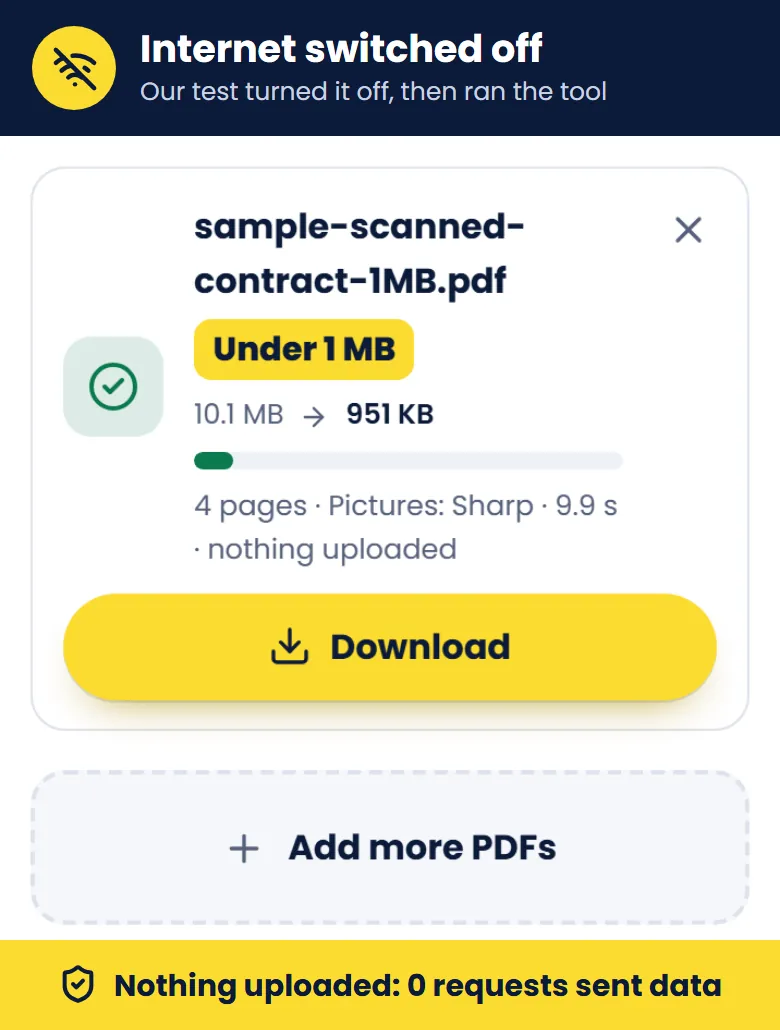
Papers that must fit 1 MB are often private: ID proofs, marksheets, certificates, bank statements. Many PDF websites send your file to their own computers first. Here a program running inside your browser does the work, on your own phone or computer, and the new file is saved straight to your device. The result row says "nothing uploaded".
You can test it. Wait until the note under the tool says Ready, then switch off Wi-Fi and mobile data and choose your PDF. It should still work, because there is nowhere for the file to go. We ran that test on the compressor, whose engine this page shares, but not again on this page. There is no account and no watermark. Our privacy policy has the details.
If something goes wrong
The messages the page can show, and what to do about each:
- "Already under 1 MB, so you can use your original file." Nothing to download. Upload the original.
- "Over 1 MB." The smallest copy is still too big. You can still download it, and the row tells you to try a bigger size or fewer pages. See Typed documents and books.
- "This PDF can't get any smaller, so keep your original file." The new copy would not be smaller than yours. Keep the original.
- "This PDF is locked with a password." Remove it with Unlock PDF (you need the password), then bring the unlocked copy here.
- "This file can't be read as a PDF." It may be damaged, or not a PDF. Download it again or ask for a new copy.
- "This file needs more memory than your browser allows." Close other tabs, or use a computer.
- Three more. "This tool couldn't start in this browser": update your browser, or use Chrome, Edge, Firefox or Safari. "Only PDF files work here": make photos and Word files into PDFs first, with JPG to PDF or Word to PDF. "Something went wrong while resizing this file": your original is unchanged, so try again with a fresh copy.
- The form still refuses the file. Check its other rules: a smallest size, a file type or name, and the slot you chose.
Limits
- Typed text and fonts can't shrink, so a typed PDF has a smallest size of its own. We have no measured figure for one over 1 MB.
- Many scanned pages share one budget: twenty different pages fitted at Readable, and more will be softer.
- Big scans take time and memory. A file over 2 GB is refused: split it into smaller PDFs first.
- A PDF that needs a password to open is refused until you unlock it. One with only editing limits can be shrunk, and the copy opens without them.
- A digital signature stops being valid when the file changes, and the row warns you. A signature scanned as part of a page is just a picture and stays.
- The page only makes PDFs smaller, never bigger. It doesn't work on JPG photos and doesn't turn a scan into searchable text.
Other ways to make a PDF smaller
This page is not the only way:
- Another size here. For a smaller limit see 500 KB, for a bigger one 2 MB. With no limit at all, our PDF compressor lets you pick a quality level.
- Scan again, smarter. A lower resolution setting in your scanner app, or only the pages you need, gives a smaller file.
- Save typed documents, don't scan them. A PDF saved straight from Word or Google Docs is usually far smaller and sharper than a scan of its printout. In our files, 24 typed pages took 123,583 bytes, while one scanned page took 1,077,615.
- PDF programs. Many have a reduce-file-size option, but they may not let you aim for an exact size like 1 MB, so you may need several tries.
- Upload-based websites. They work, but they send your file to their servers, a poor fit for Aadhaar, PAN or certificates.