What Password Strength Checker does, and when you need it
Password Strength Checker tells you how hard a password would be to guess, as you type it: a rating from Very weak to Very strong, the bits of randomness behind it, the time a fast attacker would need, and the plain reasons it is weaker than it looks. It all happens in your browser: the password is never sent, saved or shown to anyone, and there is no sign-up.
People use it when:
- A site says "weak" or "medium" and they want to know why, and what would fix it.
- They have used the same few passwords for years and want to know how bad they are.
- They are choosing a password they must remember, such as a phone's or a password manager's, and want it strong enough.
- Someone teaches a family or an office what a strong password looks like, with real examples.
To make a strong password instead of checking one, Password Generator makes random ones on your device.
How it works
The checker starts from the most an attacker would have to try: the kinds of characters in the password (small letters, capitals, numbers, symbols) and its length. Sixteen characters drawn from all four kinds give about 105 bits of randomness; each bit doubles the guesses needed.
Then it looks for the shortcuts real attackers take, and cuts the score when it finds one:
- One of the most used passwords, from a list of the worst, Indian favourites included: 123456, password, india123, sairam.
- The same with look-alikes swapped: P@ssw0rd is still password.
- A common word or name with numbers or symbols added: Mumbai#2026!, Sachin@10.
- A character three times or more in a row, or a run such as 1234, abcd or qwer.
- Something that looks like a year, often a birthday.
- Fewer than 12 characters, or fewer than three kinds of character.
Finally it works out how long trying half of all the possibilities would take at ten billion guesses a second, and says so in words.
Real results from our tests
We checked these passwords with the page's own code on 31 October 2026. They are the kinds people really use, made up for the test; don't use any of them.
| Password | Rating | Bits | A fast attacker would need | Why |
|---|---|---|---|---|
| 123456 | Very weak | 2 | less than a second | The most used password, and a run |
| India@123 | Very weak | 10 | less than a second | One of the most used passwords |
| P@ssw0rd | Very weak | 10 | less than a second | password with look-alikes swapped |
| Mumbai#2026! | Weak | 30 | less than a second | A city with a year and symbols added |
| 9876543210 | Weak | 33 | less than a second | Numbers only, and short |
| kV8#pL2q | Fair | 53 | 4 days | Random, but only 8 characters |
| x7Qm!vR2#tN9 | Strong | 79 | 8,567 centuries | Random, 12 characters, all four kinds |
| tR7#qL9!vX2$mK4& | Very strong | 105 | longer than the universe has existed | Random, 16 characters, all four kinds |
| Tr0ub4dor&3 | Strong | 72 | 90 centuries | Too generous: see below |
What the numbers mean: the first five, the kinds most people use, all fall in under a second. Only the random ones are strong, and length is what lifts them from Fair to Very strong. The last row is a fair warning about every meter, this one included: "troubador" with look-alikes and an ending is a famous example of a password that looks strong but is a dictionary word underneath. The checker knows the commonest passwords and words, not every word in every dictionary, so for a password you made up yourself, read Strong as "at best".
On a first visit the page downloads about 0.1 MB for the tool: the page, its styles, its scripts and the fonts, with Google's ad code not counted.
Step by step
- Type the password in the box. It is hidden as you type, like a password box on any site; tick Show it to see it. Try an example fills one in.
- Read the rating under it: the coloured bar, the word, the bits and the time to guess.
- Read the reasons listed under that, if there are any; "No common weaknesses found" means it found none.
- Change the password where it is weak, and clear the box when you are done.

The five levels
| Rating | Bits of randomness | At ten billion guesses a second |
|---|---|---|
| Very weak | Under 28 | Under a hundredth of a second |
| Weak | 28 to 35 | Up to about 3 seconds |
| Fair | 36 to 59 | 3 seconds to about 2 years |
| Strong | 60 to 79 | About 2 years to 2 million years |
| Very strong | 80 and more | Over 2 million years |
For email, banking and anything that can reset other accounts, aim for Very strong. For a phone's or a laptop's lock, which stops after a few wrong tries, Strong is plenty.
What to aim for, account by account
| Account | Aim for |
|---|---|
| Very strong and used nowhere else, with two-step sign-in: it can reset every other account | |
| Net banking, and the email your UPI apps use | Very strong, unique, with two-step sign-in |
| Shopping, social media, games | Strong at least, and unique: a leak there must not open anything else |
| Home Wi-Fi | Very strong: 20 random characters, shared by QR code |
| A password manager's master password | Very strong and memorable: a long passphrase of random words |
| Phone lock, UPI PIN | A 6-digit PIN that isn't a date, a run or your number |
What "a fast attacker would need" means
Logging in to a site is slow: most sites lock an account or slow down after a few wrong tries, so guessing there is hopeless for an attacker. The real danger is a breach: when a site's password file is stolen, attackers guess against it on their own computers, with graphics cards trying billions of passwords a second against weakly protected files.
The checker assumes ten billion guesses a second, and counts the time to try half of all the possibilities, which is when a guess is as likely as not to have succeeded. Sites that store passwords well make attackers far slower, but you can't know how a site stores yours, so it is wise to plan for the fast case.
Each warning explained, and the fix
- "It is one of the most used passwords, which are guessed first."
- Attackers start with lists of leaked passwords, most used first. Don't change a character or two; make a new random one.
- "It is a common word or password with numbers or symbols added, which guessing programs try early."
- Programs try every common word with a capital, a year, 123 or ! added, and @ for a. Swap the whole thing for random characters.
- "A character repeats three times or more in a row."
- aaa or 111 adds almost nothing. Use different characters.
- "It has a run such as 1234, abcd or qwer."
- Runs along the alphabet, the numbers or the keyboard are among the first things tried.
- "It looks like it holds a year, which is easy to guess if it is a birthday."
- Birthdays and anniversaries are on social media. Leave dates out.
- "It is shorter than 12 characters: a longer one is much harder to guess."
- Each extra character multiplies the work. Twelve is the least; sixteen is better.
- "Mix capitals, small letters, numbers and symbols."
- More kinds of character give each character more possibilities. Length helps more, though.
Indian password habits that attackers know
Leaked password lists show the same patterns again and again in India, and guessing programs are tuned for them:
- Names of gods and greetings: sairam, omsairam, krishna, ganesha, jaihind.
- Cricketers and cities: sachin, dhoni, virat, mumbai, delhi, with a number after.
- Mobile numbers and dates of birth: ten digits or DDMMYYYY, easy to find for anyone who knows you.
- Names with @123: Priya@123, Rahul@1995, the shape many sites' rules push people towards.
A password that follows any of these patterns is weak however long it is. Random characters, kept in a password manager, avoid them all.
Why a site called it strong and this page doesn't
Many sites' meters only check their own rules: at least eight characters, a capital, a number and a symbol. "Password@123" passes every one of those rules and gets a green bar, yet it is among the first guesses any attacker makes. Rules like these push people towards the same few shapes, a word with a capital first and @123 at the end, and attackers know those shapes well. This page looks for the shapes, not just the rules, so it is stricter, and the difference is worth taking seriously.
Phone PINs, UPI PINs and pattern locks
A PIN is a different case from a password. A 4-digit PIN has 10,000 possibilities and a 6-digit one a million, far too few for an online account, but enough for a phone or a UPI app because they lock or slow down after a few wrong tries, and nobody can guess offline. What matters there is not being guessable: avoid 1234, 0000, 1111, your birth year and the last digits of your mobile number. A pattern lock is easy to spot over a shoulder or from the smudges on a screen, so a PIN is safer. Never tell anyone your UPI PIN: it is only ever needed to pay, never to receive.
How sites should store passwords, and why it matters to you
A careful site never keeps your password itself, only a hash of it: a scrambled form that can be checked but not reversed. Slow hashes such as bcrypt or Argon2 make each guess costly, so a stolen file holds up for years against a strong password. A careless site uses a fast hash, or none, and then a breach exposes weak passwords at once. You can't see which kind a site is, which is why the checker plans for the fast case, and why a different password for each site matters most of all.
Strong passwords for parents and grandparents
Older family members often reuse one simple password because they can't remember more. Two kind ways to help: set up a password manager on their phone, which fills passwords in for them, with one strong passphrase to remember; or write their passwords in a small book kept safely at home, never in the phone's notes. A written list at home is far safer than one password used everywhere, because a thief on the internet can't reach a book in a drawer.
Why a long password can still be weak
Length only helps when the characters are unpredictable. "Password1234567890" is 18 characters long, but it is a common word followed by a run, and both are tried early. Attackers don't try every combination in order; they try what people choose first, in order of how often people choose it. A password is as strong as the shortest way to guess it, which is why the checker cuts the score when it spots a shortcut, however long the password is.
What no meter can know
- Whether it has leaked. A password used on a site that was breached is in attackers' lists, however strong it looks. That is the best reason for a different password on every site.
- Your personal details. Your child's name, your bike's number or your pet's name look random to a meter, but not to someone who knows you.
- Every word and phrase. The checker knows the commonest passwords and words, not every dictionary, film line or song.
So a Weak rating is always worth acting on, and a Strong one on a password you made up yourself is a best case. Only a password made at random has a strength that is truly known.
Is it safe to type a real password here?
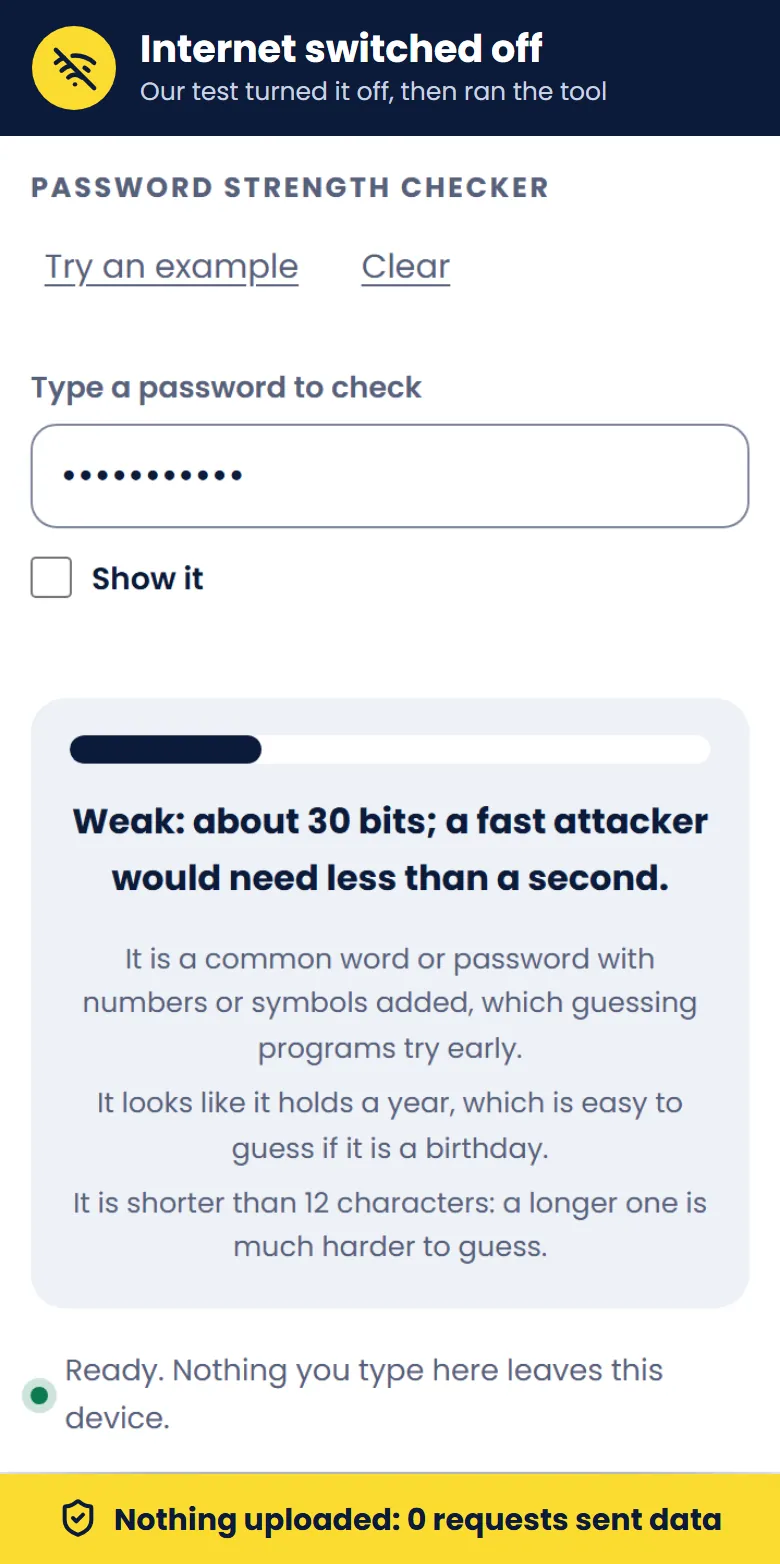
The check runs entirely in your browser: the password isn't sent to us or anyone, isn't saved, and is gone when you clear the box or close the page; the page even works with the internet switched off once loaded. Still, the safest habit with any site is to check a password built the same way as yours, with the same kind of word, numbers and symbols, rather than the one you use. The rating comes out the same.
After the check: what to do
- Replace weak passwords, email first, as it can reset everything else, then banking and shopping.
- Use a new random password for each account, made with Password Generator.
- Keep them in a password manager, your browser's own or another, so you never need to remember them.
- Turn on two-step sign-in wherever it is offered.
If a site you use was breached
Change that site's password at once, and the password of every other account where you used the same one: attackers try leaked passwords on email, banking and shopping sites within days. Turn on two-step sign-in there too. Then watch for emails and messages that pretend to come from the breached site and ask you to "confirm" your details; a breach is often followed by such fakes. Have I Been Pwned, a free service at haveibeenpwned.com, tells you whether your email address appears in known breaches.
A worked example: one family's passwords
A family's shared computer has three favourite passwords: "Sachin@10" for the children's games, "Mumbai#2026!" for email, and "9876543210", a phone number, for the bank's app. The checker rates them Weak, Weak and Weak: a cricketer with numbers added, a city with a year and symbols, and ten digits that are someone's number. Each falls in under a second at ten billion guesses a second.
The fix takes an evening: a random 16-character password for each email account and the bank, made with Password Generator and saved in the browser's password manager, and two-step sign-in on email. The checker then rates each new password Very strong, longer than the universe has existed to guess, and none of them is anyone's name, number or birthday.
Private: the password never leaves your device
What you type is checked inside your browser by the page's own code; the password is never sent to us, kept or written to the device's storage. Google's ad code runs on the page too, but our code never gives it what you type. How we prove it shows how anyone can check.
Limits
- It knows the commonest passwords, words and patterns, not every dictionary word or phrase.
- It can't tell whether a password has leaked, or whether it holds your personal details.
- Times assume ten billion guesses a second against half the possibilities; real attacks can be slower, or faster against weakly stored passwords.
Other ways
- Have I Been Pwned's Pwned Passwords tells you whether a password appears in known breaches. It sends only the start of a scrambled form of the password, never the password itself.
- Password managers and browsers (Google Password Manager, iCloud Keychain, Bitwarden) warn about saved passwords that are weak, reused or leaked.
This page explains why a password is weak, in plain words, and never sends the password anywhere.
Terms explained
- Bits of randomness
- How unpredictable a password is; each bit doubles the guesses needed.
- Dictionary attack
- Guessing with lists of words and leaked passwords, with common changes, before anything else.
- Brute force
- Trying every possible password in turn.
- Breach
- A site's password file stolen, which attackers then guess against offline.
- Hash
- The scrambled form in which sites should store passwords.
- Leetspeak
- Swapping letters for look-alikes, as in P@ssw0rd: well known to attackers.