What Meta Tag Generator does, and when you need it
Meta Tag Generator writes the tags that go in a web page's head: the title and description that search results show, the robots tag that tells search engines whether to list the page, the canonical address, and the Open Graph and X (Twitter) tags that make a link look good when it is shared on WhatsApp, Facebook, LinkedIn or X. You type the words; it writes correct, safely escaped HTML, counts the title's and description's length, and you copy it into your page. It all happens in your browser, with nothing uploaded and no sign-up.
People use it when:
- A new page or a small business site needs its title, description and share tags, and nobody remembers the exact syntax.
- A link shared on WhatsApp shows no picture or the wrong words.
- A page should stay out of Google, such as a thank-you page or a test page.
- A site builder has no SEO fields, and the tags must go into the theme by hand.
How it works
From what you type, the page writes, in this order: the character set (UTF-8) and the viewport tag that phones need; the title; the description; the robots tag; the canonical link if you give an address; and, with Open Graph and X (Twitter) tags ticked, og:type, og:title, og:description, og:url, og:site_name and og:image, with a twitter:card that asks for a large picture when there is one.
- Everything is escaped: &, quotes and angle brackets in your words are written the way HTML needs, so a title like Tom & Jerry "Fan" Club can't break the page.
- Spaces in the description are tidied: line breaks and double spaces become single spaces.
- Lengths are counted and compared with what search results usually show.
- Addresses are checked to start with http:// or https://.
Real results from our tests
We ran three made-up pages through the page's own code on 31 October 2026.
| Page | Tags written | What the page said |
|---|---|---|
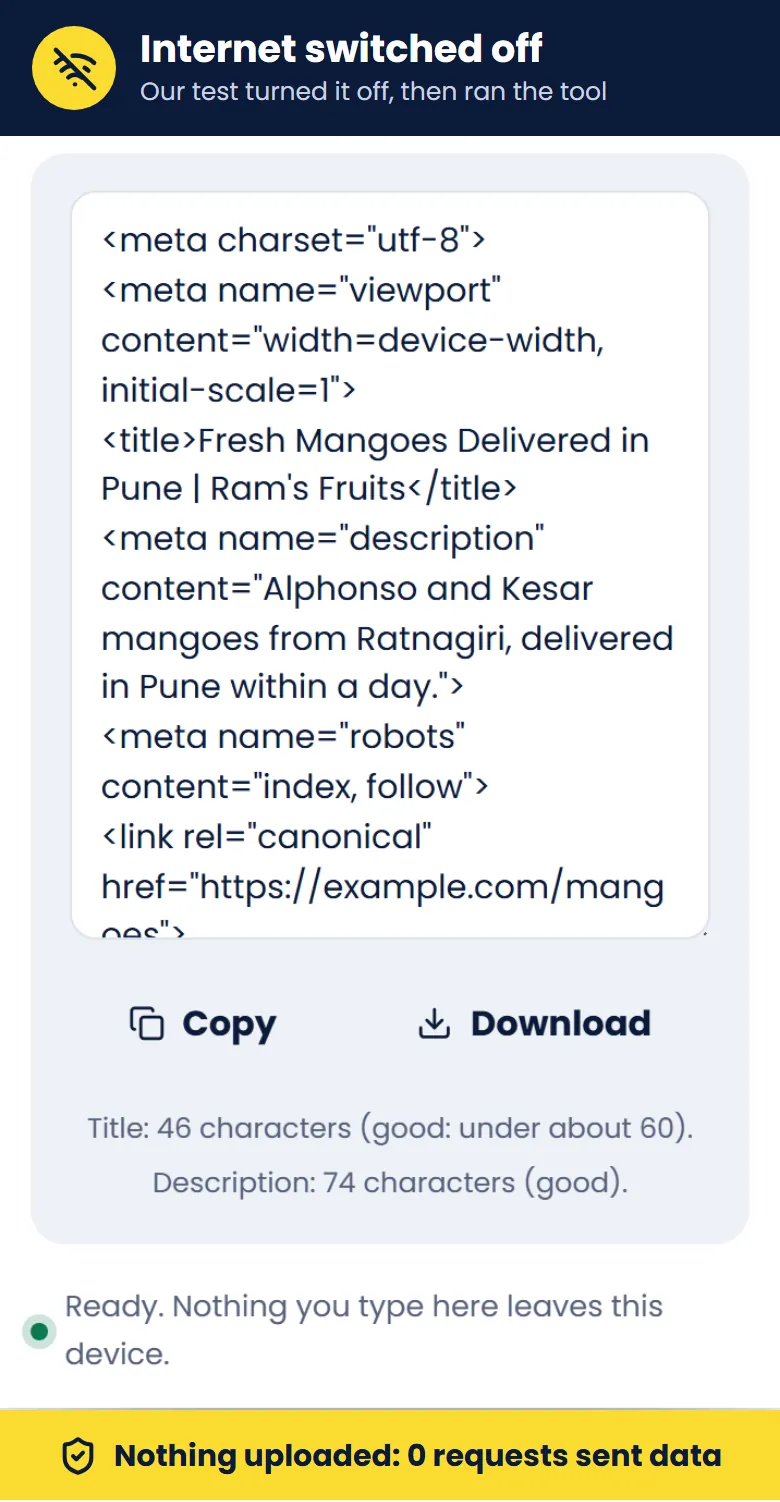
| A fruit shop's mango page, with an address, a picture and a site name | 13, Open Graph and X included | Title: 46 characters (good: under about 60). Description: 74 characters (good). |
| A coaching class's page, kept out of search, no share tags | 5, robots set to noindex, follow | Title: 96 characters (Google usually shows about 60; the rest may be cut). Description: 8 characters (a little short). |
| A title with &, quotes and angle brackets | Escaped as &, ", < and > | Valid HTML, shown as typed in search and shares |
What the numbers mean: the notes are guidance, not rules; a 96-character title still works, but its end is likely to be cut in results, so the words that matter belong at its start.
On a first visit the page downloads about 0.1 MB for the tool: the page, its styles, its scripts and the fonts, with Google's ad code not counted.
Step by step
- Type the page title and the description. Both are needed; the notes under the result count them.
- Add the page's address, a share picture and the site name if you have them.
- Choose Search engines: show this page in search, or keep it out.
- Leave Open Graph and X (Twitter) tags ticked for good previews when the link is shared.
- Copy the tags, or download them as meta-tags.html, and paste them into the page's head.

Each tag explained
| Tag | What it does |
|---|---|
| meta charset="utf-8" | Reads the page's letters right: Hindi, ₹ and emoji included |
| meta name="viewport" | Lets phones show the page at their own width instead of a shrunk computer page |
| title | The page's name on its browser tab, and usually its headline in search results |
| meta name="description" | A summary that search results often show under the headline |
| meta name="robots" | Whether search engines may list the page, and follow its links |
| link rel="canonical" | The one address search engines should use for this page |
| og:title, og:description, og:image, og:url, og:site_name, og:type | What WhatsApp, Facebook, LinkedIn and others show when the link is shared |
| twitter:card | X's preview style; X reads the og: tags for the words and picture |
Writing the title
- Keep it to about 60 characters. Google cuts longer titles by their width on screen, and the end goes first.
- Put the main words first: "Fresh Mangoes Delivered in Pune" before "| Ram's Fruits".
- Give every page its own title. Ten pages called "Home | My Shop" tell search engines nothing.
- Write for people, not search engines: say what the page offers, in the words people search, without stuffing in every keyword.
Google sometimes shows a different title from yours, made from the page's headings, when it thinks they describe the page better. A clear, accurate title makes that rarer.
Writing the description
A description doesn't move a page up in Google by itself, but it is often the text people read before choosing which result to click. Aim for 120 to 160 characters: enough to say what the page offers, who it is for and why it is worth a click, short enough to be shown in full. Like titles, Google may show a piece of the page instead when it matches a search better. Write a different one for each page.
Why 60 characters is only a guide
Search results don't count characters: they cut a title when it runs out of width on the screen. Wide letters such as W and M, capitals and some scripts fill that width sooner than narrow ones such as i, l and t. So a title of 58 characters in capitals can be cut while one of 64 small letters fits. The page's notes count characters because that is what you can see while typing; treat about 60 for a title and about 160 for a description as the safe side, put the words that matter first, and let the end be the part that may go.
Titles for different kinds of page
| Page | A title that works |
|---|---|
| Home page | What you do and where, then the name: Home Tuition for Classes 6 to 10 in Indore | Sharma Tutors |
| A product | The product and what sets it apart: Pure Kanjivaram Silk Saree, Temple Border | Lakshmi Silks |
| A local service | The service and the town: AC Repair in Andheri West, Same-Day Visits | CoolFix |
| An article or blog post | The question it answers: How to Store Mangoes So They Ripen Evenly |
| A contact page | Contact Sharma Tutors, Indore: Phone, WhatsApp and Address |
Common mistakes
- The same title and description on every page, often the site's name, which tells search engines nothing about each page.
- Every keyword at once: "Best Cheap Saree Shop Saree Online Saree India" reads as spam to people and to Google.
- ALL CAPITALS, which reads as shouting and takes more width.
- A description copied from another site or a supplier's catalogue.
- A share picture given as a short path, such as /images/mango.jpg; sharing apps need the full https:// address, which is why the page asks for one.
- Noindex left on after a site goes live, which keeps the whole site out of Google.
Share previews on WhatsApp and social media
- The picture: 1200 by 630 pixels suits Facebook, LinkedIn, X and WhatsApp; give its full address, starting https://. Keep the important part in the middle, as some apps crop the edges.
- The words: og:title and og:description follow your title and description, so they match search.
- Previews are remembered: WhatsApp, Facebook and LinkedIn keep a copy of a link's preview. After changing the tags, Facebook's Sharing Debugger and LinkedIn's Post Inspector fetch a fresh one; on WhatsApp, a new link, such as one with ?v=2 on the end, shows the new preview.
Keeping a page out of search
Choose "Keep it out of search" (noindex, follow) for pages nobody should land on from Google: thank-you pages, internal search results, test or draft pages, such as a layout still filled from Lorem Ipsum Generator, and printable copies. Search engines can still follow its links. "Out of search, links not followed" (noindex, nofollow) also asks them to ignore the links.
Noindex isn't a lock: anyone with the address can still open the page. Anything private, such as customers' details or staff pages, needs a password, not just a tag.
One trap: a page blocked in robots.txt can't be read by search engines, so they never see its noindex tag, and the page can still show in results if other sites link to it. To keep a page out of search, let it be crawled and use noindex. Robots.txt Generator explains the difference.
The canonical address
The same page often has several addresses: with and without www, with ?ref= or UTM tags from UTM Link Builder, sorted or filtered. A canonical tag names the one address you want search engines to use, so they don't split the page's standing between copies. Use the full, plain address of the page itself, starting https://, on every version of it.
Where to paste them
- Plain HTML: inside <head> ... </head>, replacing any title and description already there, so there is only one of each.
- WordPress: SEO plugins such as Yoast SEO or Rank Math have boxes for the title, description and share picture; use those rather than pasting tags, or you get two sets.
- Shopify, Wix and Squarespace: each has its own SEO settings for each page; type the words there.
- Blogger: the theme's HTML editor holds the head; Blogger's own search description setting covers the description.
Wherever they go, check the page afterwards: two descriptions or two titles is a common mistake.
Why there is no keywords tag
The meta keywords tag was used by search engines in the 1990s and abused so heavily that Google has ignored it for years. It still shows competitors your chosen keywords, so the page leaves it out. Your title, headings and the words of the page itself are what search engines read.
Titles in Hindi and other languages
Titles and descriptions can be in any language: the UTF-8 tag lets browsers and search engines read Hindi, Tamil or Bengali correctly. Search results cut titles by width, and scripts differ in width, so the 60-character note is a rough guide for those; read your result in Google once the page is listed. For a page in two languages, give each version its own page, title and description.
Checking them
- View the page's source (Ctrl+U in Chrome on a computer) and look for one title, one description and your other tags.
- Share the link to yourself on WhatsApp and look at the preview.
- In Google Search Console, URL Inspection shows how Google sees the page, robots and canonical included.
Search results change only after Google visits the page again, which can take days or weeks. URL Inspection's Request indexing asks Google to come sooner for a page that matters; it doesn't promise a date.
When to change them
Change a page's title and description when what the page offers changes: a new price, an offer that has ended, a service you no longer give. Leave alone a page that already brings visitors from search, unless you have a reason, because a new title is judged afresh. Search Console's Performance report shows the words people searched before they saw your page; when those words differ from your title's, using the searchers' own words in the title and description often earns more clicks.
What else helps a page show in search
Meta tags name and describe a page; they don't make it rank by themselves. What matters more:
- The page itself: words that answer what people search, with one clear heading that matches the title.
- Speed on phones: most visitors arrive on a phone, and slow pages lose them before they read.
- Links from your own pages: a new page linked from your home page or menu is found and understood sooner.
- A sitemap in Search Console, listed in your robots.txt, so Google knows every page; Robots.txt Generator adds the line.
- Links from other sites that people trust, earned by being useful, never bought.
Local shops and Google Maps
For searches like "AC repair near me", Google shows a map with businesses before the ordinary results. Those come from Google Business Profile, which is free: your name, address, phone, hours, photos and reviews, kept up to date. A shop with a website should do both: the profile for the map, and a title such as "AC Repair in Andheri West" for the results below it, with the same name, address and phone number in both places.
A worked example: a fruit shop's mango page
A fruit shop in Pune adds a page for its mangoes. Its title, "Fresh Mangoes Delivered in Pune | Ram's Fruits", is 46 characters, with the words people search first and the shop's name last. The description, "Alphonso and Kesar mangoes from Ratnagiri, delivered in Pune within a day.", says what, where and how fast. With the page's address, a 1200 by 630 photo of the mangoes and the site name, the page writes 13 tags. Pasted into the head, they make the link show the photo, the title and the description when customers forward it on WhatsApp, and they give Google a clear name and summary for the page.
Private: made on your device
The tags are written inside your browser; nothing you type is sent to us or kept, and once loaded the page works with the internet switched off. Google's ad code runs on the page too, but our code never gives it what you type. How we prove it shows how anyone can check.
Problems and fixes
- "Type a full address starting with https://."
- The page address or the picture's address is missing https://, or has a space. Paste it from the browser's address bar.
- WhatsApp shows no picture
- The picture's address isn't a full https:// address that opens on its own, or the old preview is remembered. Open the picture's address in a browser to check, then share a fresh link.
- Google shows a different title or description
- Google chose words it thinks match the search better. Make yours accurate and specific, and give it time.
- The page has two titles
- A theme or plugin writes its own. Use its boxes instead of pasting tags, or remove one set.
Limits
- It writes the tags; it doesn't check your page or fetch your picture.
- One page at a time.
- No structured data (schema.org); that is a separate kind of tag.
- Lengths are counted in characters; search engines cut by width, so the notes are a guide.
Other ways
SEO plugins for WordPress, and the SEO settings of Shopify, Wix and other site builders, write these tags from boxes on each page; use those when you have them. This page is for hand-made sites, themes edited by hand, landing pages and anyone who wants to see and check the exact tags.
Terms explained
- Meta tags
- Lines in a page's head that describe the page to browsers, search engines and apps.
- Head
- The part of a web page's HTML, between <head> and </head>, that visitors don't see.
- Open Graph
- The og: tags that sharing apps read for a link's preview.
- Canonical
- The one address a page should be known by.
- Noindex
- A request to search engines not to list a page.
- Escaping
- Writing &, quotes and brackets so HTML reads them as text.
- Search Console
- Google's free service that shows how a site appears in search, and which words people searched.
- Google Business Profile
- Google's free listing for a business, shown on Maps and in local results.