What URL encoding is, and when you need it
A web address can hold only a small set of plain characters. Everything else, a space, a Hindi letter, an & that is part of a name, has to be written as a percent sign and two hex digits, one code for each byte. That is percent encoding, often called URL encoding: a space becomes %20, & becomes %26, and the Hindi word चाय (tea) becomes %E0%A4%9A%E0%A4%BE%E0%A4%AF.
This page works both ways. Encode writes your text with % codes, in the style you choose. Decode reads % codes back into plain text. Your browser does all of it: the text is never uploaded, and nothing is kept once you close the page.
Where it helps:
- A search link with Hindi or Tamil words. A link you share often shows as a long run of % codes. Decode turns it back into words you can read.
- A value with &, = or # in it. A name like
Tom & Jerryin an address must be writtenTom%20%26%20Jerry, or the & starts a new value and the name is cut in two. - A message that shows %20 where spaces should be. Decode reads it at once.
- Building links by hand. UTM links for a campaign, a WhatsApp message link or a redirect address all need their values encoded.
- Reading what an app or a form sent. Form data uses + for a space, which the page can read too.
It doesn't open, check or shorten an address, and percent codes are not a way to hide anything: anyone can read them back.
Step by step: encoding and decoding
- Choose Encode or Decode at the top of the tool.
- Add your text. Type it, paste with the Paste button or Ctrl+V (a long press on a phone), press Try a sample, or open a text file. You can drop a file anywhere on the page.
- In Encode, choose the style. Everything for one value, Keep address characters for a whole address, or Form style for what web forms send. The section below explains each.
- In Decode, say how to read +. Turn on Read + as a space when the text came from a web form; leave it off for a normal address, where + is a plus.
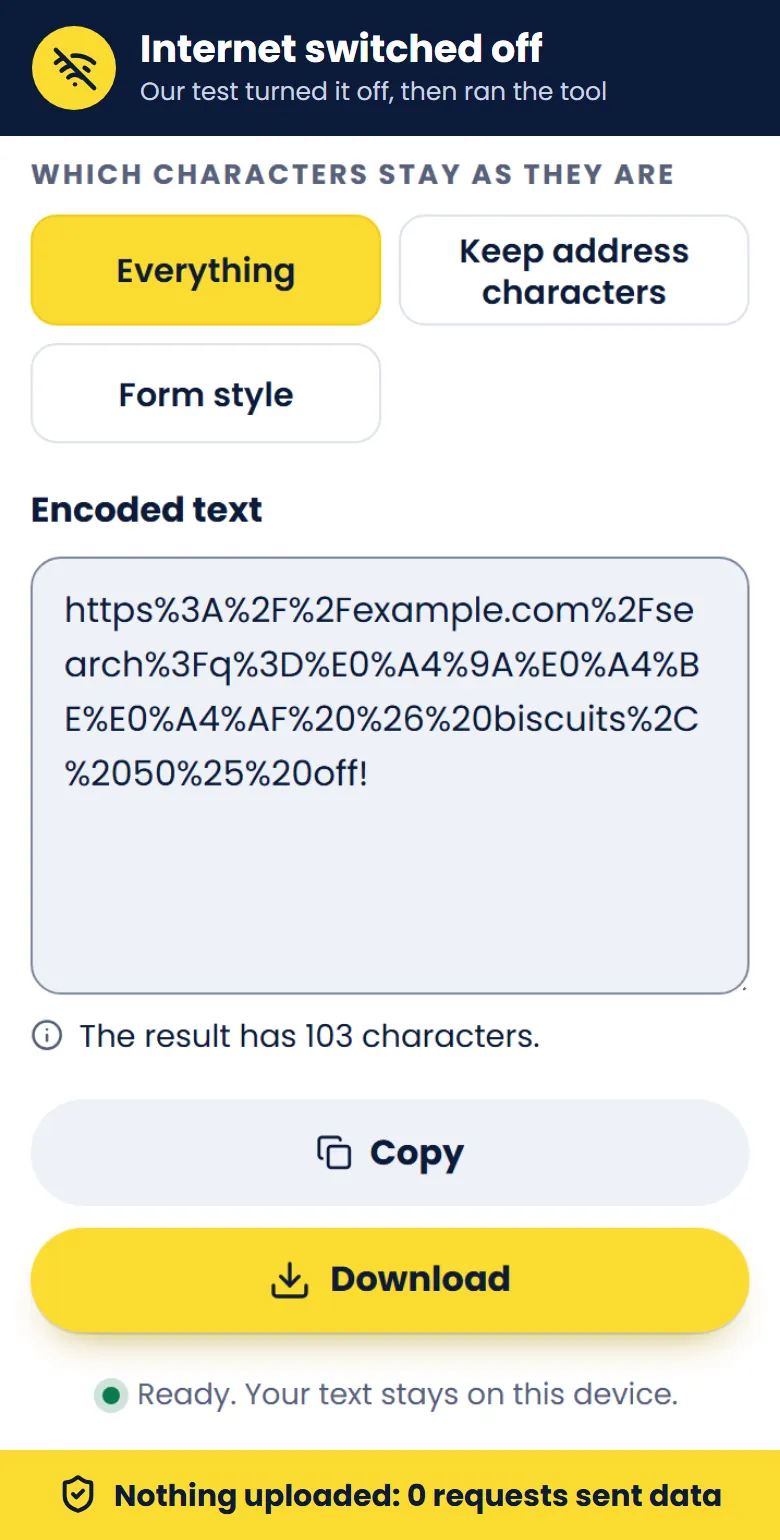
- Read the line under the result. In Encode it gives the length, for the sample “The result has 103 characters.” In Decode it counts the codes read, such as “14 percent codes read.”, and adds a note when it found a stray %, bytes that aren't text, or codes left over from a second encoding.
- Copy or download. Copy takes the whole result; Download saves it as url-encoded.txt or url-decoded.txt, exactly as shown.
The result follows your typing, so there is no button to press. Clear empties the box, and the × on a file removes it.
What the page does, exactly
The page works on bytes. These are its rules in full, and the same rules are checked by our tests.
| Part | The rule | Example |
|---|---|---|
| Text to bytes | Text is written as UTF-8 first, so every language works. A line break is the byte 10, written %0A. Half of an emoji (a lone surrogate) has no UTF-8 form and is written as U+FFFD (%EF%BF%BD), with no error | é is the two bytes C3 A9, written %C3%A9; a Hindi letter is three bytes and nine characters |
| Everything | For one part of an address, such as a value after ?q=. The letters A to Z and a to z, the digits 0 to 9 and the marks - _ . ! ~ * ' ( ) stay as they are. Every other byte becomes a % and two capital hex digits, so a space is %20 and the marks of an address (: / ? # & =) are written too. This is what JavaScript's encodeURIComponent keeps | a&b=c d becomes a%26b%3Dc%20d |
| Keep address characters | For a whole address. The same, and ; / ? : @ & = + $ , # stay too, so the address keeps its shape. This is what JavaScript's encodeURI keeps | https://a.com/b c?d=é becomes https://a.com/b%20c?d=%C3%A9 |
| Form style | What a web form sends, by the WHATWG rule: only the letters, the digits and * - . _ stay, a space becomes +, and every other byte is a % code, a ~ included | a b~c becomes a+b%7Ec |
| Reading % codes | %XX with two hex digits in either case is one byte. Any other character stays as it is, and a + becomes a space only when "Read + as a space" is on. The bytes are read as UTF-8 | %E0%A4%A8 is न, and %2B is + |
| A stray % | A % that is not followed by two hex digits stays a % and is counted, and the page says so. Nothing stops with an error | 100% reads as 100%, with 1 stray % sign |
| Bytes that are not text | Bytes that are not valid UTF-8 (a code cut short, like %C3 alone) show as the replacement character, and the page says so | %FF shows as � |
| Encoded twice | When the result still has %XX codes, the page says the text may have been encoded twice. One reading takes off one layer | %2520 reads as %20, with a note |
What the rules don't decide: percent codes only change how bytes are written. They are not encryption and hide nothing. The page can't tell which style another system expects, so read its documentation, or use the rule of thumb below: Everything for each value. It doesn't open the address or check that it works. And a text with mistakes in it is read as far as it can be, with a note saying what was found, rather than refused or guessed.
Real results from our tests
We tested the URL Encode tool with headless Chromium 148, the open-source browser Chrome is built on, on a Windows laptop with an Intel Core i7-1185G7 and 32 GB of memory, on 13 October 2026. Other work was running on the laptop at the same time, so times vary a little from run to run: each time below is the middle one of 3 runs.
Encoding and decoding are quick. It took 15 milliseconds or less to write 500,000 characters of English, Hindi or a mix of English, Hindi, Tamil and emoji with percent codes, the most the page takes at once, and 21 milliseconds or less to read the codes back. Hindi is the longest once it is coded: the 500,000 characters became 3,857,142 characters of codes, because each Hindi letter is three bytes and nine characters. The box also takes at most 500,000 characters in Decode, so we gave Decode the most text whose codes fit, 499,842 characters of codes for Hindi and 499,970 for English.
After a text is put in the box, the page waits 0.15 second before it changes it, so a burst of typing is changed once, and 0.4 second when the text has more than 400,000 characters. So the result showed between 0.41 and 0.43 second after the paste in our test, in Encode and in Decode. A result of more than 100,000 characters shows only its first 100,000 in the box, and says so, because showing a very long text is slow for the browser, most of all for Hindi and Tamil. Copy and Download take all of it.
Checked against two other programs. JavaScript's own encodeURIComponent, encodeURI and decodeURIComponent made the codes, and read them back, for 20,000 random texts of English letters and marks, accents, Hindi, Tamil, Chinese, emoji and control characters, and the page's code gave the same 80,000 results. Python's urllib.parse made the codes in all three styles, with the keep-lists in the table above, and read them back both with and without the plus as a space, for 3,000 random texts and 24 awkward ones, and the page gave the same 15,120 results.
Size and offline. On a first visit the page downloads about 0.1 MB for the tool: the page, its styles, its script and the fonts, with Google's ad code not counted. In our test we switched the network off after the page had loaded and pressed Try a sample: the encoded text showed 0.1 seconds later in each of 15 runs.
Phone-sized screen. We also ran every test on a phone-sized screen in Chromium (390 × 844 pixels, with touch). That is not a real phone. Every button and box was 44 pixels high or more, and the page did not scroll sideways.
Try it yourself: press "Try a sample" at the top of this page. It puts https://example.com/search?q=चाय & biscuits, 50% off! in the box. With "Keep address characters" the result is https://example.com/search?q=%E0%A4%9A%E0%A4%BE%E0%A4%AF%20&%20biscuits,%2050%25%20off!, and with "Everything" the colons, slashes, ? and = are coded too. Choose Decode and press the sample again to read the codes back.
Everything, address characters or form style: which one to use
Everything is for one part of an address: a search word, a name, a message. It codes every byte except letters, digits and - _ . ! ~ * ' ( ), so the marks that have a job in an address, / ? & = #, can't change it. Tom & Jerry becomes Tom%20%26%20Jerry. This is what JavaScript's encodeURIComponent does, and the right choice most of the time.
Keep address characters is for a whole address that you want to make safe without breaking it. It also keeps ; / ? : @ & = + $ , #, so https:// and the ? and & stay as they are while spaces and Hindi letters are coded. Be careful with it: an & inside a value is kept too. The sample https://example.com/search?q=चाय & biscuits, 50% off! becomes https://example.com/search?q=%E0%A4%9A%E0%A4%BE%E0%A4%AF%20&%20biscuits,%2050%25%20off!, and a site reading it would see the search word end at the &.
Form style is what a web form sends, by the WHATWG rule: only letters, digits and * - . _ stay, a space becomes +, and every other byte is a % code, even ~ (%7E). Tom & Jerry becomes Tom+%26+Jerry. Use it when a program or an API asks for form encoding (application/x-www-form-urlencoded).
If you aren't sure, encode each value with Everything and put the address together yourself: https://example.com/search?q= followed by the coded search word.

Hindi, Tamil, emoji and other languages
Percent codes are made from bytes, so text is first written as UTF-8. English letters are 1 byte each and often stay as they are. A Hindi or Tamil letter is 3 bytes, so it becomes 9 characters of codes, and an emoji is 4 bytes, 12 characters:
नमस्ते(18 bytes) becomes%E0%A4%A8%E0%A4%AE%E0%A4%B8%E0%A5%8D%E0%A4%A4%E0%A5%87, 54 characters.- The emoji 🙏 becomes
%F0%9F%99%8F. - A line break becomes
%0A.
So a Hindi text grows about 3 to 9 times longer once coded. Decoding reads the bytes back as UTF-8, and the Hindi returns exactly.
One difference from JavaScript's own functions: half of an emoji, which can appear when a long text is cut in the middle, has no UTF-8 form. encodeURIComponent stops with an error there; this page writes it as the replacement character, %EF%BF%BD, and carries on.
Common mistakes: plus or %20, encoded twice, a stray %
- A space is %20, and + only in form style. In the path of an address, a + is a plus. Turn on Read + as a space only for text that came from a form.
- Encoded twice. Coding a text that already has codes turns each % into %25:
a bbecomesa%20b, and againa%2520b. When a decoded result still has % codes, the page says the text may have been encoded twice; paste the result in again to take off the second layer. - A stray %. In
100%the % isn't followed by two hex digits, so it stays as it is, and the page counts it: “1 % sign not followed by two hex digits was left as it is.” Nothing stops with an error. - The replacement character, �. Bytes that are not valid UTF-8, such as a code cut short (
%C3on its own) or%FF, show as �, and the page says so. - A whole address coded with Everything.
https://becomeshttps%3A%2F%2Fand the address stops working. Use Keep address characters for a whole address, or code only the values. - No codes at all. Decoding a plain text says: “There were no percent codes to read. If you meant to write the text with % codes, choose Encode.”
Opening a text file
Press Open a text file or drop one on the page, and its text goes in the box. Files saved as UTF-8 are read as they are; a UTF-16 file with a byte order mark is read too; and an older Windows file that isn't UTF-8 is read as Windows-1252, with a note: “This file isn't saved as UTF-8, so it was read as Windows-1252. If letters look wrong, save it as UTF-8 and add it again.” A line break from a Windows file counts as one break, %0A.
Word, PDF and picture files are not opened: “Only text files (.txt and similar) can be opened here. For a Word or PDF file, copy its text and paste it into the box.” A file can hold up to 500,000 characters, like the box.
Private: your text stays on your device
Your text never leaves your device. The tool runs inside your browser and has no upload step: it never sends the text you type, paste or open anywhere, and it does not save it, so closing the page forgets it. The page's Content Security Policy lets it contact only this site and Google's ad service, which pays for the site; our code never gives your text to the ad code. You can check it yourself in your browser's network panel (F12 on a computer): encoding or decoding adds no request that carries your text.
This matters for what goes into addresses: search words, names, phone numbers, tokens and links to private documents. An encoder that works on a server receives whatever you paste; here your own browser does the work, and what you type is gone when you close the page. Once the page has loaded it works offline too: in our test we switched the network off and pressed Try a sample, and the encoded text showed 0.1 seconds later in each of 15 runs. Read our privacy policy and how we prove your files are never uploaded.
Long texts
The box takes up to 500,000 characters, about 500 KB of English text. A longer paste or file is not added, and the page says so, starting “That text is very long ... so it was not added”. Remember that coding makes text longer: a Hindi text becomes 3 to 9 times longer, so the coded form of a very long text may not fit back in the box to be decoded in one piece. Split it into parts.
A result of more than 100,000 characters shows its first 100,000 in the box, with “Showing the first 100,000 of N characters. Copy and Download take all of it.” Big texts are quick: in our test the page's code coded 500,000 characters of English in 6 milliseconds and of Hindi in 15 milliseconds. Through the page, a paste of 500,000 characters showed its result in about 0.42 seconds, most of it the 0.4 second the page waits before working on a text that long.
Tips
- Code each value on its own, then put the address together. It is the one way that never breaks an address.
- Don't code a whole address with Everything. Use Keep address characters, and check any & or = inside your values.
- From a form? Use Form style to encode, and Read + as a space to decode.
- Still % codes after decoding? Decode once more: the text was coded twice.
- Making campaign links? The UTM Link Builder codes the values for you.
- Your original is safe. The page never changes your text in the box; the result is a new copy.
- Base64 in a link? URL-safe Base64 needs no % codes at all; Base64 Encode and Decode makes it.
- A long value starting eyJ in a link is usually a token: JWT Decoder reads what it says.
- Other places, other codes: HTML Entities Encoder writes < and & for HTML, JSON Escape adds the backslashes a JSON string needs, and Text to Slug makes a readable address from a title.
Limits
- Text only. It works on typed, pasted or opened text. It does not open Word, PDF or picture files: copy the text out of them first.
- 500,000 characters at once about 500 KB of English text. A longer paste or file is not added, and the page says so. Showing a long text in a box is slow for the browser, most of all for Hindi and Tamil.
- Not encryption. Anyone can read percent codes. They hide nothing.
- No address checking. The page does not check that an address is valid, does not open it and does not shorten it.
- One layer at a time. A text encoded twice needs two readings. The page says when the result still has codes.
- Not saved. The text and the result are forgotten when you close the page.
- Browsers. We tested only in Chromium, the engine behind Chrome and Edge, with computer and phone-sized screens. We did not test on real phones, in Safari or in Firefox, so we cannot promise how they behave.
Terms explained
- Percent encoding
- Writing a byte as % and two hex digits so it can sit safely in a web address. Also called URL encoding.
- URL
- A web address, such as https://example.com/search?q=tea.
- Query string
- The part of an address after the ?, with name=value pairs joined by &.
- Reserved character
- A mark with a job in an address (: / ? # & =). It must be coded when it is part of a value.
- UTF-8
- The common way of writing text of every language as bytes. Hindi letters take 3 bytes each, an emoji 4.
- Hex digit
- One of 0 to 9 and A to F. Two of them write one byte, from 00 to FF.
- Form encoding
- The way a web form sends its values: a space becomes +, and most other marks become % codes.