What the loan interest rate calculator does
Loan offers often tell you the EMI and the number of months, but not the interest rate, or they give a flat rate that sounds lower than it is. This calculator works backwards from the numbers you can see: the loan amount, the EMI and the number of EMIs. It finds the yearly interest rate on the reducing balance that gives exactly that EMI, the rate lenders quote for home and car loans, to two decimals.
It also shows the total interest, the total you pay and the same loan as a flat rate, with the working, exact to the paisa. It all happens in your browser: nothing you type is uploaded or kept.
When it helps:
- A consumer loan or a no-cost EMI offer that shows only the EMI.
- A dealer's loan quoted at a flat rate, to see the real rate.
- Comparing two offers with different amounts, EMIs and months.
- Checking a lender's statement: whether the EMI matches the rate on paper.
Step by step
- Type the loan amount, such as
5,00,000: the money you actually get. - Type the EMI, such as
10,624, and the number of EMIs in months, from 1 to 600. - Read the answer: the interest rate a year in large type, then the total interest, the total paid, the same loan as a flat rate, and the months.
- Open "How this was worked out" to see the EMIs at the rates just below and just above the answer. Copy result gives a one-line summary.
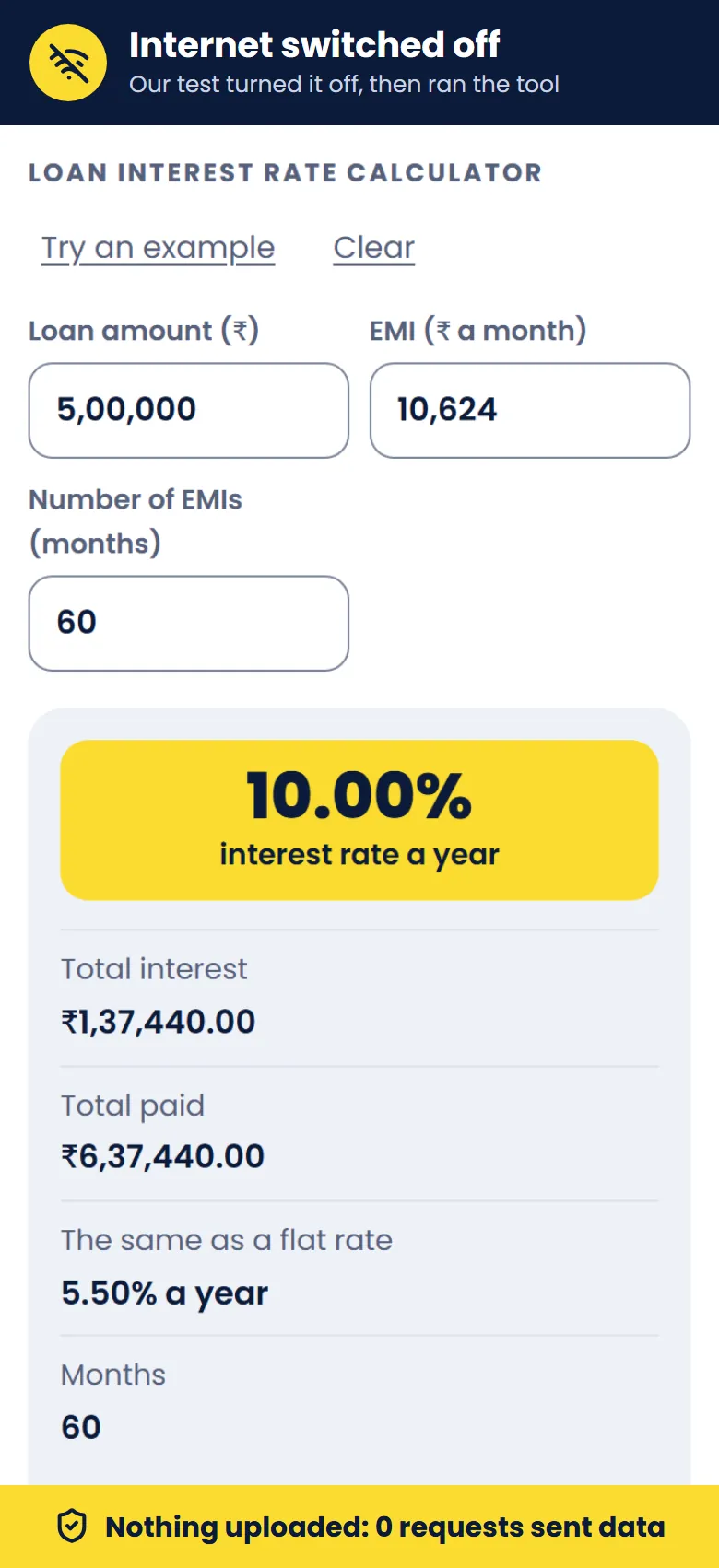
Try an example fills in a loan of ₹5,00,000 repaid in 60 EMIs of ₹10,624, and Clear empties the boxes.
The rules, in full
These are the calculator's rules, and the same rules are checked by our tests.
| Part | The rule | Example |
|---|---|---|
| The rate | The yearly rate on the reducing balance whose EMI, by the EMI calculator's formula with EMIs at the end of each month, equals the EMI typed | ₹5,00,000 in 60 EMIs of ₹10,624: 10.00% |
| To 2 decimals | Rounded half up to a hundredth of a percent, found with exact comparisons, never floating point | An EMI exactly between 8.50% and 8.51% gives 8.51% |
| Totals | Total paid = EMI × months; interest = total paid − loan | ₹10,624 × 60 = ₹6,37,440.00 |
| Flat rate | Interest × 12 ÷ (loan × months), as a percentage to 2 decimals | The example: 5.50% a year |
| No interest | EMIs that add up to exactly the loan give 0.00% | ₹1,00,000 in 10 EMIs of ₹10,000 |
| Can't repay | EMIs that add up to less than the loan can never repay it, and the page says so instead of a rate; so does a rate above 1,000% a year | 100 EMIs of ₹999 for ₹1,00,000 |
Real results from our tests
We tested the Loan Interest Rate Calculator with headless Chromium 148, the open-source browser Chrome is built on, on a Windows laptop with an Intel Core i7-1185G7 and 32 GB of memory, on 1 November 2026. Other work was running on the laptop at the same time, so times vary a little from run to run: each time below is the middle one of 3 runs.
Checked against a second program. Python's own exact fractions, with none of the page's code, worked out 10,000 random loans (amounts, EMIs and 1 to 600 months, rates up to 1,000% a year) and the page gave the same rate every time, to the hundredth of a percent, with the same total interest, total paid and flat rate, and the same notes for EMIs that can never repay a loan.
The answer is drawn at once. The page worked out an answer in 1.10 milliseconds or less, in the middle of 3 runs of 200 different inputs worked out in a row, not counting the moment the browser takes to paint the screen. Even with 600 EMIs, the most the page takes, an answer took 3.8 milliseconds or less.
Size and offline. On a first visit the page downloads about 0.1 MB for the tool: the page, its styles, its scripts and the fonts, with Google's ad code not counted. In our test we switched the network off after the page had loaded and pressed Try an example: the answer showed 0.1 seconds later or less in each of 15 runs.
Phone-sized screen. We also ran the tests on a phone-sized screen in headless Chromium (390 × 844 pixels, with touch). That is not a real phone. Every button and box was 44 pixels high or more, and the page did not scroll sideways. These tests don't cover Safari or Firefox.
Try it yourself: press "Try an example" at the top of this page. It puts 5,00,000, 10,624 and 60 in the boxes, and the rate is 10.00% a year, with ₹1,37,440.00 of interest. Then change the EMI to 11,250: the rate is 12.50%, though as a flat rate it is only 7.00%.
How the rate is found
There is no formula that turns an EMI straight into a rate, so the calculator searches for it. The EMI rises with the rate, so it tries a rate, works out the exact EMI at that rate with the EMI formula, EMI = P × i × (1 + i)n ÷ ((1 + i)n − 1), and moves up or down, halving the gap each time, until it has the rate to a hundredth of a percent.
The working shows the proof. For the example, at 9.995% a year the EMI would be about ₹10,622.2923, and at 10.005% about ₹10,624.7525. The EMI typed, ₹10,624.00, lies between the two, so the rate is 10.00% to two decimals. Every comparison is made in exact fractions, so a rate right on a boundary is never put on the wrong side by a rounding slip.
A spreadsheet's =RATE(60, -10624, 500000) * 12 gives about the same answer, as a decimal to multiply by 100.

Flat and reducing rates
A reducing-balance rate charges interest each month only on what you still owe, so the interest falls as you repay. A flat rate charges interest on the whole loan for the whole time, however much you have repaid. The same loan therefore has a flat rate that looks much lower than its reducing rate.
Take ₹5,00,000 repaid in 60 EMIs of ₹11,250. The interest is ₹1,75,000.00, which is 7.00% a year flat, but the reducing-balance rate is 12.50%. The 7% loan that a dealer quotes costs as much as a 12.50% loan from a bank. Our Flat to Reducing Rate Calculator converts a flat rate directly, and our post on flat and reducing rates explains the difference with examples.
Checking an offer
The rate is the fair way to compare loans of different sizes and lengths. Type each offer's amount, EMI and months, and compare the rates; the lower rate costs less for the same money and time. Then compare the total interest, which tells you what each loan costs in rupees.
Use the amount you actually receive. If a processing fee or an insurance premium is taken out of the loan before you get it, the money in your hand is smaller, and typing that smaller amount with the same EMI shows the true rate including the fee. A "no-cost EMI" offer whose EMIs add up to more than the price you would pay in cash has interest in it, and this calculator shows how much.
A check on the example from our EMI post: ₹1,00,000 repaid in 12 EMIs of ₹8,884.88 gives 12.00%, the rate the EMI was worked out from.
Fees, rounding and the rate
The rate here is the rate of the EMIs alone: it knows nothing of fees, insurance, GST on fees or pre-EMI interest unless they change the amount you type. Lenders also round the EMI, often up to the next rupee, so a rate worked out from a rounded EMI can be a few hundredths away from the rate on the sanction letter. A difference of that size is rounding, not a different deal.
In India, banks and other lenders the RBI regulates give a key fact statement with each loan, showing an annual percentage rate that includes the fees, as the Flat to Reducing Rate Calculator's guide explains; it is usually higher than the rate here. If the two are far apart, the fees are large. Ask the lender for the key fact statement and compare.
Using the rate
Once you know the rate, the EMI Calculator shows what the same loan would cost at another rate or over another tenure, and the Loan Prepayment Calculator shows what a part-payment would save. The Compound Interest Calculator shows what the same money would earn if you saved it instead of borrowing.
Worked examples
Six loans, the EMIs a lender might quote, and the rate behind each:
| Loan and EMIs | Rate a year | Interest | As a flat rate |
|---|---|---|---|
| ₹30,000 in 12 EMIs of ₹2,750 | 17.97% | ₹3,000.00 | 10.00% |
| ₹50,000 in 6 EMIs of ₹8,600 | 10.89% | ₹1,600.00 | 6.40% |
| ₹1,00,000 in 12 EMIs of ₹9,000 | 14.45% | ₹8,000.00 | 8.00% |
| ₹2,00,000 in 24 EMIs of ₹9,500 | 12.91% | ₹28,000.00 | 7.00% |
| ₹5,00,000 in 60 EMIs of ₹10,000 | 7.42% | ₹1,00,000.00 | 4.00% |
| ₹10,00,000 in 120 EMIs of ₹12,668 | 9.00% | ₹5,20,160.00 | 5.20% |
In every row the real rate is between about 1.7 and 1.9 times the flat rate, which is why a loan quoted at a flat rate always costs more than it sounds. A small loan with a modest EMI can still carry a high rate: the ₹30,000 loan pays only ₹3,000 of interest, but at 17.97% a year, because it is repaid so quickly.
Common mistakes
- Typing the price instead of the loan. If you paid a down payment, the loan is the price less that payment; type what you borrowed.
- Forgetting EMIs paid in advance. Some offers take one or two EMIs at the start: count them, and take them off the loan you receive.
- Comparing a flat rate with a reducing rate. Turn both into reducing rates first; this page gives the reducing rate and the flat rate side by side.
- Leaving fees out of the amount. A fee taken from the loan means you receive less; type the smaller amount to see the rate with the fee in it.
- Reading a few hundredths as a different deal. A rounded EMI shifts the rate slightly; that is rounding, not a hidden charge.
- Mixing months and years. The last box is the number of EMIs: 5 years is 60.
Reading the answer
The large figure is the yearly interest rate on the reducing balance, to two decimals. Total interest is everything you pay, the EMI times the months, less the loan; total paid is the EMIs added up. The same as a flat rate shows how a dealer might quote the same loan, so you can compare the two kinds of quote. When no rate fits, because the EMIs add up to less than the loan or would mean more than 1,000% a year, a calm note takes the place of the answer and says which. Copy result puts the loan and its rate on one line, ready to paste into a message or to compare with another offer.
Questions to ask before you take the loan
- How much will I actually receive? Fees taken from the loan lower it; use that amount here.
- How many EMIs, and is any paid in advance? Count every one.
- Is the rate flat or reducing? If flat, this page shows the reducing rate it really is.
- What is the annual percentage rate in the key fact statement? It includes the fees.
- Can I prepay, and is there a charge? The Loan Prepayment Calculator shows what a part-payment saves.
Ask for the answers in writing before you sign, and work the rate out here from the figures on the paper, not from a figure said over the phone.
Two offers side by side
Two offers for the same ₹3,00,000 over 36 months. Offer A has no fee and an EMI of ₹9,800. Offer B has a lower EMI, ₹9,650, but takes a ₹6,000 processing fee out of the loan, so you receive ₹2,94,000:
| Typed as | Rate a year | Paid over what you receive |
|---|---|---|
| Offer A: ₹3,00,000, 36 EMIs of ₹9,800 | 10.85% | ₹52,800.00 |
| Offer B, fee left out: ₹3,00,000, 36 EMIs of ₹9,650 | 9.79% | ₹47,400.00 |
| Offer B, fee counted: ₹2,94,000, 36 EMIs of ₹9,650 | 11.18% | ₹53,400.00 |
With the fee left out, offer B looks cheaper. Counted the right way, from the ₹2,94,000 in your hand, it is 11.18%, dearer than offer A's 10.85%: it costs ₹600 more over the three years, and offer A puts ₹6,000 more in your hand at the start. A lower EMI is not always the cheaper loan.
Checking the answer with the EMI Calculator
The two calculators work the same sum in opposite directions, so each checks the other. The EMI Calculator gives an EMI of ₹10,623.52 for ₹5,00,000 at 10% for 5 years; rounded up to ₹10,624, the EMI a lender might quote, this page gives back 10.00%. In the same way, ₹3,00,000 at 12% for 3 years is an EMI of ₹9,964.29; at ₹9,965 this page gives 12.00%.
The round trip also shows what a fee does. If a ₹6,000 fee, 2% of that ₹3,00,000 loan, is taken out of it, you receive ₹2,94,000 for the same EMIs, and the rate is 13.42%: the fee adds more than a percentage point a year on a three-year loan, and more on a shorter one.
Private: your numbers stay on your device
What you type never leaves your device. The calculator runs inside your browser and has no upload step: it never sends your loan amount, EMI or months anywhere, and it doesn't save them, so closing the page forgets them. The page's Content Security Policy lets it contact only this site and Google's ad service, which pays for the site; our code never gives your numbers to the ad code. You can check it yourself in your browser's network panel (F12 on a computer): working out the answer adds no request that carries what you typed.
Read our privacy policy and how we prove your files are never uploaded.
Tips
- Type the money you receive, after any fee taken from the loan, to see the true rate.
- Count every EMI, including any paid in advance.
- Compare rates, then totals, when choosing between offers.
- Ask for the key fact statement to see the rate with the fees.
- A flat rate is never the real rate: convert it before you compare.
Limits
- Equal EMIs at the end of each month; loans with uneven payments, a balloon payment or pre-EMI interest are not covered.
- No fees in the rate unless you take them off the amount; it is not an annual percentage rate.
- Up to 600 EMIs and rates up to 1,000% a year.
- Rounded EMIs can give a rate a few hundredths away from the lender's.
- Not advice. It works out the numbers; the choice of loan is yours.
Terms explained
- Reducing balance
- Interest charged each month only on what is still owed.
- Flat rate
- Interest charged on the whole loan for the whole time, however much is repaid.
- EMI
- An equated monthly instalment: the same payment every month.
- Key fact statement
- A lender's summary of a loan's terms, with its annual percentage rate.
- Annual percentage rate
- A yearly rate that includes the fees, so it is usually higher than the interest rate.