What the profit margin calculator does, and when you need it
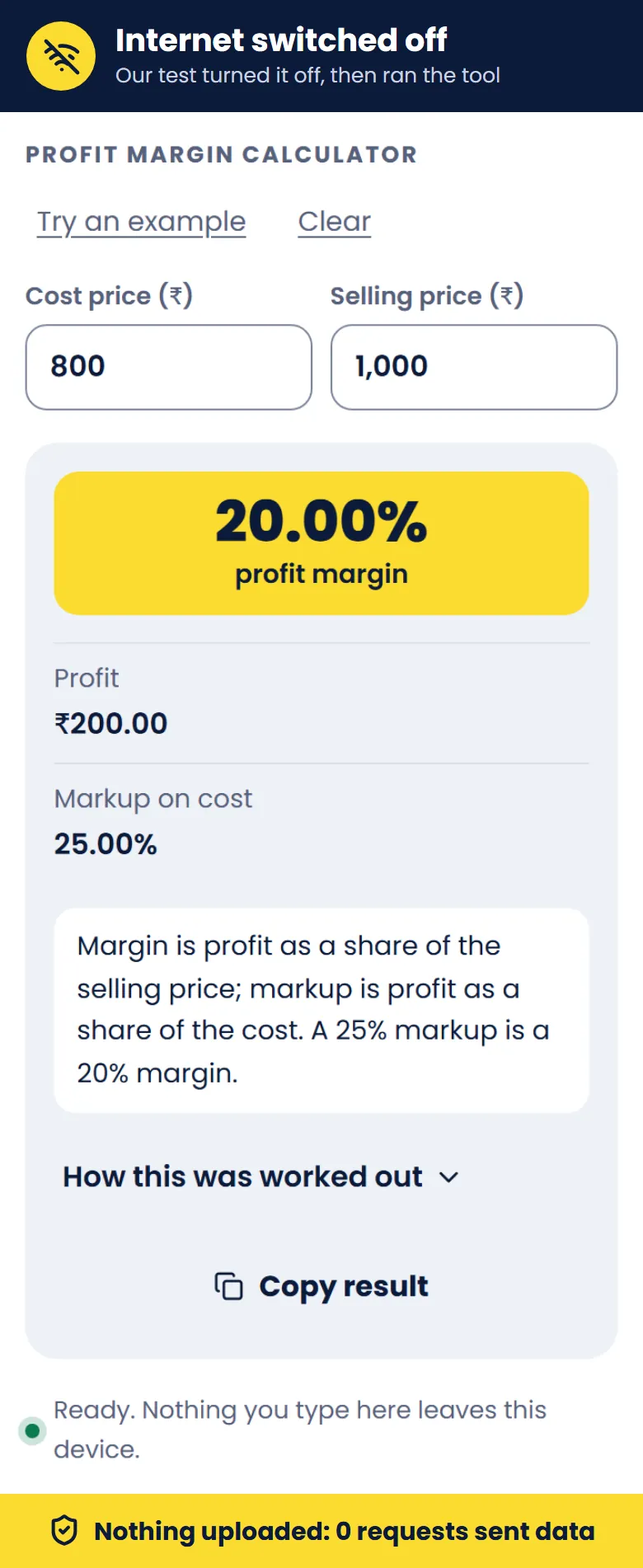
Type what something cost you and what you sell it for, and this calculator shows the profit, the profit margin, which is the profit as a share of the selling price, and the markup, the profit as a share of the cost. Buy for ₹800 and sell for ₹1,000, and the profit is ₹200: a 20.00% margin and a 25.00% markup. If you sell for less than it cost, it shows the loss instead, in the same two ways.
It all happens in your browser: nothing you type is uploaded or kept, which matters when the numbers are your shop's costs and prices.
When it helps:
- Pricing a product in a shop, a stall or an online store.
- Checking a supplier's offer: what margin is left at the price you can sell for?
- Planning a sale: how much of the margin a discount takes away.
- Comparing suppliers: the same selling price against two different costs.
- School and commerce exams, where profit, loss, margin and markup questions are common.
Step by step
- Type the cost price, what the item cost you, such as 800. Commas the Indian or the international way and Hindi digits are read.
- Type the selling price, what the customer pays you for it, such as 1,000.
- Read the answer: the margin in large type, then the profit and the markup on cost. A loss shows as a loss margin, a loss and the loss on cost.
- Open “How this was worked out” to see each formula with your numbers, and use Copy result for a one-line summary.
Try an example fills in a cost of ₹800 and a price of ₹1,000, and Clear empties the boxes.
What the page does, exactly
These are the calculator's rules in full, and the same rules are checked by our tests.
| Part | The rule | Example |
|---|---|---|
| What you can type | Digits, also those of Hindi and other scripts, a dot for decimals, and commas the Indian or the international way | 1,000 and 1000 are the same |
| The boxes' limits | A cost from ₹0 and a selling price from ₹0.01 | A cost of 0 has no markup to show |
| Profit or loss | Selling price minus cost; if that is below zero, it is a loss, shown as a positive amount | ₹1,000 − ₹800 = ₹200 of profit |
| Margin | Profit ÷ selling price × 100, or loss ÷ selling price × 100 as the loss margin | 200 ÷ 1,000 = 20.00% |
| Markup | Profit ÷ cost × 100, or loss ÷ cost × 100 as the loss on cost | 200 ÷ 800 = 25.00% |
| Rounding | Every sum is worked out exactly, in whole numbers and fractions rather than the computer's binary approximations; percentages are written to two decimal places and amounts to the paisa, half up, only at the end | ₹1,200 to ₹1,499 is 19.95% |
What the rules don't decide: which costs to count. The calculator takes the cost you type; the guide below lists what usually belongs in it.
Real results from our tests
We tested the Profit Margin Calculator with headless Chromium 148, the open-source browser Chrome is built on, on a Windows laptop with an Intel Core i7-1185G7 and 32 GB of memory, on 1 November 2026. Other work was running on the laptop at the same time, so times vary a little from run to run: each time below is the middle one of 3 runs.
Checked against a second program. Python's decimal numbers, with 120 digits and none of the page's code, worked out 25,000 random sales of costs from ₹0 to ₹5 crore and selling prices from ₹1 to ₹5 crore, with and without paise, a tenth of them with no cost at all, and the page's code gave the same 75,000 values every time: the margin and the markup to two decimal places, and the profit or loss to the paisa, of each. The boxes were typed as people type them, with Indian and international commas, and in Hindi, Bengali and Gujarati digits. 51 of the percentages sat exactly on half of the last decimal, and every one was rounded up, as it should be.
The answer is drawn at once. The page drew the answer to a typed amount in 0.07 milliseconds (the middle of 3 runs of 200 amounts typed in a row), not counting the moment the browser takes to paint the screen.
Size and offline. On a first visit the page downloads about 0.1 MB for the tool: the page, its styles, its scripts and the fonts, with Google's ad code not counted. In our test we switched the network off after the page had loaded and pressed Try an example: the margin showed 0.1 seconds later or less in each of 15 runs.
Phone-sized screen. We also ran the tests on a phone-sized screen in Chromium (390 × 844 pixels, with touch). That is not a real phone. Every button and box was 44 pixels high or more, and the page did not scroll sideways.
Try it yourself: press "Try an example" at the top of this page. It puts 800 and 1,000 in the boxes and the margin is 20.00%, with a markup of 25.00%. Then change the selling price to 1,066.67: the margin is 25.00%.

The formulas, by hand
Three short formulas cover it, with a cost of ₹800 and a selling price of ₹1,000:
- Profit = selling price − cost = ₹1,000 − ₹800 = ₹200.
- Margin = profit ÷ selling price × 100 = 200 ÷ 1,000 × 100 = 20%.
- Markup = profit ÷ cost × 100 = 200 ÷ 800 × 100 = 25%.
The two percentages describe the same ₹200 against different bases, which is why they always differ: the margin is measured against the larger number, the price, so it is always the smaller of the two.
Margin or markup?
Both are right; they answer different questions. Markup answers “how much do I add to my cost?”, and shopkeepers often price that way: cost plus 25%. Margin answers “how much of each sale do I keep?”, and it is what accounts, business reports and most retail planning use, because sales, not costs, are what is counted.
Mixing them up is a common and costly mistake. A shop that wants to keep 25% of every sale but adds 25% to its cost keeps only 20%. To keep 25%, it has to add 33.33% to the cost.
Markup and margin side by side
| Markup on cost | Margin on price | Cost ₹100 sells for |
|---|---|---|
| 10% | 9.09% | ₹110 |
| 20% | 16.67% | ₹120 |
| 25% | 20.00% | ₹125 |
| 50% | 33.33% | ₹150 |
| 100% | 50.00% | ₹200 |
The other way round: a 10% margin needs an 11.11% markup, 30% needs 42.86%, 40% needs 66.67%, and a 50% margin needs a 100% markup, doubling the cost. In formulas, margin = markup ÷ (1 + markup), and markup = margin ÷ (1 − margin), with both as decimals.
Pricing for a target margin
To find the price that gives a margin you want, divide the cost by (1 − the margin as a decimal):
- Cost ₹800, 20% margin: 800 ÷ 0.80 = ₹1,000.
- Cost ₹800, 25% margin: 800 ÷ 0.75 = ₹1,066.67.
- Cost ₹800, 40% margin: 800 ÷ 0.60 = ₹1,333.33.
Type the price back into the calculator to check: ₹800 and ₹1,066.67 give a 25.00% margin and a 33.33% markup. Many sellers then round the price to one that looks better, such as ₹1,099, and check the margin again: here it rises to 27.21%.
Leave GST out
GST collected from a customer isn't profit: a GST-registered seller pays it on to the government. So work out the margin on prices before GST, with a cost before the GST you can claim back. A price of ₹1,180 that includes 18% GST is ₹1,000 before GST; with a cost of ₹800, the margin is 20.00%. Typing ₹1,180 instead would show 32.20%, a margin that isn't really there. The GST Calculator takes GST out of a price. A seller who isn't registered for GST can't claim back the GST paid on purchases, so for them that GST is simply part of the cost. Our post on how to remove GST from a total amount shows how to find the price before GST from a total.
What a discount does to margin
A discount comes straight out of the profit, so it cuts the margin by much more than its own percentage. Cost ₹800, price ₹1,000: a 20.00% margin. Give 10% off, and the price is ₹900, the profit ₹100 and the margin 11.11%: a 10% discount has halved the profit. Before planning a sale, work out the sale price with the Discount Calculator, then type it here with the cost to see what is left.
When it is a loss
When the selling price is below the cost, the calculator shows a loss, as a positive amount with its own name, so there are no confusing minus signs. Cost ₹1,000 and price ₹800 is a loss of ₹200: a 25.00% loss margin, against the price, and a 20.00% loss on cost. School books usually ask for the loss percentage on the cost price, which is the second figure.
Selling at a loss can still make sense, such as clearing old stock, but it helps to know exactly how much each sale costs you.
What counts as cost
The margin is only as good as the cost you type. For a product you buy and resell, the cost usually includes:
- The purchase price from the supplier, before the GST you can claim back.
- Freight and packing to get it to you, and to the customer if delivery is free.
- Platform or payment fees, such as a marketplace's commission on each sale.
That gives the gross margin on each item. Rent, salaries and electricity are spread over all sales, so they are usually left out of each item's cost and taken from the total profit instead; what is left after them is the net margin.
Worked examples
- A kirana item bought for ₹85 and sold for ₹100: a 15.00% margin and a 17.65% markup.
- A shirt bought for ₹350 and sold for ₹499: ₹149 of profit, a 29.86% margin and a 42.57% markup.
- A phone case bought for ₹75 and sold for ₹100: a 25.00% margin and a 33.33% markup.
- A gadget bought for ₹1,200 and sold for ₹1,499: a 19.95% margin and a 24.92% markup.
- Stock bought for ₹1,250 and cleared at ₹1,000: a loss of ₹250, a 25.00% loss margin and a 20.00% loss on cost.
Profit and loss in school and exams
In Indian school mathematics and many competitive exams, “profit percent” and “loss percent” are worked out on the cost price unless the question says otherwise. That is the markup figure here. A book bought for ₹800 and sold for ₹1,000 is a profit of 25% in an exam answer, the markup on cost, while a business report would call it a 20% margin. Read the question for which base it wants: “on the cost price” is the markup, “on the selling price” is the margin.
A common exam question works backwards: an item sold for ₹1,000 at a 25% profit on cost cost ₹1,000 ÷ 1.25 = ₹800. Type both prices here to check the answer.
How many you need to sell
A margin is a share of each sale, but a shop also has costs that don't change with sales, such as rent. Divide them by the profit on each item to see how many sales it takes to cover them. With a monthly stall rent of ₹6,000 and ₹200 of profit on each item, the stall has to sell 30 items a month before it earns anything for itself; every sale after the thirtieth adds ₹200 to the month's income.
Selling online: fees are costs too
A marketplace or a payment service usually takes a fee on each sale, and that fee comes out of your margin. If an item costs you ₹800 and sells for ₹1,000, a fee of 10% of the price, ₹100, makes the real cost ₹900, and the margin falls from 20.00% to 10.00%. Add every fee and the cost of delivery to the cost before you trust the margin, and check your platform's own fee table, since fees differ by category and change over time.
Margins on goods with an MRP
Packaged goods in India carry an MRP, the most a shop can charge, and a shop's margin comes from buying below it. A packet with an MRP of ₹100 that the shop buys for ₹85 gives a 15.00% margin when sold at the MRP; any discount to the customer comes out of that ₹15. Distributors and wholesalers each keep a share of the price on the way, which is why the shop's share is often small.
Percentage points and percentages
When a margin falls from 20% to 15%, it has fallen by 5 percentage points, but the profit on each rupee of sales has fallen by a quarter: from 20 paise to 15. Say which you mean when comparing margins, since “down 5%” could mean either.
Private: your numbers stay on your device
Your costs and prices never leave your device. The calculator runs inside your browser and has no upload step: it never sends the numbers you type anywhere, and it doesn't save them, so closing the page forgets them. The page's Content Security Policy lets it contact only this site and Google's ad service, which pays for the site; our code never gives your numbers to the ad code. You can check it yourself in your browser's network panel (F12 on a computer): working out a margin adds no request that carries your numbers.
Read our privacy policy and how we prove your files are never uploaded.
Tips
- Price from the margin you need, not from a markup you're used to.
- Leave GST out of both the cost and the price.
- Count every cost of the item, including fees and delivery.
- Check the margin after a discount before you advertise it.
- Recheck when costs rise: if a supplier raises an ₹800 cost by 5% and your ₹1,000 price stays the same, the margin falls from 20.00% to 16.00%.
Limits
- One item at a time: for many items, work each out and add up the profits.
- No GST, fees or overheads are added for you; type them into the cost.
- No target-margin box: work out the price as shown above, and check it here.
- Not advice. It works out the numbers; what to charge is your decision.
- Browsers. We tested only in Chromium, the engine behind Chrome and Edge, with computer and phone-sized screens. We did not test on real phones, in Safari or in Firefox, so we cannot promise how they behave.
Terms explained
- Cost price
- What an item cost you to buy or make.
- Selling price
- What the customer pays you for it.
- Margin
- Profit as a percentage of the selling price.
- Markup
- Profit as a percentage of the cost price.
- Gross margin
- The margin on the item's own costs, before rent, salaries and other overheads.
- Net margin
- What is left of sales after every cost, as a percentage.
- Loss margin
- A loss as a percentage of the selling price.