What GZIP Compressor does, and when you need it
GZIP Compressor squeezes each file you add into a .gz file, in your browser: report.csv becomes report.csv.gz, the same kind of file the gzip command makes on Linux and Macs. Nothing is uploaded, there is no sign-up, and we set no size limit. Your files are never changed; each .gz is a new file to download, and its row shows how much smaller it is.
People use it when:
- A log or a data export is too big to send. Text and CSV often shrink to a small part of their size.
- A server, an API or a data portal asks for .gz. Many accept squeezed uploads, and some want them.
- A database dump needs storing. SQL text squeezes well, and .sql.gz is how most hosting tools keep backups.
- A website wants files squeezed ahead of time, as .js.gz or .css.gz, for its server to send to browsers.
gzip squeezes one file into one .gz. To put several files together, use Create TAR.GZ or Create ZIP File.
How it works
The page reads each file as a stream and passes it through the gzip compressor built into your browser, the same deflate method ZIPs use, wrapped in gzip's small header and its check number, a CRC-32 of the whole file, which every unzip tool checks. The result is kept by the browser, on your disk when it is big, until you download it. Several files are squeezed one after another, each into its own .gz.
Nothing is lost: gunzip, 7-Zip or any gzip tool gives back the file exactly, byte for byte.
Why some files shrink so much: deflate looks back over the last 32 KB it has read, and when a run of bytes repeats, it writes a short pointer to the earlier copy instead of the bytes. A log line that repeats the same words with a new time and number is mostly pointers. Then the letters and pointers used most get the shortest codes. A photo, a video or a ZIP has no repeats left to find, so it stays about the same size.
Real results from our tests
We squeezed these test files with this page in Chromium 148, the open-source browser Google Chrome is built on, on a Windows 11 laptop with an Intel Core i7-1185G7 processor and 32 GB of memory, on 1 November 2026. Our scripts made the files to look like everyday ones; none is anyone's real file. Python's gzip module, which shares no code with the page, then unsqueezed each .gz and compared it with the original, byte for byte.
| File | Before | .gz | Time | What happened |
|---|---|---|---|---|
| A day's server log | 500 MB | 69.1 MB | 10.2 s | 86% smaller |
| A shop's database backup (SQL) | 250 MB | 41.6 MB | 7.9 s | 83% smaller |
| A month's sales CSV | 1.09 MB | 194 KB | 1.0 s | 83% smaller |
| A phone photo (JPG) | 1,001 KB | 1,001 KB | 1.0 s | About the same size: packed already |
| A video-sized file | 600 MB | 600 MB | 18.8 s | About the same size: packed already |
Python's gzip module unsqueezed every .gz back to the very same bytes as the original. Text, the log, the SQL and the CSV, squeezed to about a sixth of its size; the photo and the video, packed already, came out about the same, and the page said so.
Step by step
- Choose the files, or drop them on the page. Any kind and any size. To try the page first, press Try with a sample file: it adds a small price list made in your browser.
- Press Compress to .gz. A bar shows how much has been read; the cross stops it.
- Download each .gz from its row. Each row shows the size before and after, and how much smaller it is, or that it is about the same size.
Several files make several .gz files, one each, in the order you added them. Each row has its own Download, so you keep only the ones you need.

Which files shrink
| File | As .gz |
|---|---|
| Logs, CSV, SQL dumps, JSON, XML | Often a tenth of the size or less: lines repeat a lot |
| HTML, CSS, JavaScript, plain text | Usually a quarter to a third |
| PDF, Word, Excel | A little, or hardly at all: they are packed inside already |
| Photos, videos, music, ZIPs | About the same, sometimes a few bytes bigger |
The table is a rule of thumb; Real results has our measured numbers. For a PDF that must get smaller, Compress PDF shrinks its pictures instead.
Squeezing twice gains nothing. A .gz, a ZIP or a .tar.gz is squeezed already, so putting it through gzip again, or zipping a .gz, leaves it about the same size. Squeeze the plain file, once.
.gz, .zip or .tar.gz
- .gz squeezes one file. It is what servers, logs, database backups and data portals use.
- .zip holds many files and folders, each squeezed on its own, and opens everywhere. Use it for people on Windows, Macs and phones.
- .tar.gz holds many files and folders squeezed together. Use it for Linux, servers and code.
All three use the same deflate squeezing, so the same file shrinks about the same in each.
Who asks for .gz files
- Search engines. Google and Bing take a sitemap squeezed, as sitemap.xml.gz. Their 50 MB limit is for the sitemap unsqueezed, so gzip helps with the upload, not with that limit.
- Data portals and research. Big CSV and JSON downloads are often .gz, and labs send DNA sequencing reads as .fastq.gz. Many places that hand out .gz files take them back the same way.
- Servers and hosting. Old logs are kept as access.log.2.gz and so on, and hosting control panels make and take database backups as .sql.gz.
- Support teams. Asked for a log, send a .gz: it is smaller, and the person on the other side has a tool that opens it.
Logs, CSV exports and database dumps
- Logs are the best case: lines that differ only by a time and a number squeeze to a small part of their size, which makes a week's log easy to email or attach to a support ticket.
- CSV exports from accounting, sales or bank software repeat column values and dates, and shrink a lot. Many data portals and analysis tools read .csv.gz directly.
- SQL dumps from MySQL or PostgreSQL are text, and .sql.gz is the usual way to keep them; restore tools read them after gunzip.
Remove passwords, personal data or anything the other side shouldn't see before you send a log or a dump: squeezing hides nothing.
Programs that read a .gz as it is
Many programs read a .gz without unpacking it first, so the squeezed file can stay squeezed on your disk:
- Python: pandas reads
pd.read_csv("sales.csv.gz")directly, and the gzip module opens any .gz like a plain file. - R:
read.csv("sales.csv.gz")works as it is. - Linux:
zcatprints a .gz,zlesspages through it andzgrepsearches it, all without unpacking. - Databases: phpMyAdmin's Import page takes a .sql.gz, and
gunzip -c backup.sql.gz | mysql -u you -p shoprestores one in a single step.
Excel and Google Sheets can't open a .csv.gz. Unpack it first with Extract TAR.GZ, then open the CSV.
For websites: files squeezed ahead of time
Web servers squeeze pages as they send them, and many can send a file that is already squeezed instead: style.css.gz beside style.css, for example. Squeezing them once, ahead of time, saves the server that work on every visit. Make the .gz files here, upload them next to the originals, and set your server to use them:
- nginx:
gzip_static on;sends file.gz whenever it is there. - Caddy:
file_server { precompressed gzip }does the same.
Keep each original next to its .gz, for the rare browser or tool that doesn't take gzip. The browser receiving a .gz unsqueezes it itself, so visitors never see it. Many hosts and CDNs squeeze files on their own: check your host's help before you upload .gz copies.
Opening a .gz
A .gz holds one file, so opening it gives that file back, named after the .gz with the .gz taken off.
- Here, on any device: Extract TAR.GZ opens a .gz and gives back the file, on a phone too.
- Windows: 7-Zip, which is free: right-click the .gz, choose 7-Zip, then Extract Here.
- Mac: double-click it; the file appears next to the .gz.
- Linux:
gunzip report.csv.gzgives back report.csv and removes the .gz;gunzip -kkeeps it.
A worked example: a log for a support ticket
Support asked for a day's server log, 500 MB, far too big for an email or most ticket forms. GZIP File squeezed it to 69.1 MB, 86% smaller, in 10.2 seconds, and Python's gzip module unsqueezed it back to the very same 524,288,000 bytes. Attach the .gz; anyone on Linux, Mac or Windows can open it, and log tools often read .gz files without unsqueezing them first.
Names
Each .gz is named after its file with .gz added: access.log becomes access.log.gz. The name isn't stored inside the .gz itself, so a tool that unsqueezes it names the file by dropping the .gz: rename the .gz and the file inside takes the new name. Type a name in the box by each Download if you want another.
Keep the file's own ending before the .gz, as in sales.csv.gz: it tells people and programs what is inside. A .gz called just sales.gz unpacks to a file with no ending, which a computer doesn't know how to open.
Big files
We set no limit. A file is read as a stream, so it is never held whole in the page's memory, and the browser keeps the .gz on your disk while it is made: leave room for it. Time grows with the file's size. On a phone, files of a few GB can be more than a phone browser manages; a computer is better for those.
Checking a .gz
Every .gz ends with the CRC-32 and the size of the file it holds; any gzip tool checks both when it unsqueezes, and refuses a .gz damaged on the way. Three ways to test one:
- Here: open it with Extract TAR.GZ. A good .gz shows its file and size; a damaged one gets "This file is damaged: part of it is missing or changed."
- Linux and Mac:
gzip -t file.gztests it without unpacking, and says nothing when it is fine. - Windows: in 7-Zip, right-click it and choose Test archive.
A .gz keeps its file's size in 4 bytes, so for a file over 4 GB, gzip -l lists a wrong size. The file still comes back whole, and the CRC still checks it.
On a phone
The page works the same in a phone's browser: choose the file from Files or Downloads, press Compress to .gz, and download it; the .gz goes where the phone keeps downloads. Phones' own file apps often can't open a .gz, so to check one, open it with Extract TAR.GZ. For files of a few GB, a computer is quicker and has more room.
How long does it take?
GZIP reads every byte once, so the time grows with the file's size. On our test laptop, text squeezed at roughly 30 to 50 MB a second: a 500 MB server log took 10.2 seconds and a 250 MB SQL backup 7.9 seconds. A month's sales CSV of about 1 MB took about a second, most of it the page getting the file ready rather than squeezing it.
Files that are packed already take just as long to read but don't shrink: the 600 MB video-sized file took 18.8 seconds and came out about the same size, and a phone photo the same. If a file won't get smaller, the page says so, and you can keep the original. A phone is slower than a laptop, so a big file there takes longer; keep the page open and the screen on until the row says it is done.
To be sure a .gz is complete before you delete the original, unsqueeze it again, for example with gunzip on Linux or Mac, and compare the two files' SHA-256 hashes with our Hash Generator: the same hash means the same file. On Linux and Mac, sha256sum or shasum does the same in a terminal, and gzip -t tests a .gz without writing anything out. Each time above is from a single run on a laptop doing other work too, so treat it as a guide rather than a promise.
Private: your files stay on your device
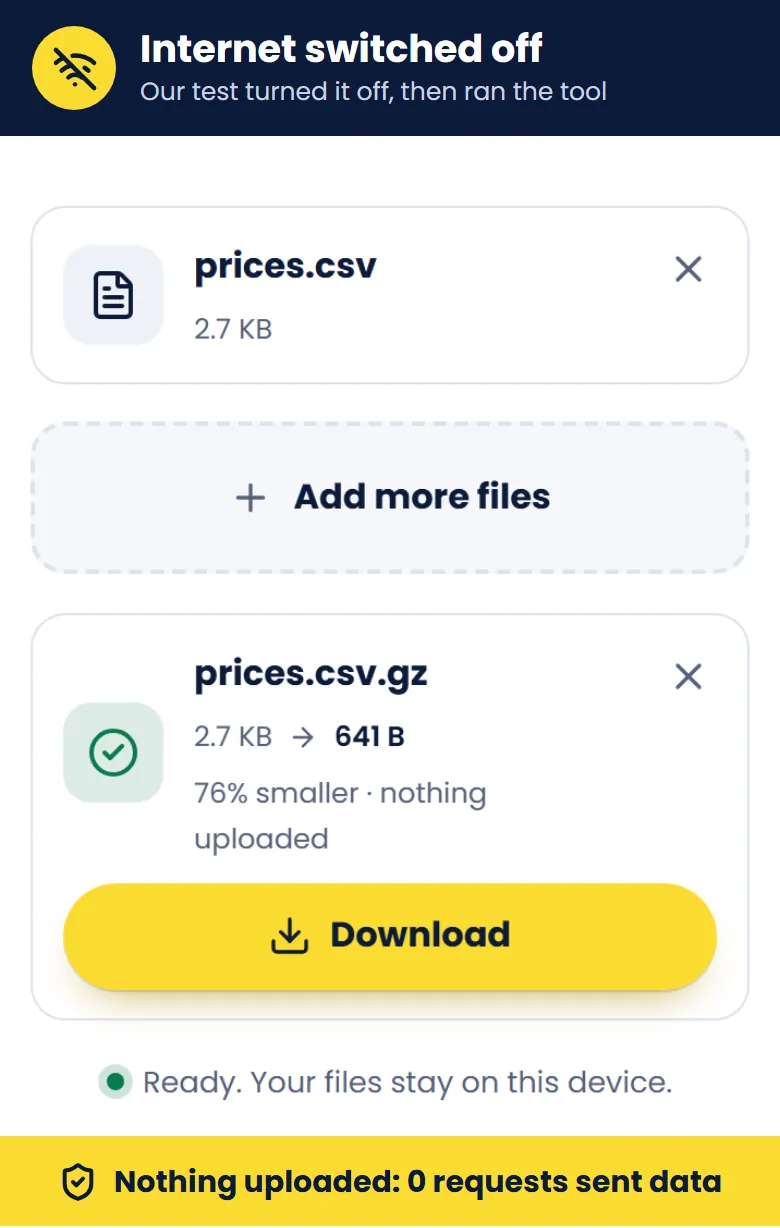
Each file is squeezed inside your browser; nothing is uploaded, and once loaded the page works with the internet switched off. Google's ad code runs on the page too, but our code never gives it your files or their names. How we prove it shows how anyone can check.
Problems and fixes
- The .gz is hardly smaller
- The file was packed already: a photo, a video, a PDF or a ZIP. That is normal.
- "This browser can't squeeze files."
- An old browser without a built-in compressor. Update it, or use another browser.
- "This device ran out of room for the result."
- Free some disk space, or squeeze fewer files at once.
- The other side can't open it
- They need a tool that reads .gz: 7-Zip on Windows, or Extract TAR.GZ in a browser.
- The .gz is a few bytes bigger than the file
- gzip adds a small header and its check number, and a packed file can't shrink to make up for it. Send that file as it is.
- Excel won't open the .csv.gz
- Excel can't read .gz. Unpack it with Extract TAR.GZ first, then open the CSV.
- The file inside has another name
- It is named after the .gz. Rename the .gz before unpacking it, and the file takes that name.
Limits
- One file per .gz; for many files together, use TAR.GZ or ZIP.
- One squeezing level, the browser's own; gzip -9 or other methods, such as zstd or brotli, can be a little smaller.
- The original name isn't stored inside the .gz.
- No password: gzip can't lock a file. Anyone with the .gz can open it.
Other ways
- Linux and Mac:
gzip -k filekeeps the original and makes file.gz;gzip -9 -k filesqueezes a little harder, more slowly. - Many cores at once: pigz, on Linux and Macs, uses every core of the processor and makes .gz files any gzip tool opens.
- Python, anywhere:
python -m gzip filemakes file.gz. - Windows: 7-Zip, with gzip as the archive kind.
This page needs no install and works the same on a phone, a Chromebook or a locked-down office computer.
Terms explained
- gzip, .gz
- A way of squeezing one file with deflate, losing nothing; .gz is its file ending.
- gunzip
- Unsqueezing a .gz back into the file.
- Deflate
- The squeezing method gzip and ZIP share.
- CRC-32
- The check number a .gz keeps for its file.
- Compression ratio
- How much smaller the .gz is than the file.
- .tgz
- A short name for .tar.gz: several files in a TAR, squeezed with gzip.
- Precompressed file
- A .gz made ahead of time, for a web server to send instead of squeezing the file on every visit.