What Extract TAR.GZ does, and when you need it
Extract TAR.GZ opens .tar.gz, .tgz, .tar and .gz files in your browser, lists everything in them, and saves the files you want, with their folders when you save them all to a folder. Nothing is uploaded, there is no sign-up and no program to install, and we set no size limit.
People use it when:
- A download came as .tar.gz. Software, fonts, data sets and website templates are often shared this way, especially by people who use Linux.
- A server backup or log arrived as .gz or .tar.gz, and they are on Windows or a phone.
- They need one file from a big archive and don't want to unpack all of it.
- Their computer is locked down and can't install 7-Zip.
What a TAR.GZ file is
It is two old Unix tools at work, one after the other. TAR (from "tape archive") puts many files and folders end to end in one file, each with a small header holding its name, size, date and permissions. It doesn't squeeze anything. gzip then squeezes that one file, with the same deflate method most ZIPs use. The result is .tar.gz, often shortened to .tgz.
A ZIP squeezes each file on its own and keeps a list at its end; a TAR.GZ squeezes everything as one stream, which often makes it a little smaller for many small text files, but means it must be unsqueezed from the start to reach any file in it.
Where TAR.GZ files come from
- Software and source code. GitHub offers every release as "Source code (zip)" and "Source code (tar.gz)"; many projects share only the second.
- Python and JavaScript packages. A Python package's source comes as .tar.gz, and npm packs JavaScript packages as .tgz.
- Google Takeout. When you export your Google data, Takeout lets you choose .zip or .tgz.
- Servers and hosting. Website backups, database dumps and logs are usually .tar.gz or .gz.
- Data sets and fonts shared by universities, government data sites and designers.
ZIP or TAR.GZ: the differences
| ZIP | TAR.GZ | |
|---|---|---|
| Usual on | Windows, Mac, phones, email | Linux, servers, software source code |
| Squeezing | Each file on its own | All files as one stream |
| Size | A little bigger for many small files | Often a little smaller for many small files |
| One file out | Read straight from the ZIP | Unsqueezed from the start first |
| Permissions and links | Usually not kept | Kept, for Linux and Mac |
| Opens without extra software | Everywhere | Linux, Mac, and Windows 10 and 11 with the tar command |
Neither loses anything: both give back every byte of every file. To make one yourself, Create TAR.GZ and Create ZIP File are here.

How it works
For a .gz or .tgz, the page first unsqueezes the whole file with the gzip decompressor built into your browser, which keeps a big result on your disk rather than in memory. Then it reads the TAR's headers one after another, 512 bytes each, to list every file. Saving a file just copies its bytes out of the TAR.
A plain .gz that holds one file, not a TAR, gives that file back under its own name: the name kept inside the .gz, or the .gz's name without ".gz".
Real results from our tests
We opened these test files with this page in Chromium 148, the open-source browser Google Chrome is built on, on a Windows 11 laptop with an Intel Core i7-1185G7 processor and 32 GB of memory, on 1 November 2026. Python's tarfile and gzip modules made them, from files our scripts made up; none is anyone's real file.
| What we opened | File | Time | What happened |
|---|---|---|---|
| Opened a project archive made by Python | 177 KB | Listed in 1.5 s | “2000 files · 27 folders · 43.4 MB unpacked” |
A TAR.GZ has no table of contents, so the page unsqueezes the whole archive once to list it: a 177 KB file that held 43.4 MB of files took 1.5 seconds. After that, each file saves at once.
Step by step
- Choose the file, or drop it on the page. A .gz or .tgz is unsqueezed first, with the amount done so far shown as it goes; then the list appears.
- Save one file with the Download on its row.
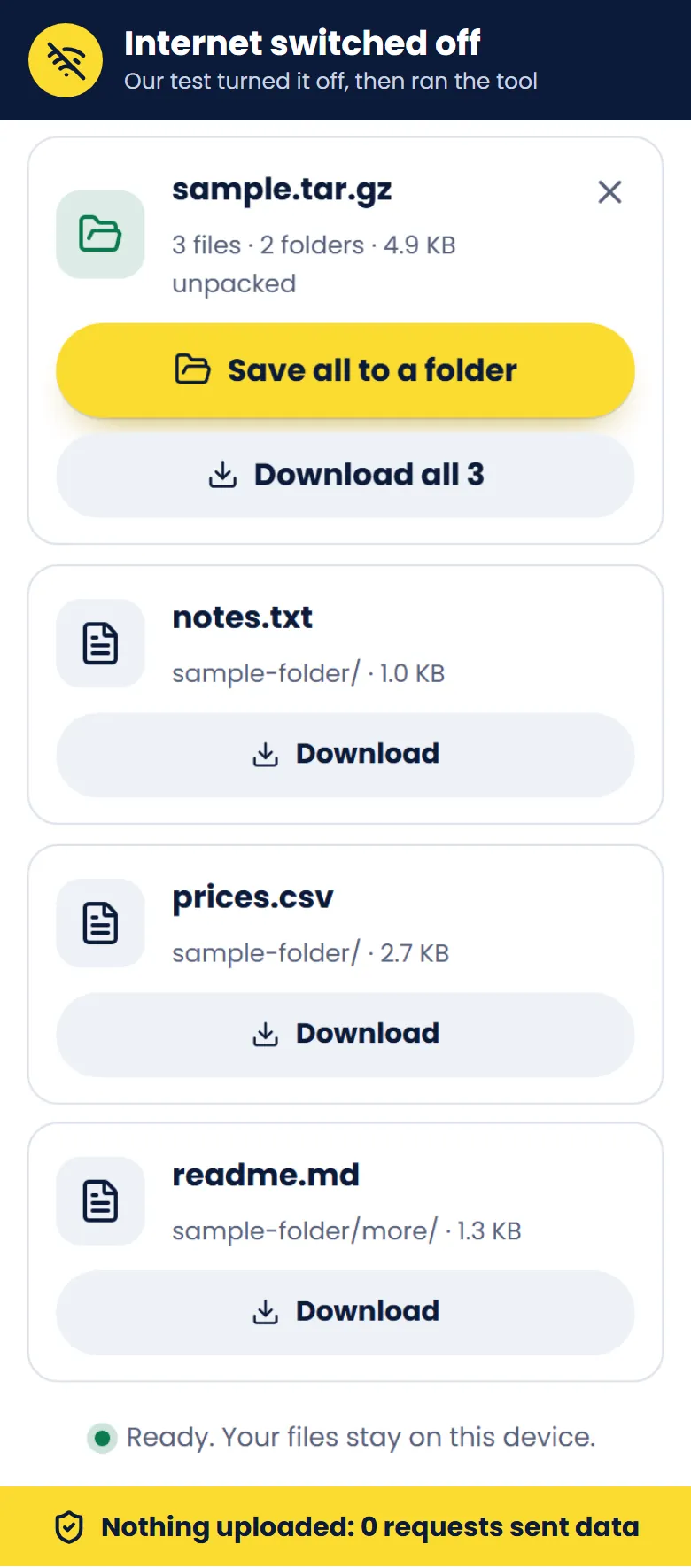
- Or save them all: Save all to a folder (Chrome and Edge on computers) writes every file into a folder you pick, folders and all; Download all saves them one after another.
.tar, .tar.gz, .tgz and .gz
| Ending | What it is | Here |
|---|---|---|
| .tar | Files end to end, not squeezed | Opens at once |
| .tar.gz, .tgz | A TAR squeezed with gzip | Unsqueezed, then listed |
| .gz | One file squeezed with gzip | Gives back that one file |
| .tar.bz2, .tar.xz, .tar.zst | A TAR squeezed another way | Not yet: the page says which kind it is |
| .zip | Another kind of archive | Use Unzip Files |
On Windows
Windows 10 and 11 have a tar command built in. In Command Prompt or PowerShell, in the folder with the file, tar -xf file.tar.gz unpacks it, folders and all. This page is the same without a command line: choose the file, see what is inside, and save what you need. 7-Zip opens .tar.gz too, in two steps: first the .gz, then the .tar inside it.
Opening a GitHub release on Windows
- On the project's Releases page, download "Source code (tar.gz)", or the .tar.gz the project lists for your system.
- Choose it here. Most such archives hold one folder named after the project and its version, such as "project-2.4.1", with everything inside it.
- Look through the list first: README, LICENSE and install notes are usually near the top of that folder. Save README to read how to install.
- Save all to a folder when you are ready to use it; the folders inside come out as the project made them.
If the project offers a .zip as well, either works; the files inside are the same.
Reading a Python package before you install it
A Python package's source download is a .tar.gz. Opening it here lets you read what it holds, without installing anything: its README and licence, its setup files (pyproject.toml or setup.py), and the code itself. Save any file to read it in a text editor. Installing still needs Python's own tools; this page only reads the archive.
A JavaScript package made by npm is a .tgz too, with everything in a folder called package: its package.json, its README and its code.
Server backups, logs and database dumps
- A database dump as .sql.gz is one squeezed file: the page gives back the .sql file, which any text editor opens. A big dump can be several GB unsqueezed; leave room for it.
- Logs as .log.gz come back as plain text logs, one per .gz. To squeeze a log into a .gz yourself, use GZIP Compressor.
- A website backup as .tar.gz holds the site's files and folders; save all to a folder to get the whole site, or just the file you need.
To look at the start of a big .sql or .log without saving it, ZIP File Viewer opens TAR.GZ files and shows the first 200 KB of text files on the page.
Google Takeout as .tgz
When Google Takeout is set to .tgz, a big export comes as several files with -001, -002 and so on in their names. Each is a whole .tgz holding some of the files, not a part of one archive, so open them here one at a time. Takeout puts each Google service in its own folder, and the same folders appear in every part: save each part's files into the same folder, and together they make the whole export again.
After unpacking
- Read the README first. Software archives say how to install or build them there; a .tar.gz of source code doesn't install itself.
- Linux programs don't run on Windows. A .sh script or a Linux program from the archive needs Linux, a Mac, or WSL on Windows.
- The archive stays. Unpacking doesn't change or delete it; delete it yourself when you have what you need.
- To send some of the files on, put them in a ZIP with Create ZIP File, which opens on every computer and phone.
When the list looks odd
- Everything is in one folder. That is normal: most archives hold one top folder named after what they contain.
- Names start with "./". Some tools write names that way; the page drops the "./", so the files are the same.
- Files starting with a dot, such as .gitignore or .env, are hidden files on Linux and Mac. They are real files, often settings; Windows shows them like any other.
- Fewer files than you expected. Links are left out and counted in the note at the top; empty folders don't show as rows.
On a phone
Phones rarely open .tar.gz on their own. Choose the file here, from Downloads on Android or the Files app on an iPhone, and save the files you need; each goes to your Downloads, without its folders. A .tar.gz of several GB can be more than a phone browser can unsqueeze; a computer handles those better.
Taking out just one file
Say a project's .tar.gz holds thousands of files and you need its README or one data file. Open it, find the file with the browser's search (Ctrl+F on a computer, Find in page on a phone) by part of its name or its folder, and press Download on its row. Only that file is saved, under its own name. The list shows each file's folder, so a file deep in "project/docs/" is easy to tell from another with the same name.
Checking a download is the real one
Software sites often publish a SHA-256 check number beside each .tar.gz, so you can be sure the file you got is the one they released. Work out the downloaded file's SHA-256 with Hash Generator, which reads the file on your device, and compare it with the published one: every character must match. If it doesn't, download it again from the official page. With a command line, certutil -hashfile file.tar.gz SHA256 on Windows, shasum -a 256 file.tar.gz on a Mac and sha256sum file.tar.gz on Linux give the same number.
Inside the archive, gzip keeps a check number for everything it squeezed, and the page notices if the unsqueezed data doesn't come out whole: such a file is called damaged instead of being listed as if it were fine.
Links, permissions and dates
- Links (shortcuts to other files, common in software archives) are left out, and a note at the top says how many. The files they point to are saved as usual.
- Permissions, such as which files may run as programs on Linux, aren't kept: a browser saves plain files. On Linux or a Mac, unpack with tar to keep them.
- Dates. The TAR keeps each file's date, but files saved by a browser carry the day you save them.
Long names, and names in any language
Old TAR headers hold names of up to 100 characters. Longer ones are kept two other ways, in PAX records or in GNU's long-name entries, and the page reads both, so deep folders in software archives come out whole. Names are read as UTF-8, so Hindi, Tamil or any script shows as written.
Big files
We set no limit. A .tar.gz is unsqueezed in full before it is listed, so the browser needs room on your disk for the unsqueezed TAR, and the time grows with its size; a plain .tar is listed without that step. On a computer, several GB are fine; on a phone, keep to smaller files.
Safety
Opening an archive here only reads it: nothing inside is run. Names that try to climb out of their folder, such as "../../file", are cleaned so a file is saved only where you choose. Look at the list before you save anything from an archive you didn't expect, and be wary of programs (.exe, .sh, .bat) in an archive that should hold data.
Archives inside archives
A download sometimes nests one archive inside another: a .zip inside a .tar.gz, a .tar.gz inside a .zip, or a backup with a .gz of each day inside it. This page lists the inner archive as a file like any other. Save it, then open it with the page made for its kind: Unzip Files or ZIP File Viewer for a .zip, this page again for a .tar.gz or .tgz, and GZIP File to make a .gz of your own. Each step stays on your device, so a nested backup can be checked file by file without uploading any of it.
Private: the file stays on your device
The archive is unsqueezed and read inside your browser, and the files are saved straight to your device; nothing is uploaded, and once loaded the page works with the internet switched off. Google's ad code runs on the page too, but our code never gives it your files or their names. How we prove it shows how anyone can check.
Messages, and what to do
- "This is a ZIP file: open it with Unzip Files."
- It is a ZIP with another name; Unzip Files opens it.
- "This is a .bz2 file" or "an .xz file"
- A TAR squeezed another way, which this page can't open yet. 7-Zip can.
- "This file isn't a TAR file, or it is damaged."
- It may be another kind of file, or a download cut short. Download it again.
- "This file is damaged: part of it is missing or changed."
- The gzip stream ends early or a check failed. Download it again.
- The bar runs for a while before the list shows
- A .tar.gz is unsqueezed in full before its files can be listed; a big one takes a little time. The row shows how much has been unsqueezed so far.
- Download all saved only the first file
- The browser blocked the rest. Allow the page to download several files when it asks, or save each file from its row.
Limits
- No .tar.bz2, .tar.xz or .tar.zst yet.
- Links, permissions and dates aren't kept when saving.
- A .tar.gz is unsqueezed in full before it is listed.
- Save all to a folder needs Chrome or Edge on a computer.
Other ways
- Windows 10 and 11:
tar -xf file.tar.gzin Command Prompt. Windows 11, since its 2023 updates, opens .tar.gz and .tgz in File Explorer too. - Mac: double-click the file, or
tar -xzf file.tar.gzin Terminal. - Linux:
tar -xzf file.tar.gzunpacks it, andtar -tzf file.tar.gzlists what is inside without unpacking. - 7-Zip on Windows, in two steps: the .gz, then the .tar inside it.
This page needs none of them, which helps on a phone, a Chromebook or an office computer where you can't install anything or open a command line.
Terms explained
- TAR
- An archive of files put end to end, each with a 512-byte header; not squeezed.
- gzip, .gz
- A way of squeezing one file, with the same deflate method most ZIPs use.
- .tgz
- Another name for .tar.gz.
- PAX
- The modern form of TAR headers, which holds long names and big sizes.
- Symbolic link
- A shortcut to another file, common in Linux software.
- Tarball
- An everyday name for a .tar or .tar.gz file.